 Suresh Vinasiththamby
Author Archives: Suresh Vinasiththamby
Suresh Vinasiththamby
Author Archives: Suresh Vinasiththamby

In the previous posts in this series, we covered the basics of multicast, IGMP, PIM Dense Mode, and PIM Sparse Mode. In the Sparse Mode post, we manually configured the RP address on every router in the network. This works fine in a small lab, but in a larger network with many routers, it becomes difficult to manage. If the RP changes, you have to update the configuration on every single router.
 Suresh Vinasiththamby
AutoRP solves this problem by allowing routers to dynamically learn the RP address. Instead of manually configuring the RP on each router, you configure one or more routers to announce themselves as Candidate RPs. A separate router (or the same as the Candidate RP router) called the Mapping Agent collects these announcements and distributes the RP information to all other routers in the network. This makes RP management much easier and also provides a way to implement RP redundancy.
There are two methods to dynamically learn the RP address, which are Auto-RP and Bootstrap Router (BSR). In this Continue reading

In the previous post, we covered PIM Dense Mode and mentioned that it is not widely used in production because of its flood and prune behaviour. Every router in the network receives the multicast traffic first, and then routers without interested receivers have to send prune messages. This is inefficient, especially in large networks.
 Suresh Vinasiththamby
In this post, we will look at PIM Sparse Mode, which takes the opposite approach. Instead of flooding traffic everywhere and pruning where it is not needed, Sparse Mode only sends traffic to parts of the network that explicitly request it. Routers with interested receivers send Join messages and only then does the multicast traffic start flowing. This makes Sparse Mode much more efficient and scalable, which is why it is the preferred mode in most production networks today.
In Dense Mode, we saw two main problems. Multicast traffic is flooded everywhere, and every router has to maintain state for every multicast group, even if all its interfaces are pruned. Sparse Mode Continue reading

In the previous posts, we covered the basics of multicast, including how sources send traffic to group addresses and how receivers use IGMP to signal their interest to the last hop router. We also looked at how IGMP snooping helps switches forward multicast traffic only to ports with interested receivers.
In this post, we will look at PIM, Protocol Independent Multicast. PIM is the protocol that routers use to build the multicast forwarding tree between the source and the receivers. There are different modes/flavours of PIM, and in this post, we will focus specifically on PIM Dense Mode.
 Suresh Vinasiththamby
 Suresh Vinasiththamby
PIM, Protocol Independent Multicast, is the protocol routers use to build a loop-free multicast distribution tree from the source to the receivers. It is called protocol-independent because it does not rely on any specific unicast Continue reading

In the previous post, we covered the basics of multicast. In this post, we will focus on IGMP, Internet Group Management Protocol.
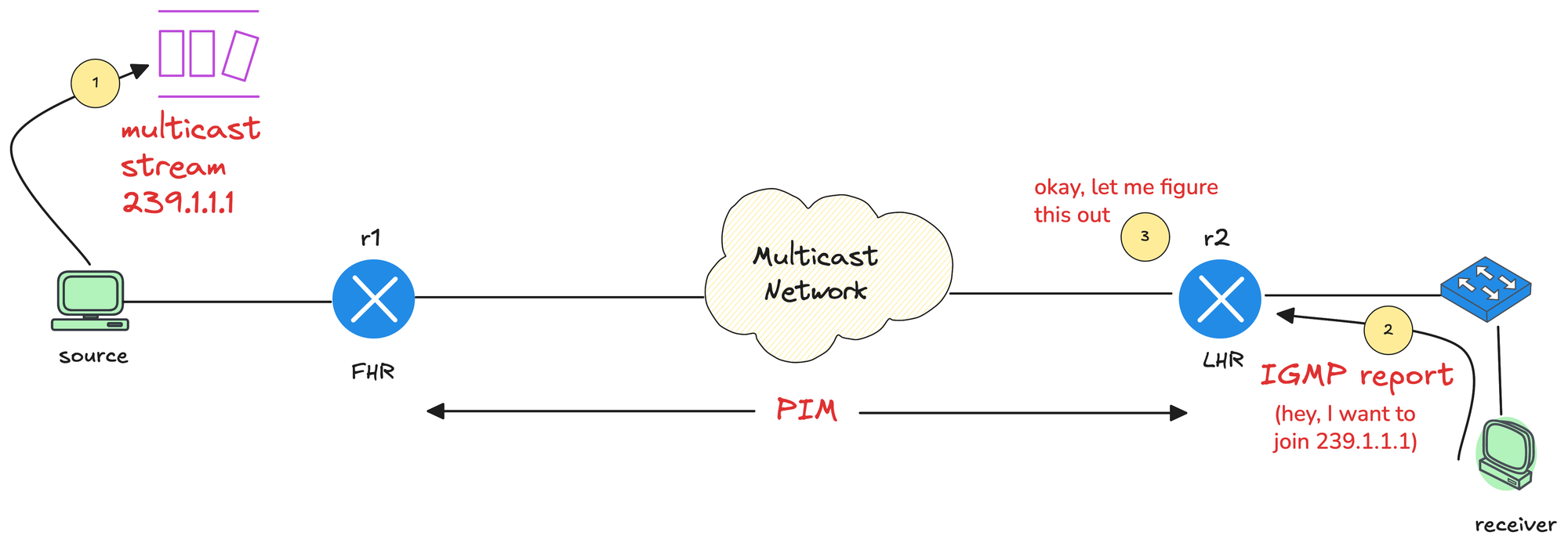
Just as a quick recap, in multicast, the source application (sender) sends multicast traffic to a multicast group address. Somewhere in the network, a receiver wants that traffic stream, so the receiver needs a way to signal that interest.
The router closest to the source is called the First Hop Router (FHR), and the router closest to the receiver is called the Last Hop Router (LHR). Between these two points, the multicast network, meaning all multicast-enabled routers, needs to build a loop-free tree that connects the sender to all interested receivers. IGMP plays a key role in making that happen.
 Suresh Vinasiththamby
IGMP is the protocol used by receivers to signal their interest in multicast traffic. When a host wants to receive a multicast stream, it sends an IGMP Membership Report, also known as an IGMP join, to the multicast group address.

Multicast is one of those topics I have been meaning to learn properly for a long time. When I did my JNCIS-ENT about eight years ago, I studied multicast, but I honestly do not remember much of it now.
I recently started doing some revision and decided to write a series of blog posts as I go through it again. I want something I can come back to in the future without having to relearn everything from scratch. Hopefully, as a reader, you will also find it useful and easy to follow. If you want to learn multicast, I am going to assume you are already familiar with unicast and broadcast.
As always, if you find this post helpful, press the ‘clap’ button. It means a lot to me and helps me know you enjoy this type of content. If I get enough claps for this series, I’ll make sure to write more on this specific topic.
Unicast is the most common method of IP communication. It is simply a one-to-one conversation between two devices. One device sends traffic, and one specific device receives it. Most of what we do on a network every day is unicast. Continue reading

By design, iBGP requires a full mesh of peerings between all routers so every router can learn routes from all other routers without loops. Prefixes learned from an iBGP peer are not advertised to another iBGP peer. This rule exists to prevent routing loops inside the autonomous system, and it is also the main reason why a full mesh is required. As the number of routers grows, maintaining this full mesh becomes complex and resource-heavy.
BGP confederations are one way to solve the scaling problems created by the BGP full mesh requirement. Another common approach is using Route Reflectors. BGP confederations break up a large autonomous system into smaller subautonomous systems (sub-ASs), reducing the number of iBGP peerings required.
 Suresh Vinasiththamby
Routers within the same sub-AS still need a full iBGP mesh, but the number of peerings is much smaller now. Connections to other confederations are made with standard eBGP, and peers outside the sub-AS are treated as external.
The confederation AS appears whole to other Continue reading
Let’s assume a simple scenario. You have two different teams managing your FortiGate firewalls. One team is made up of network administrators who need full access to the firewalls. The other team only needs limited access and should not be able to make any configuration changes.
A common way to handle this is by using administrator profiles and a remote radius server. You can assign different admin profiles based on who is logging in, without creating local users on every firewall. In this post, we will look at how to achieve this using Cisco ISE and Radius. You do not have to use Cisco ISE, any Radius server can do the job, but this post focuses on Cisco ISE since it is commonly used in enterprise environments.
 Suresh Vinasiththamby
For this example, we will have two users, each belonging to a different group with different access requirements. In most environments, group membership is managed by something like Active Directory. For the sake of simplicity, I am going to use local identity groups on Continue reading

Let’s assume a simple scenario. You have two different teams managing your Arista devices. One team is made up of network administrators who need full access to the devices. The other team only needs limited access and should not be able to make any configuration changes.
A common way to handle this is by using role-based access with Radius. You can assign different privilege levels based on who is logging in, without creating local users on every device. In this post, we will look at how to achieve this using Cisco ISE and Radius. You do not have to use Cisco ISE, any Radius server can do the job, but this post focuses on Cisco ISE since it is commonly used in enterprise environments.
 Suresh Vinasiththamby
For this example, we will have two users, each belonging to a different group with different access requirements.

What if I told you that all it takes to build a simple BGP lab with two eBGP peers (or even a hundred, for that matter) is a single YAML file? No need to add nodes on a GUI, connect links, or configure interface IPs manually. You just define the lab in a YAML file as shown below, and in about two minutes, you’ll have two routers of your choice fully configured with BGP and an established eBGP session.
provider: clab
defaults.device: eos
defaults.devices.eos.clab.image: ceos:4.34.2

addressing:
  mgmt:
    ipv4: 192.168.200.0/24

nodes:
  - name: r1
    module: [ bgp ]
  - name: r2
    module: [ bgp ]

bgp:
  as_list:
    100:
      members: [ r1]
    200:
      members: [ r2 ]

links:
  - r1-r2
r1#show ip bgp summary
BGP summary information for VRF default
Router identifier 10.0.0.1, local AS number 100
Neighbor Status Codes: m - Under maintenance
Description Neighbor V AS MsgRcvd MsgSent InQ OutQ Up/Down State PfxRcd PfxAcc PfxAdv
r2 10.1.0.2 4 200 5 5 0 0 00:00:15 Estab 1 1 1r2#show ip bgp summary
BGP summary information for VRF default
Router identifier 10.0.0.2, Continue reading
"Can you suggest some specs for a server for my network labs?" is probably the question I get asked the most. People reach out all the time asking for recommendations. The thing is, I never really know their exact situation or what they’re trying to do in their lab. So, I usually just share what I have and what worked best for me, and let them decide what fits their setup.
In this post, I’ll go over the cheapest way to build your own network lab without spending too much.
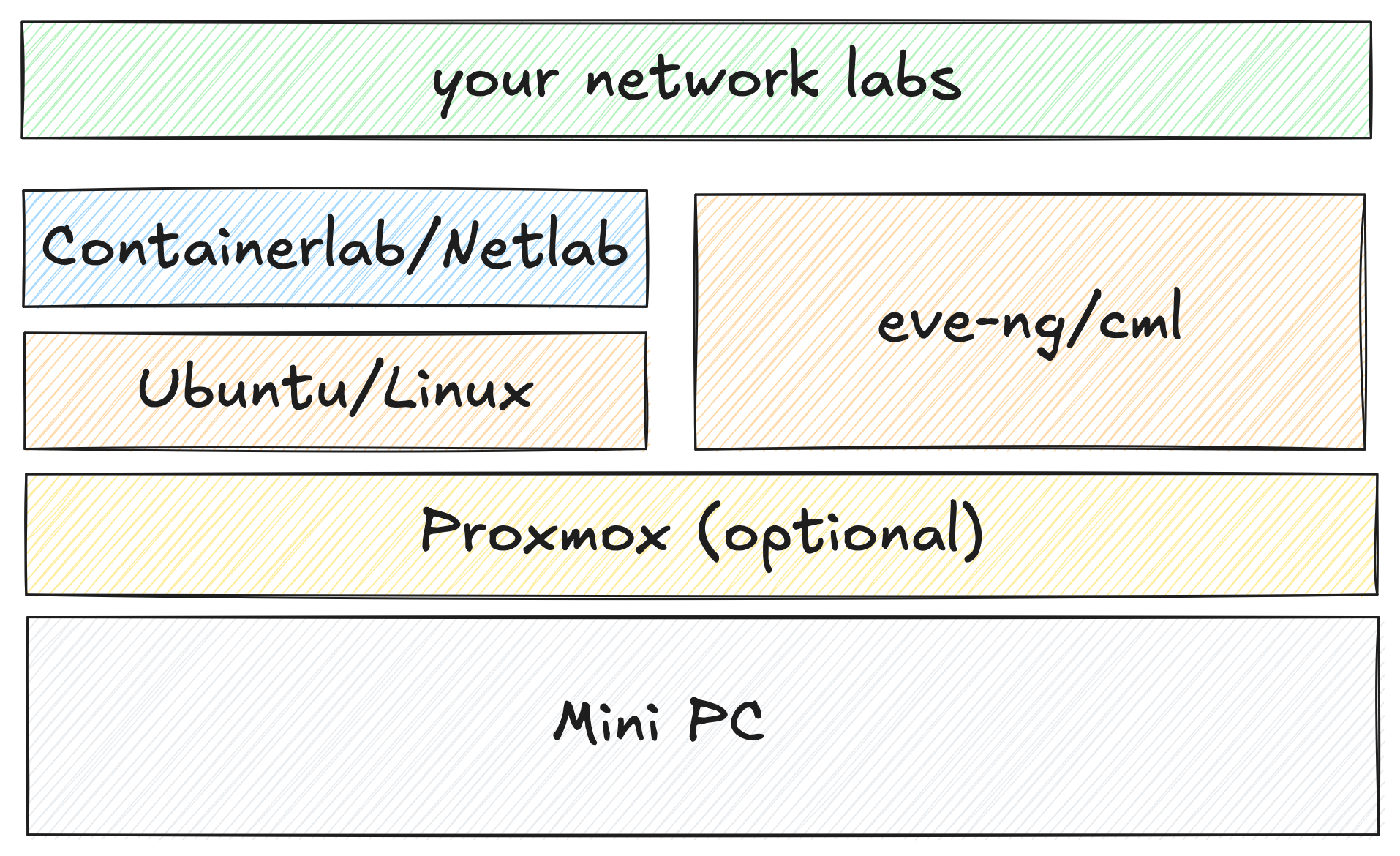
You don’t need expensive hardware to build a solid network lab. A used mini PC with decent specs is more than enough to run tools like Proxmox, Continue reading
Netpicker brings together configuration backups, security and compliance checks, and automation in one place. It supports over 150 network vendors, including Cisco, Juniper, Arista, Palo Alto, Fortinet and many more. It also integrates well with other tools like Netbox, Nautobot, and Infrahub for inventory management, and Slurp’it for network discovery. All of these features, including backups, integrations, and automation, are available in the free version. The paid version adds features such as RBAC, approvals, detailed logging, support, and workflows for teams that need more control.
In our previous introductory post, we looked at what Netpicker is, how to set it up, and how it can back up configurations across multiple vendors. In this post, we'll focus on Netpicker Automation and how to use the Netpicker plugin with Netbox, so let's get to it.
Netpicker has partnered with me for this post, and they also support my blog as a sponsor.
This post assumes you already have a functioning Netpicker and NetBox instances. If you're completely new to Netpicker, check out the introductory post first, where we covered the basics like installation and initial setup. For this example, we’re using NetBox Community version 4.3. Continue reading
If you follow my blog, you probably know that I’m a big advocate for using Containerlab and Netlab to spin up network labs. I’ve already covered both tools in detail, so I won’t go over the basics again here. You can check the links below if you’re new to them or want a quick refresher. In this post, we’ll look at how to take packet captures in Containerlab labs. So, let’s get started.
 Suresh Vinasiththamby
 Suresh Vinasiththamby
I know everyone has their own way of running Containerlab, so I thought I’d share how I set up and run my labs. My daily driver is a MacBook, but I run Containerlab on a server that’s set up as Continue reading

Let’s assume a simple scenario. You have two different teams managing your Palo Alto firewalls. One team is made up of network administrators who need full access to the firewalls. The other team only needs limited access and should not be able to make any configuration changes.
A common way to handle this is by using Admin Roles and a remote Radius server. You can assign different admin roles based on who is logging in, without creating local users on every firewall. In this post, we will look at how to achieve this using Cisco ISE and Radius. You do not have to use Cisco ISE, any Radius server can do the job, but this post focuses on Cisco ISE since it is commonly used in enterprise environments.
 Suresh Vinasiththamby
For this example, we will have two users, each belonging to a different group with different access requirements. In most environments, group membership is managed by something like Active Directory. For the sake of simplicity, Continue reading