vSRX policy-based IPsec VPN over GRE (part 1/2)
During the implementation of using my own public IP space on my home server I ran into a weird issue of not being able to pass traffic between hosts on either side of the VPN. After investigation it seems to be a combination of factors by using GRE tunneling, a policy based…Using my own public IP space on a regular internet connection with a Juniper SRX
Recently I purchased new servers for my home lab (topic for more posts to follow when everything is fully done). I wanted to use these servers to run a number of workloads (mainly virtual machines) and I wanted to use the public IP space I recently got for that. Of course my…My favorite podcasts
After my last blog about reading books I received a lot of good recommendations from people to have a good list of books to read! I figured it would be good to share my list of favorite podcasts as well.Read a book!
At the start of this year I set myself a number of goals. One of them was to read at least 1 book a month. I tried to accomplish a number of things with that. The first was to get the amount of screen time down. This also means reading books on paper, which I actually prefer over…New beginnings!
After long consideration I decided to take on a new role back at Juniper Networks! Over the past few months I have thought a lot about what I want in the future and how I can get there. When I had a chat with an ex-colleague at Juniper, he told me that they were looking to set-up…Next Generation Global Connectivity
Technologies like SDWAN have fundamentally changed the way we think about WAN infrastructures for enterprise IT environments over the past few years. Global WAN offerings are no longer a necessity as pretty much ‘any’ connectivity will do. You are no longer bound to private (MPLS-based) connections/networks. Software and smarter routing mechanisms will fix all your […]Next Generation Global Connectivity
Technologies like SDWAN have fundamentally changed the way we think about WAN infrastructures for enterprise IT environments over the past few years. Global WAN offerings are no longer a necessity as pretty much 'any' connectivity will do. You are no longer bound to private…Why leave a vendor job….twice?
Over the past few months I’ve been working hard on my new start-up company PeakFactory, it’s going really well, but for this post I want to focus on the reason why I chose to leave the companies I used to work for. I thought this was relevant, as many people have asked me why, but also in general there is a lot of discussion how to advance your career in different directions.
Why leave a comfortable and good job at all?
Back in 2013 I was working in a very good position, where I had a lot of freedom in choosing the customers I’d like to work on and was involved in all technical aspects of a project (pre-sales, proof of concepts, implementation and support). Still I had this feeling that I wanted to explore more an different areas for a wider audience. Which is why I decided to start working for a networking vendor. My main reason for choosing a vendor is that I could leverage my experience in the technology and apply it for a wider audience (maybe even worldwide)
Why work for Cisco and Juniper?
In early 2014 I got in touch with Cisco and I left Continue reading
Why leave a vendor job….twice?
Over the past few months I’ve been working hard on my new start-up company PeakFactory, it’s going really well, but for this post I want to focus on the reason why I chose to leave the companies I used to work for. I thought this was relevant, as many people have asked me why…What is P4?
Recently I attended a workshop organised by the Open NFP organisation about Data Plane acceleration. The primary goal of the workshop was to get students and researchers (why was I there you may think) familiar with the P4 programming language.
P4 is a programming language created to simplify writing data planes for networking use cases. Recently the P4-16 spec was released and could be considered a mature version of the language.
Now I’m not a hardcore developer. I know my way around in Python, GoLang and C#, but I never wrote anything more low level like C. P4 is created a little bit like GoLang, where I do not mean it as comparison, but as an architecture. P4 is designed so you only need to focus on the actual networking features that you want to make available on the hardware you are programming it for. Then when you compile it, it will generate runtime code for your hardware. Or as the creators explain it:
At one level, P4 is just a simple language for declaring how packets are to be processed. At another level, P4 turns network system design on its head.
There is no need to worry on low Continue reading
What is P4?
Recently I attended a workshop organised by the Open NFP organisation about Data Plane acceleration. The primary goal of the workshop was to get students and researchers (why was I there you may think) familiar with the P4 programming language.VMware NSX 101 – Components
Today I want to explain the basic components and the set-up of VMware NSX. In this case I’m referring to NSX for vSphere or NSX-V for short. I want to explain what components are involved, how you set them up for an initial deployment and what the requirements are.
Versioning
At time of this writing the latest release is NSX 6.1.4. This version added support for vSphere 6, although you cannot use any vSphere 6 feature in this release, there is support for the platform itself only.
vSphere
The first step is of course deploy your ESXi vSphere cluster with ESXi 5.5 or 6.0 with vCenter 5.5 or 6.0. I recommend using the vCenter Server Appliance (VCSA) instead of the Windows version. You will also need a Windows VM where the vSphere Update Manager is installed, this is not available as virtual appliance, only as Windows application. I also highly recommend installing an Active Directory server to manage all of your passwords. You will be installing a large amount of machines with all different usernames and possibly passwords. I recommend picking a very long and difficult one, as all VMware appliances seem to require Continue reading
VMware NSX 101 – Components
Today I want to explain the basic components and the set-up of VMware NSX. In this case I’m referring to NSX for vSphere or NSX-V for short. I want to explain what components are involved, how you set them up for an initial deployment and what the requirements are.EVPN Configuration
In my last blog I explained the features and use cases of the EVPN technology. In this blog I want to show how easy it is to configure, enable and expand EVPN. The configuration is focused on the Juniper MX platform, but as Junos is the single operating system across the entire…EVPN Configuration
In my last blog I explained the features and use cases of the EVPN technology. In this blog I want to show how easy it is to configure, enable and expand EVPN. The configuration is focused on the Juniper MX platform, but as Junos is the single operating system across the entire Juniper portfolio, configuration on other platforms (like EX9200) is equal.
Design
The topology is really simple. I’m using 2 routers in this example, so multi-homing is not in scope. Each router has an Ethernet segment connected that consists of multiple VLANs on each side. There is 1 VLAN ID that is not equal on both sides, so this has to be taken care of.
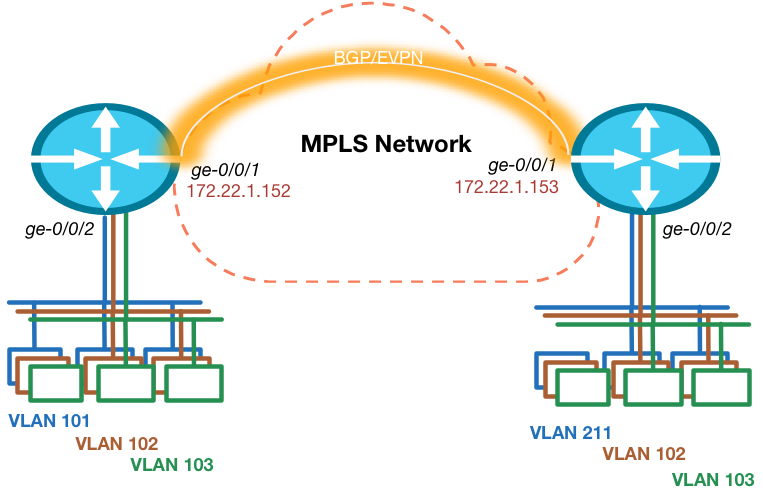
Prepare for EVPN
To make sure we can start creating our VPN, we have to ensure the foundation is in place. This means we need IP reachability to the other Data Center routers loopback address and we need BGP with the EVPN address family enabled. The Junos release I’m testing with needs a special knob to be enabled to ensure packet lookups are done in the right way. Other versions will see this knob disappear as it is default moving forward.
routing-options {
    autonomous-system 64999;
    forwarding-table {
         Continue reading
EVPN (RFC 7432) Explained
EVPN or Ethernet VPN is a new standard that has finally been given an RFC number. Many vendors are already working on implementing this standard since the early draft versions and even before that Juniper already used the same technology in it’s Qfabric product. RFC 7432 was previously known as: draft-ietf-l2vpn-evpn.
The day I started at Juniper I saw the power of the EVPN technology which was already released in the MX and EX9200 product lines. I enabled the first customers in my region (Netherlands) to use it in their production environment.
EVPN is initially targeted as Data Center Interconnect technology, but is now deployed within Data Center Fabric networks as well to use within a DC. In this blog I will explain why to use it, how the features work and finally which Juniper products support it.
Why?
Data Center interconnects have historically been difficult to create, because of the nature of Layer 2 traffic and the limited capabilities to control and steer the traffic. When I have to interconnect a Data Center today I have a few options that often don’t scale well or are proprietary. Some examples:
- Dark Fiber
- xWDM circuit
- L2 service from a Service Provider
- VPLS
- Continue reading
EVPN (RFC 7432) Explained
EVPN or Ethernet VPN is a new standard that has finally been given an RFC number. Many vendors are already working on implementing this standard since the early draft versions and even before that Juniper already used the same technology in it's Qfabric product. RFC 7432 was…Nested Virtualization
A typical Network Virtualization demo is difficult as you need quite some hypervisor hosts to run some VMs on and interconnect them using Overlays. I solve this using nested virtualization. This means that I run a hypervisor running on another. This gives me the flexibility that my physical nodes, or “hypervisor underlay” if you will, can scale easily and I’m independent of them.
My physical cluster consists of 2 nodes running ESXi with vCenter. On top of that I’m running 4 other ESXi hosts divided in 2 “virtual” clusters and 4 KVM hosts as Contrail Compute Nodes.
How does this work?
This technology works using Intel’s VT-x (which is hardware assisted virtualization) and EPT (to virtualise memory allocations). This combination works since the “Nehalem” arch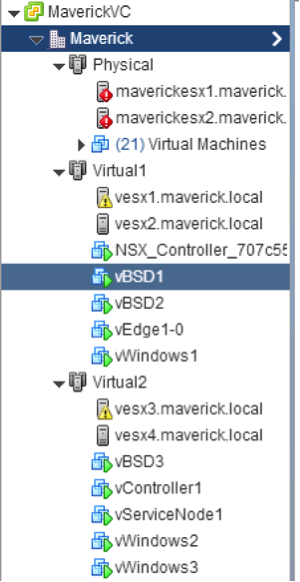 itecture (released 2008). The technology is ported to the more “Desktop” oriented CPU’s as well, so there is a good chance your notebook supports it as well. Since the Haswell architecture the nested virtualization works even better as Intel now supports VMCS Shadowing for nested VMs, which creates a data structure in memory per VM (and now supports nested VMs as well, which used to be a software effort).
Memory is the biggest burden in these Continue reading
Nested Virtualization
A typical Network Virtualization demo is difficult as you need quite some hypervisor hosts to run some VMs on and interconnect them using Overlays. I solve this using nested virtualization. This means that I run a hypervisor running on another. This gives me the flexibility that…Using the Junos Space REST API
Automation is going to be fundamental in all networking products. I’ve been working a lot on integrating Juniper products in existing and standard software. There are many different ways to automate something on a network running Junos. Using REST (or RESTful) APIs is one way of doing this. The reason I’m using REST is that it’s fairly easy to understand, but the best thing is that a large amount of existing products supports REST to integrate with it.
The goal of this blog is to explain how Junos products support REST, compatibility with older versions and how it scales.
What is REST?
REST (REpresentational State Transfer) is a simple stateless architecture that generally runs over HTTP. There are 4 commonly supported commands. When you issue a command your input data consists of a URL, HTTP headers and a body holding the data.
HTTP Headers are used for things like Authentication and a Content Type to let the application know what data format the body will contain.
The URL specifies which data you want to receive from the application or you want to change.
The body is empty in a request for data, when you want to change some data this Continue reading