 Ivan Pepelnjak
Author Archives: Ivan Pepelnjak
Ivan Pepelnjak
Author Archives: Ivan Pepelnjak
Like OSPF, IS-IS was designed when router memory was measured in megabytes and clock speeds in megahertz. Not surprisingly, it includes a scalability mechanism similar to OSPF areas. An IS-IS router could be a level-1 router (having in-area prefixes and a default route), a level-2 router (knowing just inter-area prefixes), or a level-1-2 router (equivalent to OSPF ABR).
Even though multilevel IS-IS is rarely used today, it always makes sense to understand how things work, and the Multilevel IS-IS Deployments lab exercise created by Dan Partelly gives you a perfect starting point.

Click here to start the lab in your browser using GitHub Codespaces (or set up your own lab infrastructure). After starting the lab environment, change the directory to advanced/1-multilevel and execute netlab up.
The first IPv6 specs were published in 1995, and yet 30 years later, we still have a pretty active IETF working group focused on “developing guidelines for the deployment and operation of new and existing IPv6 networks.” (taken from the old charter; they updated it in late October 2025). Why is it taking so long, and what problems are they trying to solve?
Nick Buraglio, one of the working group chairs, provided some answers in Episode 203 of the Software Gone Wild podcast.
In 2007, Jeff Atwood published a legendary blog post summarizing a 1997 paper by Brian Foote and Joseph Yoder.
Reading that blog post (or the original paper), the inevitable conclusion is that we haven’t made much progress in the last 20 years. Even worse, almost every single pathological architecture described in that blog post applies quite well to real-life organically grown networks.
netlab release 25.12 (25.12.02 to be exact – I had a few PEBCAK moments) was published last Friday. Here are the highlights:
In the first VXLAN lab, we covered the very basics. Now it’s time for a few essential concepts (before introducing the EVPN control plane or integrated routing and bridging):
Sean Goedecke published an excellent set of recommendations for good technical writing, including:
Based on some emails I received in the past (and the lack of response to the lengthy emails I sent), we should apply the same rules to emails (and all other forms of technical communication).
What could be better than watching 0x02 Jeffs discuss networking? How about having Petr Lapukhov of the RFC 7938 fame as a guest discussing AI/ML Data Center Design?
Note: Petr disappeared into the information black hole called Facebook over a decade ago, so I wondered how they allowed him to chat on a podcast for hours. It turns out he moved to NVIDIA, which might influence the podcast content a bit, but I’m pretty sure Petr is still Petr ;)
Last week, we fixed the mismatched route targets in our sample multi-pod EVPN fabric. With that fixed, every PE device should see every other PE device as a remote VTEP for ingress replication purposes. We got that to work on Site-A (AS 65001), but not on Site-B (AS 65002); let’s see what else is broken.
Note: This is the fifth blog post in the Multi-Pod EVPN series. If you stumbled upon it, start with the design overview and troubleshooting overview posts. More importantly, familiarize yourself with the topology we’ll be using; it’s described in the Multi-Pod EVPN Troubleshooting: Fixing Next Hops.
Ready? Let’s go. Here’s our network topology:
Dan Partelly, a heavy netlab user (and an active contributor), sent me this interesting perspective on how one might want to use netlab without ever building a lab with it. All I added was a bit of AI-assisted editing; my comments are on a grey background.
In all podcasts and interviews I listened to, netlab was referred to as a “lab management solution”. But this is misleading. It’s also a translator, due to its ability to abstract devices, and can easily generate perfectly usable configs for devices or technologies you have never worked on.
In his latest blog post (Systems design 3: LLMs and the semantic revolution), Avery Pennarun claims that LLMs might solve the problem we consistently failed to solve on a large scale for the last 60 (or so) years – the automated B2B data exchange.
You might agree with him or not (for example, an accountant or two might get upset with hallucinated invoice items), but his articles are always a fun read.
Route redistribution into IS-IS seems even easier than its OSPFv2/OSPFv3 counterparts. There are no additional LSAs/LSPs; the redistributed prefixes are included in the router LSP. Things get much more interesting once you start looking into the gory details and exploring how different implementations use (or do not) the various metric bits and TLVs.
You’ll find more details (and the opportunity to explore the LSP database contents in a safe environment) in the IS-IS Route Redistribution lab exercise.

Click here to start the lab in your browser using GitHub Codespaces (or set up your own lab infrastructure). After starting the lab environment, change the directory to feature/7-redistribute and execute netlab up.
When I published a blog post making fun of the ridiculously incorrect Cisco IOS/XE OSPFv3 documentation, an engineer working for Cisco quickly sent me an email saying, “Well, the other vendors are not much better.”
Let’s see how well Arista EOS is doing; this is their description of the router-id command (taken from EOS 4.35.0F documentation; unchanged for at least a dozen releases):
Aleksandr Albin built a large (almost 20-router) lab topology (based on an example from Jeff Doyle’s Routing TCP/IP Volume 2) that he uses to practice inter-AS IP multicast. He also published the topology file (and additional configuration templates) on GitHub and documented his experience in a LinkedIn post.
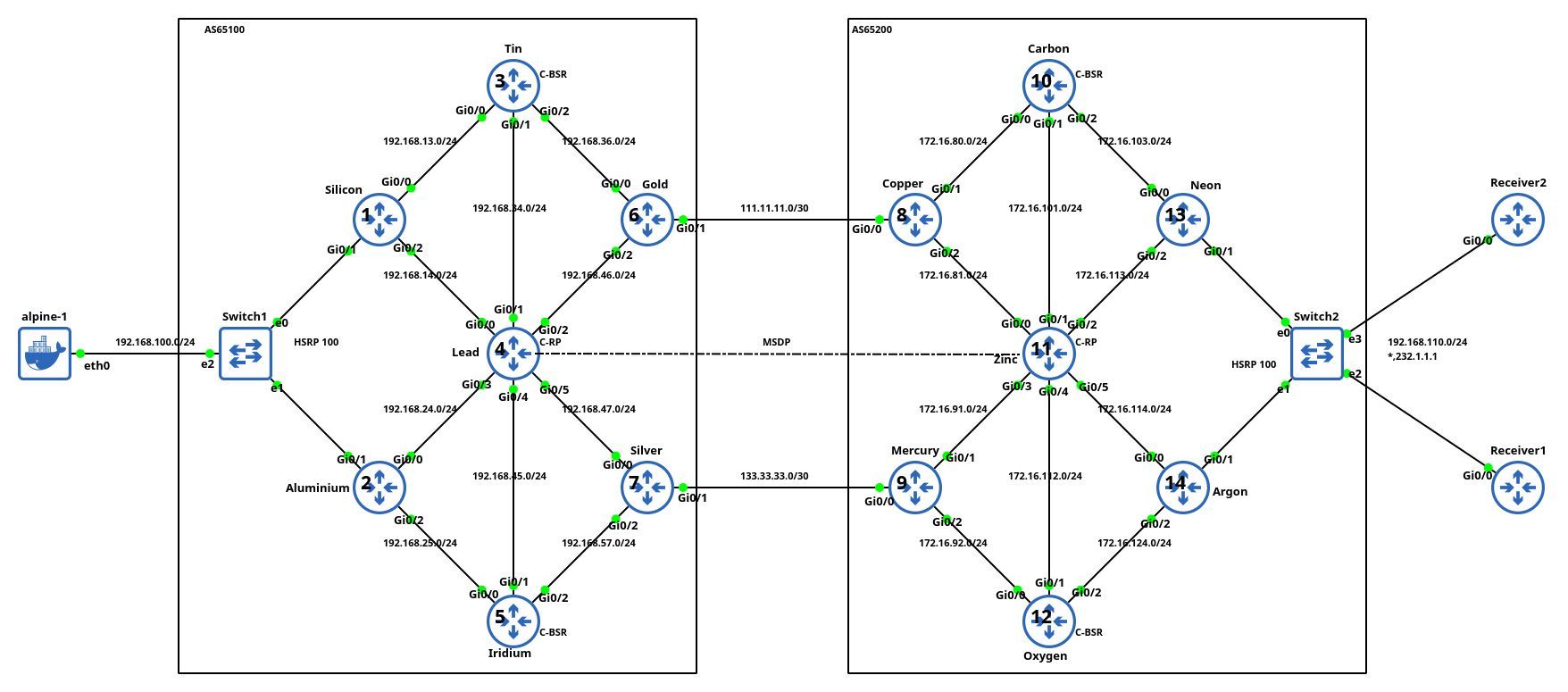
Lab topology, copied with permission by Aleksandr Albin
It’s so nice to see engineers using your tool in real-life scenarios. Thanks a million, Aleksandr, for sharing it.
Last week, we fixed the incorrect BGP next hops in our sample multi-pod EVPN fabric. With that fixed, every PE device should see every other PE device as a remote VTEP for ingress replication purposes. However, that’s not the case; let’s see why and fix it.
Note: This is the fourth blog post in the Multi-Pod EVPN series. If you stumbled upon it, start with the design overview and troubleshooting overview posts. More importantly, familiarize yourself with the topology we’ll be using; it’s described in the Multi-Pod EVPN Troubleshooting: Fixing Next Hops.
Ready? Let’s go. Here’s our network topology:
One would hope that the developers of a network operating system wouldn’t feel the irresistible urge to reinvent what should have been a common configuration feature for every routing protocol. Alas, the IOS/XR developers failed to get that memo.
I decided to implement route redistribution (known as route import in netlab) for OSPFv2/OSPFv3, IS-IS, and BGP on IOS/XR (Cisco 8000v running IOS/XR release 24.4.1) and found that each routing protocol uses a different syntax for the source routing protocol part of the redistribute command.

The EVPN in the Data Center and Bridging with EVPN parts of the EVPN webinar, featuring Dinesh Dutt, are now available without a valid ipSpace.net account. Enjoy!
Dmitry Klepcha published an excellent document describing how you can use netlab to build a series of data center fabric labs, starting from a simple IP network (without routing) and finishing with a complex EVPN/VXLAN network using symmetric IRB and MLAG toward hosts.
But wait, there’s more: all the lab topologies he used in his exercises are available on GitHub, which means that you could just clone the repo and start using them (I also “borrowed” some of his ideas as future netlab improvements).
Finally, thanks a million to Roman Pomazanov for bringing Dmitry’s work to my attention (and for the quote at the end of his post ;).
Vadim Semenov created a nice demo that allows you to use an LLM to query the collected link-state graphs through an MCP agent (SuzieQ would probably be faster and easier to deploy, but hey, AI).
If you want to kick the tires, you’ll find the source code on GitHub (Network AI assistant, MCP server for Topolograph service). You’ll also need Vadim’s previous projects: Topolograph and OSPF watcher or IS-IS watcher.
Last month, I wrote about the specifics of troubleshooting multi-pod EVPN designs. Today, I’d like to start a journey through an example in which (channeling my inner CCIE preparation lab instructor) I broke as many things as I could think of.
Here’s the lab topology we’ll use (and as usual, the corresponding netlab topology file and device configurations are on GitHub). Our network has two sites (pods), each with a spine switch, a leaf switch, and a host attached to the leaf switch. The inter-pod link is connected to the spine switches to minimize the number of devices.
Remember the vendor consultants who persuasively told you how to use their gear to build a disaster recovery solution with stretched VLANs, even though the only disaster recovery they ever experienced was the frantic attempt to restart their PowerPoint slide deck? Fortunately, I was only involved in the aftermath of their activity when the laws of physics reasserted themselves, and I helped the poor victims rearchitect their network into a somewhat saner state.
There’s another batch of snake-oil salesmen consultants peddling their warez to the gullible incompetent managers: the AI preachers promising reduction in support costs. Like the other group of consultants, they have never worked in support and have never implemented a working AI solution in their lives, but that never bothered them or their audience.
Unfortunately, this time I had the unfortunate “privilege” of having the painful front-row seat.