How to show captured data from Cisco IOS on the fly in Wireshark/tcpdump
Monitor features in Cisco devices are able to show data flows but Cisco IOS lacks the option to export data on the fly. I wrote tiny GNU/Linux shell script to solve this restriction.
That is something like ASA capture (https://supportforums.cisco.com/document/69281/asa-using-packet-capture-troubleshoot-asa-firewall-configuration-and-scenarios) via HTTP/HTTPS.
I tested script on:
Router(config)#uname -a
IOSv Router IOS 15.4 Cisco IOS Software, vios Software (vios-ADVENTERPRISEK9-M), Experimental Version 15.4(20131213:232637) [lucylee-ca_pi23 137]
Copyright (c) 1986-2013 by Cisco Systems, Inc.
Compiled Mon 16-Dec-13 19:50 by lucylee Unknown Unknown IOS
1. Create user and add privilege level 15 (root)
username user secret userpass
username user privilege 15
2. Start HTTP server, authentication style and optional (set max connection to 16 (default 5))
For security reasons you should set HTTP/HTTPS authorization with ACL and instead of HTTP use HTTPS server.
ip http server
ip http authentication local
ip http max-connections 16
3. Configure Monitor settings
Below I created a circular buffer called MY_BUFFER. Linear buffer is limited that means, if buffer is full IOS will stop capture. In circular buffer "old" data will be rewritten when buffer is full.
monitor capture buffer MY_BUFFER size 1024 max-size 9500 circular
Next step is to create a capture point. I created the Continue reading
HP VSR1001 Virtual Services Router on GNS3
HP VSR is a Comware 7 router software application for a server which provides the same functionality as a physical router. Installed on either VMware or KVM virtual machine it offers routing, Firewall, IPSec, and MPLS VPN security services.
The tutorial gives you some ideas how to install HP VSR1000 (Virtual Service Router) running Comware 7 OS on Qemu disk and connects Qemu appliance to GNS3.
They are HP VSR1001, VSR1004 and VSR1008 models available for download. Differences between models are explained here. As the VSR1001 model has the lowest RAM requirements comparing to other models and we do not have to concern the forwarding performance, VSR 1001 demo ISO image is our choice. The demo is full featured, performance limited and requiring no license and with no expiration date.
HP VSR1001 Minimum Hardware Requirements
- CPU: 2.0 GHz
- Memory: 1 GB
- Disk space: 8 GB
- Network interfaces: 2 virtual NICs, E1000 and VirtIO virtual NICs are recommended, maximum 16 NICs supported
1. Download HP VSR1001 Virtual Services Router
Navigate to the Download page here
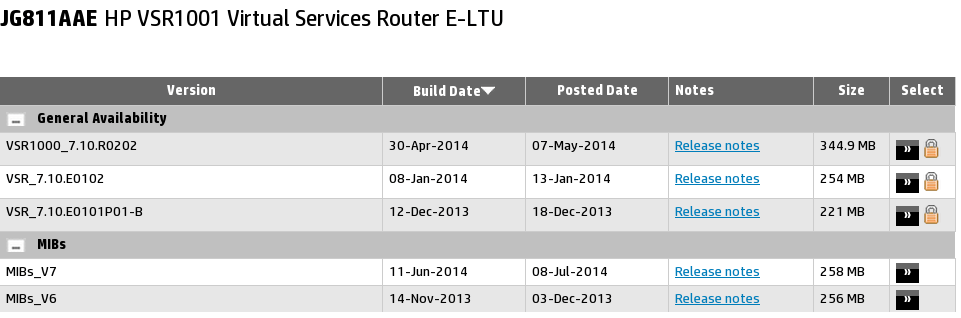
Picture 1 - HP VSR1001 Virtual Services Router Download Page
Click on the button >> on he right, beside the padlock icon. Either sign in with your HP Passport account or Continue reading
How to run Juniper Firefly Perimeter vSRX on GNS3
Firefly Perimeter is a virtual security appliance that provides security and networking services at the perimeter in virtualized private or public cloud environments. It runs as a virtual machine (VM) on a standard x86 server and delivers similar security and networking features available on branch SRX Series devices.
However not all the features that are supported by SRX hardware devices are supported. Here is the list of features supported by current firefly 12.1x46-d10 release.
Firefly Perimeter Hardware Specifications
- Memory 2 GB
- Disk space 2 GB
- vCPUs 2
- vNICs Up to 10
- Virtual Network Interface Card type (NIC) E1000
Thanks to Juniper’s software evaluation program we can download the Firefly Perimeter security solution for free and test it out for 60 days. In this tutorial we are going to connect Firefly Perimeter to GNS3 and create a simple lab to test connectivity between two vSRX instances. As GNS3 has built-in support for VirtualBox and Qemu/KVM they both can used as hypervisor.
Firefly Perimeter virtual machines can be download here. You have to use your Juniper account to proceed the download but a valid service contract is not required to to download Firefly Perimeter virtual machine.
Picture 1 - Juniper Login Window
Notice that they Continue reading
Cisco Virtual IOS on GNS3
The tutorial discuss the use of GNS3 software to run Cisco Virtual IOS (vIOS). Cisco vIOS is shipped and supported as a part of the Cisco's One Platform Kit (onePK) that is distributed in form of virtual machine. It might be downloaded with Cisco.com account. Currently, it is not required to have Cisco account associated with service contracts, Bill-to IDs, or product serial numbers in order to download onePK.
Software Prerequisites
- Host OS - any 64 bit Linux OS
- Qemu emulator and virtualizer compiled with x86_64 support
- KVM
- GNS3 0.8.7 - the last version that has Qemu support included
- Cisco all-in-one-VM-1.2.1-194.ova virtual machine
Minimum Hardware Requirements
- CPU with hardware virtualization support (AMD-V or VT-X virtualization extensions)
- Storage - 10 GB
- RAM - 2000 MB
- RAM vIOS - 384 MB
Script for Extracting vIOS from All-In-One VM
Here is a Linux bash script that helps you to extract vIOS vios-adventerprisek9-m.vmdk from all-in-one VM file. Download all-in-one.ova file from here and assign executable privileges to the script.
$ chmod +x extract_vios.txt
Then you can run the script as it is shown below. The only user input is selecting path to all-in-one VM file Continue reading
VyOS x64 Installation on Qemu
VyOS is a community fork of Vyatta, a Linux-based network operating system that provides software-based network routing, firewall, and VPN functionality. The VyOS project was started in late 2013 as a community fork of the GPL portions of Vyatta Core 6.6R1 with the goal of maintaining a free and open source network operating system in response to the decision to discontinue the community edition of Vyatta.
VyOS runs on both physical and virtual platforms. It supports paravirtual drivers and integration packages for virtual platforms. It is completely free and open source.
The aim of the tutorial is to show VyOS installation on Qemu virtual machine and get it working on GNS3.
VyOS Qemu and VirtualBox virtual disks can be downloaded here.
I created a Bash script deploy_vyos for automatic deployment of VyOS to Qemu image. The script downloads stable VyOS ISO image from the Internet, creates Qemu disk and starts Qemu virtual machine with attached ISO image. Then is starts Expect script install_vyos that automatically configure all required configuration options without user intervention.
Just copy both scripts to the same directory, assign run privileges to both scripts with the command below and run the deploy_vyos script.
$ chmod +x Continue reading
RouterOS x86 Qemu and VirtualBox Appliances Download
MikroTik RouterOS is the stand-alone operating system of MikroTik RouterBOARD hardware. It can also be installed on a PC and will turn it into a router with all the necessary features – routing, firewall, bandwidth, management, wireless access point, backhaul link, hotspot, gateway, VPN server and more.
RouterOS x86 installed on Qemu and VirtualBox disks is not licensed, you have 24 hours in total to run these images.
login/pass: admin / password is not set
1. RouterOS x86 6.15
Qemu
https://drive.google.com/file/d/0B6L2h6R5UKMhQUcxMFl2a1pZZGs/edit?usp=sharing
http://sourceforge.net/projects/gns-3/files/Qemu%20Appliances/routeros-6.15-qemu.zip/download
http://www.4shared.com/zip/HG7nubJlba/routeros-615-qemu.html
VirtualBox
https://drive.google.com/file/d/0B6L2h6R5UKMhODYyNm0tWnFjXzA/edit?usp=sharingv
http://sourceforge.net/projects/gns-3/files/VirtualBox%20Appliances/routeros-6.15-vbox.zip/download
http://www.4shared.com/zip/qPN2tmD7ba/routeros-615-vbox.html