Continuous Detection and Mitigation (CDM)
Ansible for security automation
Overview
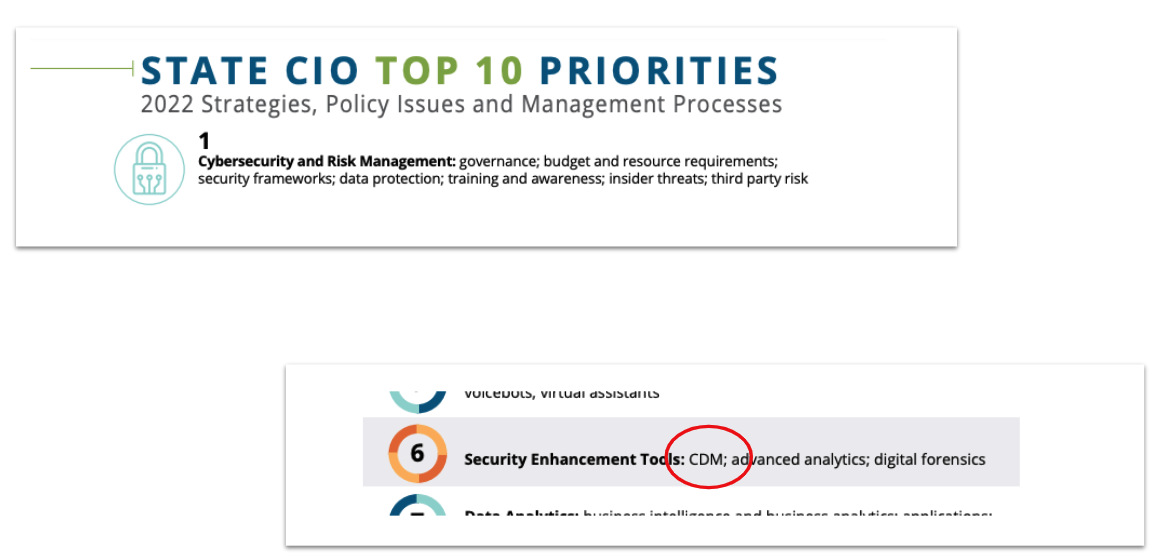
Per NASCIO, the top priority for state CIOs is cybersecurity and risk management. A key focus for this initiative is to leverage the Continuous Diagnostics and Mitigation (CDM) framework provided by the Cybersecurity and Infrastructure Security Agency (CISA). In this blog post we will explore a high level view of the CDM framework, review Ansible’s role in security automation and finally understand how Ansible can help agencies with Day 0 through Day 2 tasks while working with the CDM framework.
What is CDM?
Today more than ever, cyber threats mean that securing and defending our networks are of utmost importance. A recent report published by the National League of Cities revealed that an astonishing 44% of local governments report they experience a cyberattack daily or even hourly. So it is not surprising to see that cybersecurity and risk management is the number one priority for our state CIOs. With that background, let’s understand the CDM program.
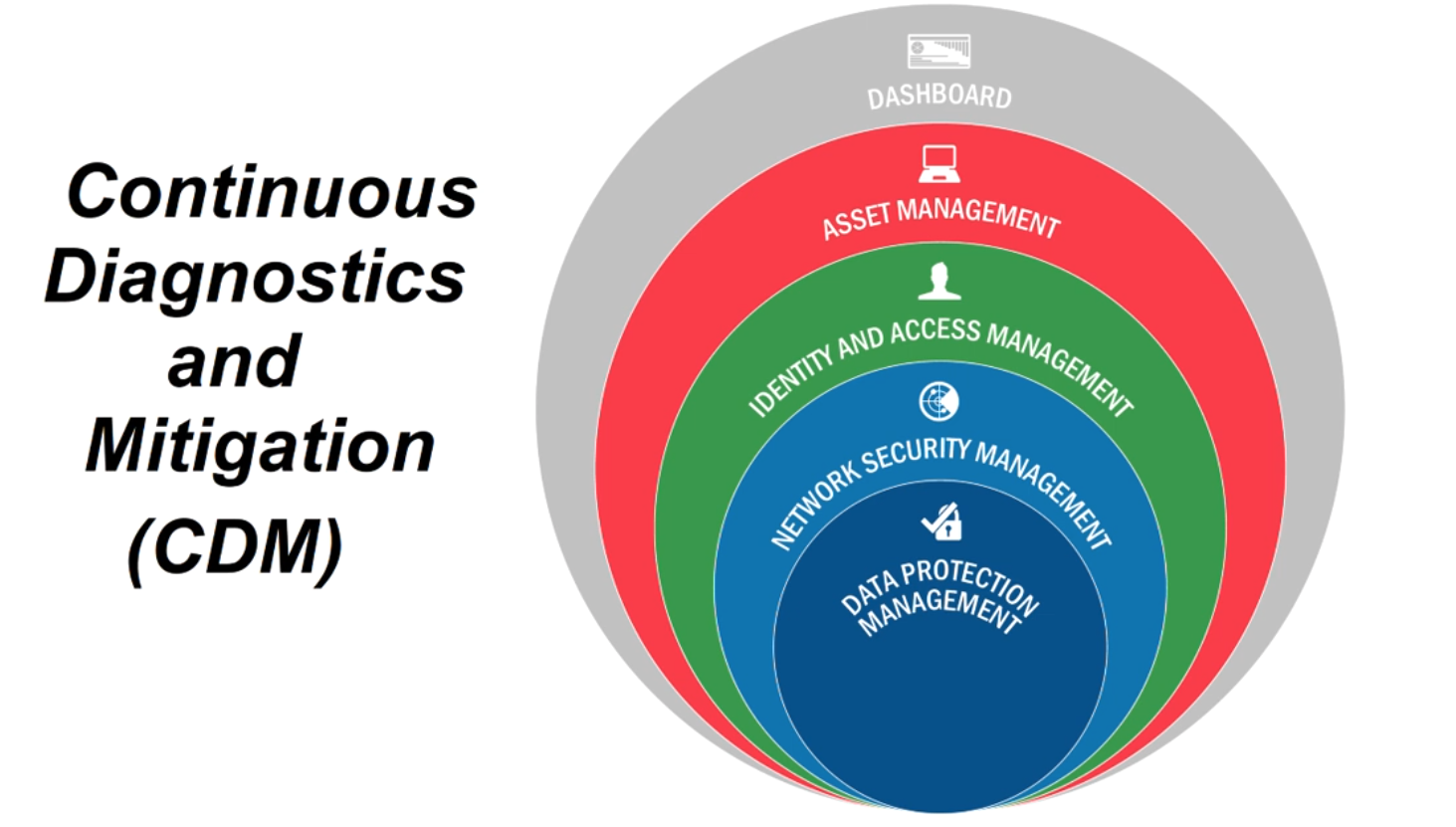
Source: https://www.cisa.gov/cdm-training
The CDM framework is defined by CISA. CDM provides capabilities and tools that help identify Continue reading
Automating Applications and Servers at the Edge with Red Hat Ansible Automation Platform

In my previous blog, Why 2022 will be the year for edge automation, we discussed the objective of edge solutions to bring resources closer to the end user or data source.
As edge expands its IT footprint and becomes an extension of the data center, bare-metal, virtual environments, private cloud and public cloud start to coexist as part of the infrastructure.
While our customers move forward with their own automation journey, they are adding edge computing to the puzzle, with common automation challenges such as:
How to automate disparate architectures at scale?
How do we reduce the operational burden, if the IT teams do not grow exponentially?
What is needed to foster a collaborative automation practice?
As part of this blog we will go through a hybrid edge computing automation scenario. But let's start with the fundamental question: Why is hybrid cloud critical for edge computing?
Hybrid cloud to solve edge computing challenges
At the edge, geography matters.
The fundamental need is to allocate resources closer to where the data is generated to pre-process the information before forwarding it to the data centers. The reason for this architectural change is to increase Continue reading
Technology Short Take 154
Welcome to Technology Short Take #154! My link of links and articles from around the Internet is a bit light on networking and virtualization this time around, but heftier in the security, cloud, and OS/application sections. I hope that I’ve managed to include something that you’ll find useful. Enjoy the content!
Networking
- Lucas Pardue and Christopher Wood share a primer on proxies. (Hat tip to Matt Oswalt for putting this on my Twitter timeline.)
- Ivan Pepelnjak talks about the 1.2.1 release of netsim-tools in this blog post.
Servers/Hardware
- It seems like silicon photonics is something the industry has been talking about for years, but something that never seems to come to fruition. The Next Platform recently chatted with Andy Bechtolsheim about it; you can read the results of that discussion here.
Security
- Daniel Holback talks about the addition of fuzzing to the Flux controllers, to improve the security posture of the Flux project.
- Wojciech Reguła shares a trick for bypassing the macOS TCC protection using older applications.
- It appears that a well-known crytomining botnet has started targeting Docker. (Hat tip to Teri Radichel for sharing this and making it appear on my Twitter timeline.)
- GitHub Continue reading
Event-driven remediation with systemd and Red Hat Ansible Automation Platform

Over the many years of working as an engineer and architect with a particular interest in storage, I have learned that donuts and energy drinks can really bring you some joy in trying situations. When it seems that your infrastructure is on fire and you need an exorcist to help you find the ghost in the machine, a humble box of glazed donuts can give you and your team a much-needed break and allow you to refocus.
Now, the issue with this habit is that it might help you in the moment, but over time this can become a real health issue. Configuration drift, technical issues, and technical debt can all have similar effects on your health, increasing your heart rate and causing sleepless nights. Red Hat Ansible Automation Platform can assist you here with not only keeping your infrastructure in check, but also giving your teams the peace of mind that systems are running as they should.
Being able to schedule compliance checks on your systems with Ansible Automation Platform enables you to preserve configuration and system states, and keep them running the way you prefer. But sometimes this is not proactive enough. What if you have Continue reading
New reference architecture: Red Hat Ansible Automation Platform 1.2 to 2 Migration Guide

Side-by-Side migration to Ansible Automation Platform 2
The release of Red Hat Ansible Automation Platform 2.1 comes with a re-imagined architecture that delivers exciting features such as automation mesh and automation execution environments among an entire suite of tools and components that enable enterprises to scale automation across their organizations.
With the importance of enterprise automation and taking advantage of the latest Ansible Automation Platform, we created a simple reference architecture to help guide you migrate from Ansible Automation Platform 1.2 to Ansible Automation Platform 2.
It consists of using a side-by-side methodology for the migration process via using the Ansible Automation Platform installer to do the migration and restoring a Database backup from a Ansible Automation Platform 1.2 cluster.
Why are you going to love it?
Say goodbye to the guessing game of how you’ll migrate to the latest and greatest. Our goal is to simplify the migration planning, considerations and, most importantly, the step-by-step on how to do it.
What will I find inside this reference architecture?
Inside this reference architecture you’ll find:
- Migration considerations
- Prerequisites
- Infrastructure migration
- Migrating virtual environments to automation execution environments
The migration considerations focus Continue reading
Deep dive on Ansible VScode extension
Ansible as part of the Red Hat Ansible Automation Platform continues to grow and mature. Recent enhancements include Ansible Content Collections, automation execution environments, and an increasing list of integrations using plugins and modules. It is more important than ever that both new and experienced content creators have access to tools that help them write better content faster. The newly created Ansible Devtools initiative focuses on developing and enhancing tools like ansible-navigator, Ansible VScode extension, ansible-lint and so on to help ease the Ansible automation content creator experience. In this blog, we will do a deep dive into the Ansible VSCode extension, giving an overview of how it works and the initial setup required to get it working after installation.
Evolution
The Ansible VSCode extension was initially a fork of Tomasz Maciążek’s VSCode extension. After the fork, the server and client-side code were decoupled into their own separate repositories to allow independent releases for both server and client.
The Ansible Language Server is released as a node module on the npm repository, allowing it to be reused by other editors supporting language server protocol, while Continue reading
Technology Short Take 153
Welcome to Technology Short Take #153! My personal and professional life has kept me busy over the last couple of months, so things have been quiet here on the blog. I’ve still been collecting links to share with you, though, and here’s the latest collection. I hope you’re able to find something useful here!
Networking
- This article contains some good information on IPv6 for those who are just starting to get more familiar with it, although toward the end it turns into a bit of an advertisement.
- Want to understand
kube-proxy, a key part of Kubernetes networking, a bit better? Start here. Arthur Chiao’s post on crackingkube-proxyis also an excellent resource—in fact, there’s so much information packed in there you may need to read it more than once. - Xavier Avrillier walks readers through using Antrea (a Kubernetes CNI built on top of Open vSwitch—a topic I’ve touched on a time or two) to provide on-premise load balancing in Kubernetes.
Servers/Hardware
- Cabling is hardware, right? What happens to submarine cables when there are massive events, like a volcanic eruption? Ulrich Speidel shares some of the findings after the volcanic eruption in Tonga.
Security
- Although Linux is often considered Continue reading
Red Hat Insights for Ansible Automation Platform New Report : Modules
Red Hat Insights is a suite of cloud services available on the Red Hat Hybrid Cloud Console, powered by an expert system that is built upon years of data collected from across Red Hat’s worldwide customer base. For Red Hat Ansible Automation Platform customers, it provides predictive analytical reporting of your Ansible automation.
This blog breaks down the new reports that analyze module usage within the Ansible Automation Platform.
In summary, module usage is really important because modules can contain security vulnerabilities and require updates to support new integrations of hardware or software. It is paramount to know which modules you are using in your automation.
Let's look at each report and what each of them can deliver for you.
Reports
Most used modules
Description: The number of job template and task runs, grouped by Ansible module usage.
Use Case: You can use this report to discover which modules are being used the most across your automation, helping you to check things like organization-wide adoption of purpose-built modules over potentially less performant, catch-all solutions.
Example:

This chart shows how the file and gather_facts modules are the most used, but also shows that over the past 6 Continue reading
Configuring an AWS dynamic inventory with Automation controller
One of the core components of Ansible is inventories. In its most basic form, an inventory provides host information to Ansible so it can trigger the tasks on the right host or system. In most environments, the static inventory is sufficient for the Ansible control node to work from, however as we expand our use of automation, we need to transition to more effective methods of gathering ever-changing environment details.
This is where the use of a dynamic inventory is beneficial. This allows the platform to gather information for the inventory from environments that are not static sources. A prime example of this is using a dynamic inventory plugin to gather inventory information from a cloud provider or hypervisor, enabling you to keep an inventory up to date with instance details.
Amazon Web Services (AWS) is one of the biggest public cloud providers used around the world. Organizations use their Elastic Compute Cloud services (EC2) for their workflows, however managing an inventory for your instances running on AWS would typically have to be done manually, which is problematic and time consuming. Using the AWS Identity and Access Management interface (IAM), we are able to get programmatic access to the AWS Continue reading
Inside the newest features in the Red Hat Ansible Certified Content Collection for ServiceNow ITSM
The Red Hat Ansible Certified Content Collection for ServiceNow helps you create automated workflows targeting IT service management (ITSM) tasks faster while establishing and maintaining a single source of truth in the ServiceNow configuration management database (CMDB). In this blog, I’ll share the latest features we’ve added to the Collection, and you can find additional resources about existing features at the end of this blog.
We’ve added three major updates to the Red Hat Ansible Certified Content Collection for ServiceNow:
- Advanced inventory features
- Customized list mappings
- Creating problem tasks and change requests tasks
Let’s take a closer look at each of these.
Support for advanced inventory features
A new feature in ServiceNow Collection introduces a new inventory functionality, called “enhanced inventory”, which provides the ability to create groups based on CMDB relationships. Previous versions of the inventory plugin allowed us to create predefined groups, such as the “Linux Red Hat” and “Windows XP” examples shown here:
---
plugin: servicenow.itsm.now
query:
  - os: = Linux Red Hat
  - os: = Windows XP
keyed_groups:
  - key: os
    prefix: os
Inspecting the inventory collected using the above configuration results in:
ansible-inventory -i inventory.now.yaml --graph` output:
|--@os_Linux_Red_Hat:
Continue readingLet’s Level Set at the Edge
Introduction
Typically when people hear the word edge, everyone gets a little apprehensive of what that means. So Josh, Andy, Martin and Chad got together to collaborate on what that means from their collective experiences across multiple industries. In this blog we will cover what the difference is between the near edge and far edge, as well as give some examples of what we have seen in these environments across multiple industries.
Near Edge
Near edge typically refers to distributed deployments of “scaled-down” IT-like services to support business operations outside the core data centers and public cloud providers. This includes anything from retail stores, branch field offices, manufacturing facilities, warehouses and distribution centers that generally have stable connectivity.
Traditionally, these have been referred to as remote offices or branch offices, with the common acronym ROBO, but there are far more examples of this deployment pattern. Consider the following:
- A point of sale system or back office processing at a retail location.
- A localized authentication/authorization source for badge access to a manufacturing plant.
- A file share located locally to a University’s extension office that’s replicated over an unreliable connection.
These are all examples that fit under our definition of Continue reading
What’s New in the Ansible Content Collection for Kubernetes 2.3
With increased adoption of container automation, IT organizations continue to expand their requirements when it comes to deploying and managing their Kubernetes clusters. As such, we at Red Hat continue to add new features and capabilities to meet those demands by announcing the availability of kubernetes.core version 2.3, our Red Hat Ansible Certified Content Collection for Kubernetes and Helm.
In this blog post, we’ll go over what’s new and what’s different in this release of our Kubernetes Collection.
New Module - k8s_taint
With the release of kubernetes.core 2.3, we introduce the k8s_taint module. This module provides the ability for a Kuberentes node to repel a pod or set of pods from being scheduled unless they have a matching toleration. This establishes that with taints and tolerations in place, pods are not scheduled onto inappropriate nodes.
This feature is quite useful when you are trying to ensure exclusivity of a particular set of nodes (only allow a particular group of users access) or you want to provide particular nodes with special hardware (such as GPUs) to only run pods that require the use of the specialized hardware and keep out the pods that don’t require Continue reading
Two Simple Ways Automation Can Save You Money on Your AWS Bill
Red Hat Ansible Automation Platform is an excellent automation and orchestration tool for public clouds. For this post, I am going to walk through two common scenarios where Ansible Automation Platform can help out. I want to look outside the common public cloud use-case of provisioning and deprovisioning resources and instead look at automating common operational tasks.

What is an operational task? It is simply anything that an administrator has to do outside of creating and deleting cloud resources (e.g. instances, networks, keys, etc.) to help maintain their company's public cloud account. One of the problems I’ve encountered is instances being left on, running up our public cloud bill in the background while we were focusing our attention elsewhere. The more users you have, the more likely problems are to occur; automation can help address these issues and maintain control of your account. There are two common scenarios I want to address here:
- Bespoke AWS instances were manually created for a one-off initiative, usually to test something, then instances were forgotten about and left running.
- Continuous Integration (CI) instances were spun up to test changes programmatically every time a Pull Request (PR) went into our project, and would Continue reading
The Ansible cookie: Magic in the middle
If Ansible Automation Platform was compared to the crunchy goodness of a cookie, private automation hub would be the sweet center bringing it all together and making your mouth water!
Private automation hub provides organizations with a central location for their automation resources. Ansible automation hub is part of the hosted services from console.redhat.com. This hosted offering provides automation adepts access to Red Hat Ansible Certified Content Collections for several industry-leading technologies and partners.
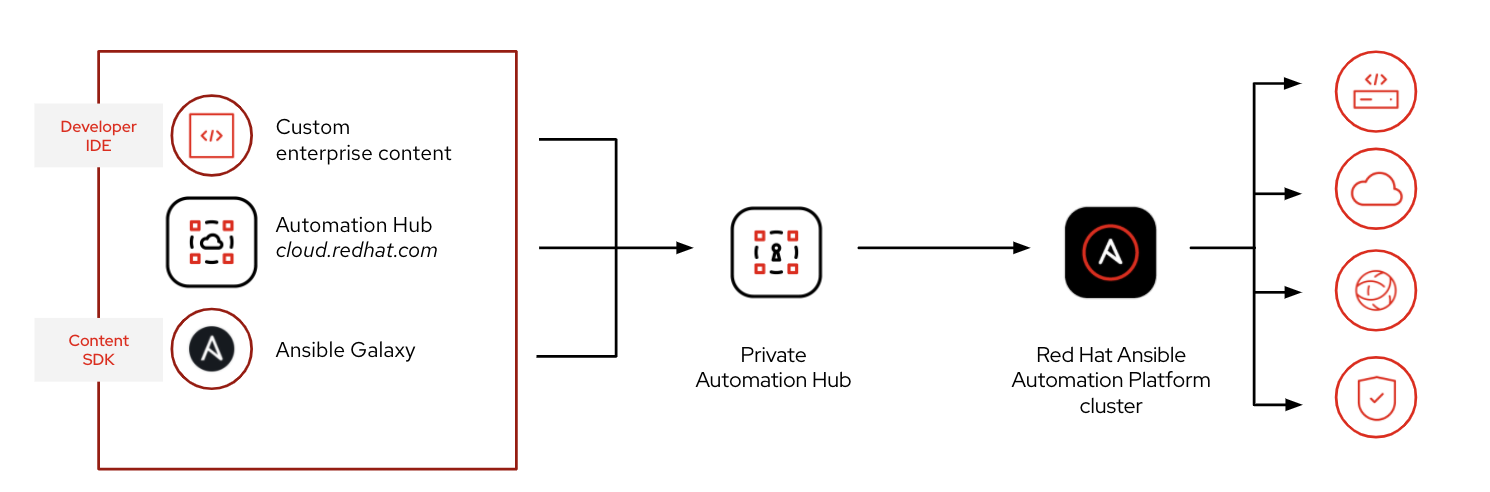
Private automation hub brings this functionality on-premises and allows for users to curate their custom automation content with not only Red Hat Ansible Certified Content but with community content from Ansible Galaxy. Private automation hub also acts as a container registry where we can store and distribute the automation execution environments needed for Ansible Automation Platform 2.
How do we get started with building our own private automation hub and use it in our enterprise? How do automation controller and private automation hub interact?
Let’s get cooking and build our mouthwatering automating platform!
To deploy the “magic in the middle,” we are going to use the Ansible Automation Platform installer from our automation controller node. Since we are installing a private automation Continue reading
How to Migrate your Ansible Playbooks to Support AWS boto3
Red Hat Ansible Automation Platform is known for automating Linux, Windows and networking infrastructure. While both the community version of Ansible and our enterprise offering, Red Hat Ansible Automation Platform, are prominently known for configuration management, this is just a small piece of what you can really achieve with Ansible’s automation. There are many other use-cases that Ansible Automation Platform is great at automating, such as your AWS, Azure or Google public cloud.
Ansible Automation Platform can automate deployments, migrations and operational tasks for your public cloud. This is extremely powerful because you can orchestrate your entire infrastructure workflow, from cloud deployment, to instance configuration, to retirement, rather than requiring a point tool for each separate use-case. This also allows IT administrators to concentrate on automating business outcomes rather than individual technology silos.
Specifically for this blog, I wanted to cover converting your Ansible Playbooks for provisioning an instance on AWS from the unsupported ec2 module to the fully supported ec2_instance module. Amazon has deprecated their Software Development Kit (SDK) Boto in favor of the newer fully supported SDK Boto3. Alina Buzachis announced What's New: The Ansible AWS Collection 2.0 Release back in October 2021, which includes Continue reading
Forecasting and tracking the ROI of automation
Great ideas start with coffee, but business innovation starts with automation. Just like that morning jolt of warm friendly caffeine, Red Hat Ansible Automation Platform has the ability to enhance, optimize and make your technology stack flow like the beloved beverage most of the world consumes on a daily basis.
It is easy to discuss all the technical benefits that Ansible Automation Platform can bring to organizations, but what about the business benefits? How can you observe the state of your automation and return on investment (ROI)? How can you explain the financial impact of automation to key stakeholders? The answer to all of these questions is Red Hat Insights for Red Hat Ansible Automation Platform.
Red Hat Insights is an analytics platform to help you understand your automation efforts. It lets your data work for you by proactively identifying and correcting issues. Included as a hosted service offering with Ansible Automation Platform, Insights provides a visual dashboard to indicate automation performance, health notifications, organizational statistics, and more.
The most relevant features within Insights for IT business leaders and decision makers who want to validate their automation strategy are Reports, Savings Planner and Automation Calculator.
Tracking how automation Continue reading
Technology Short Take 152
Welcome to Technology Short Take #152! Normally I’d publish a Technology Short Take in the morning on a Friday, but I really wanted to get this one out so I’m making it live late in the day on a Monday. Here’s hoping I’ve included some content below that you find useful!
Networking
- I was (and am) familiar with RFC 1918 and the concept of non-routable address spaces. However, I was not familiar with the term “bogons” to refer to such prefixes that should not be publicly routed. Thanks to this article, that oversight is now corrected. Oh, and the article shares a handy Python script to help implement bogon filtering in NSX-T.
- Koyeb describes, at a high level, the global networking stack for their serverless platform. Components involved include the open source Kuma service mesh (in turn leveraging Envoy), anycast BGP, and mutual TLS (mTLS).
- Ivan Pepelnjak does a great job of describing all the things you really shouldn’t do (or don’t really need to do) when trying to deal with migrating container hosts in a data center fabric. In truth, the answer is exactly as Ivan says at the top of the article: when it comes to Continue reading
Performance Improvements in Automation Controller 4.1
Red Hat Ansible Automation Platform 2 is the next generation automation platform from Red Hat’s trusted enterprise technology experts. With the release of Ansible Automation Platform 2.1, users now have access to the latest control plane – automation controller 4.1.
Automation controller helps standardize how automation is deployed, initiated, delegated, and audited, allowing enterprises to automate with confidence while reducing sprawl and variance. Users can manage inventory, launch and schedule workflows, track changes, and integrate into reporting, all from a centralized user interface and RESTful API.
Automation controller 4.1 provides significant performance improvements when compared to its predecessor Ansible Tower 3.8. To put this into context, we used Ansible Tower 3.8 to run jobs, capture various metrics while jobs were running/finished, and compare that with automation controller 4.1. This post highlights the significant performance improvements in automation controller 4.1.
Benchmark framework
In order to deep dive into the prospective performance enhancements with the latest automation controller, we at the performance engineering team at Red Hat created a benchmarking framework consisting of the following workflow:
- Installation of RHEL 8.3 virtual machines with 4 CPU and 16 GB RAM deployed within the IBM Cloud
- Continue reading
Edge Automation with NetGitOps on Red Hat Ansible Automation Platform 2
Network edge automation challenges
As organizations grow and expand geographi cally, they start extending their IT infrastructure into the distributed and far edge layers through opening new branch offices.
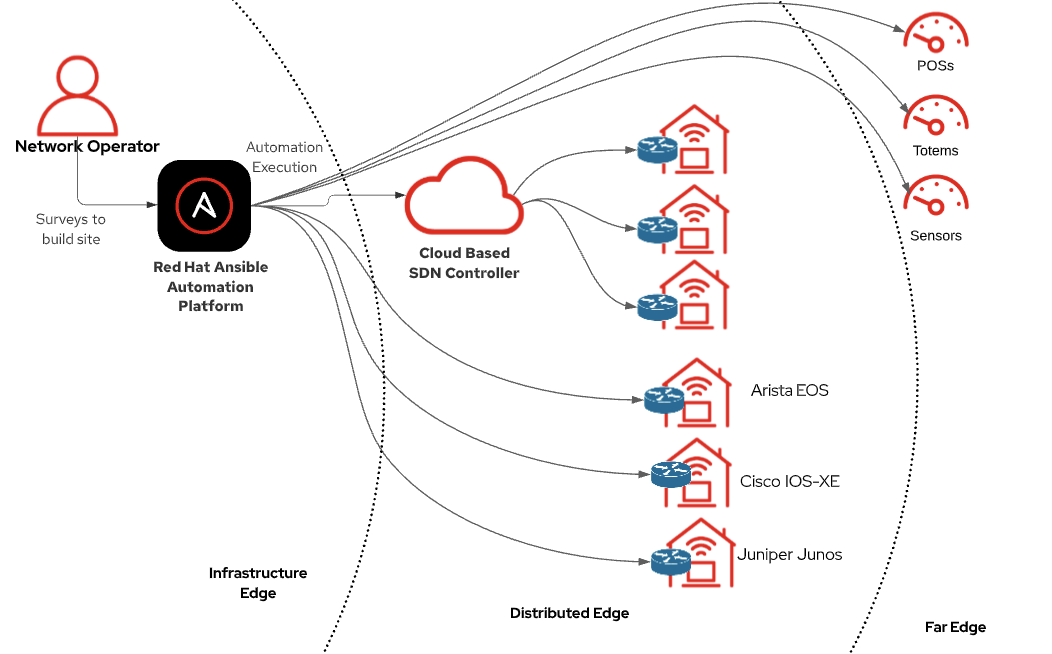
Restaurants, retail stores, and other customer-centric businesses provide differentiated wireless access for their employees, contractors and customers to interconnect within their designated areas.
Configuring and managing multiple wireless settings via Red Hat Ansible Automation Platform simplifies the deployments at scale.
Network administrators can use GitOps practices to automate wireless infrastructure as a code (IaC).
This case covers a sample use case for a company that uses an SDN (software-defined network) controller with a large network infrastructure, including access points, switches, and firewalls/routers to provide connectivity for thousands of branches across multiple countries. We will show you step by step how to automate wireless network access point settings at scale through a SD-WAN controller, which will be Cisco Meraki for purposes of this demo.
Considerations about using a source of control. Why not scripts?
Typically an SDN controller has an API. Having access to an SDN API is an advantage, since we have a single point of contact with the controller, and we can operate the whole network Continue reading
Five ways to get started with network automation
As many of you know, Red Hat Ansible Automation Platform is a highly flexible IT automation platform that can automate your Linux and Windows instances, your VMware private cloud, your AWS, Azure or Google public cloud, and even your security infrastructure. Today I want to write about one of my favorite use-cases; using Ansible Automation Platform for network automation. It provides easy, highly customizable automation for your routers and switches so you can automate them just like any other IT infrastructure.
However, even though network automation has become increasingly popular, most organizations are still managing their network infrastructure manually by a CLI or GUI. Why is this? This manual CLI work often means that network engineers are reactive and constantly drowning with break-fix network issues because of manual mis-configurations, or the inability to implement change quickly and efficiently.
Because network engineers are so busy firefighting in their day job, they don’t have time to look at a new activity like automating, even though automation will save them time and money in the long run. I fundamentally believe that network automation is not an all or nothing situation. You need to adopt network automation in small increments so you Continue reading