How to Create VyOS Firewall Rules?

Hi all, welcome back to another blog post on VyOS. In the previous post, we covered how to install VyOS and set up the initial configurations. In this blog post, we'll cover how to configure firewall rules in VyOS. To demonstrate, we'll create a hypothetical office setup with a VyOS router/firewall. The router will have two interfaces - one facing the Users and another facing the Internet. Our goal is to allow the Users subnet to access the Internet for ICMP, DNS, and general web traffic.
Diagram
Our example is based on the following diagram. I don't have a public IP address on my lab but just play along and pretend that 10.10.0.7 is a public IP 😊 (This IP is behind my ISP's router)
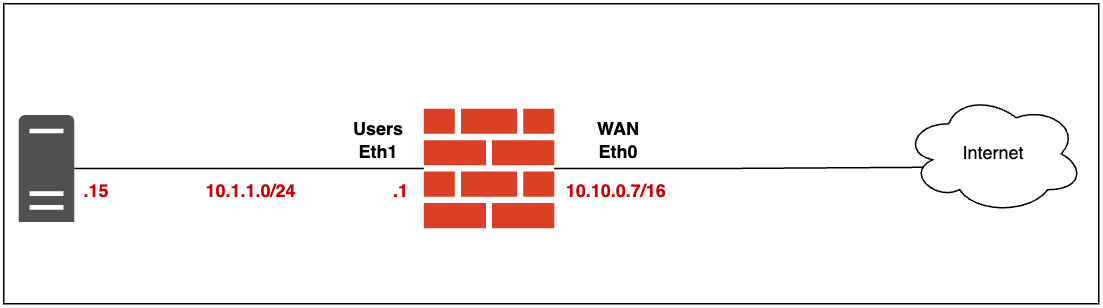
As you can see in the diagram, the VyOS router has two interfaces. The interface connected to the Users subnet (Eth1) has an IP address of 10.1.1.1/24. There's also a test machine in this subnet with the IP address 10.1.1.15. Our goal is to ensure that this test machine can successfully ping an Internet IP address and browse the general Internet.