Featured Interview: CA Technologies’ Tim Diep – Why Network Assurance is Vital to the Service Chain
 Network assurance saves you time, money and keeps you away from implementation sweats. Learn more with CA Technologies' Tim Diep.
Network assurance saves you time, money and keeps you away from implementation sweats. Learn more with CA Technologies' Tim Diep.
For best article visual quality, open Ping on You! – small weekend web/CGI project directly at NetworkGeekStuff.
After a few previous web programming endeavors (both here on networkgeekstuff.com with SDN programming and in real life job) I had a taste to develop “something” and since I am a network geek, I wondered what I have needed in the past as network tools that would ideally be placed on the internet. So I came to the very basic list of things like ping, nslookup or putty as tool accessible only via a browser.
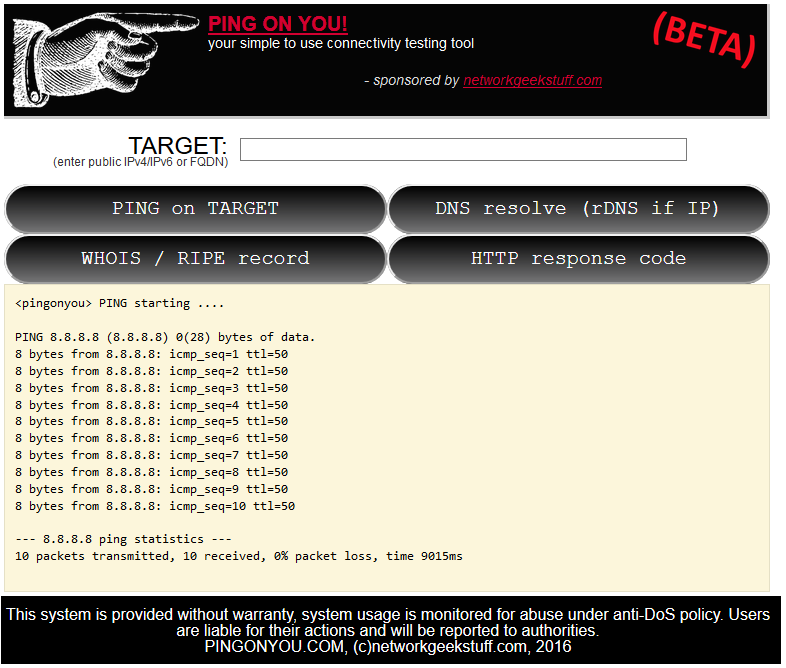
So without more delay, I give you first beta release of Ping on You! – pingonyou.com the list of current features is:
Here is a quick view how it looks when you try to ping google’s public DNS service on 8.8.8.8, since in the background a linux like ping tool is used, you have the same output:
Additionally, here are some features that I plan to do when I get more time, however no release date right now because there are much more complex than the above ones:
For best article visual quality, open [minipost] Windows partition editing with diskpart directly at NetworkGeekStuff.
This will really be a micro-post as I only want to document this for my benefit. This is a way how to change partition table for disks, or USB sticks. In my example, I had a linux live boot USB stick that I needed to quickly convert into a usable storage USB stick with NTFS under windows and of course the visual GUI tools under My Computer -> Manage -> Disk Management was not having full visibility on all partitions that the linux created on this USB stick, so this is how to actually do partitioning on windows.
So without more delay, this is an example how to clean the USB stick partition table and reformat it for windows use:
In summary, short, but hopefully useful minipost for someone.
In the future, will software define everything?
Evaluating container technologies and tools requires looking at appropriate metrics and asking the right questions.
Don’t leave your Cisco device exposed on the Internet. Take these steps for basic security.
In this post I’m going to share how to add some Git and Docker Machine “awareness” to your OS X Bash prompt. This isn’t anything new; these tricks are things that Bash users have been employing for years, especially on Linux. For most OS X users, though, I think these are tricks/tools that aren’t particularly well-known so I wanted to share them here.
I’ll divide this post into two sections:
Please note that I’ve only tested these on El Capitan (OS X 10.11), but it should work similarly for most recent versions of OS X.
Before I get started, allow me to explain what I mean by “awareness”:
eval $(docker-machine env <name>)) in your Bash prompt as well as tab completion for most Docker Machine commands and machines.Ready? Let’s get started!
To add some Continue reading

California Nurds
I know a place
Where the tech is truly awesome
Smart network folks; all clustered
inside CA’s borders
Cablin’ guys and gals
Running fibers to the servers.
We’re all hard core geeks, we are
certified nerf herders.
You may think you are sad,
But nothing comes close
To the silicon coast
Santa Clara’s just mad, you can’t
help your nerd lust
Oooooh Oh Oooooh
California nurds;
we are incredible!
Armed with Flukes,
we’re testing non stop.
Wi Fi smarts
so hot
we’ll melt your antenna
Oooooh Oh Oooooh
California nurds,
we like telemetry;
But we don’t
like SNMP.
West Coast time is lame
so we use UTC
Oooooh Oh Oooooh
We love unicorns, shooting
rainbows from their rear ends.
We’re Software Defined, running
everything in Python.
–John Herbert, with sincere apologies to Katy Perry
If you liked this post, please do click through to the source at California Nurds by Katy Sperry and give me a share/like. Thank you!


 There were big personnel changes at Cisco and Cumulus.
How does Internet work - We know what is networking
Ever needed one extra router? It’s possible to split the router into more logical routers by using VRF. How? Here’s how! Virtual Routing and Forwarding or VRF allows a router to run more that one routing table simultaneously. When running more routing tables in the same time, they are completely independent. For example, you could use same or overlapping IP addresses in both VRFs and it can be used without conflict. It is possible to use same VRF instance on more routers and connect every instance separately using VRF dedicated router port or only a sub-interface. You can find VRFs to be used