Advertising a Default Route Into EIGRP
Let’s get an IPv4 default route into EIGRP. There are a few methods to do it. I hate most of them, though. I think it will be obvious which one I like.
Here’s the lab I have set up to test everything. I want R4 to generate the default in each case.
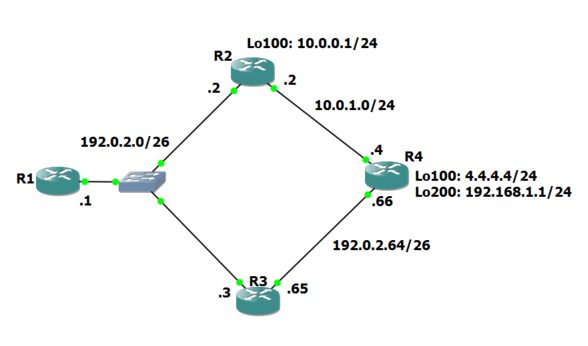
Default Network – Candidate default. I don’t think I’ve ever used that all my years in networking, but here’s how to use it in EIGRP for a default route. You basically say “If you don’t know where to send a packet, send it to where network X lives.” We’re going to set the 192.168.1.0/24 as the default network, so, in our case X = 192.168.1.0. R4 will tag that route as a default candidate when it advertises it to the rest of the network. The config is easy but requires a stateful (yes, stateful) network to beconfigured as the default.
R4 config:
R4(config)#ip default-network 192.168.1.0
!
R1 routes:
R1#sh ip route
...
     4.0.0.0/24 is subnetted, 1 subnets
D       4.4.4.0 [90/435200] via 192.0.2.3, 00:08:33, FastEthernet0/0
                [90/435200] via 192.0.2.2,  Continue reading


