Telecom APIs: A Key IT Tool to Scale Services and Improve Customer Experiences
Businesses are actively using Telecom APIs to support their distributed workforces, boost customer service and retention, and enable greater scalability of communication capabilities.Enable secure access to applications with Cloudflare WAF and Azure Active Directory


Cloudflare and Microsoft Azure Active Directory have partnered to provide an integration specifically for web applications using Azure Active Directory B2C. From today, customers using both services can follow the simple integration steps to protect B2C applications with Cloudflare’s Web Application Firewall (WAF) on any custom domain. Microsoft has detailed this integration as well.
Cloudflare Web Application Firewall
The Web Application Firewall (WAF) is a core component of the Cloudflare platform and is designed to keep any web application safe. It blocks more than 70 billion cyber threats per day. That is 810,000 threats blocked every second.
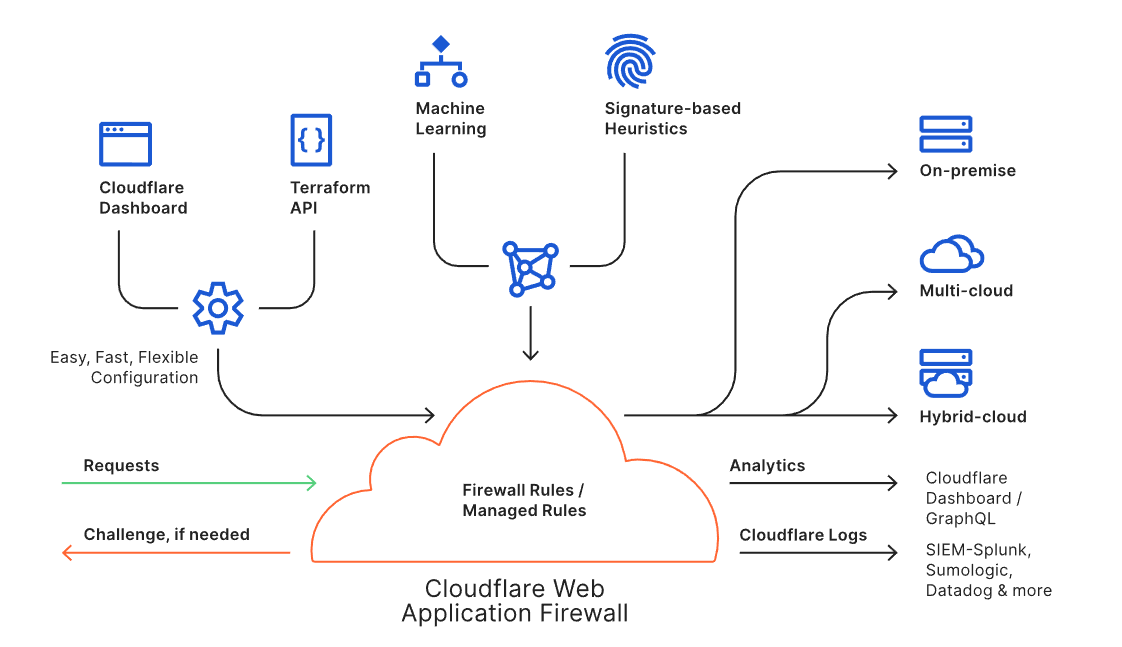
The WAF is available through an intuitive dashboard or a Terraform integration, and it enables users to build powerful rules. Every request to the WAF is inspected against the rule engine and the threat intelligence built from protecting approximately 25 million internet properties. Suspicious requests can be blocked, challenged or logged as per the needs of the user, while legitimate requests are routed to the destination regardless of where the application lives (i.e., on-premise or in the cloud). Analytics and Cloudflare Logs enable users to view actionable metrics.
The Cloudflare WAF is an intelligent, integrated, and scalable solution to protect business-critical Continue reading
DDoS mitigation using a Linux switch
Linux as a network operating system describes the benefits of using standard Linux as a network operating system for hardware switches. A key benefit is that the behavior of the physical network can be efficiently emulated using standard Linux virtual machines and/or containers.
In this article, CONTAINERlab will be used to create a simple testbed that can be used to develop a real-time DDoS mitigation controller. This solution is highly scaleable. Each hardware switch can monitor and filter terabits per second of traffic and a single controller instance can monitor and control hundreds of switches.
Create test network
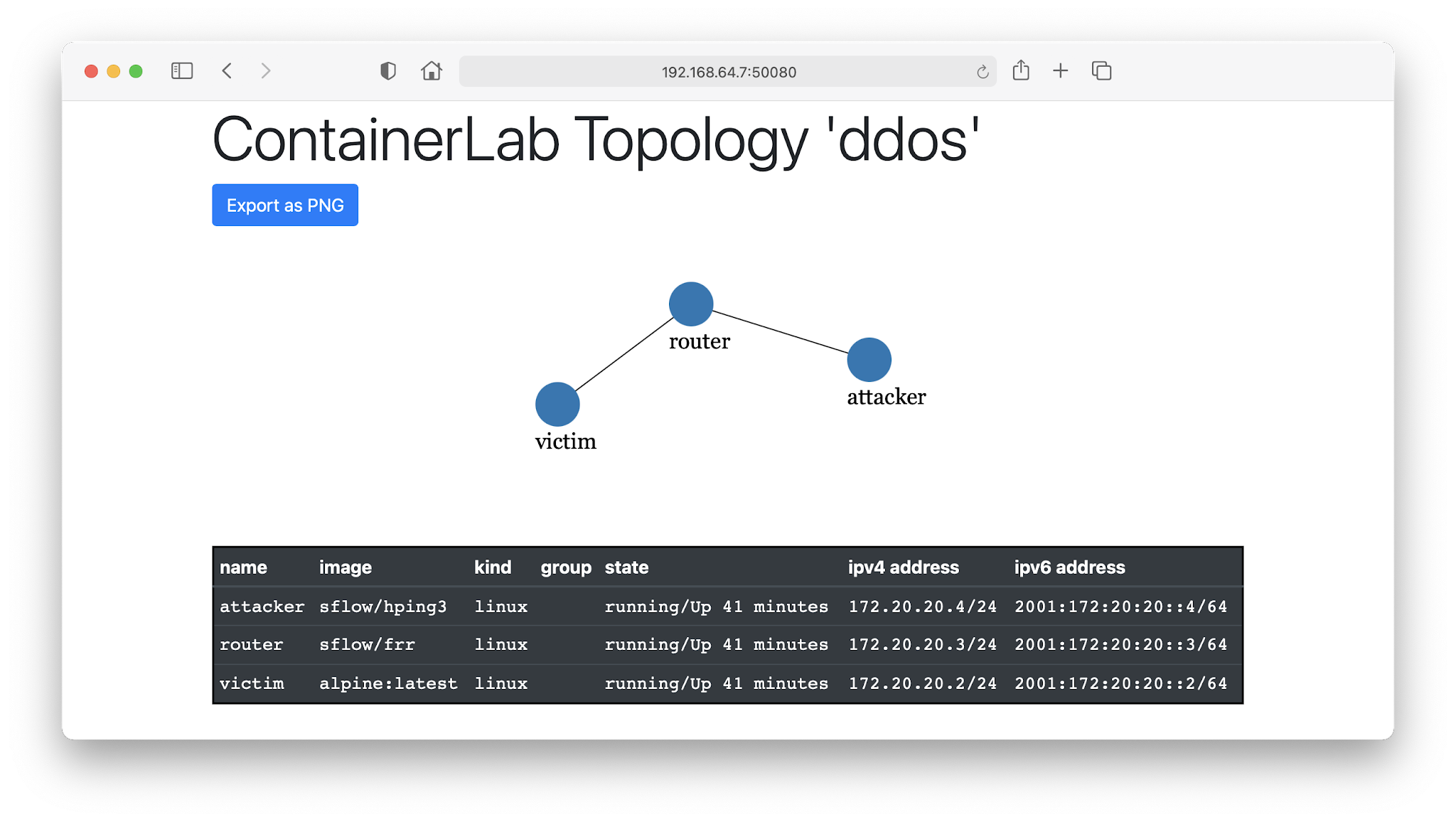
The following ddos.yml file specifies the testbed topology (shown in the screen shot at the top of this article):
name: ddos
topology:
  nodes:
    router:
      kind: linux
      image: sflow/frr
    attacker:
      kind: linux
      image: sflow/hping3
    victim:
      kind: linux
      image: alpine:latest
  links:
    - endpoints: ["router:swp1","attacker:eth1"]
    - endpoints: ["router:swp2","victim:eth1"]
Run the following command to run the emulation:
sudo containerlab deploy ddos.yml
Configure interfaces on router:
interface swp1
 ip address 192.168.1.1/24
!
interface swp2
 ip address 192.168.2.1/24
!
Configure attacker interface:
ip addr add 192.168.1.2/24 dev eth1
ip route add 192.168.2.0/24 via 192.168.1. Continue reading
Successful Strategies for Building and Growing IXPs

Insights from a comparative study launched today To bring faster, affordable, and resilient connectivity to people, local Internet stakeholders often turn to Internet exchange points (IXPs). They’re a critical digital infrastructure where networks come together to connect and exchange Internet traffic. IXPs help keep domestic Internet traffic local, reducing transit costs, lag time, and providing […]
The post Successful Strategies for Building and Growing IXPs appeared first on Internet Society.
OSPF Inter-Process Route Selection
The traditional wisdom claimed that a Cisco IOS router cannot compare routes between different OSPF routing processes. The only parameter to consider when comparing routes coming from different routing processes is the admin distance, and unless you change the default admin distance for one of the processes, the results will be random.
Following Vladislav’s comment to a decade-old blog post, I decided to do a quick test, and found out that code changes tend to invalidate traditional wisdom. OSPF inter-process route selection is no exception. That’s why it’s so stupid to rely on undefined behavior in your network design, memorize such trivia, test the memorization capabilities in certification labs, or read decades-old blog posts describing arcane behavior.
OSPF Inter-Process Route Selection
The traditional wisdom claimed that a Cisco IOS router cannot compare routes between different OSPF routing processes. The only parameter to consider when comparing routes coming from different routing processes is the admin distance, and unless you change the default admin distance for one of the processes, the results will be random.
Following Vladislav’s comment to a decade-old blog post, I decided to do a quick test, and found out that code changes tend to invalidate traditional wisdom. OSPF inter-process route selection is no exception. That’s why it’s so stupid to rely on undefined behavior in your network design, memorize such trivia, test the memorization capabilities in certification labs, or read decades-old blog posts describing arcane behavior.
The uselessness of bash
The way I write automation for personal projects nowadays seems to follow a common pattern:
- A command line, that’s getting a bit long
- A bash script
- Rewrite in Go
Occasionally I add a step between 2 and 3 where I write it in Python, but it’s generally not actually gaining me anything. Python’s concurrency primitives are pretty bad, and it’s pretty wasteful.
Maybe there’s an actually good scripting language somewhere.
I should remember that writing a bash script (step 2) seems to almost never be worth it. If it’s so complicated that it doesn’t fit on one line, then it’ll become complicated enough to not work with bash.
There are two main things that don’t work well. Maybe there are good solutions to these problems, but I’ve not found them.
1. Concurrency
There are no good primitives. Basically only xargs -P and &. It’s
annonying when you have an embarrassingly parallelizable problem where
you want to run exactly nproc in parallel.
Especially error handling becomes terrible here.
2. Error handling
You can handle errors in bash scripts in various ways:
||operator. E.g.gzip -9 < a > a.gz || (echo "handling error…")set -eat the top Continue reading
It’s Most Complicated than You Think
It’s not unusual in the life of a network engineer to go entire weeks, perhaps even months, without “getting anything done.” This might seem odd for those who do not work in and around the odd combination of layer 1, layer 3, layer 7, and layer 9 problems network engineers must span and understand, but it’s normal for those in the field. For instance, a simple request to support a new application might require the implementation of some feature, which in turn requires upgrading several thousand devices, leading to the discovery that some number of these devices simply do not support the new software version, requiring a purchase order and change management plan to be put in place to replace those devices, which results in … The chain of dominoes, once it begins, never seems to end.
Or, as those who have dealt with these problems many times might say, it is more complicated than you think. This is such a useful phrase, in fact, it has been codified as a standard rule of networking in RFC1925 (rule 8, to be precise).
Take, for instance, the problem of sending documents through electronic mail—in the real world, there are various Continue reading
Reducing Cloud Overspend By Increasing Network Visibility
With cloud adoption only increasing, enterprises will need to optimize their efficiencies, operations, and, most importantly, prevent wasteful overspending.Tech Bytes: Digital Experience Management For Distributed Workforces (Sponsored)
Today's Tech Bytes podcast dives into Digital Experience Management, or DEM. With distributed and remote work becoming more accepted, IT orgs are looking for better ways to monitor and manage user experience. We talk about DEM with sponsor Palo Alto Networks. Our guest is Anupam Uphadhyaya, Senior Director, Product Management at Palo Alto Networks.
The post Tech Bytes: Digital Experience Management For Distributed Workforces (Sponsored) appeared first on Packet Pushers.
Tech Bytes: Digital Experience Management For Distributed Workforces (Sponsored)
Today's Tech Bytes podcast dives into Digital Experience Management, or DEM. With distributed and remote work becoming more accepted, IT orgs are looking for better ways to monitor and manage user experience. We talk about DEM with sponsor Palo Alto Networks. Our guest is Anupam Uphadhyaya, Senior Director, Product Management at Palo Alto Networks.Announcing VMware HCX 4.1
VMware HCX is a crucial component of the modernization journey for many VMware customers as they transform their data centers into SDDCs, both on-premises and in the public cloud. HCX, an application mobility platform, simplifies application migration, workload rebalancing, and business continuity across data centers and clouds, and enables large-scale migration of workloads to modern environments.
With the HCX 4.0 release, we rolled out some major updates. Now, the journey continues steadily forward with the release of HCX 4.1. Let’s dive in and see what’s new.
What’s New
Migrations Estimations: Predictive Estimations for Bulk Migrations
One key capability that was launched in HCX 4.0 was Migration Estimation — which provides real-time predictions for bulk migrations. With the HCX 4.1 release, customers will see a more accurate predictive estimate for bulk migrations in draft stage before wave execution.

Seed Checkpoint for Bulk Migration
In the past, failed replication-based migrations, like bulk migrations with HCX, automatically executed a cleanup process, which would lead to a total loss of replicated data. To the customer, this entailed losing all migration progress, while for larger VM profiles this meant the loss of many days of replication progress.
The seed checkpoint Continue reading
Network Break 337: Hey, You Dropped Some Bitcoin; Fastly Recovers From Outage…Fastly
On this week's Network Break deployment of virtual donuts and tech commentary, Fastly takes out much of the Web but recovers quickly, AWS suffers an outage at a German data center, US law enforcement reclaims a large chunk of Bitcoin ransom, Bosch unveils a new fab to make silicon wafers for automotive chips, and more.
The post Network Break 337: Hey, You Dropped Some Bitcoin; Fastly Recovers From Outage…Fastly appeared first on Packet Pushers.
Network Break 337: Hey, You Dropped Some Bitcoin; Fastly Recovers From Outage…Fastly
On this week's Network Break deployment of virtual donuts and tech commentary, Fastly takes out much of the Web but recovers quickly, AWS suffers an outage at a German data center, US law enforcement reclaims a large chunk of Bitcoin ransom, Bosch unveils a new fab to make silicon wafers for automotive chips, and more.The Week in Internet News: Twitter Deletes Tweet, Nigeria Bans the Whole Platform

No more tweets: After Twitter removed a tweet by Nigerian President Muhammadu Buhari, the federal government there banned the platform, at least temporarily, because of “the persistent use of the platform for activities that are capable of undermining Nigeria’s corporate existence,” DW.com reports. Some Nigerians are tweeting anyway, but they risk arrest for doing so, […]
The post The Week in Internet News: Twitter Deletes Tweet, Nigeria Bans the Whole Platform appeared first on Internet Society.