Hedge 253: Touch Grass!
In this episode of the Hedge, Eyvonne, Tom, and Russ talk about whether Intel will survive, centralization and industrial spying, and why you need to go touch grass and read a book.
In this episode of the Hedge, Eyvonne, Tom, and Russ talk about whether Intel will survive, centralization and industrial spying, and why you need to go touch grass and read a book.
As much as I love explaining how to use BGP in an optimal way, sometimes we have to do what we know is bad to get the job done. For example, if you have to deal with clueless ISPs who cannot figure out how to use BGP communities, you might be forced to use the Big Hammer of disaggregated prefixes. You can practice how that works in the next BGP lab exercise.
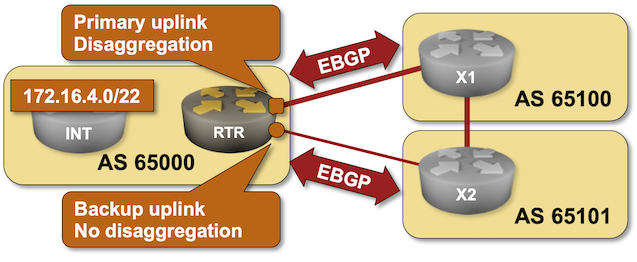
Click here to start the lab in your browser using GitHub Codespaces (or set up your own lab infrastructure). After starting the lab environment, change the directory to policy/b-disaggregate and execute netlab up.
Chip maker and enterprise software player Broadcom announced its financial results for the final quarter of its fiscal 2024 today, which ended on November third, and all we kept thinking about as chief executive officer Hock Tan went over the numbers was the question in the title above. …
How Long Before Broadcom Makes More AI Compute Engines Than Nvidia? was written by Timothy Prickett Morgan at The Next Platform.
The AI era has a much different vibe than prior eras in the IT industry. …
GenAI Races Ahead, But Enterprises Are Still At The Starting Line was written by Jeffrey Burt at The Next Platform.
COMMISSIONED Imagine this: a patient is rushed into the emergency room, disoriented, unable to speak – signs point to a stroke. …
From Big Data To Better Healthcare: How Storage Drives AI In Medicine was written by Timothy Prickett Morgan at The Next Platform.
My Internet Routing Security talk from last year’s DEEP conference (a shorter version of the Internet Routing Security webinar) is now available on YouTube.
Hope you’ll find it useful ;)
Everybody wants to get rich in AI these days, and if you can’t do it by investing in the compute engine makers or the hyperscalers and cloud builders, then the next best thing to put your money into is probably some form of optical I/O. …
Nvidia, AMD, And Intel Help Stuff The Coffers At Ayar Labs was written by Timothy Prickett Morgan at The Next Platform.

If you're in the Network Automation space or attended one of the last two Autocon events, you might have come across a new tool called 'Infrahub' from OpsMill. I've been keeping an eye on it and experimenting with the product for some time now. In this blog post, we'll cover how to install Infrahub, what it is, and walk through a simple example to get you started. Let's dive in.
Installing Infrahub is straightforward if you're familiar with Docker and have it installed. For this example, I'm using an Ubuntu 22.04 server with Docker and Docker Compose already set up. Here's all I had to do.
suresh@infrahub:~$ git clone https://github.com/opsmill/infrahub.git
Cloning into 'infrahub'...
remote: Enumerating objects: 95389, done.
remote: Counting objects: 100% (5707/5707), done.
remote: Compressing objects: 100% (2801/2801), done.
remote: Total 95389 (delta 3698), reused 4482 (delta 2877), pack-reused 89682
Receiving objects: 100% (95389/95389), 136.18 MiB | 40.26 MiB/s, done.
Resolving deltas: 100% (69451/69451), done.
suresh@infrahub:~$ cd infrahub/
suresh@infrahub:~/infrahub$ docker-compose up -d[+] Running 70/7
✔ message-queue 10 layers [⣿⣿⣿⣿⣿⣿⣿⣿⣿⣿] 0B/0B Pulled
✔ task-manager 13 layers Continue readingSupercomputer interconnects have not been this exciting in a long time, but the confluence of forces have come together to put high speed, low latency networks at the forefront of systems architecture. …
Eviden Mainstreams BXI Interconnect Thanks To Ultra Ethernet And AI Boom was written by Timothy Prickett Morgan at The Next Platform.
Cloudflare’s AI Audit dashboard allows you to easily understand how AI companies and services access your content. AI Audit gives a summary of request counts broken out by bot, detailed path summaries for more granular insights, and the ability to filter by categories like AI Search or AI Crawler.
Today, we're going one step further. You can now quickly see which AI services are honoring your robots.txt policies, which aren’t, and then programmatically enforce these policies.
Robots.txt is a plain text file hosted on your domain that implements the Robots Exclusion Protocol, a standard that has been around since 1994. This file tells crawlers like Google, Bing, and many others which parts of your site, if any, they are allowed to access.
There are many reasons why site owners would want to define which portions of their websites crawlers are allowed to access: they might not want certain content available on search engines or social networks, they might trust one platform more than another, or they might simply want to reduce automated traffic to their servers.
With the advent of generative AI, AI services have started crawling the Internet to Continue reading