CrowdStrike-Ukraine Explained
Trump's conversation with the President of Ukraine mentions "CrowdStrike". I thought I'd explain this.What was said?
This is the text from the conversation covered in this
“I would like you to find out what happened with this whole situation with Ukraine, they say Crowdstrike... I guess you have one of your wealthy people... The server, they say Ukraine has it.”Personally, I occasionally interrupt myself while speaking, so I'm not sure I'd criticize Trump here for his incoherence. But at the same time, we aren't quite sure what was meant. It's only meaningful in the greater context. Trump has talked before about CrowdStrike's investigation being wrong, a rich Ukrainian owning CrowdStrike, and a "server". He's talked a lot about these topics before.
Who is CrowdStrike?
They are a cybersecurity firm that, among other things, investigates hacker attacks. If you've been hacked by a nation state, then CrowdStrike is the sort of firm you'd hire to come and investigate what happened, and help prevent it from happening again.
Why is CrowdStrike mentioned?
Because they were the lead investigators in the DNC hack who came to the conclusion that Russia was responsible. The pro-Trump crowd believes this conclusion is Continue reading
CMC Networks Bolsters SD-WAN with Enea NFV Access
Enea's NFV Access platform will power CMC Network's Rapid Adaptive Network SD-WAN in Africa and the...
Ericsson Bribery Scandal Cuts Deep, Surpassing $1B Penalty
Ericsson expects to pay $1.23 billion to cover a potential settlement and related costs to resolve...
Cisco Warns of ‘Continued Attempts’ to Exploit Critical Bug
Cisco disclosed more than two dozen vulnerabilities in its network automation software and one...
Designing Your First Application in Kubernetes, Part 4: Configuration
I reviewed the basic setup for building applications in Kubernetes in part 1 of this blog series, and discussed processes as pods and controllers in part 2. In part 3, I explained how to configure networking services in Kubernetes to allow pods to communicate reliably with each other. In this installment, I’ll explain how to identify and manage the environment-specific configurations expected by your application to ensure its portability between environments.

Factoring out Configuration
One of the core design principles of any containerized app must be portability. We absolutely do not want to reengineer our containers or even the controllers that manage them for every environment. One very common reason why an application may work in one place but not another is problems with the environment-specific configuration expected by that app.
A well-designed application should treat configuration like an independent object, separate from the containers themselves, that’s provisioned to them at runtime. That way, when you move your app from one environment to another, you don’t need to rewrite any of your containers or controllers; you simply provide a configuration object appropriate to this new environment, leaving everything else untouched.
When we design applications, we need to identify what Continue reading
Deep Dive: How Do Banks Score on Privacy and Security?

In April 2019 the Internet Society’s Online Trust Alliance published its 10th annual Online Trust Audit & Honor Roll assessing the security and privacy of 1,200 top organizations. The Banking sector includes the top 100 banks in the U.S., based on assets according to the Federal Deposit Insurance Corporation (FDIC). Banks had a standout year, with a dramatic increase in scores across the board. Let’s take a closer look.
Overall, 73% of banks made the Honor Roll, putting the banking sector 4th behind the News and Media (78%), Consumer Services (85%), and the U.S. Federal Government (91%) sectors. In the previous Audit, only 27% made the grade. This large jump is due to improvements in all three scoring categories: email authentication, site security, and privacy.
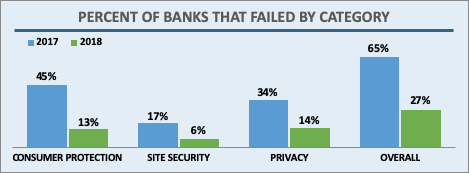
Banks, like most sectors, came close to 100% adoption in the two main email security technologies studied in the Audit: SPF (93%) and DKIM (87%). In addition, banks saw a marked improvement in how many sites implemented both both technologies at 87% in 2018, up from 60% in 2017. This puts banks among the most improved sectors in this area.
DMARC builds on SPF and DKIM results, provides a means for Continue reading
HTTP/3: the past, the present, and the future

During last year’s Birthday Week we announced preliminary support for QUIC and HTTP/3 (or “HTTP over QUIC” as it was known back then), the new standard for the web, enabling faster, more reliable, and more secure connections to web endpoints like websites and APIs. We also let our customers join a waiting list to try QUIC and HTTP/3 as soon as they became available.

Since then, we’ve been working with industry peers through the Internet Engineering Task Force, including Google Chrome and Mozilla Firefox, to iterate on the HTTP/3 and QUIC standards documents. In parallel with the standards maturing, we’ve also worked on improving support on our network.
We are now happy to announce that QUIC and HTTP/3 support is available on the Cloudflare edge network. We’re excited to be joined in this announcement by Google Chrome and Mozilla Firefox, two of the leading browser vendors and partners in our effort to make the web faster and more reliable for all.
In the words of Ryan Hamilton, Staff Software Engineer at Google, “HTTP/3 should make the web better for everyone. The Chrome and Cloudflare teams have worked together closely to bring HTTP/3 and QUIC from nascent standards to widely Continue reading
Volta Networks Virtualizes Routing on Edgecore White Boxes
Volta Networks aims to squeeze legacy vendors’ service provider business by bringing its virtual...
Exploring Cluster API v1alpha2 Manifests
The Kubernetes community recently released v1alpha2 of Cluster API (a monumental effort, congrats to everyone involved!), and with it comes a number of fairly significant changes. Aside from the new Quick Start, there isn’t (yet) a great deal of documentation on Cluster API (hereafter just called CAPI) v1alpha2, so in this post I’d like to explore the structure of the CAPI v1alpha2 YAML manifests, along with links back to the files that define the fields for the manifests. I’ll focus on the CAPI provider for AWS (affectionately known as CAPA).
As a general note, any links back to the source code on GitHub will reference the v0.2.1 release for CAPI and the v0.4.0 release for CAPA, which are the first v1apha2 releases for these projects.
Let’s start with looking at a YAML manifest to define a Cluster in CAPA (this is taken directly from the Quick Start):
apiVersion: cluster.x-k8s.io/v1alpha2
kind: Cluster
metadata:
  name: capi-quickstart
spec:
  clusterNetwork:
    pods:
      cidrBlocks: ["192.168.0.0/16"]
  infrastructureRef:
    apiVersion: infrastructure.cluster.x-k8s.io/v1alpha2
    kind: AWSCluster
    name: capi-quickstart
---
apiVersion: infrastructure.cluster.x-k8s.io/v1alpha2
kind: AWSCluster
metadata:
  name: capi-quickstart
spec:
  region: us-east-1
  sshKeyName: default
Right off the bat, Continue reading