How to Transition to DevOps in Less Than 30 Days
It doesn't take long to lay the foundation for an agile enterprise. Get the initiative going and sort out the bumps along the way.
On Thinking About Infrastructure as Code
I just finished reading Cindy Sridharan’s excellent post titled “Effective Mental Models for Code and Systems,” and some of the points Sridharan makes immediately jumped out to me—not for “traditional” code development, but for the development of infrastructure as code. Take a few minutes to go read the post—seriously, it’s really good. Done reading it? Good, now we can proceed.
Some of these thoughts I was going to share in a planned presentation at Interop ITX in May 2019, but since I’m unable to speak at the conference this year due to schedule conflicts (my son’s graduation from college and a major anniversary trip for me and Crystal), I figured now was as good a time as any, especially given the timing of Sridharan’s post. Also, a lot of these thoughts stem from a discussion with a colleague at work, which in turn led to this Full Stack Journey podcast on practical infrastructure as code.
Anyway, let me get back to Sridharan’s post. One of the things that jumped out to me right away was Sridharan’s proposed hierarchy of needs for code:

As you can see in the image (full credit for which belongs to Sridharan, as far Continue reading
7 Enterprise Infrastructure Predictions for 2019
It is no secret that enterprise infrastructures are undergoing major changes. Growing use of public cloud, SaaS, and SD-WAN in 2019 will play a significant role in the way infrastructures evolve.
The Linux Migration: December 2018 Progress Report
In December 2016, I kicked off a migration from macOS to Linux as my primary laptop OS. Throughout 2017, I chronicled my progress and challenges along the way; links to all those posts are found here. Although I stopped the migration in August 2017, I restarted it in April 2018 when I left VMware to join Heptio. In this post, I’d like to recap where things stand as of December 2018, after 8 months of full-time use of Linux as my primary laptop OS.
I’ll structure this post roughly as a blend of the formats I used in my April 2017 and July 2017 progress reports.
Hardware
Readers may recall that I was using a Dell Latitude E7370 (see my E7370 hardware review) up until August 2017, when I put the Linux migration on hold indefinitely due to productivity concerns. Upon moving to Heptio, I switched to a Lenovo ThinkPad X1 Carbon (see here for my review of the X1 Carbon—the “TL;DR” is that I love it). In my home office, the X1 Carbon connects to a USB-C expansion hub that provides connectivity to a 34” 21:9 ultrawide curved monitor, external HD webcam, and a USB headset for Zoom Continue reading
Another Step Closer to Our Mission

The Internet now reaches more than half the world.
A recent estimate indicates that nearly 4 billion people – more than half the world’s population – now use the Internet. More people are now online than existed in the world the year I was born. Everyone, it seems, values the Internet. We all still know the Internet is for everyone.
The Internet Society, including all our chapters and members, was part of Internet growth in this period. 2018 was a year of many changes at the Internet Society. We changed the staff and ways of organizing work to make things clearer. We changed our CEO. But at the same time, we brought infrastructure to some of the most remote parts of the world. We pushed for better security for many of the new devices that are connecting to the Internet. And we worked to include the whole range of voices when it comes to who’s making decisions about the Internet’s future.
These are just a few of the things we, the whole Internet Society, did together. We work together because that’s what internetworking is: working together, each of us making a greater whole of our individual parts.
So, as Continue reading
Vendor Lock-in – Is It Really That Bad?!
In today’s IT infrastructure, open source software is a common component. Many organizations and network engineers stay away from certain architectures and products citing vendor lock-in as their only argument but often lack the understanding to why they think vendor lock-in is a problem. Let me explain.
There are lock-ins of different forms. For example if you are buying MPLS VPN service from a SP, you are somewhat locked in to their offering and pricing. I see at least three types of different lock-in:
Vendor lock-in – This is the one that everyone is familiar in. It means that the vendor has a solution that is proprietary, perhaps using proprietary management or routing protocols so that it can’t interact with solutions from other vendors.
Tools lock-in – This may or may not be as much of a lock-in as vendor lock-in, but when an organization has invested enough time, money and manpower into a specific toolset, it’s difficult to move to other tooling.
People lock-in – An often oversighted form of lock-in. Depending on architecture, toolset and so on, your organization may need a certain type of engineers to work on the network. These may be difficult to find which Continue reading
How to hide (obfuscate) any traffic using obfs4
Overview
In this post, I’m going to give you the information necessary to be able to use obfs4 protocol not just for wrapping Tor traffic, but for virtually any other TCP traffic as well.
Doing so for the previous Pluggable Transports of this kind (namely obfs2,obfs3 and ScrambleSuit) was rather simple. obfsproxy program written python, already supports being run in standalone (or so called unmanaged) mode and there are dozens of guides available on how to do so.
However, obfs4proxy which implements obfs4 protocol in Go, is primarily designed to work in conjunction with Tor (managed mode). This is not a protocol limitation but rather an implementation one.
If you ever try running obfs4proxy by itself, you’d get an error like this:
[ERROR]: obfs4proxy – must be run as a managed transport
But Hey! It is not the end of the world. There are still couple of ways to make use of obfs4 outside of Tor:
Adding unmanaged mode of operation to obfs4proxy
This is probably the best way, but I’m not a Go programmer so I’ll leave that to those who are.Using external wrappers
PTProxy and ptadapter in Python, along with Shapeshifter in Continue reading
Networking with Fish Update: Site Refresh
Four 1/2 years ago Networking with Fish as a web site was born. To say I knew nothing about having a web site would be a massive understatement. All I knew was I needed to “give back“. I needed to... Read More ›
The post Networking with Fish Update: Site Refresh appeared first on Networking with FISH.
IPv6 in China
China has an estimated Internet user population of 741 million, out of a total population of 1.4 billion people. If there was extensive deployment of IPv6 services in China, then the case that IPv6 has already achieved critical mass of deployment would be easy to make. On the other hand, if such a significant user population had no IPv6 service and no visible plans for IPv6 services, then the entire conversation about the times and certainties about the future of IPv6 takes on a different direction. Which means that China matters in the world of IPv6. It matters a lot.My Ignorance for a Year and Dell IDRAC
Hi,
I have a Dell R810 and it makes a lot of noise. So, I have put it somewhere remote in the home where it’s completely inhabitable for human beings. Now, the problem was always to go there and manually power-up the system. This has been the scenario for years. So, technically if am away from my home I need to take help from my wife. All this is going well and I was always wondered should it not have a better way to do things.
Was talking to my friend and he had some paid solution for the same thing, he doesn’t even remember and that’s for his cisco gear, now for Cisco gear as long you supply power they will be powered (if the Power button is always on), for servers however just like our Personal CPU’s and Laptops you have to manually press the power button.
Then yesterday all of a sudden I took this somewhat seriously and explored options, then I understood it was sitting right inside the server, Dell has something called Integrated DRAC system which helps you do this thing, all you need to have is a proper Lan connection, the message was Continue reading
Weekly Show 422: Hardware Supply Chains And Trusted Execution
Today's show dives into issues around IT supply chain security and mechanisms such as trusted execution. We examine how they work and how they're implemented, and look at similar measures in routing and switching.
The post Weekly Show 422: Hardware Supply Chains And Trusted Execution appeared first on Packet Pushers.
Serverless and Knative Underline Cloud Native Evolution
 Knative is seen as an important catalyst for unifying the dozens of serverless platforms in the market.
Testing notes: simulating link failure by filtering BFD packets
In some testing I am doing, I need to prove that BFD can be used with iBGP to tell the BGP protocol when there is an interruption. This will enable BGP to be brought down much faster than if regular BGP timers are used.
To make this easier to do, I used a firewall filter on one of the two routers to filter out BFD but accept all other packets:
Single-hop BFD (i.e. across a link) uses UDP 3784, while multi-hop BFD uses 4784. Since my BFD sessions are configured between loopbacks, it is this latter type I need to filter.

In the example below, CORE1 is a BGP client of CORE2, which is the route-reflector.
The following was configured on the routers to bring up the BFD session (I am only showing one side – you can figure out the mirror of this yourself I think):
[edit protocols bgp group CORE neighbor 10.0.0.6]
      bfd-liveness-detection {
          minimum-receive-interval 300;
          multiplier 3;
          transmit-interval {
              minimum-interval 100;
          }
      }
When the remote side was done, the session came up:
axians@CORE1> show bfd session
Dec 28 17:17:10
                               Detect Transmit
Address       State Interface  Time   Interval  Multiplier
10.0. Continue reading
Networking Vendors Jump On 400GbE in 2018
 The 400GbE standard is four times as fast as 100 gig Ethernet, and it offers an economically attractive price-per-port and better power efficiency.
Top 5 Blog Post 2018: Simplifying Kubernetes with Docker Compose and Friends
All this week we’ve been bringing you the top 5 blog posts for 2018 –coming in at #1 is our post on open sourcing our Docker Compose on Kubernetes capability. This new capability enables you to simplify the Kubernetes experience. To learn more, continue reading…
Today we’re happy to announce we’re open sourcing our support for using Docker Compose on Kubernetes. We’ve had this capability in Docker Enterprise for a little while but as of today you will be able to use this on any Kubernetes cluster you choose.

Why do I need Compose if I already have Kubernetes?
The Kubernetes API is really quite large. There are more than 50 first-class objects in the latest release, from Pods and Deployments to ValidatingWebhookConfiguration and ResourceQuota. This can lead to a verbosity in configuration, which then needs to be managed by you, the developer. Let’s look at a concrete example of that.
The Sock Shop is the canonical example of a microservices application. It consists of multiple services using different technologies and backends, all packaged up as Docker images. It also provides example configurations using different tools, including both Compose and raw Kubernetes configuration. Let’s have a look Continue reading
LibreRouter: A Multi-Radio Wireless Router for Community Networks
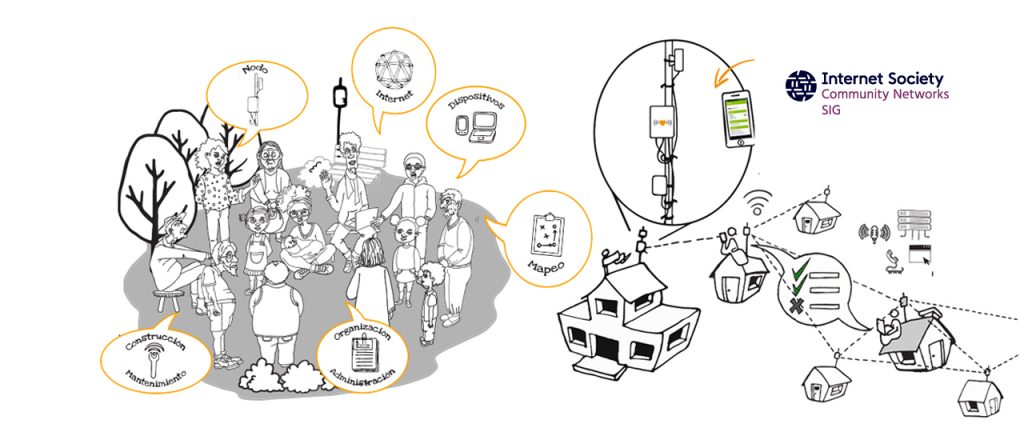
Since their inception, community networks have depended on modifying existing off-the-shelf routers to adapt them to their particular needs. Software development originated in community-network groups and the free software movement as a whole have pushed the barrier of innovation and helped commercial enterprises develop new products over the years.
The LibreRouter, created by the collaboration of the Internet Society Community Networks Special Interest Group (CNSIG) and AlterMundi with the support of Beyond the Net Funding Programme, is an open-source hardware WiFi router designed for the specific needs of community networks.
The LibreRouter Project works to achieve autonomy and technological sovereignty that allows deploying, managing, scaling, and sustaining community networks. The reality is that community networks are not a profitable market segment for the industry. This means that the equipment used is not adequate to solve the particular needs they have. To manufacture the equipment you have to be encouraged to understand it and do it in a different and integral way.
Besides the hardware development, the most important part of this project is the integral work that involves software solutions and documentation material. It’s an important work focused on the communities themselves having the capabilities to deploy their Continue reading
SD-WAN – Glorified DMVPN?
I had an interesting discussion with Jon Cooper in the Network Collective Slack. The discussion was around SD-WAN. We were discussing if SD-WAN is just a “glorified DMVPN” or if it’s something more than that. Note that this was a bit tongue in cheek comment from Jon but it’s interesting for the sake of discussion.
To compare the two, let’s look at some of the design and operational challenges of running a DMVPN.
Physical design – How many Hub routers do you need? In a DMVPN, the Hub router is a special type of device that is responsible for mapping the underlay IP address to the overlay IP address. If a Hub needs to be added, this Next Hop Server (NHS) needs to be added to the spokes. With Cisco SD-WAN, this is handled by the vBond which is a virtual machine running in a public cloud. Adding a device is simple as the WAN edge routers use a hostname (DNS) to ask for the IP of the vBond. This means that the physical design is less rigid.
Logical design – In a DMVPN, you need to decide on the number of DMVPN clouds. Do you do a single cloud Continue reading
Who Went Where: The Top Personnel Changes of 2018
 From Hans Vestberg’s quick rise at Verizon to Google Cloud’s leadership shakeup, this year was full of personnel changes that turned heads.