AMD Builds Out Its AI Software And Services Stack With Silo AI Buy
You can build a software ecosystem if you have time. But sometimes, you want to speed things up, and then you have to pay to build that ecosystem out. …
AMD Builds Out Its AI Software And Services Stack With Silo AI Buy was written by Timothy Prickett Morgan at The Next Platform.
Cloudflare Zaraz adds support for server-side rendering of X and Instagram embeds
We are thrilled to announce Cloudflare Zaraz support of server-side rendering of embeds, featuring two Managed Components: X and Instagram. You can now use Cloudflare Zaraz to effortlessly embed posts from X or Instagram on your website in a performant, privacy-preserving, and secure way. Many traditional tag managers or customer data platforms rely heavily on third-party JavaScript and cookies to embed content, leading to concerns about privacy and performance. In contrast, we designed our solution to work without loading any third-party JavaScript or cookies, and furthermore to completely eliminate communication between the browser and third-party servers.
Starting today, you can use Cloudflare Zaraz not only for server-side data reporting to conventional marketing and analytics tools but also for server-side content rendering on your website. We are excited to pave the way with tools that enhance security, protect user privacy, and improve performance. Take a look at it:
Embed social media content without sacrificing security and speed
Since social media platforms emerged, we have become more and more familiar with seeing posts being embedded on websites, from showcasing user testimonials on product pages to featuring posts from reporters and politicians in news articles or blogs. Traditionally, this process has involved integrating Continue reading
Worth Reading: Terminal Line Editing
In another wonderful deep dive, Julia Evans explains why you can’t edit the command line in some Linux utilities like the ancient sh.
You’ll also figure out:
- Why does CTRL-A jump to the beginning of the line?
- How can you enable command line editing in ancient utilities?
Have fun!
AWS Charges A Hefty Premium For Graviton 4 Instances
The decades of Moore’s Law improvements in server CPU performance and economics have trained us all to think that no matter what, we will always see a lower cost per unit of performance with each successive generation of processors. …
AWS Charges A Hefty Premium For Graviton 4 Instances was written by Timothy Prickett Morgan at The Next Platform.
PP022: Inside an Equipment Test Lab
Third-party test labs can help buyers make decisions about which products to purchase. While a testing lab can’t mimic the conditions of your specific production environment, it can assess a product’s fundamental capabilities and measure throughput, performance, and–in the case of security devices–effectiveness against a test suite of malware or attack techniques. On today’s episode... Read more »HW031: Wi-Fi Surveys – Past, Present & Future
The evolution of wireless surveys is the topic of today’s Heavy Wireless podcast with guest Jussi Kivineimi of Hamina. We cover the transition from traditional on-site assessments to predictive tools, with an emphasis on the importance of a hybrid approach for accurate network design. We also tackle the role of APIs in network design, the... Read more »DDoS threat report for 2024 Q2

Welcome to the 18th edition of the Cloudflare DDoS Threat Report. Released quarterly, these reports provide an in-depth analysis of the DDoS threat landscape as observed across the Cloudflare network. This edition focuses on the second quarter of 2024.
With a 280 terabit per second network located across over 230 cities worldwide, serving 19% of all websites, Cloudflare holds a unique vantage point that enables us to provide valuable insights and trends to the broader Internet community.
Key insights for 2024 Q2
- Cloudflare recorded a 20% year-over-year increase in DDoS attacks.
- 1 out of every 25 survey respondents said that DDoS attacks against them were carried out by state-level or state-sponsored threat actors.
- Threat actor capabilities reached an all-time high as our automated defenses generated 10 times more fingerprints to counter and mitigate the ultrasophisticated DDoS attacks.
View the interactive version of this report on Cloudflare Radar.
Quick recap - what is a DDoS attack?
Before diving in deeper, let's recap what a DDoS attack is. Short for Distributed Denial of Service, a DDoS attack is a type of cyber attack designed to take down or disrupt Internet services, such as websites or mobile apps, making them unavailable Continue reading
RADIUS/UDP vulnerable to improved MD5 collision attack
The MD5 cryptographic hash function was first broken in 2004, when researchers demonstrated the first MD5 collision, namely two different messages X1 and X2 where MD5(X1) = MD5 (X2). Over the years, attacks on MD5 have only continued to improve, getting faster and more effective against real protocols. But despite continuous advancements in cryptography, MD5 has lurked in network protocols for years, and is still playing a critical role in some protocols even today.
One such protocol is RADIUS (Remote Authentication Dial-In User Service). RADIUS was first designed in 1991 – during the era of dial-up Internet – but it remains an important authentication protocol used for remote access to routers, switches, and other networking gear by users and administrators. In addition to being used in networking environments, RADIUS is sometimes also used in industrial control systems. RADIUS traffic is still commonly transported over UDP in the clear, protected only by outdated cryptographic constructions based on MD5.
In this post, we present an improved attack against MD5 and use it to exploit all authentication modes of RADIUS/UDP apart from those that use EAP (Extensible Authentication Protocol). The attack allows a Monster-in-the-Middle (MitM) with access to RADIUS traffic Continue reading
802.1Q-Tagged Frames Through Unmanaged Switch – Forwarded or Dropped?
As a follow-up to the post yesterday on native VLANs, there was a question on what would happen to 802.1Q-tagged frames traversing an unmanaged switch. Unmanaged in this case being a switch that does not support VLANs. While this might be more of a theoretical question today, it’s still interesting to dive into it to better understand how a 802.1Q-tagged frame is different from an untagged frame.
Before we can answer the question on what a VLAN-unaware switch should do, let’s refresh our memory on the Ethernet header. The Ethernet frame consists of Destination MAC, Source MAC, Ethertype, and FCS. 802.1Q adds an additional four bytes consisting of Tag Protocol Identifier (TPID) and Tag Control Information (TCI). This is shown below:
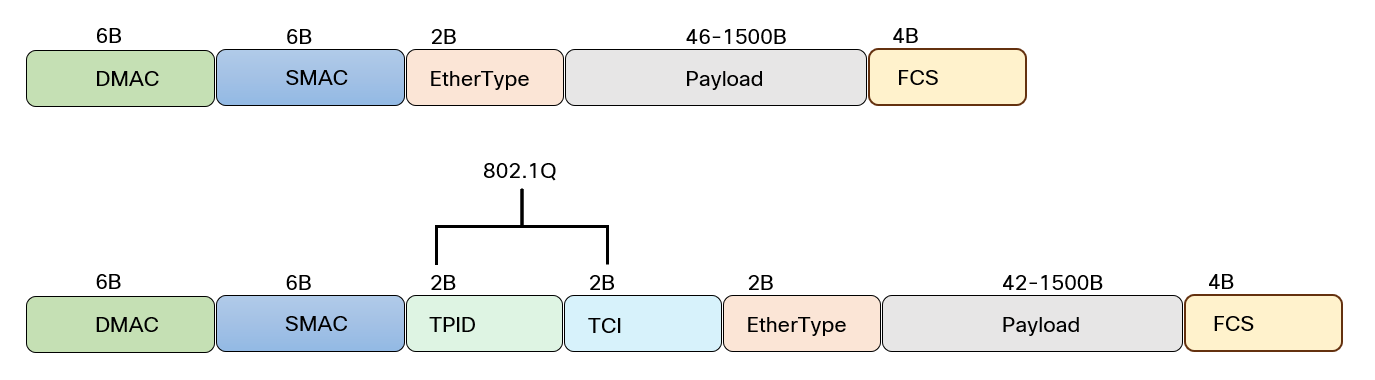
Note how the TPID in the tagged frame is in the place of EtherType for untagged frames. It’s also a 2-byte field and the TPID is set to 0x8100 for tagged frames. The EtherType field is still there and would be for example 0x0800 for IPv4 payload.
To demonstrate what this looks like on the wire, I’ve setup two routers with the following configuration:
hostname R1
!
vrf definition ETHERNET
 !
 address-family ipv4
 exit-address-family
!
interface GigabitEthernet1.100
 encapsulation  Continue reading
Embracing Modern Virtualization with Calico’s Microsegmentation
In the rapidly evolving landscape of IT infrastructure, enterprises are increasingly moving away from traditional virtualization platforms due to rising licensing costs and the limitations these older systems impose on modern cloud-native application needs. The shift towards Kubernetes, which can manage diverse workloads such as containers, virtual machines (VMs), and bare metal environments, accelerates the migration from traditional virtualization platforms.
The Limitations of Traditional Network Segmentation
Traditionally, enterprises have segmented their virtualized environments using VLANs and logical switches to create distinct virtual networks and security zones. This segmentation was primarily static VM environments. However, this traditional approach to network segmentation is ill-equipped to handle the dynamic nature of Kubernetes environments, where workloads are frequently created and destroyed, leading to rapidly changing network configurations and policies.
Calico’s Solution: Dynamic and Unified Microsegmentation
Calico is designed to address the shortcomings of traditional network segmentation in the age of Kubernetes and container-based architectures. Calico provides a robust, dynamic, and high-performance network policy engine that supports a diverse range of workloads and scales across environments.
Key Features of Calico’s Microsegmentation:
- Unified Security Model: Calico offers a consistent security model across various environments, whether you are managing VMs, containers, or bare metal. This unified approach Continue reading
Embracing Modern Virtualization with Calico’s Microsegmentation
In the rapidly evolving landscape of IT infrastructure, enterprises are increasingly moving away from traditional virtualization platforms due to rising licensing costs and the limitations these older systems impose on modern cloud-native application needs. The shift towards Kubernetes, which can manage diverse workloads such as containers, virtual machines (VMs), and bare metal environments, accelerates the migration from traditional virtualization platforms.
The Limitations of Traditional Network Segmentation
Traditionally, enterprises have segmented their virtualized environments using VLANs and logical switches to create distinct virtual networks and security zones. This segmentation was primarily static VM environments. However, this traditional approach to network segmentation is ill-equipped to handle the dynamic nature of Kubernetes environments, where workloads are frequently created and destroyed, leading to rapidly changing network configurations and policies.
Calico’s Solution: Dynamic and Unified Microsegmentation
Calico’s microsegmentation capabilities are designed to address the shortcomings of traditional network segmentation in the age of Kubernetes and container-based architectures. Calico provides a robust, dynamic, and high-performance network policy engine that supports a diverse range of workloads and scales across environments.
Key Features of Calico’s Microsegmentation:
- Unified Security Model: Calico offers a consistent security model across various environments, whether you are managing VMs, containers, or bare metal. This Continue reading
Tech Bytes: High Performance, Scalable Object Storage with MinIO (Sponsored)
Today on the Tech Bytes podcast we talk with Jonathan Symonds, Chief Marketing Officer at MinIO about MinIO’s object storage offering; a software-defined, Amazon S3-compatible object storage that offers high performance and scale for modern workloads and AI/ML. We discuss how MinIO helps customers across industries drive AI innovation and AI architectures, how object storage... Read more »IDC Boosts Datacenter Compute And Storage Spending Forecast
When you have to compile the revenue streams of thousands of major IT hardware, software, and services suppliers into the datacenter, it takes a bit of time to get that data, get it right, and then aggregate it for a datacenter market analysis. …
IDC Boosts Datacenter Compute And Storage Spending Forecast was written by Timothy Prickett Morgan at The Next Platform.
French elections: political cyber attacks and Internet traffic shifts
The 2024 French legislative election runoff on July 7 yielded surprising results compared to the first round on June 30, with the New Popular Front (NPF) gaining the most seats, followed by French President Macron’s Ensemble party, and the National Rally. Coalition negotiations will follow. In this post, we examine the ongoing online attacks against French political parties and how initial election predictions at 20:00 local time led to a noticeable drop in France’s Internet traffic.
This blog post is part of a series tracking the numerous elections of 2024. We have covered elections in South Africa, India, Iceland, Mexico, the European Union, the UK and also the 2024 US presidential debate. We also continuously update our election report on Cloudflare Radar.
Let’s start with the attacks, and then move on to the Internet traffic trends.
Political parties under attack
As we highlighted last week, the first round of the French elections saw specific DDoS (Distributed Denial of Service) attacks targeting French political party websites. While online attacks are common and not always election-related, recent activities in France, the Netherlands, and the UK confirm that DDoS attacks frequently target political parties during election Continue reading
NB486: Chrome Ditches Entrust Certs; Do AI Stocks Mirror the DotCom Bubble?
Take a Network Break! This week we cover why the Google Chrome browser won’t trust a set of Entrust digital certificates come November and what you should do about it, an emergency security patch from Juniper, and the reasons why France’s Competition Authority is scrutinizing Nvidia. A roaming provider in the EU says a massive... Read more »Why Do We Have Native VLANs?
Recently, my friend Andy Lapteff asked an excellent question. Why do we have native VLANs? As in, why allow untagged frames on a trunk link?
There was a time where we didn’t have VLANs. At first there was hubs, then bridges, multi-port bridges, and finally switches. Cisco was one of the first vendors to introduce VLANs, even before it became a standard, through the use of Inter Switch Links (ISL). ISL is long gone and encapsulated the entire Ethernet frame so native VLANs were not relevant there. In 1998, the 802.1Q standard was released.
In 802.1Q, 1.2 VLAN aims and benefits, the following is described:
a) VLANs are supported over all IEEE 802 LAN MAC protocols, and over shared media LANs as well as point-to-point LANs.
b) VLANs facilitate easy administration of logical groups of stations that can communicate as if they were on the same LAN. They also facilitate easier administration of moves, adds, and changes in members of these groups.
c) Traffic between VLANs is restricted. Bridges forward unicast, multicast, and broadcast traffic only
on LAN segments that serve the VLAN to which the traffic belongs.
d) As far as possible, VLANs maintain compatibility Continue reading
BGP Labs: a Year Later
Last summer, I started a long-term project to revive the BGP labs I created in the mid-1990s. I completed the original lab exercises (BGP sessions, IBGP, local preference, MED, communities) in late 2023 but then kept going. This is how far I got in a year:
- Twenty-six deploy BGP exercises, including advanced settings like AS path manipulations, MD5 passwords and BFD, and new technologies like TCP/AO and interface EBGP sessions.
- Fifteen BGP routing policies exercises, covering the basic mechanisms as well as dirty tricks like route disaggregation
- Four load balancing exercises, from EBGP ECMP to BGP Link Bandwidth and BGP Additional Paths.
- Five challenges for everyone who got bored doing the simple stuff ;)
That completes the BGP technologies I wanted to cover. I’ll keep adding the challenge labs and advanced scenarios. Here are some ideas; if you have others, please leave a comment.
blog.ipspace.net Is On Cloudflare Pages
Long story short: Years after migrating my blog to Hugo, I found the willpower to deal with the “interesting” way Cloudflare Pages deal with static HTML files, changed the Hugo URL scheme, and spent two days fixing broken links.
Apart from having the satisfaction of ticking off a long-outstanding project, the blog pages should load faster, and I won’t have to deal with GitLab hiccups anymore.
If you notice anything being broken, please let me know. Thank you!