We’ve Added A New Cybersecurity Certified Penetration Testing Engineer Course To Our Library!
Cybersecurity has become an integral part of any IT system. This course is focused on the 5 key elements of penetration testing: Information Gathering, Scanning, Enumeration, Exploitation, and Reporting. These key areas build upon each other and provide you with the technical know-how to gear you up for a career in penetration testing.

Who Should Watch:
This course is for students who want to become a penetration tester. It is recommended to have at least 3 years experiences with networking and basic security knowledge. Other cybersecurity certifications are always a help.
What You’ll Learn:
In this course you will learn the required skills to pass the CPTE demonstration practical knowledge of penetration testing and cybersecurity. At the end of this course you will have the understanding of the basic course requirements to pass the exam and conduct penetration tests.
About The Instructor:
Joe Brinkley has over 10 years of professional IT and Information Security experience under his belt. Joe has always been a tinkerer, geek and all around “computer guy.” He has numerous certifications including the CPTE.
All Access Pass members can view this course on our streaming site. You can also purchase this course at ine.com.

We have lift off – Rocket Loader GA is mobile!

Today we’re excited to announce the official GA of Rocket Loader, our JavaScript optimisation feature that will prioritise getting your content in front of your visitors faster than ever before with improved Mobile device support. In tests on www.cloudflare.com we saw reduction of 45% (almost 1 second) in First Contentful Paint times on our pages for visitors.
We initially launched Rocket Loader as a beta in June 2011, to asynchronously load a website’s JavaScript to dramatically improve the page load time. Since then, hundreds of thousands of our customers have benefited from a one-click option to boost the speed of your content.
With this release, we’ve vastly improved and streamlined Rocket Loader so that it works in conjunction with mobile & desktop browsers to prioritise what matters most when loading a webpage: your content.
Visitors don’t wait for page “load”
To put it very simplistically - load time is a measure of when the browser has finished loading the document (HTML) and all assets referenced by that document.
When you clicked to visit this blog post, did you wait for the spinning wheel on your browser tab to start reading this content? You Continue reading
VMware’s Future Is Networking, CEO Pat Gelsinger Says
 In addition to NSX, the company’s software-defined storage and hyperconverged products also saw strong growth during the first quarter of its fiscal 2019.
Cisco Gets Modular With Servers In Epyc Fashion
Believe it or not, Cisco Systems has a bunch of customers for its UCS blade and rack servers that are in the gaming industry, which has its share of near-hyperscale players who have widely geographically distributed clusters spread around the globe so players can get very low latency access over the Internet to games running on that infrastructure. …
Cisco Gets Modular With Servers In Epyc Fashion was written by Timothy Prickett Morgan at .
Helm Breaks Free From Kubernetes Project, Joins CNCF
 CNCF cited a recent Kubernetes application survey that found 64 percent of app developers, operators, and ecosystem tool developers were using Helm to manage applications on Kubernetes.
SDxCentral’s Weekly Roundup — June 1, 2018
 Linux Foundation offers free course on open source networking; Apstra, Dell EMC, and Awnix deploy OpenSwitch
Link Propagation 121: All The Links Fit To Click
Welcome to Link Propagation, a Packet Pushers newsletter. Link Propagation is included in your free membership. Each week we hand-select the most relevant practitioner blog posts, tech news, and product announcements. We age them in oak barrels for up to seven days and then distill them using ancient craft techniques handed down by Tim Berners-Lee. […]Living in Times of Digital Uncertainty: Are Control and Trust Compatible?
The Cambridge Analytica data misuse is the most recent high-profile incident to impact Internet trust. Trust – or the lack thereof – is the term used to describe much of the current state of the Internet. For years now, we have been hearing about a decline in user trust because of fears of surveillance, cybercrime, data breaches, crack downs on speech, or misuse of their data.
However, recently updated data from a recently released edition of CIGI’s annual survey on Trust seems to shatter commonly-held views on the state of trust and raise some novel questions. While the survey covers a wide range of issues from privacy to e-commerce and online habits, one particular result is rather striking:
Three quarters of respondents (73%) said that they agree with the statement “overall, I trust the Internet.” Last year only 56% said that. The trust was highest in China (91%) and India (90%).
This result appears to contradict the assumption that overall trust in the Internet is diminishing.
If, indeed, there is an overall increase in trust, then the first question we should ask is: what type of trust are we talking about?
- Are we referring to trust with regard to Continue reading
WISP Design – OSPF “Leapfrog” path for traffic engineering
Introduction
One challenge that every WISP owner or operator has faced is how to leverage unused bandwidth on a backup path to generate more revenue.
For networks that have migrated to MPLS and BGP, this is an easier problem to solve as there are tools that can be used in those protocols like communities or MPLS TE to help manage traffic and set policy.
However, many WISPs rely solely on OSPF and cost adjustment to attempt to influence traffic. Alternatively, trying to use policy routing can lead to a design that doesn’t failover or scale well.
Creating a bottleneck on a single path
WISPs that are OSPF routed will often have a primary path back to the Internet at one or more points in the network typically from a tower that aggregates multiple backhauls.
As more towers are added that rely on this path, it can create a bottleneck while other paths are unused.
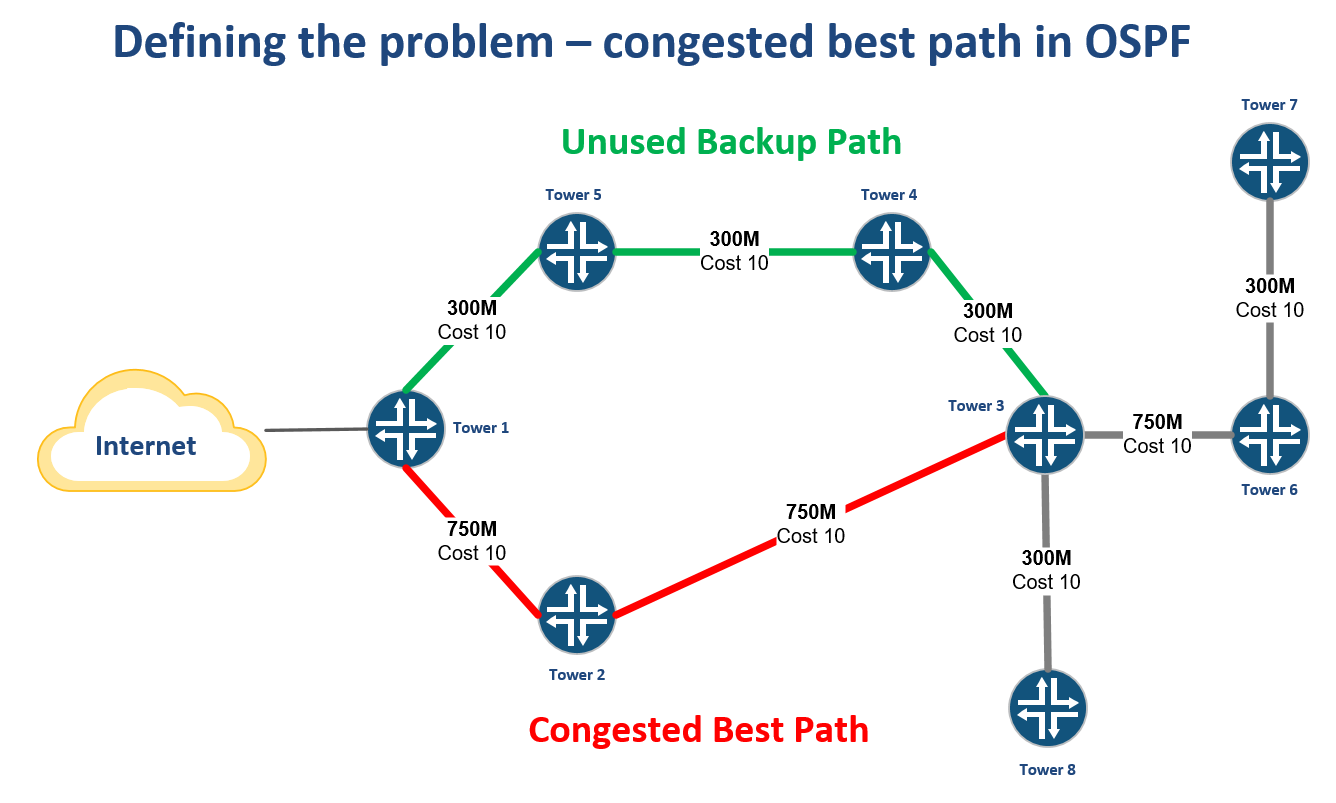
Creating an alternate best path by leapfrogging another router
One way to solve this problem is to use VLANs to create another subnet for OSPF to form an adjacency.
By tagging the VLAN from Tower 6 through Tower 3 and into Tower 4, a new path Continue reading
WISP Design – OSPF “Leapfrog” path for traffic engineering
Introduction
One challenge that every WISP owner or operator has faced is how to leverage unused bandwidth on a backup path to generate more revenue.
For networks that have migrated to MPLS and BGP, this is an easier problem to solve as there are tools that can be used in those protocols like communities or MPLS TE to help manage traffic and set policy.
However, many WISPs rely solely on OSPF and cost adjustment to attempt to influence traffic. Alternatively, trying to use policy routing can lead to a design that doesn’t failover or scale well.
Creating a bottleneck on a single path
WISPs that are OSPF routed will often have a primary path back to the Internet at one or more points in the network typically from a tower that aggregates multiple backhauls.
As more towers are added that rely on this path, it can create a bottleneck while other paths are unused.
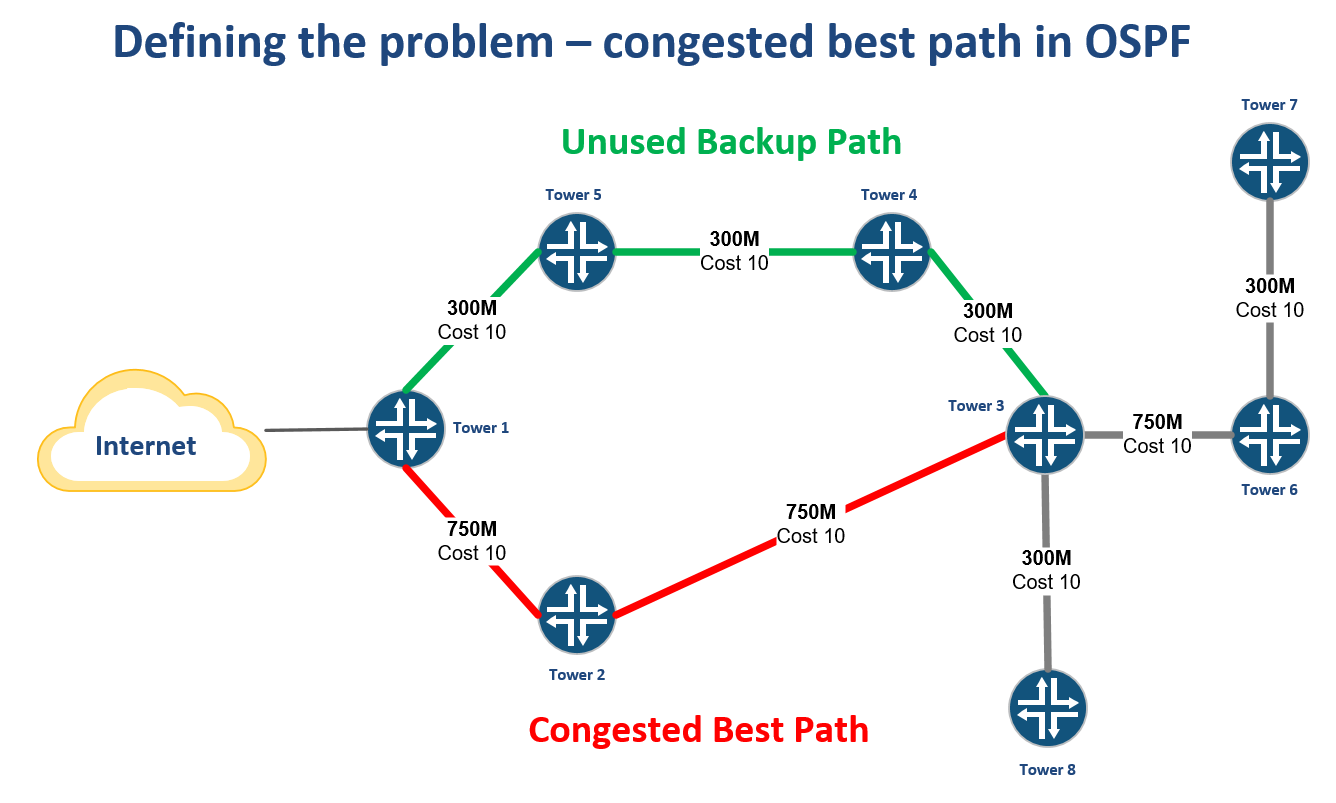
Creating an alternate best path by leapfrogging another router
One way to solve this problem is to use VLANs to create another subnet for OSPF to form an adjacency.
By tagging the VLAN from Tower 6 through Tower 3 and into Tower 4, a new path Continue reading
AI for IT: Who Will Lead the Charge for a Standard?
For artificial intelligence in networking to become mainstream, we need a common standard across the IT stack.
Intent-Based Networking’s True Intent Revealed
For some companies, the goal of intent-based networking may be rather simple.
Show 392: Debating The Value Of Expert Certifications
On today’s Weekly Show the Packet Pushers jump on the live grenade that is the debate over the value of IT certifications.
Spurred by Greg’s blog about giving up his CCIE status, this episode looks at the value of technology certifications such as the CCIE and others.
Greg and guests Mike Fryar, Chris Kluka, and Jeremy Filliben discuss the benefits and limits of professional certifications, the differences between certifications and actual skills, whether certifications represent a standardized body of knowledge or just a set of instructions, and how the industry might better foster learning.
Sponsor: InterOptic
InterOptic offers high-performance, high-quality optics at a fraction of the cost. Find out more at InterOptic.com, and if you re attending Interop 2018 in Vegas, stop by the InterOptic booth to learn how they can help you spec the right optics for your network.
Sponsor: Cumulus Networks
The Cumulus Linux network OS is simple, open, untethered Linux that can run on more than 70 hardware platforms and help you transition from your legacy infrastructure. Cumulus Networks is Web-scale networking for the digital age. Go to cumulusnetworks.com to find out more.
Show Links:
Quitting My CCIE Status – Greg Ferro
Install Netmiko on Windows
Netmiko develop by kirk Byers is open source python library based on Paramiko which simplifies SSH management to network devices .
Netmiko library makes task to automate . Its very tedious to find out the procedure to install Netmiko in Windows enviornment.Let’s make out task simple :-
Steps:
- Install Anaconda ( https://www.anaconda.com/download/)
- From the Anaconda shell, run “conda install paramiko”.

- From the Anaconda shell, run “pip install scp”.

- Install git for windows (https://www.git-scm.com/downloads)
- Clone Netmiko from Git Bash Window (https://github.com/ktbyers/netmiko).

- Change directory to netmiko.

- Run python setup.py install from Git Bash Window

- Check on Python console to confirm the availabilty of paramiko and netmiko library


Its done.. Enjoy automating tasks !!!!