Not-so-free Flow of Data
The digitalization of human activities, from social interactions to industrial processes, has led to unprecedented levels of data collection. New data is constantly being produced, driven by the rise of user-generated content, the digitalization of industries and services, and the improvement of both machine to machine communication and data storage. As recognized in the Commission’s Communication “Towards a data-driven economy”, this trend “holds enormous potential in various fields, ranging from health, food security, energy efficiency to intelligent transport systems and smart cities”. Indeed, data has become an essential resource for societal improvement.
Navigating Complex Data Structures in Ansible Playbooks
Have you ever tried to navigate complex data structures within Ansible playbooks using awkward looping constructs and convoluted map filters?
It might be easier to munge the data structure into a more appropriate format first and then use the munged data in subsequent tasks. Wondering how to do it?
Read more ...Mixed Signals From Server Land
With a new generation of Xeon processors coming out later this year from Intel and AMD trying to get back in the game with its own X86 server chips – they probably will not be called Opterons – it is not a surprise to us that server makers are having a bit of trouble making their numbers in recent months. But we are beginning to wonder if something else might be going on here than the usual pause before a big set of processor announcements.
In many ways, server spending is a leading indicator because when companies are willing to …
Mixed Signals From Server Land was written by Timothy Prickett Morgan at The Next Platform.
Adapting IT Operations to Emerging Trends: 3 Tips
Enterprise IT must transform itself if it wants to provide the business with the agility it needs to remain competitive.
Some moon math
So "Brianna Wu" (famous for gamergate) is trending, and because I love punishment, I clicked on it to see why. Apparently she tweeted that Elon Musk's plan to go to the moon is bad, because once there he can drop rocks on the Earth with the power of 100s of nuclear bombs. People are mocking her for the stupidity of this.But the math checks out.
First of all, she probably got the idea from Heinlein's book The Moon is a Harsh Mistress where the rebel moon colonists do just that. I doubt she did her own math, and relied upon Heinlein to do it for her. But let's do the math ourselves.
Let's say that we want to stand at the height of the moon and drop a rock. How big a rock do we need to equal the energy of an atomic bomb. To make things simple, let's assume the size of bombs we want is that of the one dropped on Hiroshima.
As we know from high school physics, the energy of a dropped object (ignoring air) is:
energy = mass * gravity * height
Solving for mass, the equation is:
mass = energy/(gravity * height)
So Continue reading
AT&T Picks HPE to Deliver Cloud-Based Services
 HPE lends a hand to AT&T as it works to reach its goal of virtualizing its network.
The Power of Software Defined Fabric at Mobile World Congress
Feb. 28th, Barcelona – I am very excited about Mobile World Congress (MWC) 2017. This year it’s not about cell...Some notes on space heaters (GPU rigs)
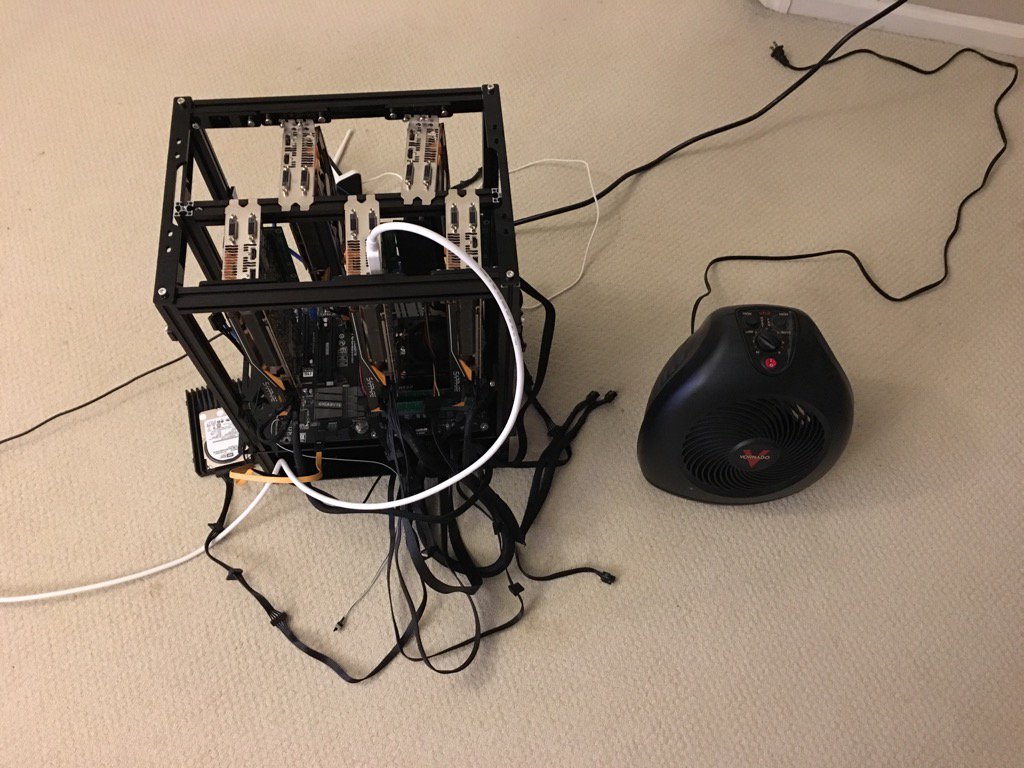
This is a "GPU rig", containing five graphics cards. Graphics cards have highly parallel processors (GPUs) with roughly 10 times the performance of a CPU -- but only for highly parallel problems.
Two such problems are password cracking [*] and cryptocurrency mining.
Password cracking is something cybersecurity professionals regularly need to do. When doing a pentest, or assessment, we'll get lists of passwords we need to crack. Having a desktop computer with a couple of graphics cards is a useful thing to have.
There are three popular cryptocurrencies: Bitcoin, Ethereum, and ZCash. Everyone is using ASICs for Bitcoin, so you can't mine them on a GPU any more, but GPUs are still useful for Ethereum and ZCash.

Fabric Extension (FEX) Cheat Sheet Released

Here is the Cisco FEX Cheat Sheet on Nexus platform, Fabric Extender (FEX for short) is a companion to a Nexus 5K to 9K switch. The FEX, unlike a traditional switch, has no capability to store a forwarding table or run any control plane protocols. It relies on its parent 5K/6K/7K/9K to perform those functions. As the name implies, the FEX “extends” the fabric (ie, the network) out towards the edge devices that require network connectivity.
If you found a bug or want new content to be added, please report it!
Fabric Extension (FEX) Cheat Sheet Released
Here is the Cisco FEX Cheat Sheet on Nexus platform, Fabric Extender (FEX for short) is a companion to a Nexus 5K to 9K switch. The FEX, unlike a traditional switch, has no capability to store a forwarding table or run any control plane protocols. It relies on its parent 5K/6K/7K/9K to perform those functions. As the name implies, the FEX “extends” the fabric (ie, the network) out towards the edge devices that require network connectivity.
If you found a bug or want new content to be added, please report it!