Spine/Leaf Topology Explorer with Ansible
I’ve mentioned before the need for networks to be addressed in a very programmatic way. Very often, I’ve found the discussion is actually a lot less about “programming language” details and more about getting rid of the methodology of addressing the network as a mere “collection of boxes” (see “Box Mentality”). Instead, we have the ability to address the network as any developer would address the distributed components of an application.DNS Packet
The Naked DNS Packet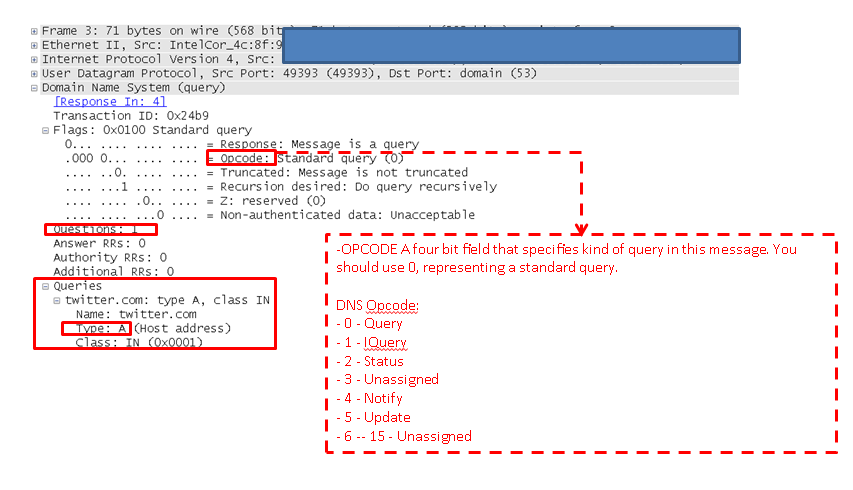
The above shows the DNS Opcodes in a DNS request.

Additional insight into the packet - As you can see that the DNS server responding was not authoritative and supported recursion.
IP Subnetting Part 2: Simple Subnetting Examples
Subnetting is a foundational concept in IP networking. Although it is often misunderstood and even dreaded, this is a simple concept if we could look at things from the perspective of binary. However the combination of binary concepts, IP addressing and subnet masking is a lot to attempt to understand at once.
In this article, we will look at some simple examples that are meant to illustrate the process of IPv4 subnetting. This is not meant to be a comprehensive study. It is meant to build my previous subnetting article and should introduce only basic concepts. In future articles, we will delve into more complex and complete examples of IP subnetting.
In an earlier article, I outlined the concept of Classful IP Addressing. That knowledge is a fundamental starting point for the IP Subnetting discussed here. In that article, I outlined three classes of unicast IP addresses. The class an IP address belongs to determines what part of the address is the network and what part is the host. That assumption can be overridden when by applying a subnet mask to the configuration of a modern IP stack.
Example IP Addresses
Address Class Network Continue reading
Docker Essentials – The docker file
So we’ve done quite a bit with docker up to this point. If you’ve missed the earlier posts, take a look at them here…
Getting Started with Docker
Docker essentials – Images and Containers
Docker essentials – More work with images
So I’d like to take us to the next step and talk about how to use docker files. As we do that, we’ll also get our first exposure to how docker handles networking. So let’s jump right in!
We saw earlier that when working with images that the primary method for modifying images was to commit your container changes to an image. This works, but it’s a bit clunky since you’re essentially starting a docker container, making changes, exiting out of it, and then committing the changes. What if we could just run a script that would build the image for us? Enter docker files!
Docker has the ability to build an image based on a set of instructions referred to as a docker file. Using the docker run command, we can rather easily build a custom image and then spin up containers based upon the image. Docker files use a Continue reading
Choosing Sides In Technology
Sometimes There Is Too Much Choice
I started out the evening writing a post on Aruba ClearPass, but this has been weighing on my mind lately, so I figured Aruba ClearPass can wait.
It seems that the Internet is filled with all sorts of opinions as it relates to all things IT. Shocking, isn’t it? 
We squabble over all sorts of technical things that mean a great deal to us as IT folks, but probably not a whole lot to the people who actually benefit from the use of those systems. Yes, I am referring to the end users. What do they care about? They care about their systems working. That’s it. They have their own jobs to worry about. This can be confirmed by the fact that end users almost never call up the IT department or fire off an e-mail unless there is a problem. Consider exhibit A:
1. Does it work? Great. I can do my job. The IT department isn’t even on my mental radar.
2. Is it broken? Uh oh. Now I can’t do my job as effective, or quite possibly, at all. Time to notify IT to get this thing back up and running.
EIGRP and OSPF – Are We Connected?
For both OSPF and EIGRP routers to become neighbors, their interface’s primary IP address must be on the same subnet. That statement is true. There is a difference in the definition of “same subnet”, though.
In OSPF, both routers have to be configured to be on the same subnet with the same mask or else they won’t neighbor up. When an hello packet is sent, the subnet mask is sent embedded in there. The router does a quick look to be sure the subnets are defined the same way on both ends. If everything doesn’t match, they don’t neighbor. Here’s a Wireshark screenshot to show you the OSPF hello. Note: See edit below.

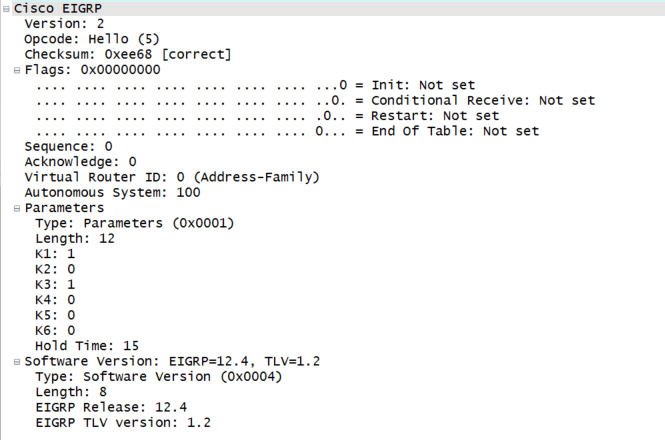
In EIGRP,the subnet mask isn’t sent in the hello packet, so that doesn’t come into play. Each router does a subnet calculation on the source address of the potential suitor, and, if that guy falls within the connected network, the peering magic happens. Here’s another Wireshark shot for you to enjoy.
Send any Wireshark certification vouchers questions my way.
Edit: I did some further research on Julius’s comment about point-to-point links in OSPF. It is absolutely true that point-to-point links do indeed ignore the subnet Continue reading
Docker performance monitoring

 |
| Visibility and the software defined data center |
The talk provides additional background on the sFlow standard and case studies. The remainder of this article describes how to use Host sFlow to monitor a Docker server pool.
First, download, compile and install the Host sFlow agent on a Docker host (Note: The agent needs to Continue reading
Musing: Flexpod at $2B Run Rate, VCE at $1.8B – Thats Unexpected
I'm completing a report for InformationWeek where the results suggest that customer have declining interest in converged hardware platforms. Then I noticed this post from Cisco on sales of FlexPod.
The post Musing: Flexpod at $2B Run Rate, VCE at $1.8B – Thats Unexpected appeared first on EtherealMind.
ERSPAN – My New Favorite Packet Capturing Trick
When I first looked at the documentation for ERSPAN I could imagine some uses for it. In some cases it could replace RSPAN, but since it’s only available on Cisco Nexus switches, newer Catalyst 6500s, Cisco ASR routers, and other “high end” devices, I determined that it really had limited uses. But I was wrong. […]
Author information

The post ERSPAN – My New Favorite Packet Capturing Trick appeared first on Packet Pushers Podcast and was written by Gary Sckolnick.
Response: WAN Optimization Market Declines 12 Percent Sequentially Indicating Softening Demand
The WAN Optimisation market shrank by 12% in Q1. Predictable and unsurprising since WanOp is a enhancing technology that only sells when the market is quiet and stable. Managing WanOp complexity is a problem no one wants.
The post Response: WAN Optimization Market Declines 12 Percent Sequentially Indicating Softening Demand appeared first on EtherealMind.
Wireshark on Android
The other day I found myself wishing I could run wireshark in realtime on an Android phone, but use the familiar GUI on my laptop. After a few minutes tinkering around, I was doing exactly that.The phone belonged to an Android developer, so he'd already rooted it, enabled developer tools, etc... He'd also installed a packet capture application which worked, but didn't allow me to see things in real time.
The Android SDK bundle contains the adb binary, which is required for connecting to the phone. Extract adb and drop it somewhere in $PATH
 # run adb as root:
 adb root
 # connect to the phone over WiFi (the phone's owner had
 # already enabled this feature with 'adb tcpip' via USB):
 adb connect <phone's wifi ip address>
 # check that we get a root shell on the phone:
 adb shell 'id'
It turns out that the packet capture application included a tcpdump binary at /data/data/lv.n3o.shark/files/tcpdump, and invoking it from the adb shell worked normally. It produced the usual startup message, and then a one line summary of each packet.
 adb shell '/data/data/lv.n3o.shark/files/tcpdump -c 2'
tcpdump: verbose output suppressed, use -v or -vv for Continue readingF5 Configuration Backups 3.0
In a previous article I introduced a project for the configuration backups of F5 devices. It offered an automated, centralized backup service for F5 BigIP devices with a web interface. There was also several features mentioned in the road map. Now after 4 months of tireless work, version 3.0 of the Config Backup for F5 […]
Author information

The post F5 Configuration Backups 3.0 appeared first on Packet Pushers Podcast and was written by Eric Flores.
Microsoft Office 365 outage
6/24/2014 Information Week - Microsoft Exchange Online Suffers Service Outage, "Service disruptions with Microsoft's Exchange Online left many companies with no email on Tuesday."The following entry on the Microsoft 365 community forum describes the incident:
====================================The closure summary shows that operators took 8 hour 39 minutes to manually diagnose and remediate the problem with degraded networking infrastructure. The network related outage described in this example is not an isolated incident; other incidents described on this blog include: Packet loss, Amazon EC2 outage, Gmail outage, Delay vs utilization for Continue reading
Closure Summary: On Tuesday, June 24, 2014, at approximately 1:11 PM UTC, engineers received reports of an issue in which some customers were unable to access the Exchange Online service. Investigation determined that a portion of the networking infrastructure entered into a degraded state. Engineers made configuration changes on the affected capacity to remediate end-user impact. The issue was successfully fixed on Tuesday, June 24, 2014, at 9:50 PM UTC.
Customer Impact: Affected customers were unable to access the Exchange Online service.
Incident Start Time: Tuesday, June 24, 2014, at 1:11 PM UTC
Incident End Time: Tuesday, June 24, 2014, at 9:50 PM UTC
=====================================
Beyond the Blog
I'm thinking about writing a book.
Obviously, there are a lot of networking books on the market today. Search for any mainstream certification on Amazon and you'll find titles from half a dozen publishers. The majority of these are oriented toward specific vendors (most commonly Cisco) and many parallel a given certification exam. These books are overall pretty great. Most of them.
There also exists a minority of books which cover topics outside of the vendor-driven mainstream, like Gary A. Donahue's Network Warrior published by O'Reilly, now in its second edition. I love this kind of independent title because its content isn't constrained to a particular mold. The author finds stuff he thinks is relevant and interesting, and he writes about it. This is the correct way to write a book.
But over the past few years it has become painfully evident to me that there are many areas of this field we simply don't talk about in print, at least not at the entry level where perhaps it would be most helpful. If you want a thirty-page lecture on subnetting or a terrible mnemonic for the OSI model, pick any CCNA book from the pile and you're good to Continue reading
INE Special
Just a quick note… Recently I have had some discussions with the people over at INE and they have offered to extend a special to the visitors of this blog. Just click on the URL https://members.ine.com/dash/aap/sign_up/premium/FryGuySpecial and you will save $500 off an all-access pass subscription. I have had access in the past and it is […]Ethernet, STP, Topology change and the behaviour of Ethernet
Introduction
This post is inspired by a post at IEOC about Uplinkfast and TCN which
can be found here.
Before we get to those parts, let’s recap how Ethernet and STP work together.
Spanning Tree
The Spanning Tree Algorithm builds a loop free tree by comparing Bridge ID(BID) and
least cost paths to the root bridge. By doing this it blocks all links not leading
to the root.

MAC Learning
Switches learn where to forward frames by looking at the source MAC address of the frame
on the port that the frame was received on. This learning is done in the data plane
as opposed to routing where the routes are learned in control plane. I will come back
to this later in the post.

S4 learns that A is located on port 1 after A has sent a frame. This is stored in
the MAC address table located in Content Addressable Memory (CAM). The CAM is a
fast memory optimized for quick lookups in the table. By default there is a 300
second aging timeout for learned MAC addressesm, meaning that if the switch
does not see any traffic from a source MAC within five minutes the entry will
Continue reading
Cisco Exam Policy Changes and Cost Increases
There has been some talk on the twitter-verse and at Cisco Live around some of the changes that Cisco is making to the CCIE/DE written and lab policies. Last month they posted those changes to their Certification Exam Policies website to let everyone know and read. The ones that are key to CCIE/DE candidates (and […]Coffee Break – Show 10
This is “The Coffee Break”. A podcast on state of the networking business where we discuss vendors moves and news, analysis on product and positioning, and look at the business of networking. In the time it takes to have coffee break.Coffee Break – Show 10
This is “The Coffee Break”. A podcast on state of the networking business where we discuss vendors moves and news, analysis on product and positioning, and look at the business of networking. In the time it takes to have coffee break.
The post Coffee Break – Show 10 appeared first on Packet Pushers.