Hiding the DNS
I’d like to look in a little more detail at the efforts to hide the DNS behind HTTPS, and put the work in the IETF's DOH Working Group into a broader perspective. There are a number of possible approaches here, and they can be classified according to the level of interaction between the DNS application and the underlying HTTPS encrypted session.DNS and DDOS
It took some hundreds of years, but Europe eventually reacted to the introduction of gunpowder and artillery by recognising that they simply could not build castles large enough to defend against any conceivable attack. So they stopped. I hope it does not take us the same amount of time to understand that building ever more massively fortified and over-provisioned DNS servers is simply a tactic for today, not a strategy for tomorrow.VyOS 1.1.8 Released

More than one year after publishing a previous VyOS version, the new VyOS 1.1.8 is finally released. VyOS is an open source network operating system that can be installed on physical hardware or as a virtual machine. It is based on GNU/Linux and joins multiple applications such as Quagga, ISC DHCPD, OpenVPN, StrongS/WAN and others under a single management interface. VyOS is a cheap and effective solution for those who want to learn Junos like CLI.
Linux user can use my installation scripts for zero-touch VyOS deployment. Scripts download the newest stable VyOS x86-64 Live ISO image from web, create VMware VMDK disk and install VyOS from ISO on the disk. The scripts are available here (part 1.1).
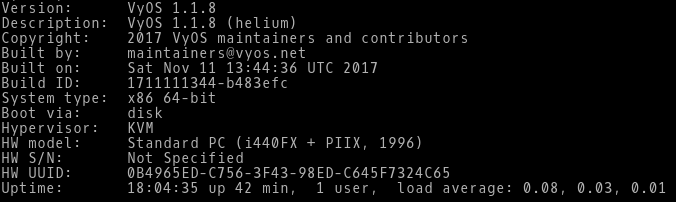
Picture 1 - VyOS Version 1.1.8
Note: The scripts are tested on Linux with installed Qemu, KVM and Expect. First, run the Bash script deploy vyos.sh. The script downloads the latest VyOS ISO image. Then run the Expect script install vyos.exp that install on VyOS Live CD.
New Video: Whitespace Handling in Jinja2
Whitespace handling is one of the most confusing aspects of Jinja2, thoroughly frustrating many attendees of my Ansible and Network Automation online courses.
I decided to fix that, ran a few well-controlled experiments, and documented the findings and common caveats in Whitespace Handling in Jinja2 video.
Cisco CSR 1000v Vagrant Libvirt Box Install
Build a Cisco CSR 1000v box for use with the libvirt provider.Cisco CSR 1000v Vagrant Libvirt Box Install
Recently I converted from using the Virtualbox provider for Vagrant to using the Libvirt provider. This post will cover how to create a Cisco csr1000v Vagrant box for use with the vagrant-libvirt provider. For reference the following software will be used in this post. Cisco csr1000v -...vCentre in Azure
A recent project I was working on involved the need to join a new office to our existing Data Centres and OSPF core using a Gig circuit over the Internet. To flesh out this idea and test its viability I thought I would try and solve an ESX capacity problem I have at home by moving vCentre into the cloud.
Video: Using Simple PowerShell Scripts
After explaining the basics of PowerShell, Mitja Robas described how to do implement the “Hello, World!” of network automation (collecting printouts from network devices) in PowerShell.
To watch all videos from this free webinar, register here.
Load Balancers Comparisons: F5 Vs KEMP Vs Citrix
Today I am going to discuss about the comparison between the load balancers which are generally best with their features and also Gartner rated them high in their reports. Load Balancers are the basic and the important need of the Enterprise network now a days. Some of the them used as Local and some of them used as Global Load Balancers.
As per the Gartner report, F5 BIG-IP leads the magic quadrant in leaders with Citrix and KEMP is also gaining the speed in Challengers. Although we have many more vendors in the market of load balancers like Radware, A10 Networks, Brocade, Barracuda Networks, Cisco and Array Networks. F5 is leading the market with the best features and capable of doing a lot of best performance and security features as well. I will discuss the comparison at Continue reading
Before we talk about Load balancers, I would like to tell you guys that we have our own youtube channel for various network videos that can further help you guys to study further. I will going to add many more videos soon on the channel, Please subscribe to the channel for the study network related videos
Subscribe us on Youtube: http://y2u.be/0c4lMYVp9go
As per the Gartner report, F5 BIG-IP leads the magic quadrant in leaders with Citrix and KEMP is also gaining the speed in Challengers. Although we have many more vendors in the market of load balancers like Radware, A10 Networks, Brocade, Barracuda Networks, Cisco and Array Networks. F5 is leading the market with the best features and capable of doing a lot of best performance and security features as well. I will discuss the comparison at Continue reading
Using Telegraf, InfluxDB and Grafana to Monitor Network Statistics
Two years ago I wrote about how to use InfluxDB & Grafana for better visualization of network statistics. I still loathe MRTG graphs, but configuring InfluxSNMP was a bit of a pain. Luckily it’s now much easier to collect SNMP data using Telegraf. InfluxDB and Grafana have also improved a lot. Read on for details about to monitor network interface statistics using Telegraf, InfluxDB and Grafana.
Background - Telegraf, InfluxDB + Grafana
There’s three parts to this:
-
Grafana: Grafana is “The open platform for beautiful analytics and monitoring.” It makes it easy to create dashboards for displaying data from many sources, particularly time-series data. It works with several different data sources such as Graphite, Elasticsearch, InfluxDB, and OpenTSDB. We’re going to use this as our main front end for visualising our network statistics.
-
InfluxDB: InfluxDB is “…a data store for any use case involving large amounts of timestamped data.” This is where we we’re going to store our network statistics. It is designed for exactly this use-case, where metrics are collected over time.
-
Telegraf: Telegraf is “…a plugin-driven server agent for collecting and reporting metrics.” This can collect data from a wide variety of sources, Continue reading
Complexity Isn’t Always Bad

I was reading a great post this week from Gian Paolo Boarina (@GP_Ifconfig) about complexity in networking. He raises some great points about the overall complexity of systems and how we can never really reduce it, just move or hide it. And it made me think about complexity in general. Why are we against complex systems?
Confusion and Delay
Complexity is difficult. The more complicated we make something the more likely we are to have issues with it. Reducing complexity makes everything easier, or at least appears to do so. My favorite non-tech example of this is the carburetor of an internal combustion engine.
Carburetors are wonderful devices that are necessary for the operation of the engine. And they are very complicated indeed. A minor mistake in configuring the spray pattern of the jets or the alignment of them can cause your engine to fail to work at all. However, when you spend the time to learn how to work with one properly, you can make the engine perform even above the normal specifications.
Carburetors have been largely replaced in modern engines by computerized fuel injectors. These systems accomplish the same goal of injecting the fuel-air mixture into Continue reading
Show 367: Silver Peak & The Maturing Of SD-WAN (Sponsored)
In today s sponsored show with Silver Peak, we talk about lessons they've learned from more than 500 customer deployments, the role of routing, the necessity of Internet breakouts, and more. Our guest is David Hughes, founder and CEO. The post Show 367: Silver Peak & The Maturing Of SD-WAN (Sponsored) appeared first on Packet Pushers.

When It Comes to Smart Toys, It Pays to Shop Smart
When your in-laws give your child a loud toy for the holidays, you know you are going to have to hear it for the next few months. But when that toy connects to the Internet, how can you be sure that you’re the only ones listening?
This holiday season, “smart toys” (Internet or Bluetooth-enabled toys) are some of the most popular toys on the market. A lot of these toys look awesome, including:
- remote control cars that connect with an app and allow you to race against AI controlled cars;
- stuffed animals that play back messages sent from loved one’s smartphones; and
- soccer balls that track your form when you kick them.
Smart toys come with fantastic features, but if left unsecured, smart toys can present a serious privacy risk to those who use them. For instance:
- Hackers could gather the personal messages recorded to play through a grandchild’s teddy bear;
- Strangers could send messages to nearby children by using a toy robot’s Bluetooth feature – putting their safety at risk; and
- Toy companies could use a toy’s microphones not only for voice commands, but to also collect personal information to sell to third parties.
Unsecured smart toys present Continue reading
Introduction to OSPF NSSA Area
Today I am going to talk about the OSPF NSSA area as this is one of the most important topic and always been asked by the interviewers. I knew many of you are already aware if the OSPF NSSA area but it is important for the network engineers who started studying OSPF in details specially area types. OSPF is one of the widely used protocol in the enterprise network and there are so many enhancements done like to integrate with the IPv6 and OSPFv3.
Before we talk about OSPF NSSA area, I would like to tell you guys that we have our own youtube channel for various network videos that can further help you guys to study further. I will going to add many more videos soon on the channel, Please subscribe to the channel for the study network related videos
Subscribe us on Youtube: http://y2u.be/0c4lMYVp9go
OSPF NSSA Area
NSSA stands for not-so-stubby area and is used in OSPF protocol. NSSA is to allow OSPF Stub areas to carry External routes which is the routes learned from other protocols like RIP, EIGRP or BGP and then redistribution into an NSSA area creates a special type of link-state advertisement (LSA) Continue reading
Promoting the African Internet Economy, an opportunity that cannot be missed
Some time ago, a European who visited my country and saw all the potential it possesses asked me “why is your country poor?”. It was a compelling question that made me think for years. It is true that there are external reasons such as the acts of colonial and other powers who have done everything to block economic progress. But, I have to admit, there is at least one major internal reason: we missed many opportunities for development.
We missed the industrial revolution of the 19th century that propelled Japan and many European countries to development. We missed the development opportunity that many South East Asian countries grabbed since the 1960s. We missed many other opportunities, simply because we didn’t realize they were there or we just could not agree on how to make the best out of them.
The African Union has a very clear vision to transform the socio-economic condition of the continent by 2063; by this year, the Union will be celebrating its hundredth anniversary (see Agenda 2063). This is a great vision. But, is Africa ready to use the opportunities that exist today and can enable it to arrive to its aspirations enshrined in Continue reading
Worth Reading: Designing Container Networking
Diane Patton (Cumulus Networks) published a short overview of container networking design options, from traditional MLAG to running Quagga on Docker host.
If you want to learn more about individual designs described in that blog post, watch the Leaf-and-Spine Fabric Architectures and Docker Networking webinars, or join one of the data center online courses.
Basic Configuration for Cisco ASA 5505 Interfaces- Trunk Port
Today I am going to talk about the basic Cisco ASA configuration of trunk ports and also to make that Cisco asa with the failover link. We are putting two ASA where one is the primary one and another is the failover ASA in the DMZ zone. I already discuss on the Cisco ASA access port configurations. If you want to have a look on the configurations, please go through the below link as a reference
Basic Configuration for Cisco ASA 5505 Interfaces- Access Ports
Basic Configuration for Cisco ASA 5505 Interfaces- Access Ports
Before we talk about these protocols, I would like to tell you guys that we have our own youtube channel for various network videos that can further help you guys to study further. I will going to add many more videos soon on the channel, Please subscribe to the channel for the study network related videos
Subscribe us on Youtube: http://y2u.be/0c4lMYVp9go
Now let's talk about the basic Cisco ASA configuration for the trunk port. Below is the basic topology showing the Cisco ASA placed in the enterprise network. The configurations, IP addresses and topology shown here is only for the demo purposes and has no relevance with any of the enterprise networks.
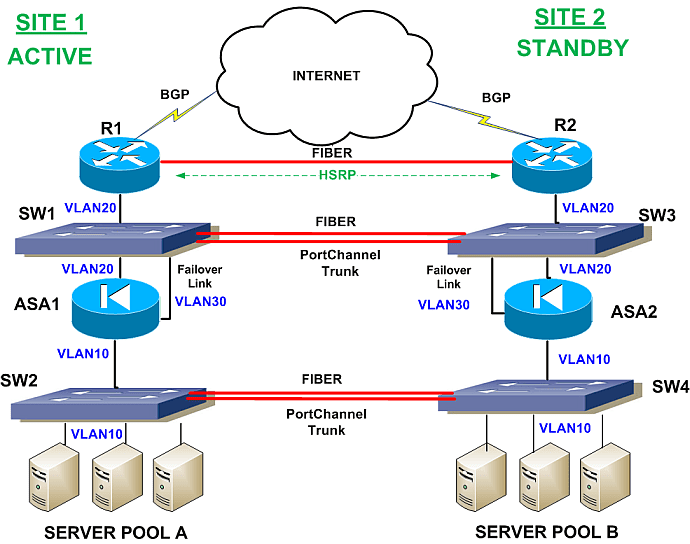 |
| Fig 1.1- Continue reading |
Basic Configuration for Cisco ASA 5505 Interfaces- Access Ports
Today I am going to talk about the basic Cisco ASA configuration on the access ports and also to make that Cisco asa with the failover link. Later on i will come up with the configuration part of the Cisco asa with the trunk port configurations. We are putting two ASA where one is the primary one and another is the failover ASA in the DMZ zone.
Before we talk about these protocols, I would like to tell you guys that we have our own youtube channel for various network videos that can further help you guys to study further. I will going to add many more videos soon on the channel, Please subscribe to the channel for the study network related videos
Subscribe us on Youtube: http://y2u.be/0c4lMYVp9go
Lets talk about the Cisco ASA configurations where we configures five VLAN interfaces, including the failover interface which is configured using the failover lan command.
 |
| Fig 1.1- Cisco ASA 5505 |
Configuration Examples for ASA 5505 Interfaces
Here in the below example, we are taking VLAN 2, VLAN 3, VLAN 4 and VLAN 5 where VLAN 6 will be the failover link and after that all VLANs will be assigned to the Continue reading
The New DDoS Landscape
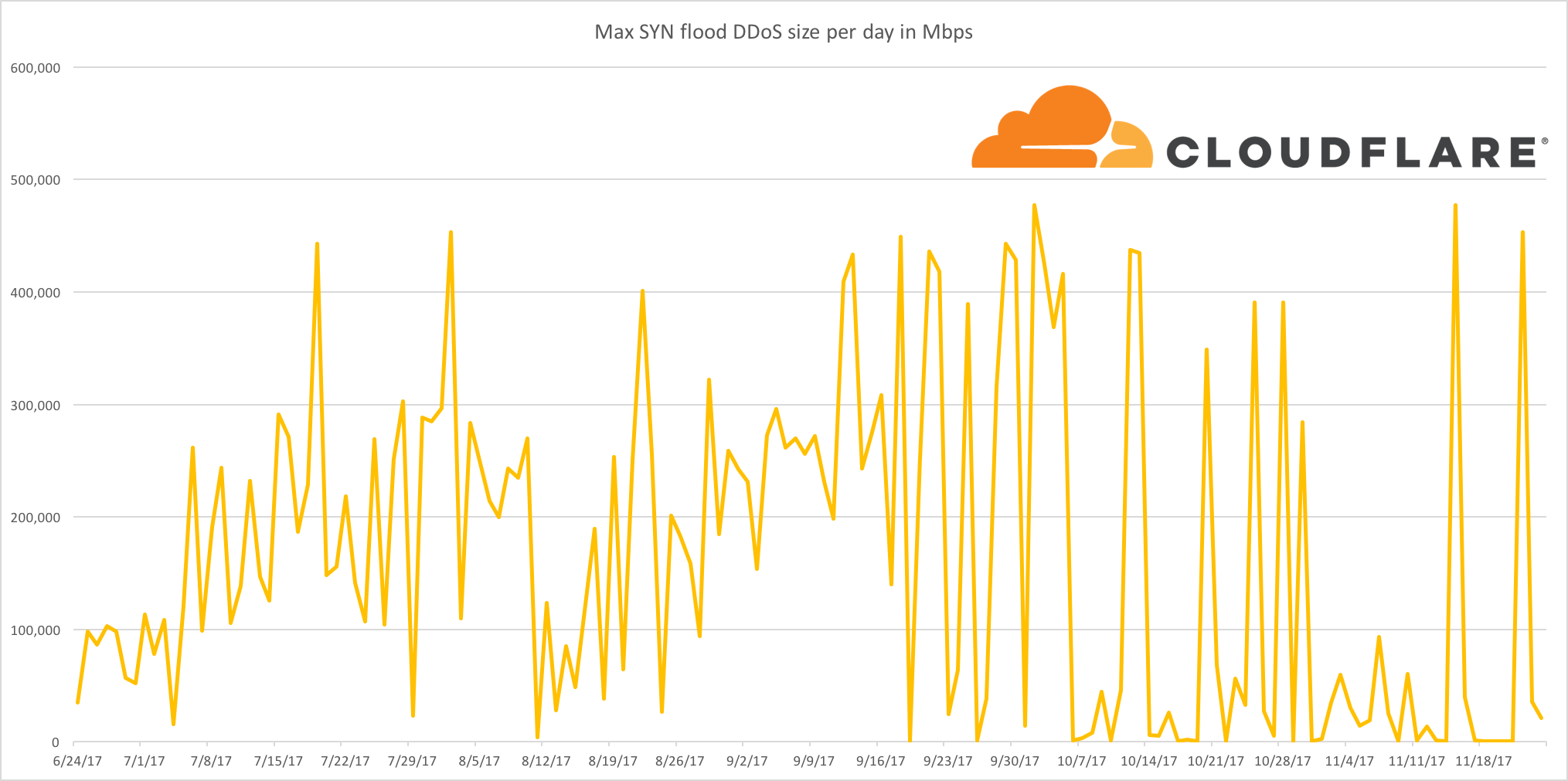
News outlets and blogs will frequently compare DDoS attacks by the volume of traffic that a victim receives. Surely this makes some sense, right? The greater the volume of traffic a victim receives, the harder to mitigate an attack - right?
At least, this is how things used to work. An attacker would gain capacity and then use that capacity to launch an attack. With enough capacity, an attack would overwhelm the victim's network hardware with junk traffic such that they can no longer serve legitimate requests. If your web traffic is served by a server with a 100 Gbps port and someone sends you 200 Gbps, your network will be saturated and the website will be unavailable.
Recently, this dynamic has shifted as attackers have gotten far more sophisticated. The practical realities of the modern Internet have increased the amount of effort required to clog up the network capacity of a DDoS victim - attackers have noticed this and are now choosing to perform attacks higher up the network stack.
In recent months, Cloudflare has seen a dramatic reduction in simple attempts to flood our network with junk traffic. Whilst we continue to see large network level attacks, in Continue reading
Want to try Warp? We just enabled the beta for you
Tomorrow is Thanksgiving in the United States. It’s a holiday for getting together with family characterized by turkey dinner and whatever it is that happens in American football. While celebrating with family is great, if you use a computer for your main line of work, sometimes the conversation turns to how to setup the home wifi or can Russia really use Facebook to hack the US election. Just in case you’re a geek who finds yourself in that position this week, we wanted to give you something to play with. To that end, we’re opening the Warp beta to all Cloudflare users. Feel free to tell your family there’s been an important technical development you need to attend to immediately and enjoy!
Hello Warp! Getting Started
Warp allows you to expose a locally running web server to the internet without having to open up ports in the firewall or even needing a public IP address. Warp connects a web server directly to the Cloudflare network where Cloudflare acts as your web server’s network gateway. Every request reaching your origin must travel to the Cloudflare network where you can apply rate limits, access policies and authentication before the request hits your Continue reading