Cloudflare’s 2023 Annual Founders’ Letter


Cloudflare is officially a teenager. We launched on September 27, 2010. Today we celebrate our thirteenth birthday. As is our tradition, we use the week of our birthday to launch products that we think of as our gift back to the Internet. More on some of the incredible announcements in a second, but we wanted to start by talking about something more fundamental: our identity.

Like many kids, it took us a while to fully understand who we are. We chafed at being put in boxes. People would describe Cloudflare as a security company, and we'd say, "That's not all we do." They'd say we were a network, and we'd object that we were so much more. Worst of all, they'd sometimes call us a "CDN," and we'd remind them that caching is a part of any sensibly designed system, but it shouldn't be a feature unto itself. Thank you very much.
And so, yesterday, the day before our thirteenth birthday, we announced to the world finally what we realized we are: a connectivity cloud.
The connectivity cloud
What does that mean? "Connectivity" means we measure ourselves by connecting people and things together. Our job isn't to be the Continue reading
The best place on Region: Earth for inference
Today, Cloudflare’s Workers platform is the place over a million developers come to build sophisticated full-stack applications that previously wouldn’t have been possible.
Of course, Workers didn’t start out that way. It started, on a day like today, as a Birthday Week announcement. It may not have had all the bells and whistles that exist today, but if you got to try Workers when it launched, it conjured this feeling: “this is different, and it’s going to change things”. All of a sudden, going from nothing to a fully scalable, global application took seconds, not hours, days, weeks or even months. It was the beginning of a different way to build applications.
If you’ve played with generative AI over the past few months, you may have had a similar feeling. Surveying a few friends and colleagues, our “aha” moments were all a bit different, but the overarching sentiment across the industry at this moment is unanimous — this is different, and it’s going to change things.
Today, we’re excited to make a series of announcements that we believe will make a similar impact as Workers did in the future of computing. Without burying the lede any further, here they Continue reading
BGP Labs: Use BFD to Speed Up Convergence
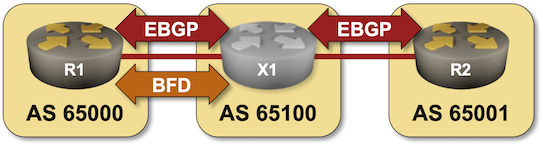
In the next BGP labs exercise you can practice tweaking BGP timers and using BFD to speed up BGP convergence.

I would strongly recommend using netlab to run BGP labs, but if you insist you can use any system you like including physical hardware.
BGP Labs: Use BFD to Speed Up Convergence
In the next BGP labs exercise, you can practice tweaking BGP timers and using BFD to speed up BGP convergence.
NFA v23.09 is here, featuring custom SSL/TLS certificates, MAC Address dictionaries, Mattermost notification channels support, and more.
The post NFA v23.09 is here, featuring custom SSL/TLS certificates, MAC Address dictionaries, Mattermost notification channels support, and more. appeared first on Noction.
The Essence of Cisco and Splunk

You no doubt noticed that Cisco bought Splunk last week for $28 billion. It was a deal that had been rumored for at least a year if not longer. The purchase makes a lot of sense from a number of angles. I’m going to focus on a couple of them here with some alliteration to help you understand why this may be one of the biggest signals of a shift in the way that Cisco does business.
The S Stands for Security
Cisco is now a premier security company now. The addition of the most power SIEM on the market means that Cisco’s security strategy now has a completeness of vision. SecureX has been a very big part of the sales cycle for Cisco as of late and having all the parts to make it work top to bottom is a big win. XDR is a great thing for organizations but it doesn’t work without massive amounts of data to analyze. Guess where Splunk comes in?
Aside from some very specialized plays, Cisco now has an answer for just about everything a modern enterprise could want in a security vendor. They may not be number one in every market but Continue reading
Welcome to connectivity cloud: the modern way to connect and protect your clouds, networks, applications and users


The best part of our job is the time we spend talking to Cloudflare customers. We always learn something new and interesting about their IT and security challenges.
In recent years, something about those conversations has changed. More and more, the biggest challenge customers tell us about isn’t something that’s easy to define. And it’s definitely not something you can address with an individual product or feature.
Rather, what we’re hearing from IT and security teams is that they are losing control of their digital environment.
This loss of control comes in a few flavors. They might express hesitance about adopting a new capability they know they need, because of compatibility concerns. Or maybe they’ll talk about how much time and effort it takes to make relatively simple changes, and how those changes take time away from more impactful work. If we had to sum the feeling up, it would be something like, “No matter how large my team or budget, it’s never enough to fully connect and protect the business.”
Does any of this feel familiar? If so, let us tell you that you are far from alone.

Reasons for loss of control
The rate of change in Continue reading
Sippy helps you avoid egress fees while incrementally migrating data from S3 to R2


Earlier in 2023, we announced Super Slurper, a data migration tool that makes it easy to copy large amounts of data to R2 from other cloud object storage providers. Since the announcement, developers have used Super Slurper to run thousands of successful migrations to R2!
While Super Slurper is perfect for cases where you want to move all of your data to R2 at once, there are scenarios where you may want to migrate your data incrementally over time. Maybe you want to avoid the one time upfront AWS data transfer bill? Or perhaps you have legacy data that may never be accessed, and you only want to migrate what’s required?
Today, we’re announcing the open beta of Sippy, an incremental migration service that copies data from S3 (other cloud providers coming soon!) to R2 as it’s requested, without paying unnecessary cloud egress fees typically associated with moving large amounts of data. On top of addressing vendor lock-in, Sippy makes stressful, time-consuming migrations a thing of the past. All you need to do is replace the S3 endpoint in your application or attach your domain to your new R2 bucket and data will start getting copied Continue reading
Traffic anomalies and notifications with Cloudflare Radar


We launched the Cloudflare Radar Outage Center (CROC) during Birthday Week 2022 as a way of keeping the community up to date on Internet disruptions, including outages and shutdowns, visible in Cloudflare’s traffic data. While some of the entries have their genesis in information from social media posts made by local telecommunications providers or civil society organizations, others are based on an internal traffic anomaly detection and alerting tool. Today, we’re adding this alerting feed to Cloudflare Radar, showing country and network-level traffic anomalies on the CROC as they are detected, as well as making the feed available via API.
Building on this new functionality, as well as the route leaks and route hijacks insights that we recently launched on Cloudflare Radar, we are also launching new Radar notification functionality, enabling you to subscribe to notifications about traffic anomalies, confirmed Internet outages, route leaks, or route hijacks. Using the Cloudflare dashboard’s existing notification functionality, users can set up notifications for one or more countries or autonomous systems, and receive notifications when a relevant event occurs. Notifications may be sent via e-mail or webhooks — the available delivery methods vary according to plan level.
Traffic anomalies
Internet traffic generally follows Continue reading
Amazon’s $2bn IPv4 tax — and how you can avoid paying it
One of the wonderful things about the Internet is that, whether as a consumer or producer, the cost has continued to come down. Back in the day, it used to be that you needed a server room, a whole host of hardware, and an army of folks to help keep everything up and running. The cloud changed that, but even with that shift, services like SSL or unmetered DDoS protection were out of reach for many. We think that the march towards a more accessible Internet — both through ease of use, and reduced cost — is a wonderful thing, and we’re proud to have played a part in making it happen.
Every now and then, however, the march of progress gets interrupted.
On July 28, 2023, Amazon Web Services (AWS) announced that they would begin to charge “per IP per hour for all public IPv4 addresses, whether attached to a service or not”, starting February 1, 2024. This change will add at least \$43 extra per year for every IPv4 address Amazon customers use; this may not sound like much, but we’ve seen back of the napkin analysis that suggests this will result in an approximately \$2bn tax on Continue reading