Goodbye, ipSpace.net Subscription
I ran the first webinar as an independent author almost exactly fourteen years ago1, with the first ticket sold just before New Year’s Eve. I kept focusing on individual webinars until someone asked me, “Would it be possible to buy access to everything you did?” His question effectively created the ipSpace.net subscription, with the first one sold in late 2010 (I still have the email that triggered the whole process).
Cloud Notes: AWS Direct Connect
https://codingpackets.com/blog/cloud-notes-aws-direct-connect
Cloud Notes: AWS Direct Connect
https://codingpackets.com/blog/cloud-notes-aws-direct-connect
Apollo 11 notes
I was re-reading the Apollo 11 mission reports, as one does, and decided to take some notes along the way.
If you’re interested in these things, I also highly recommend curiousmarc’s series on the Apollo comms hardware.
Notes
First time I’ve seen the word “doff”. Can’t wait to use it in daily conversation.
The rocket equation is a beast. The LM descent stage had 8’210kg of
propellant. The ascent stage only 2’365kg.
– Volume 1, Page 50
In total 10’849kg out of 15’061 (72%) of the LM was
propellant. (excluding the astronauts themselves)
The LM flown on Apollo 10 did not have the landing program in its computer.
To prevent the temptation to land?
– Volume 1, Page 62
Armstrong’s parents were “Mr. and Mrs. Stephen Armstrong”. Michael Collins’ mother is mentioned, but her name is also lost to history, as she’s referred to as “Mrs. James L. Collins”. Only Buzz Aldrin’s mother is named (and what a name!), as Marion Moon Aldrin.
All three were born in 1930, making them turn 39 in 1969.
– Volume 1, Page 76-78
“High speed” data mode is 2400bps, divided into 240 bit blocks.
– Volume 1, Page 93
Aside from the Continue reading
Cloud Notes: AWS Route Selection
https://codingpackets.com/blog/cloud-notes-aws-route-selection
Configuring EVPN on NX-OS
In this post we will configure EVPN on NX-OS. We will reuse the VXLAN topology from my previous post. The following will describe the setup in this post:
- VXLAN topology with OSPF as the IGP in the underlay using unnumbered links.
- EVPN in the overlay using iBGP.
- Spines acting as route reflectors.
- Separate loopbacks for IGP, BGP, and NVE.
- Ingress replication based on EVPN.
- Enhancements such as anycast gateway, ARP suppression, etc., will be covered in future posts.
The BGP topology is shown below:
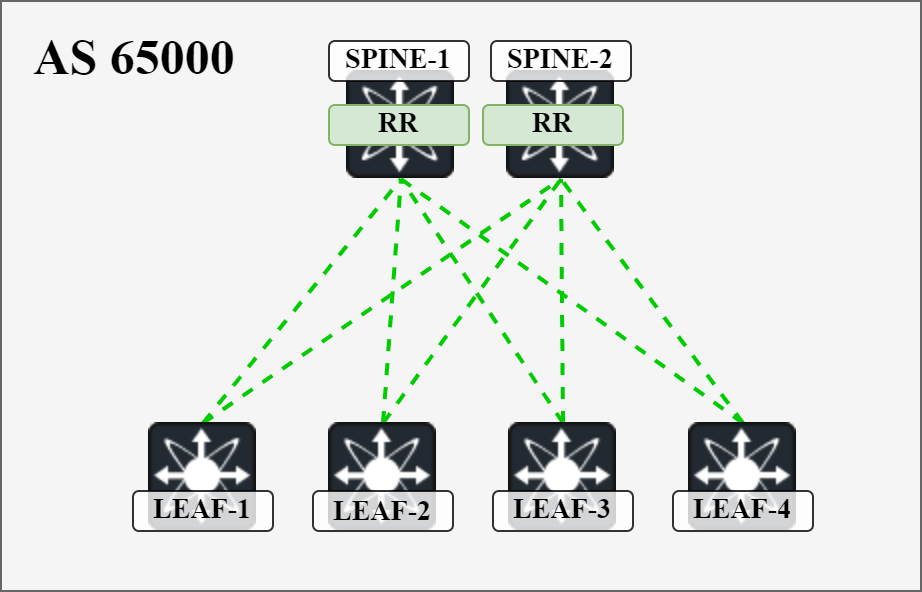
I will cover all the details of configuring EVPN and establishing the BGP sessions. We will then cover the actual exchange of routes in detail in separate posts in the future.
Starting out, the following globals and features need to be configured:
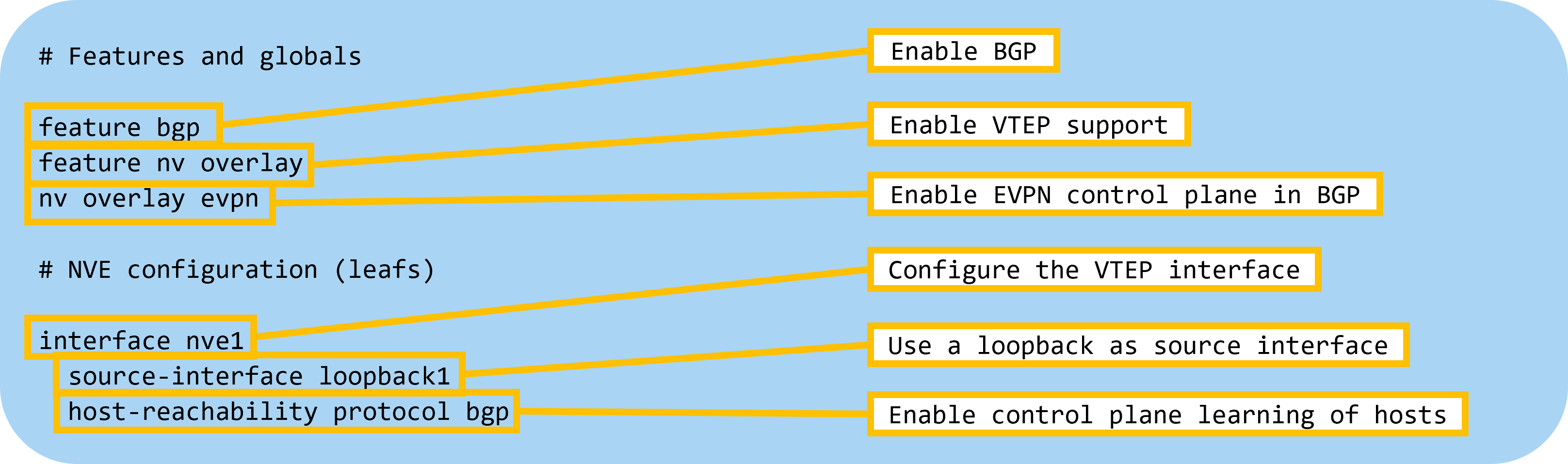
Next, let’s configure BGP on the spines with the following settings:
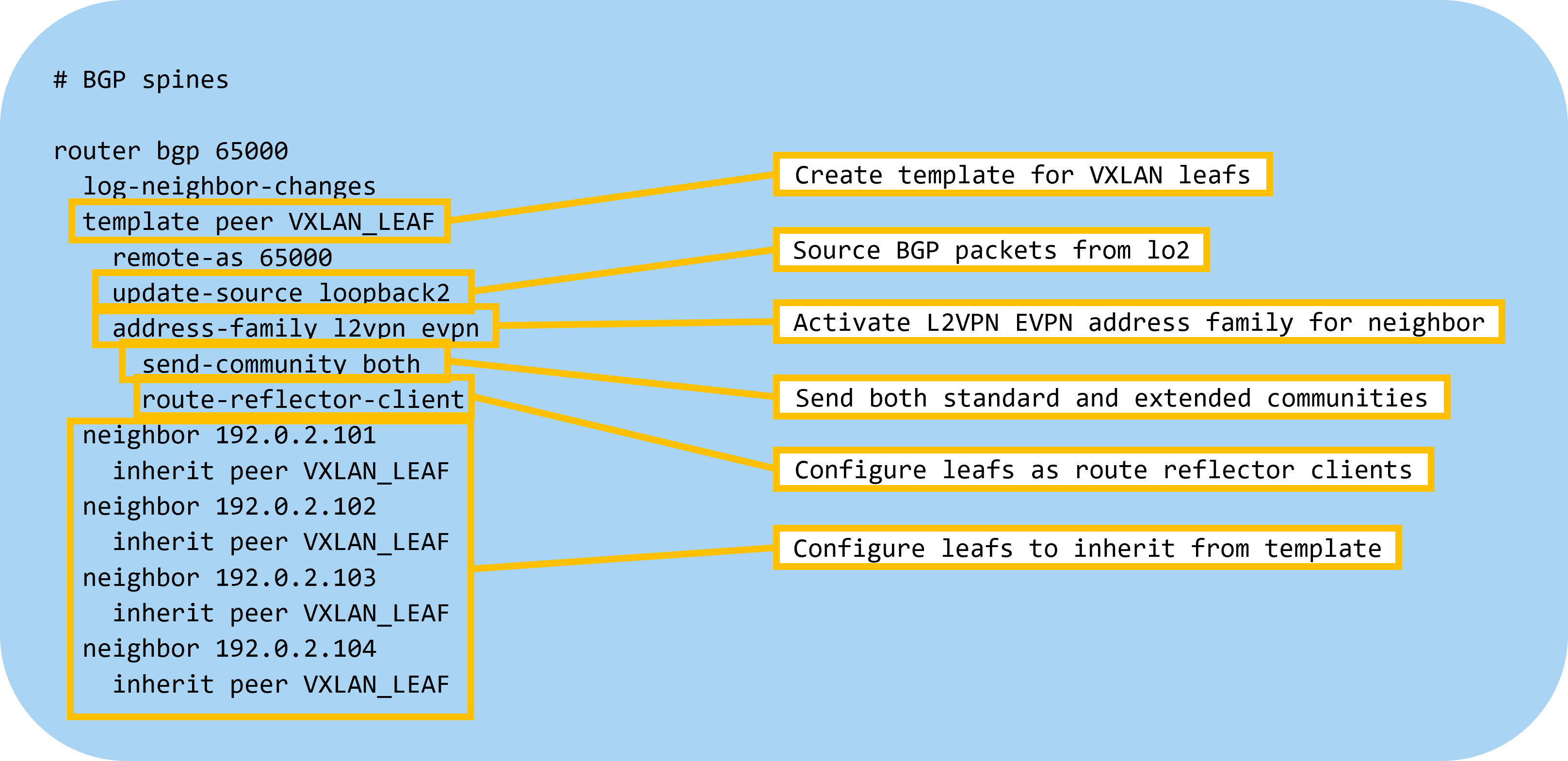
Then let’s configure BGP on the leafs:
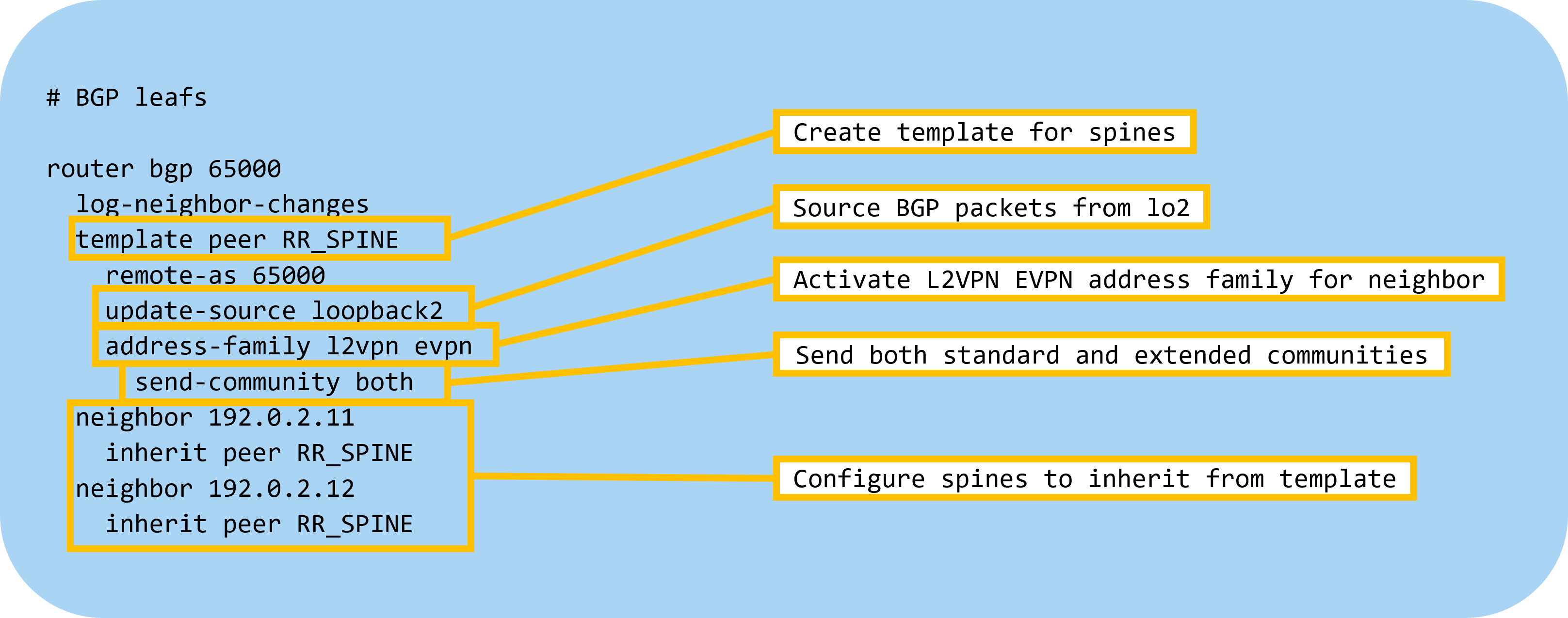
The devices will now advertise that they have AFI L2VPN and SAFI EVPN:
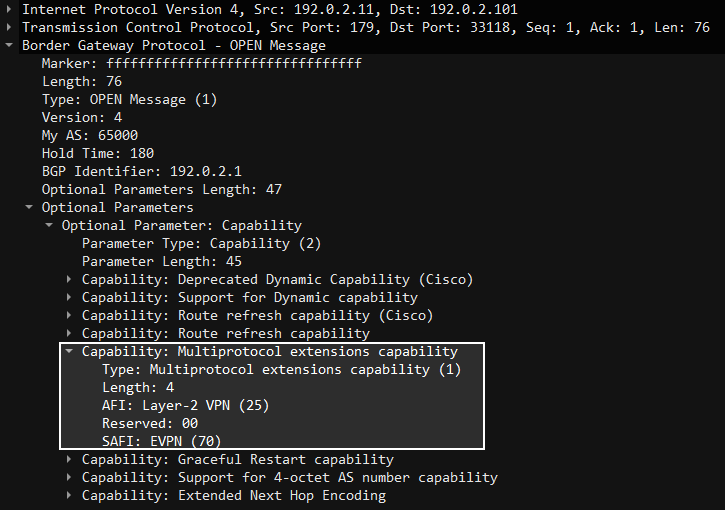
The BGP sessions are now up:
Leaf1# show bgp l2vpn evpn sum
BGP summary information for VRF default, address family L2VPN EVPN
BGP router identifier 192.0.2.3, local AS number 65000
BGP table version is 4, L2VPN EVPN config peers  Continue reading
Cloud Notes: AWS TGW
https://codingpackets.com/blog/cloud-notes-aws-tgw
Cloud Notes: AWS TGW
https://codingpackets.com/blog/cloud-notes-aws-tgw
Tigera Closes Out 2023 with Significant Momentum for Calico as Demand for Container Security Accelerates
As 2023 comes to a close, we’re happy to report that we’ve had a successful year full of powerful product advancements and notable third-party recognition.
Key product enhancements
- Plug-and-play Runtime Threat Defense – Combines signature and behavior-based threat detection to protect against both known and zero-day threats. Calico Runtime Threat Defense provides preconfigured threat detectors to detect most common MITRE attack techniques for container and network-based attacks.
- Security Score and Recommended Actions – Provides an unparalleled view of security risks, enabling enterprises to identify, prioritize and mitigate them swiftly.
- Streamlined autoscaling with Windows HostProcess Container – Simplifies Kubernetes operations while saving time and resources.
- IPv6 support for eBPF – Empowers enterprises to enhance the performance and scalability of their applications, ensuring they meet the demands of modern workloads.
- Calico cluster mesh for VxLAN – Offers a scalable solution for multi-cluster deployments, enabling multi-cluster pod-to-pod connectivity and enhancing security and visibility.
With these new enhancements, Calico is the industry’s most complete solution for securing and observing Kubernetes environments.
User feedback
Calico Open Source users represent a robust sample of IT professionals from across industries and use cases. We polled these users to better understand their needs and compiled the insights into Continue reading
Introduction to EVPN In VXLAN Networks
In previous posts I described VXLAN using flood and learn behavior using multicast or ingress replication. The drawback to flood and learn is that frames need to be flooded/replicated for the VTEPs to learn of each other and for learning what MAC addresses are available through each VTEP. This isn’t very efficient. Isn’t there a better way of learning this information? This is where Ethernet VPN (EVPN) comes into play. What is it? As you know, BGP can carry all sorts of information and EVPN is just BGP with support to carry information about VTEPs, MAC addresses, IP addresses, VRFs, and some other stuff. What does EVPN provide us?
- Ability to discover VTEPs.
- Messaging of MAC prefixes and IP prefixes.
- Reduced amount of flooding.
- Optionally ARP suppression.
Note that the use of EVPN doesn’t entirely remove the need for flooding using multicast or ingress replication. Hosts still need to use ARP/ND to find the MAC address of each other, although ARP suppression could potentially help with that. There may also be protocols such as DHCP that leverage broadcast for some messages. In addition, there may be silent hosts in the fabric where VTEP is not aware that the host is Continue reading
Cloud Notes: AWS VGW
https://codingpackets.com/blog/cloud-notes-aws-vgw
Cisco Acquires Isovalent: A Big Win for Cloud-Native Network Security and a Validation of Tigera’s Vision
This week’s news of Cisco’s intent to acquire Isovalent sends an important message to the cloud security ecosystem: network security is no longer an afterthought in the cloud-native world. It’s now a critical component of any robust security posture for cloud-native applications. This move not only validates the work of the Isovalent team in evangelizing this essential category but also underscores the vision Tigera has pioneered since 2016 with Project Calico.
I would first like to extend heartfelt congratulations to Isovalent and its founders on their well-deserved exit and thank them for their invaluable contributions to cloud-native network security.
Cisco’s acquisition recognizes that traditional perimeter security solutions simply don’t translate to the dynamic, distributed nature of cloud-native architectures and that network security is a critical part of a good cloud-native security design. This is a fundamental truth that Tigera identified early on with Project Calico. We saw the need for a fundamentally different approach to network security, one tailored to the unique demands of containerized and distributed applications running in the cloud.
Calico Open Source, born from this vision, has become the industry leader in container networking and security. It now powers over 100 million containers across 8 million+ Continue reading
Calico monthly roundup: December 2023

Welcome to the Calico monthly roundup: December edition! From open source news to live events, we have exciting updates to share—let’s get into it!
Tigera has achieved AWS Security Competency status!
Tigera has gained a new AWS Security Competency, which we’re proud to add to our already existing AWS Containers Software Competency. Read about the addition of our newest security competency. |
Find your Cluster Security Score
Calico Cloud is releasing new capabilities for security posture management called Security Scoring and Recommended Actions. Start measuring and tracking your security posture. |
Customer case study: Leader-bet
Calico provides container security and compliance for online gaming giant, Leader-bet. Read our case study to learn more. |
 Comparing NGFW container firewalls with Calico container firewall Comparing NGFW container firewalls with Calico container firewall
Learn how to establish robust firewall policies with just code or a single click for advanced threat protection using behavior-based learning and IDS/IPS integrated with the firewall. |
Open source news
Calico v3.27 is out  and there are a lot of new features, updates, and improvements that are packed into this release. Here is a breakdown of the most important changes:
- Significant performance improvements, especially for extremely large clusters
- Calico VPP Continue reading
D2C227: Platforms Reduce Cognitive Overhead
Today's Day Two Cloud explores platform engineering. We talk about how to balance the needs of infrastructure engineers and developers, how to shift to a delivery model, and how to account for human personalities and operational processes in your platform. Tools and tech are essential, but you also have to consider and incorporate the non-tech stuff.
The post D2C227: Platforms Reduce Cognitive Overhead appeared first on Packet Pushers.
D2C227: Platforms Reduce Cognitive Overhead
Today’s show explores platform engineering. Guest Chad McElligott has thought a lot about the practice of platform engineering, and a blog post and talk he gave about the subject inspired us to reach out and have a conversation. Chad describes platform engineering as “the application of a Product Mindset to supporting your engineering organization’s software... Read more »2024 Goals
https://codingpackets.com/blog/2024-goals
The RFC Process
I’ve just finished a seven-part series over at Packets Pushers about the process of writing and publishing an RFC. Even if you don’t ever plan to write a draft or participate in the IETF, this series will give you a better idea of the work that goes into creating new standards and IETF documents.
The working group chairs asked if your draft should become a working group item, and the consensus was to accept! It might seem like your draft is home free Continue reading
2023 Year In Review
https://codingpackets.com/blog/2023-year-in-review
Hedge 206: Taking Care of Yourself with Ethan Banks
As we reach the end of what has been a hard two-year stretch for what seems like the entire world, Ethan Banks joins Tom, Eyvonne, and Russ to talk about the importance of taking care of yourself. In the midst of radical changes, you can apply self-discipline to make your little part of the world a better place by keeping yourself sane, fit, and well-rested.