Accelerating Node.js applications with HTTP/2 Server Push
In April, we announced support for HTTP/2 Server Push via the HTTP Link header. My coworker John has demonstrated how easy it is to add Server Push to an example PHP application.
 CC BY 2.0 image by Nicky Fernandes
We wanted to make it easy to improve the performance of contemporary websites built with Node.js. we developed the netjet middleware to parse the generated HTML and automatically add the Link headers. When used with an example Express application you can see the headers being added:
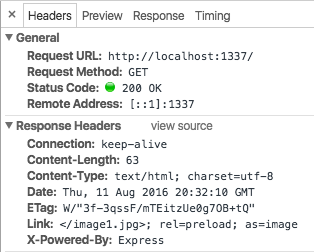
We use Ghost to power this blog, so if your browser supports HTTP/2 you have already benefited from Server Push without realizing it! More on that below.
In netjet, we use the PostHTML project to parse the HTML with a custom plugin. Right now it is looking for images, scripts and external stylesheets. You can implement this same technique in other environments too.
Putting an HTML parser in the response stack has a downside: it will increase the page load latency (or "time to first byte"). In most cases, the added latency will be overshadowed by other parts of your application, such as database access. However, netjet includes an adjustable LRU cache keyed Continue reading
OFFSITE Cloud Computing And Data Center Operator Announces WAN Optimization with Noction IRP
OFFSITE, an innovative cloud computing and data center hosting company today announced the deployment of Noction IRP in its network infrastructure. “As
The post OFFSITE Cloud Computing And Data Center Operator Announces WAN Optimization with Noction IRP appeared first on Noction.
Python Network Programming: Generating A Traceback
This excerpt from "Learning Python Network Programming" looks at how Python lets us interface with the network stack.
Why You Finally Really Need IPv6
Still think you can ignore IPv6? In this episode of Network Matters with Ethan Banks, learn why putting off a migration to IPv6 can adversely affect your business. Ethan explains the performance issues that can arise and the limitations of address translation.
We Need to Educate Our Peers
Failure to use DNS, IP addresses embedded in the code, ignoring the physical realities (like bandwidth and latency)… the list of mistakes that eventually get dumped into networking engineer’s lap is depressing.
It’s easy to reach the conclusion that the people making those mistakes must be stupid or lazy… but in reality most of them never realized they were causing someone else problems because nobody told them so.
Read more ...The Importance of the Network Software Supply Chain
At Networking Field Day 12, we heard from a number of vendors that offered solutions to some common enterprise network problems, from management, to security, and more.
However, there were a few presentations that didn’t seem directly applicable to the canonical network admin’s day-to-day. This was made clear by some comments by delegates in the room, as well as others tweeting about the presentation.
Accelerating the x86 Data Plane
Intel, for instance, spent a significant amount of time discussing the Data Plane Development Kit (DPDK), which provides a different way of leveraging CPU resources for fast packet processing.
In their presentation, Intel explained the various ways that they’ve circumvented some of the existing bottlenecks in the Linux kernel, resulting in a big performance increase for applications sending and receiving data on the network. DPDK operates in user space, meaning the traditional overhead associated with copying memory resources between user and kernel space is avoided. In addition, techniques like parallel processing and poll mode drivers (as opposed to the traditional interrupt processing model) means packet processing can be done much more efficiently, resulting in better performance.
This is all great (and as a software nerd, very interesting to me Continue reading
The Importance of the Network Software Supply Chain
At Networking Field Day 12, we heard from a number of vendors that offered solutions to some common enterprise network problems, from management, to security, and more. However, there were a few presentations that didn’t seem directly applicable to the canonical network admin’s day-to-day. This was made clear by some comments by delegates in the room, as well as others tweeting about the presentation. Accelerating the x86 Data Plane Intel, for instance, spent a significant amount of time discussing the Data Plane Development Kit (DPDK), which provides a different way of leveraging CPU resources for fast packet processing.The Importance of the Network Software Supply Chain
At Networking Field Day 12, we heard from a number of vendors that offered solutions to some common enterprise network problems, from management, to security, and more. However, there were a few presentations that didn’t seem directly applicable to the canonical network admin’s day-to-day. This was made clear by some comments by delegates in the room, as well as others tweeting about the presentation. Accelerating the x86 Data Plane Intel, for instance, spent a significant amount of time discussing the Data Plane Development Kit (DPDK), which provides a different way of leveraging CPU resources for fast packet processing.VMware NSX is the Networking Bridge to a Multi-Cloud Future
Across industries, the race is on to digital transformation. It’s all about business innovation and redefinition. The transformations are huge: Tesla isn’t just a car manufacturer; it’s a software business that makes cars. CITI is a software business that makes loans. GE is a software business that makes industrial equipment.
Register for this VMworld 2016 session to learn about the future of VMware NSX
Like most of the customers we talk with, your business is also going through a transformation. Lots of change. Lots of disruption. Lots of innovation. More apps, representing more services and new business models. More lines of business empowered to make decisions about the IT they’ll use to take their innovations to market. And there’s no doubt that a huge enabler of all of this has been the cloud.
Consider what some of the leading industry pundits are predicting:
- By 2019, the majority of virtual machines (VMs) will be delivered by IaaS providers.
- By 2019, more than 30% of the 100 largest vendors’ new software investments will have shifted from cloud-first to cloud-only.
- By 2020, a corporate “no-cloud” policy will be as rare as a “no-internet” policy is today
- By 2020, 50% of applications running Continue reading