SDxCentral’s Weekly Roundup — December 8, 2017
 ETSI launches AR group; Canonical and Rancher Labs build joint platform; VeloCloud extends to AWS.
ETSI launches AR group; Canonical and Rancher Labs build joint platform; VeloCloud extends to AWS.
Kubernetes has quickly become a key technology in the emerging containerized application environment since it was first announced by Google engineers just more than three years ago, catching hold as the primary container orchestration tool used by hyperscalers, HPC organizations and enterprises and overshadowing similar tools like Docker Swarm, Mesos and OpenStack.
Born from earlier internal Google projects Borg and Omega, the open-source Kubernetes has been embraced by top cloud providers and growing numbers of enterprises, and support is growing among datacenter infrastructure software vendors.
Red Hat has built out its OpenShift cloud application platform based on both …
No Slowdown in Sight for Kubernetes was written by Nicole Hemsoth at The Next Platform.
 CloudCenter also compares costs of running applications in public and private clouds.
Hey, it's HighScalability time:
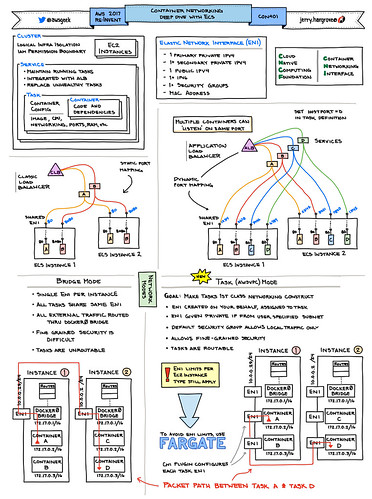
AWS Geek creates spectacular visual summaries.
If you like this sort of Stuff then please support me on Patreon. And please recommend my new book—Explain the Cloud Like I'm 10—to those looking to understand the cloud. I think they'll like it.
 The Extensible Operating System runs across all of Arista’s products.
In 4.2 release we have splitted our oVirt Ansible roles into separate RPM packages and also separate git repositories, so it is possible for user to install specific role either from Ansible Galaxy or as RPM package.
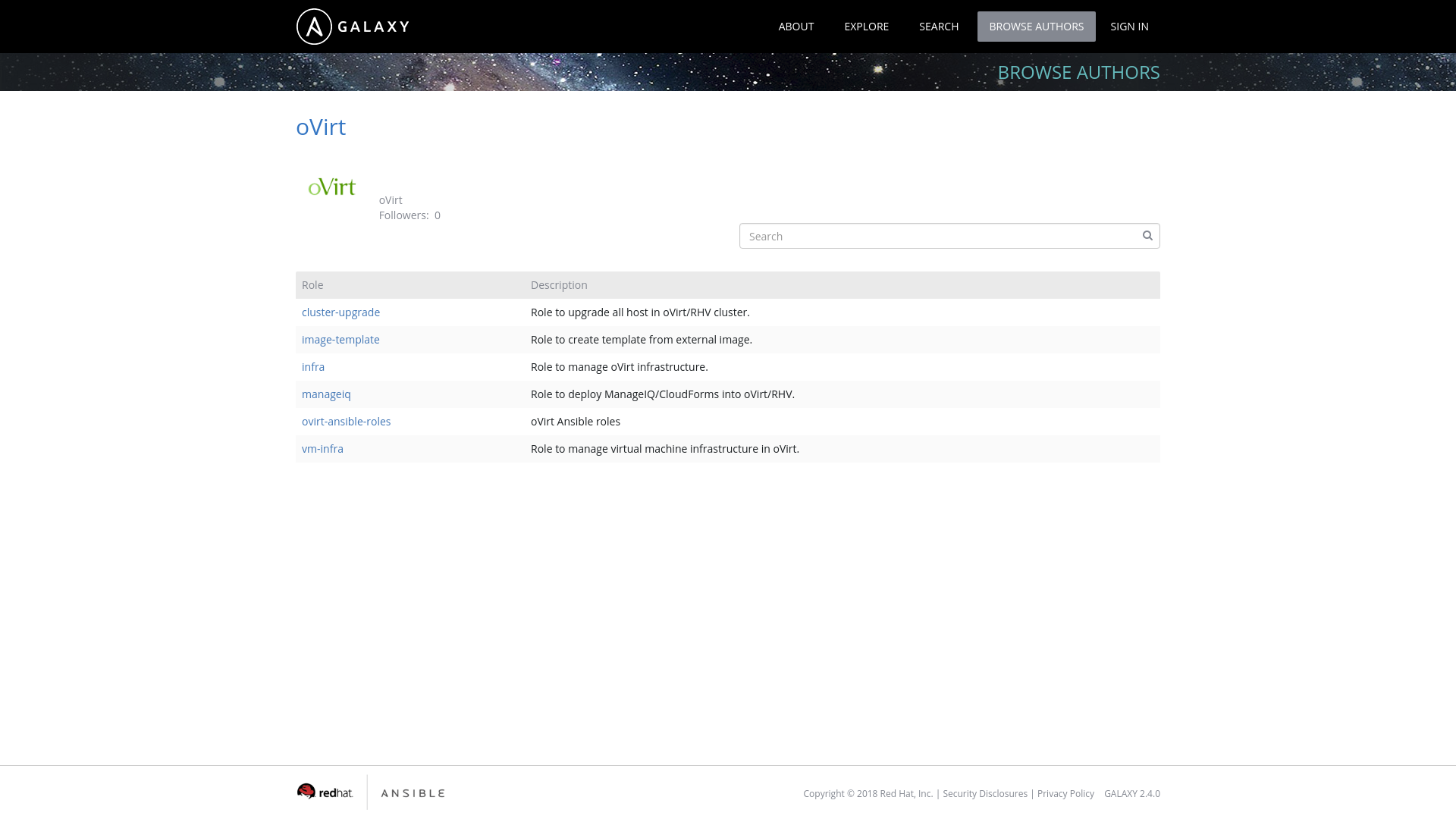
The reason to split the roles into separate packages and git repositories was mainly the usage from the AWX/Ansible Tower. Since Ansible Galaxy is only integrated with github you need to store your Ansible role in single git repostiory in order to have separate Ansible role in Galaxy. Previously we used one single repository where we have stored all the roles, but because of that manual configuration was required to make those roles usable in AWX/Ansible Tower. So as you can see on image below we now have many roles in Ansible Galaxy under oVirt user:
There are still two ways how to install the roles: either using Ansible Galaxy or using RPM package available from oVirt repositories.
You are now able to install just a single role and not necessarily all of them at once like in previous versions For example to install just oVirt cluster upgrade role, you have to run Continue reading
In 4.2 release we have splitted our oVirt Ansible roles into separate RPM packages and also separate git repositories, so it is possible for user to install specific role either from Ansible Galaxy or as RPM package.
The reason to split the roles into separate packages and git repositories was mainly the usage from the AWX/Ansible Tower. Since Ansible Galaxy is only integrated with github you need to store your Ansible role in single git repostiory in order to have separate Ansible role in Galaxy. Previously we used one single repository where we have stored all the roles, but because of that manual configuration was required to make those roles usable in AWX/Ansible Tower. So as you can see on image below we now have many roles in Ansible Galaxy under oVirt user:
There are still two ways how to install the roles: either using Ansible Galaxy or using RPM package available from oVirt repositories.
You are now able to install just a single role and not necessarily all of them at once like in previous versions For example to install just oVirt cluster upgrade role, you have to run Continue reading
In 4.2 release we have introduced a possibility to customize the host-deploy process by running the Ansible post-tasks after the host-deploy process successfully finishes.
Prior to oVirt 4.2 release administrators could customize host's firewall rules using engine-config option IPTablesConfigSiteCustom.
Unfortunately writing custom iptables rules into string value to be used in engine-config was very user unfriendly and using engine-config to provide custom
firewalld rules would be even much worse. Because of above we have introduced Ansible integration as a part of host deploy flow, which allows administrators to
add any custom actions executed on the host during host deploy flow.
As part of this role we also include additional tasks, which could be written by the user, to modify the host-deploy process for example to open some more FirewallD ports.
Those additional tasks can be added to following file:
/etc/ovirt-engine/ansible/ovirt-host-deploy-post-tasks.yml
This post-task file is executed as part of host-deploy process just before setup network invocation.
An example post-tasks file is provided by ovirt-engine installation, at following location:
/etc/ovirt-engine/ansible/ovirt-host-deploy-post-tasks.yml.example
This is just an example file, to add some task into host deploy flow, you need to create below mentioned file Continue reading
 CC-BY-SA 2.0 image by Phil! Gold
Since joining Cloudflare I’ve always known that as we grew, incredible things would be possible. It’s been a long held ambition to work in an organisation with the scale to answer a very controversial and difficult question. To do so would require a collection of individuals with a depth of experience, passion, dedication & above all collaborative spirit.
As Cloudflare’s London office has grown in the last 4 years I believe 2017 is the year we reach the tipping point where this is possible. A paradigm-shift in the type of challenges Cloudflare is able to tackle. We could finally sample every commercially available mince pie in existence before the 1st of December. In doing so, we would know conclusively which mince pie we should all be buying over Christmas to share with our friends & families.
For the uninitiated, a Mince Pie is “a sweet pie of British origin, filled with a mixture of dried fruits and spices called mincemeat, that is traditionally served during the Christmas season in the English world.” - Wikipedia for Mince Pie
The original Mince Pie was typically filled with a mixture Continue reading

As you may have heard this week, Barefoot Networks is back in the news with the release of their newest product, Barefoot Deep Insight. Choosing to go down the road of naming a thing after what it actually does, Barefoot has created a solution to finding out why network packets are behaving the way they are.
It’s no secret that modern network monitoring is coming out of the Dark Ages. ping, traceroute, and SNMP aren’t exactly the best tools to be giving any kind of real information about things. They were designed for a different time with much less packet flow. Even Netflow can’t keep up with modern networks running at multi-gigabit speeds. And even if it could, it’s still missing in-flight data about network paths and packet delays.
Imagine standing outside of the Holland Tunnel. You know that a car entered at a specific time. And you see the car exit. But you don’t know what happened to the car in between. If the car takes 5 minutes to traverse the tunnel you have no way of knowing if that’s normal or not. Likewise, if a car is delayed and takes 7-8 minutes to exit Continue reading
The post The variability of Internet Traffic appeared first on Noction.
Welcome to Technology Short Take 91! It’s been a bit longer than usual since the last Tech Short Take (partly due to the US Thanksgiving holiday, partly due to vacation time, and partly due to business travel), so apologies for that. Still, there’s a great collection of links and articles here for you, so dig in and enjoy.
Learn best practices for configuring VMware SDDC components in this excerpt from "Building VMware Software-Defined Data Centers."
A while ago (in the time of big-versus-small buffers brouhaha) I asked JR Rivers to do a short presentation focusing on buffering requirements of data center switches. He started by describing typical buffer architectures you might find in data center switches.
 Telefónica is already testing the AppFormix Health Bot.
This post is a follow-up to a post from earlier this year on manually installing the Azure CLI on Fedora 25. I encourage you to refer back to that post for a bit of background. I’m writing this post because the procedure for manually installing the Azure CLI on Fedora 27 is slightly different than the procedure for Fedora 25.
Here are the steps to install the Azure CLI into a Python virtual environment on Fedora 27. Even though they are almost identical to the Fedora 25 instructions (one additional package is required), I’m including all the information here for the sake of completeness.
Make sure that the “gcc”, “libffi-devel”, “python-devel”, “openssl-devel”, “python-pip”, and “redhat-rpm-config” packages are installed (you can use dnf to take care of this). Some of these packages may already be installed; during my testing with a Fedora 27 Cloud Base Vagrant image, these needed to be installed. (The change from Fedora 25 is the addition of the “redhat-rpm-config” package.)
Install virtualenv either with pip install virtualenv or dnf install python2-virtualenv. I used dnf, but I don’t think the method you use here will have any material effects.
Create a new Python virtual environment with Continue reading
