Tech Bytes: Switching On Fortinet’s Wired, Wireless Portfolio (Sponsored)
Today on the Tech Bytes podcast, sponsored by Fortinet, we’re going to dig into Fortinet’s campus and branch switching and wireless LAN portfolio. You might think of Fortinet primarily as a firewall company, but they do much more.
The post Tech Bytes: Switching On Fortinet’s Wired, Wireless Portfolio (Sponsored) appeared first on Packet Pushers.
Testing Out HPC On Google’s TPU Matrix Engines
In an ideal platform cloud, you would not know or care what the underlying hardware was and how it was composed to run your HPC – and now AI – applications. …
Testing Out HPC On Google’s TPU Matrix Engines was written by Timothy Prickett Morgan at The Next Platform.
Is an IP Address Protected Information?
My third article on privacy and networking is up over at Packet Pushers—
Canadian Carriers Chase the Digital Economy with Buyouts and 5G Investments
These developments can help U.S.-based enterprise IT understand the business and technology of bringing 5G to offices and homes in Canada.Network Break 380: BT, Toshiba Trial Quantum Key Distribution; Juniper Expands Free Cert Training
This week's Network Break discusses quantum key distribution, a startup getting millions to develop an enterprise SONiC distribution, Juniper expanding free cert training, quarterly financial results, and more tech news.NSA’s Zero-Trust Guidelines: An Explainer
The NSA believes that organizations should adopt a crawl, walk, run approach where zero-trust migration is gradual. It should be a careful transition that does not undermine its security posture.Can IT Security Solutions Protect Private Cell Networks?
While the uses, and threats, are similar, the tools available to protect IP networks are mostly not applicable to advanced cellular private networks.5 Ways Cloud Computing Is Revolutionizing Healthcare
Cloud-based healthcare systems, along with rapidly evolving technologies like big data, AI, and the Internet of Things (IoT), are opening multiple healthcare delivery avenues.Cloudflare Relay Worker
Our Notification Center offers first class support for a variety of popular services (a list of which are available here). However, even with such extensive support, you may use a tool that isn’t on that list. In that case, it is possible to leverage Cloudflare Workers in combination with a generic webhook to deliver notifications to any service that accepts webhooks.
Today, we are excited to announce that we are open sourcing a Cloudflare Worker that will make it as easy as possible for you to transform our generic webhook response into any format you require. Here’s how to do it.
For this example, we are going to write a Cloudflare Worker that takes a generic webhook response, transforms it into the correct format and delivers it to Rocket Chat, a popular customer service messaging platform. When Cloudflare sends you a generic webhook, it will have the following schema, where “text” and “data” will vary depending on the alert that has fired:
{
   "name": "Your custom webhook",
   "text": "The alert text",
   "data": {
       "some": "further",
       "info": [
           "about",
           "your",
           "alert",
           "in"
       ],
       "json": "format"
   },
   "ts": 123456789
}
Whereas Rocket Chat is looking for this format:
{
"text": "Example Continue readingWEBINAR: ISP Design – Separation of Network Functions
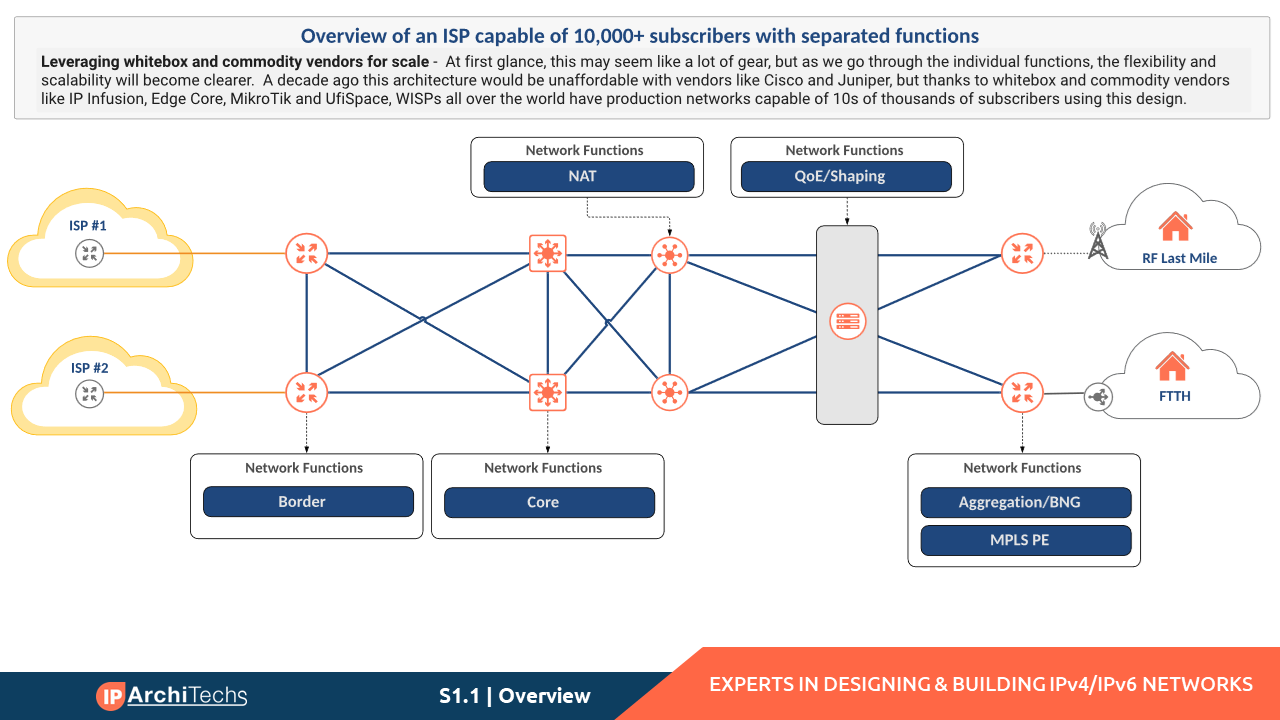
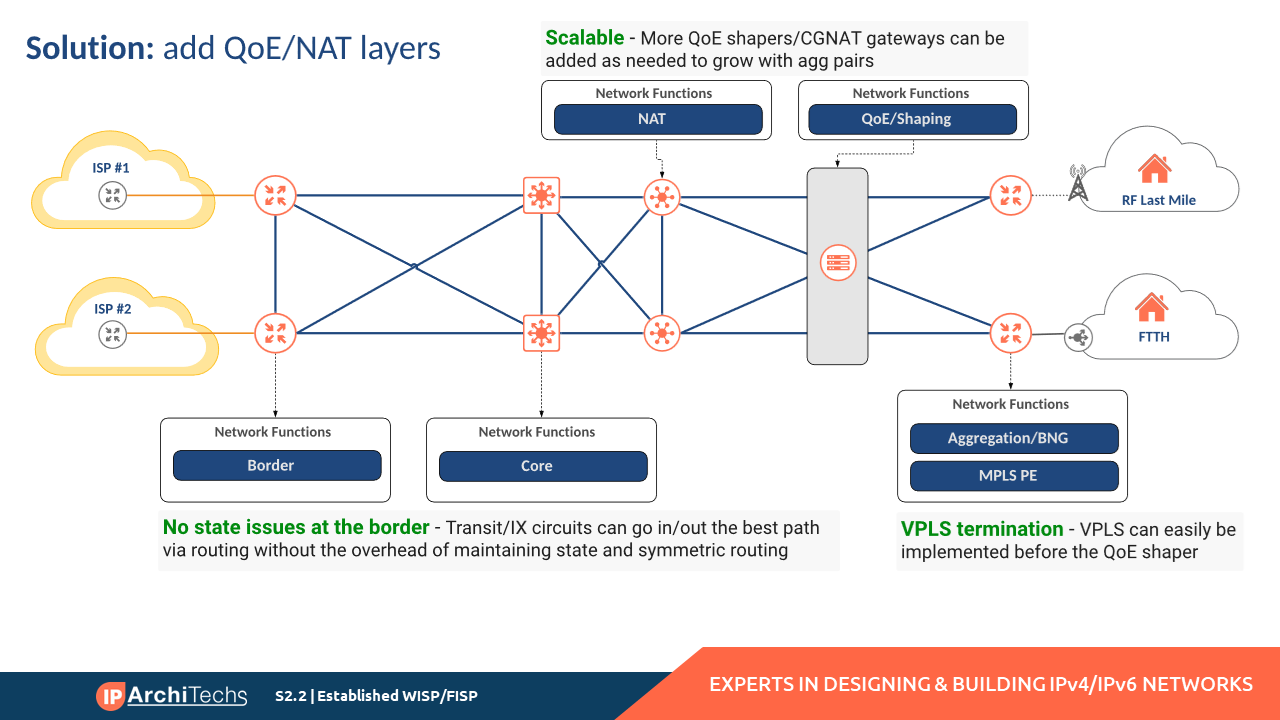
Recently, we recorded a webinar to explain a design concept frequently used by iparchitechs.com to build and migrate WISP, FISP and Telco networks – separation of network functions. It centers around simplification of roles within an ISP network. It also explores the use of lower-cost commodity network equipment to maximize the service area for a given ISP footprint while meeting key requirements like scale, redundancy and capacity.
Topics that were covered include:
- What are network functions?
- Design examples for WISP/FISP and Telco
- Equipment and budget considerations
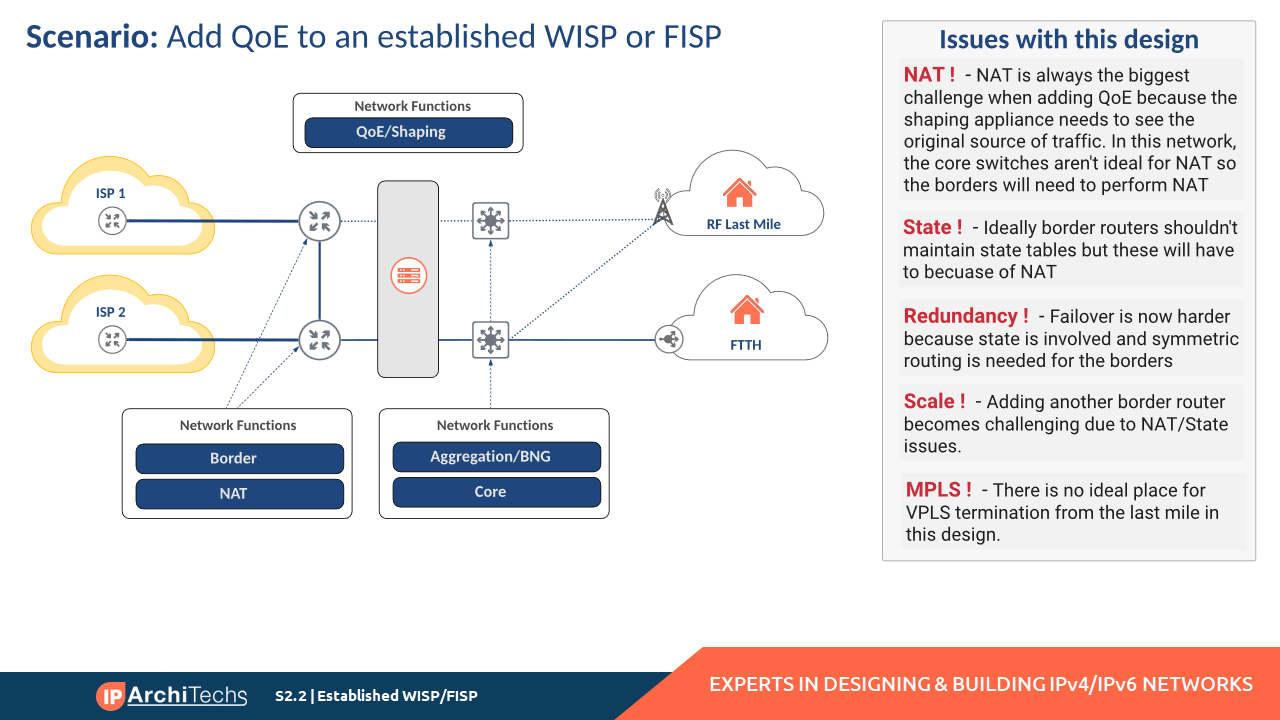
Here is an example of solving design/operational issues with network function separation:
Link to the webinar and slides:
Webinar: Webinar Recording
Slides: Slide Deck

Are we there yet?
This transition to IPv6 has been going on for 20 years now, and if there was any urgency that was instilled in the effort by the prospect of IPv4 address exhaustion then we’ve been living with exhaustion for a decade now. So perhaps it's time to ask the question: How much longer is this transition going to take?How To Send Message to Multiple Friends on Facebook
I recently programmed Python scripts that send a predefined message to all my Facebook friends. […]
The post How To Send Message to Multiple Friends on Facebook first appeared on Brezular's Blog.
How To Send Message to Multiple Friends on Facebook
I recently programmed Python scripts that send a predefined message to all my Facebook friends. The friend.py script detects all the friend links and returns them to send_message_fb.py as a list. The config.py script contains the links of the friends that should be excluded from receiving the message. The message is also defined in the […]Continue reading...
BGP MPLS-VPN Option B
The Cisco documentation about this call it Inter-AS Option B with the use case being to extend LSPs between sites over the one link. As Option B is the only MPLS-VPN method supported by Cisco SD-WAN I wanted to get a better understanding of how it works aswell as see if it could be used to extend multi-VRF prefixes between edge routers and a core switch within the same AS (rather than using Option C with LDP).
Practical OpenStack #004. Build Real World Setup
Hello my friend,
Believe or not, but the vast majority of the OpenStack Certified OpenStack Administrator (COA) trainings are not touching the architecture of the OpenStack clouds. Instead, they focus solely on the operational aspect, so that the COA certified engineer can manage OpenStack cloud. We believe it is not correct, as without how something is build it is very difficult to troubleshoot something or even guarantee a decent level of performance. Hence, we show today the full scale OpenStack cluster setup, which you can build yourself in your lab, as well as hyper converged cluster, which is suitable for building of 5G far edge locations.
Don’t Forget to Learn How to Automate All the Things
Video to the Topic
Need Help? Contract Us
If you need a trusted and experienced partner to automate your network and IT infrastructure, get in touch with us.
P.S.
If you have further questions or you need help with your networks, we are happy to assist you, just send us a message. Also don’t forget to share the article on your social media, if you like it.
BR,
Anton Karneliuk
Practical OpenStack #003. Why these videos
Hello my friend,
OpenStack isn’t new, since the first release on 21 October 2010, the 25 releases were already published bringing new capabilities and services to OpenStack users. Moreover, these days the micro services leveraging Kubernetes and containers are the main trend for application development, whereas virtual machines going in the past. That’s true to a degree; however, the OpenStack is a perfect platform to build a normalised infrastructure for your Kubernetes, which is by the way provide some key services to Kubernetes, such as load balancing.
Don’t Forget to Learn How to Automate All the Things
Video to the Topic
Need Help? Contract Us
If you need a trusted and experienced partner to automate your network and IT infrastructure, get in touch with us.
P.S.
If you have further questions or you need help with your networks, we are happy to assist you, just send us a message. Also don’t forget to share the article on your social media, if you like it.
BR,
Anton Karneliuk
Practical OpenStack #002. Why OpenStack
Hello my friend,
In the previous video you have learn about the core components of any cloud. It was quite straightforward when we remove all unneeded hype, isn’t it? At the same time, you may start thinking “Hey, that’s cool. How can I get it?” That’s a very good question. And in the new video we are covering the principles of interacting with the cloud from the user perspective and provide a quick overview of the existing public and private clouds as well as highlights, why we have chosen OpenStack as a cloud platform for Karneliuk projects and for these videos.
Don’t Forget to Learn How to Automate All the Things
Video to the Topic
Need Help? Contract Us
If you need a trusted and experienced partner to automate your network and IT infrastructure, get in touch with us.
P.S.
If you have further questions or you need help with your networks, we are happy to assist you, just send us a message. Also don’t forget to share the article on your social media, if you like it.
BR,
Anton Karneliuk