Here’s one of the secrets to AWS’s unprecedented scale and financial success: they quickly figured out that some services are not worth delivering. Most everyone else believes in building snowflake single-customer solutions to solve imaginary problems, effectively losing money while doing so.
Here’s one of the secrets to AWS’s unprecedented scale and financial success: they figured out very early on that some services are not worth delivering. Most everyone else believes in building snowflake single-customer solutions to solve imaginary problems, effectively losing money while doing so.
In a previous
post
I showed you how to configure a port mirror in Proxmox.
In that post, I used a bit of a dirty hack (bash scripts and crontab)
to ensure the port mirror is activated if the host or the VM
reboots.
Luckily for me, I have some really smart colleagues who mentioned
...continue reading
In a previous
post
I showed you how to configure a port mirror in Proxmox.
In that post, I used a bit of a dirty hack (bash scripts and crontab)
to ensure the port mirror is activated if the host or the VM
reboots.
Luckily for me, I have some really smart colleagues who mentioned
...continue reading
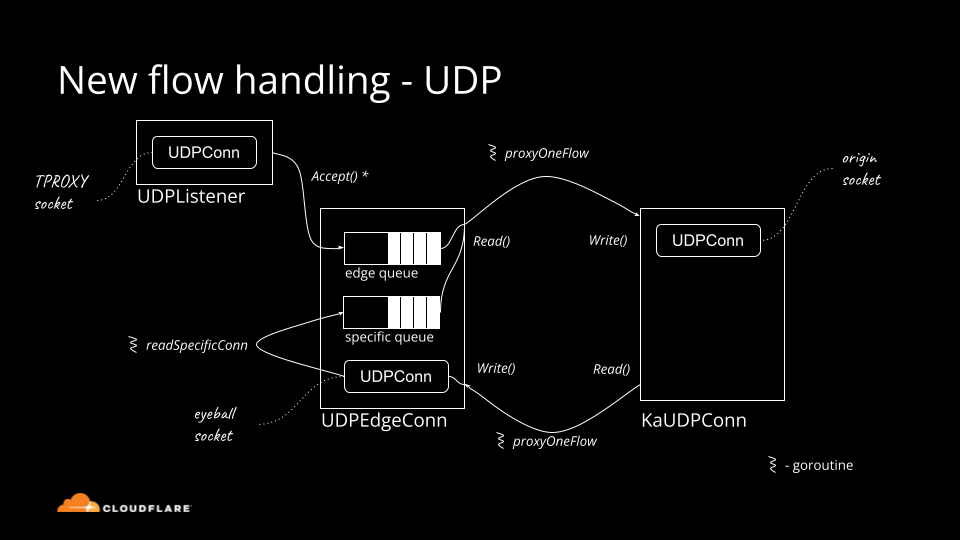
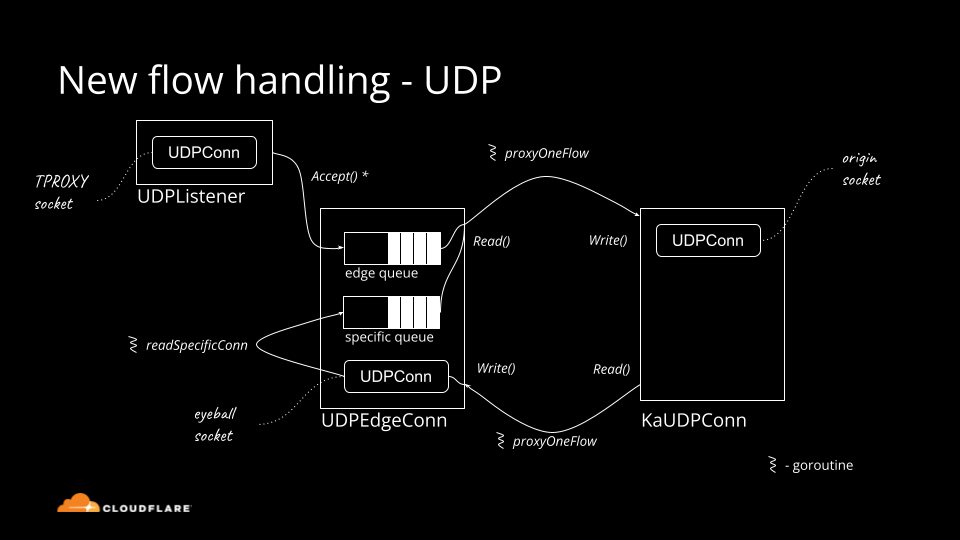
Snippet from internal presentation about UDP inner workings in Spectrum. Who said UDP is simple!
Historically Cloudflare's core competency was operating an HTTP reverse proxy. We've spent significant effort optimizing traditional HTTP/1.1 and HTTP/2 servers running on top of TCP. Recently though, we started operating big scale stateful UDP services.
Stateful UDP gains popularity for a number of reasons:
— QUIC is a new transport protocol based on UDP, it powers HTTP/3. We see the adoption accelerating.
— We operate WARP — our Wireguard protocol based tunneling service — which uses UDP under the hood.
Although UDP is simple in principle, there is a lot of domain knowledge needed to run things at scale. In this blog post we'll cover the basics: all you need to know about UDP servers to get started.
Connected vs unconnected
How do you "accept" connections on a UDP server? If you are using unconnected sockets, you generally don't.
But let's start with the basics. UDP sockets can be "connected" (or "established") or "unconnected". Connected sockets have a full 4-tuple associated {source ip, source port, destination ip, destination port}, unconnected Continue reading
A friend of mine sent me a link to a lengthy convoluted document describing the 17-step procedure (with the last step having 10 micro-steps) to follow if you want to run NSX manager on top of N-VDS, or as they call it: Deploy a Fully Collapsed vSphere Cluster NSX-T on Hosts Running N-VDS Switches1.
You might not be familiar with vSphere networking and the way NSX-T uses that (in which case I can highly recommend vSphere and NSX webinars), so here’s a CliffsNotes version of it: you want to put the management component of NSX-T on top of the virtual switch it’s managing, and make it accessible only through that virtual switch. What could possibly go wrong?
A friend of mine sent me a link to a lengthy convoluted document describing the 17-step procedure (with the last step having 10 micro-steps) to follow if you want to run NSX manager on top of N-VDS, or as they call it: Deploy a Fully Collapsed vSphere Cluster NSX-T on Hosts Running N-VDS Switches1.
You might not be familiar with vSphere networking and the way NSX-T uses that (in which case I can highly recommend vSphere and NSX webinars), so here’s a CliffsNotes version of it: you want to put the management component of NSX-T on top of the virtual switch it’s managing, and make it accessible only through that virtual switch. What could possibly go wrong?
No part of this blogpost could be reproduced, stored in a
retrieval system, or transmitted in any form or by any
means, electronic, mechanical or photocopying, recording,
or otherwise, for commercial purposes without the
prior permission of the author.
Network Automation Is So Popular These Days… Shall I Do Something Different?
Network Automaton is indeed getting more and more popular. There are a few reasons for that: one the one hand, networks getting more complex with all fancy SDx technologies (SDN, SD-WAN, SDA, etc); on the other hand, it is required to deliver new services quicker and quicker. Doing the things manually Continue reading
Flexible infrastructure choices and application architectures are changing the way that modern enterprises run their distributed environments (see Figure 1). Enterprises have become application-centric, investing significant effort and resources in continuous delivery goals and DevOps practices in order to automate routine IT and operations tasks.
Hardware-based application delivery controllers (ADCs) have been the staple of application delivery in data centers for the last two decades. However, these legacy load balancing solutions aren’t keeping up with the changes in modern, dynamic capacity and automation needs. Legacy hardware-based ADCs have become inflexible in the face of changing requirements, delaying application rollouts and causing overspending and overprovisioning in many cases. Most enterprises experience the “do more with less but faster” challenges shown in Figure 2 when it comes to rolling out new applications or updates, which can often take weeks.
With aggressive continuous delivery goals and ever-greater customer expectations, businesses are pushing back against delays due to hardware provisioning and manual configurations of ADCs that slow time to market for application deployments and updates.
Figure 1: Computing today: Evolving app architectures and infrastructure heterogeneity.
Figure 2: Legacy hardware-based load balancing solutions are not keeping up with the modern pace of business.
When we analyzed the financial reports coming out of hyperconverged platform maker Nutanix thirteen weeks ago, we lamented the fact that while Nutanix defined a new market and is one of the leaders in that market, it has been unable to expand its market fast enough to become a profitable company even after being in the field for more than a decade. …
The enterprise rush to embrace multicloud and hybrid cloud has not slowed over the past several years and, indeed, has only accelerated during the COVID-19 pandemic as organizations rushed to leverage cloud services to adapt to their suddenly highly distributed IT environments, with most of their employees working remotely. …
It's always better to catch misconfigurations and security issues earlier in your pipeline rather than later. That's especially true for cloud services where a simple configuration error can expose sensitive assets to the entire Internet. On today's Day Two Cloud podcast we discuss how to incorporate security checks into your Infrastructure-as-Code (IaC) workflows. Our guest is Christophe Tafani-Dereeper, a cloud security engineer.
It's always better to catch misconfigurations and security issues earlier in your pipeline rather than later. That's especially true for cloud services where a simple configuration error can expose sensitive assets to the entire Internet. On today's Day Two Cloud podcast we discuss how to incorporate security checks into your Infrastructure-as-Code (IaC) workflows. Our guest is Christophe Tafani-Dereeper, a cloud security engineer.
I got into an interesting debate after I published the Anycast Works Just Fine with MPLS/LDP blog post, and after a while it turned out we have a slightly different understanding what anycast means. Time to fall back to a Wikipedia definition:
Anycast is a network addressing and routing methodology in which a single destination IP address is shared by devices (generally servers) in multiple locations. Routers direct packets addressed to this destination to the location nearest the sender, using their normal decision-making algorithms, typically the lowest number of BGP network hops.
Based on that definition, any transport technology that allows the same IP address or prefix to be announced from several locations supports anycast. To make it a bit more challenging, I would add “and if there are multiple paths to the anycast destination that could be used for multipath forwarding1, they should all be used”.
I got into an interesting debate after I published the Anycast Works Just Fine with MPLS/LDP blog post, and after a while it turned out we have a slightly different understanding what anycast means. Time to fall back to a Wikipedia definition:
Anycast is a network addressing and routing methodology in which a single destination IP address is shared by devices (generally servers) in multiple locations. Routers direct packets addressed to this destination to the location nearest the sender, using their normal decision-making algorithms, typically the lowest number of BGP network hops.
Based on that definition, any transport technology that allows the same IP address or prefix to be announced from several locations supports anycast. To make it a bit more challenging, I would add “and if there are multiple paths to the anycast destination that could be used for multipath forwarding1, they should all be used”.
It is refreshing to find instances in the IT sector where competing groups with their own agendas work together for the common good and the improvement of systems everywhere. …
A single Kubernetes cluster expends a small percentage of its total available assigned resources on delivering in-cluster networking. We don’t have to be satisfied with this, though—achieving the lowest possible overhead can provide significant cost savings and performance improvements if you are running network-intensive workloads. This article explores and explains the improvements that can be achieved in Microsoft Azure using Calico eBPF in AKS, including reducing CPU usage, decreasing complexity, enabling easier compliance and troubleshooting, and more.
Before going into details about how exactly Calico takes advantage of eBPF, it is important to note that in the context of this article, Calico is viewed as an additional networking layer on top of Azure CNI, providing functionality that turbocharges its performance. In particular, the standard instructions for installing Calico’s network policy engine with AKS use a version of Calico that pre-dates eBPF mode.
Accelerating network performance
Test methodology
To show how Calico accelerates AKS network performance using eBPF, the Calico team ran a series of network performance benchmarks based on the k8s-bench-suite. These performance benchmarks compared the latest Calico eBPF data plane (using the iptables data plane) with a vanilla AKS cluster.
Tests were run using Standard_D2s_v3 nodes, which are a Continue reading
When building out network labs, often multiple people will need access to the lab. The main way right now is to use something like EVE-NG or GNS3 to provide access.
There are 2 downsides to this method. The first is that your server is exposed to the internet and if your usernames/passwords aren’t strong enough, your server can become compromised. The second is that sometimes you may not want everyone to be able to add or edit to the lab topology.
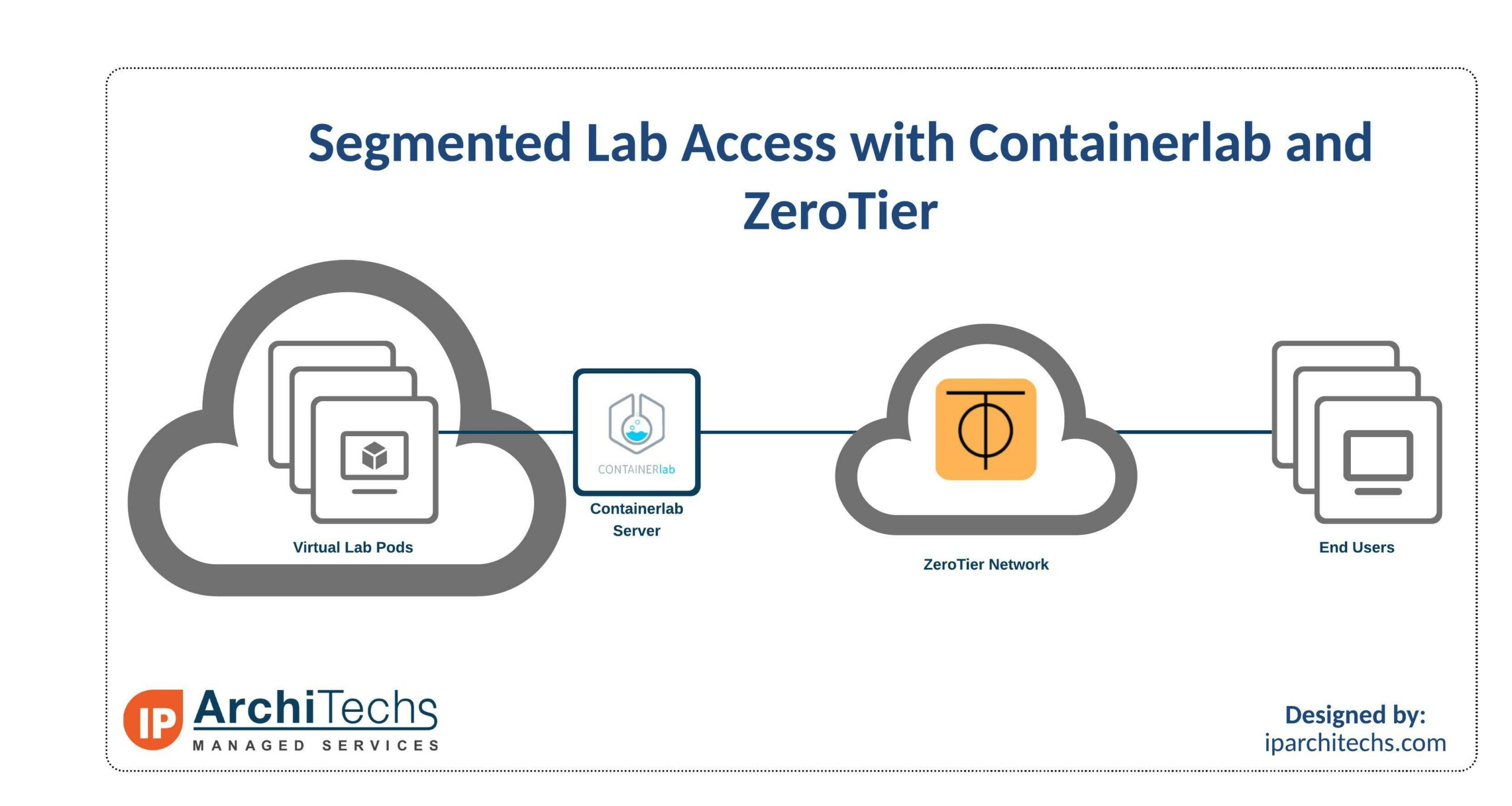
The solution to this is using Containerlab and ZeroTier. This setup is great for things like testing new hires, training classes, or for providing lab access to others on a limited basis.
What is Containerlab?
Containerlab is a container orchestrating tool for managing container-based networking labs. It doesn’t just support Container based Network Operating Systems though. Through vrnetlab, there is support for a wide variety of commonly used NOSes: Mikrotik RouterOS, Nokia SROS, Juniper vMX and vQFX, and many more.
Configs are text based making it easy to add/update links between nodes. The lab does need to be destroyed and redeployed when adding/removing links. With some tools to generate configs, it’s easy to spin up a 500+ node Continue reading
While Deep Learning is in many different categories ( like Vision, Text (NLP), Audio, Recommendation system), My interest is always in Vision or anything which involves images, I somehow to find it closer to embed into a hobby than other aspects
Any Part of Image-based Learning, involves a set of Images that are needed to train the model on what is our intention to recognize parameters, for example, consider the below image set called CIFAR-10.
https://www.cs.toronto.edu/~kriz/cifar.html — This is the URL, this has a predefined collection of 10 different categories of Images that can be used for training the classifier of an image if the Image is among any of the 10 categories.
Ordinarily, Let us say you wanted to categorize a Dog in a given picture or you had a scenario where you had months collected time-lapse photos and wanted to categorize Dog and filter out the images which involved Dog in it, you don’t have to collect so many images to train, test and build the model, Data is readily available