A Detailed Look at the Calico Ingress Gateway
The Kubernetes community recently announced that Ingress NGINX, one of the most widely used Ingress controllers, will be retired. This change means teams need to plan for a secure, modern, and future-proof alternative for managing Kubernetes traffic. The Kubernetes SIG Network and the Security Response Committee confirmed that the project will only receive basic maintenance until March 2026. After that, there will be no new releases, bug fixes, or security updates.
For organizations that have depended on Ingress NGINX for many years, this is more than a routine update. It represents a major change in how Kubernetes ingress traffic will need to be managed going forward. This raises an important question:
What should replace Ingress NGINX in a way that is secure, modern, standardized, and reliable for the long term?
As the industry moves toward the Kubernetes Gateway API and expectations for security and reliability grow, this is the right time to adopt an ingress solution designed for the future.
Calico Ingress Gateway is a 100% upstream distribution of the Envoy Gateway, supported by Tigera’s enterprise expertise, and offers a smooth and dependable path forward.
The Role of the Calico Ingress Gateway in Modern Kubernetes
Managing traffic in Kubernetes environments Continue reading
N4N018: RIB vs. FIB & Administrative Distance or Route Preference
Ready for more routing and routing protocols? Today we discuss the roles of the network operating system (NOS), routing protocols, the Routing Information Base (RIB), and the Forwarding Information Base (FIB). We also include the dynamics of routing protocols, the importance of hardware like TCAM for performance, and the concept of administrative distance or route... Read more »Cloudflare named a leader in Web Application Firewall Solutions in 2025 Forrester report
Forrester Research has recognized Cloudflare as a Leader in it's The Forrester Wave™: Web Application Firewall Solutions, Q1 2025 report. This market analysis helps security and risk professionals select the right solution for their needs. According to Forrester:
“Cloudflare is a strong option for customers that want to manage an easy-to-use, unified web application protection platform that will continue to innovate.”
In this evaluation, Forrester assessed 10 Web Application Firewall (WAF) vendors across 22 criteria, including product security and vision. We believe this recognition is due to our continued investment in our product offering. Get a complimentary copy of the report here.
Since introducing our first WAF in 2013, Cloudflare has transformed it into a robust, enterprise-grade Application Security platform. Our fully integrated suite includes WAF, bot mitigation, API security, client-side protection, and DDoS mitigation, all built on our expansive global network. By leveraging AI and machine learning, we deliver industry-leading security while enhancing application performance through our content delivery and optimization solutions.
According to the Forrester report, “Cloudflare stands out with features that help customers work more efficiently.” Unlike other solutions in the market, Cloudflare’s WAF, API Security, bot detection, client-side security, and DDoS protection are natively Continue reading
Simplify allowlist management and lock down origin access with Cloudflare Aegis
Today, we’re taking a deep dive into Aegis, Cloudflare’s origin protection product, to help you understand what the product is, how it works, and how to take full advantage of it for locking down access to your origin. We’re excited to announce the availability of Bring Your Own IPs (BYOIP) for Aegis, a customer-accessible Aegis API, and a gradual rollout for observability of Aegis IP utilization.
If you are new to Cloudflare Aegis, let’s take a step back and understand the product’s purpose and security benefits, process, and how it came to be.
Allowlisting a specific set of IP addresses has long existed as one of the simplest ways of restricting access to a server. This firewall mechanism is a starting state that just about every server supports. As we built Cloudflare’s network, one of the first features that customers requested was the ability to restrict access to their origin, so only Cloudflare could make requests to it. Back then, the most natural way to support this was to tell our customers which IP addresses belong to us, so they could allowlist those in their origin firewall. To that end, we have published our IP Continue reading
Introducing Cloudy, Cloudflare’s AI agent for simplifying complex configurations
It’s a big day here at Cloudflare! Not only is it Security Week, but today marks Cloudflare’s first step into a completely new area of functionality, intended to improve how our users both interact with, and get value from, all of our products.
We’re excited to share a first glance of how we’re embedding AI features into the management of Cloudflare products you know and love. Our first mission? Focus on security and streamline the rule and policy management experience. The goal is to automate away the time-consuming task of manually reviewing and contextualizing Custom Rules in Cloudflare WAF, and Gateway policies in Cloudflare One, so you can instantly understand what each policy does, what gaps they have, and what you need to do to fix them.
Our initial step toward a fully AI-enabled product experience is the introduction of Cloudy, the first version of Cloudflare AI agents, assistant-like functionality designed to help users quickly understand and improve their Cloudflare configurations in multiple areas of the product suite. You’ll start to see Cloudy functionality seamlessly embedded into two Cloudflare products across the dashboard, which we’ll talk about below.
And while the name Cloudy Continue reading
Making Application Security simple with a new unified dashboard experience
Over the years, we have framed our Application Security features against market-defined product groupings such as Web Application Firewall (WAF), DDoS Mitigation, Bot Management, API Security (API Shield), Client Side Security (Page Shield), and so forth. This has led to unnecessary artificial separation of what is, under the hood, a well-integrated single platform.
This separation, which has sometimes guided implementation decisions that have led to different systems being built for the same purpose, makes it harder for our users to adopt our features and implement a simple effective security posture for their environment.
Today, following user feedback and our drive to constantly innovate and simplify, we are going back to our roots by breaking these artificial product boundaries and revising our dashboard, so it highlights our strengths. The ultimate goal remains: to make it shockingly easy to secure your web assets.
Introducing a new unified Application Security experience.
If you are a Cloudflare Application Security user, log in to the dashboard today and try out the updated dashboard interface. To make the transition easier, you can toggle between old and new interfaces.
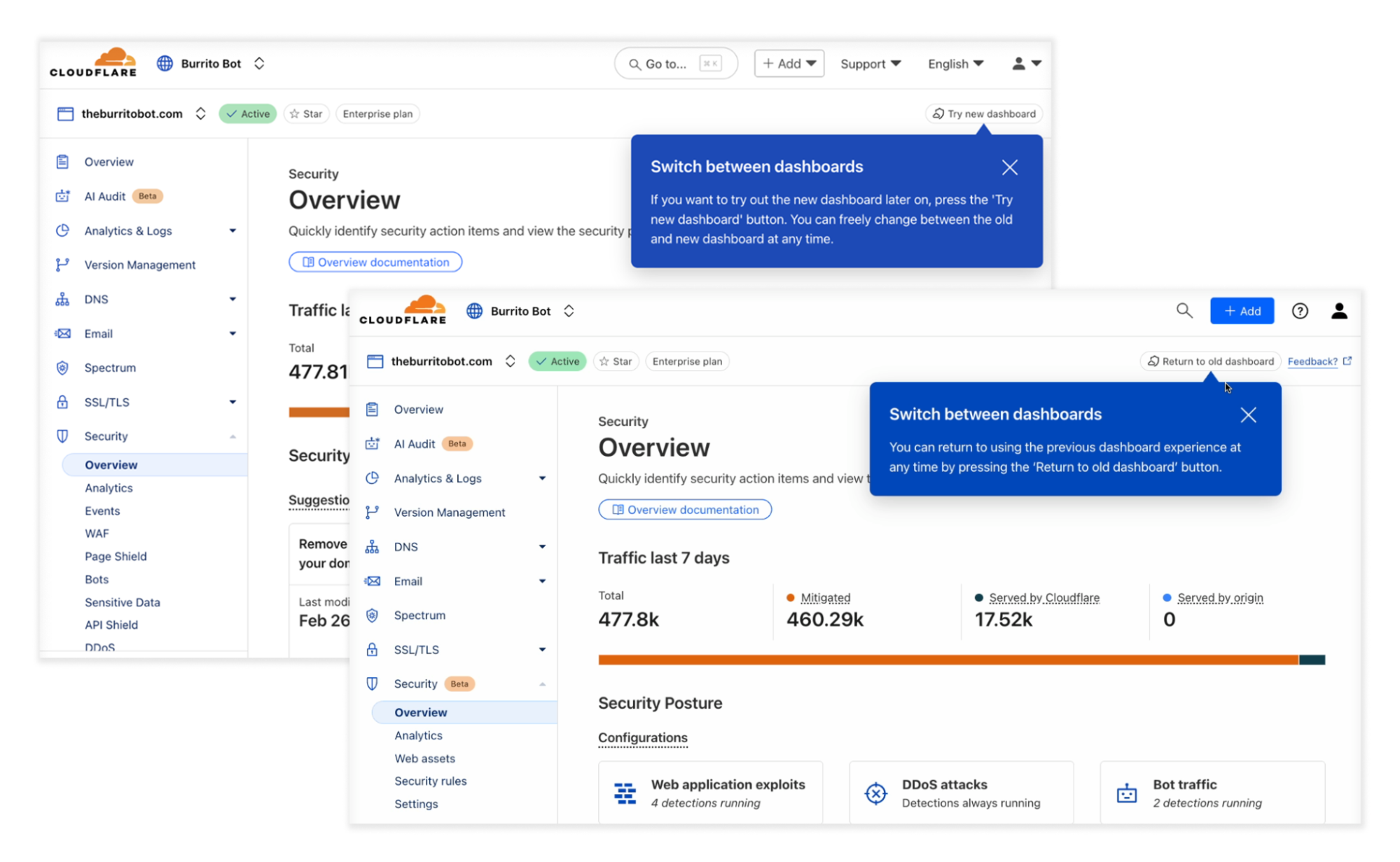
Modern applications are built using a variety of technologies. Your app might include a web interface Continue reading
HTTPS-only for Cloudflare APIs: shutting the door on cleartext traffic
Connections made over cleartext HTTP ports risk exposing sensitive information because the data is transmitted unencrypted and can be intercepted by network intermediaries, such as ISPs, Wi-Fi hotspot providers, or malicious actors on the same network. It’s common for servers to either redirect or return a 403 (Forbidden) response to close the HTTP connection and enforce the use of HTTPS by clients. However, by the time this occurs, it may be too late, because sensitive information, such as an API token, may have already been transmitted in cleartext in the initial client request. This data is exposed before the server has a chance to redirect the client or reject the connection.
A better approach is to refuse the underlying cleartext connection by closing the network ports used for plaintext HTTP, and that’s exactly what we’re going to do for our customers.
Today we’re announcing that we’re closing all of the HTTP ports on api.cloudflare.com. We’re also making changes so that api.cloudflare.com can change IP addresses dynamically, in line with on-going efforts to decouple names from IP addresses, and reliably managing addresses in our authoritative DNS. This will enhance the agility and flexibility of our API Continue reading
Routed Interfaces on Layer-3 Switches and Internal VLANs
In the Router Interfaces and Switch Ports blog post, I described why we have switch ports and routed interfaces on layer-3 switches. Another blog post in the same series described the conceptual architecture of a layer-3 switch:
- All interfaces are connected to a VLAN-aware switch
- The switch interfaces could be access or trunk interfaces1.
- Each VLAN in a VLAN-aware switch can be connected to an internal router through a VLAN interface.
However, that’s not how we configure layer-3 switches. There’s a significant gap between the conceptual configuration model and the internal architecture:
Improved support for private applications and reusable access policies with Cloudflare Access
For years, Cloudflare has helped organizations modernize their access to internal resources by delivering identity-aware access controls through our Zero Trust Network Access (ZTNA) service, Cloudflare Access. Our customers have accelerated their ZTNA implementations for web-based applications in particular, using our intuitive workflows for Access applications tied to public hostnames.
However, given our architecture design, we have primarily handled private network application access (applications tied to private IP addresses or hostnames) through the network firewall component of our Secure Web Gateway (SWG) service, Cloudflare Gateway. We provided a small wrapper from Access to connect the two experiences. While this implementation technically got the job done, there were some clear downsides, and our customers have frequently cited the inconsistency.
Today, we are thrilled to announce that we have redesigned the self-hosted private application administrative experience within Access to match the experience for web-based apps on public hostnames. We are introducing support for private hostname and IP address-defined applications directly within Access, as well as reusable access policies. Together, these updates make ZTNA even easier for our customers to deploy and streamline ongoing policy management.
In order to better understand how this feature improves the overall Continue reading
D2DO267: Get Excited About Riding the AI Infrastructure Wave
The AI buildout is driving an infrastructure boom. On today’s show, we talk with Kendall Miller, an independent consultant in the DevOps and cloud-native space, about the boom’s potential impacts on DevOps. For instance, the rise of AI workloads will increase the amount of infrastructure to be supported. At the same time, AI tools are... Read more »Improved Bot Management flexibility and visibility with new high-precision heuristics
Within the Cloudflare Application Security team, every machine learning model we use is underpinned by a rich set of static rules that serve as a ground truth and a baseline comparison for how our models are performing. These are called heuristics. Our Bot Management heuristics engine has served as an important part of eight global machine learning (ML) models, but we needed a more expressive engine to increase our accuracy. In this post, we’ll review how we solved this by moving our heuristics to the Cloudflare Ruleset Engine. Not only did this provide the platform we needed to write more nuanced rules, it made our platform simpler and safer, and provided Bot Management customers more flexibility and visibility into their bot traffic.
In Cloudflare’s bot detection, we build heuristics from attributes like software library fingerprints, HTTP request characteristics, and internal threat intelligence. Heuristics serve three separate purposes for bot detection:
Bot identification: If traffic matches a heuristic, we can identify the traffic as definitely automated traffic (with a bot score of 1) without the need of a machine learning model.
Train ML models: When traffic matches our heuristics, we create labelled datasets Continue reading
Take control of public AI application security with Cloudflare’s Firewall for AI
Imagine building an LLM-powered assistant trained on your developer documentation and some internal guides to quickly help customers, reduce support workload, and improve user experience. Sounds great, right? But what if sensitive data, such as employee details or internal discussions, is included in the data used to train the LLM? Attackers could manipulate the assistant into exposing sensitive data or exploit it for social engineering attacks, where they deceive individuals or systems into revealing confidential details, or use it for targeted phishing attacks. Suddenly, your helpful AI tool turns into a serious security liability.
Today, as part of Security Week 2025, we’re announcing the open beta of Firewall for AI, first introduced during Security Week 2024. After talking with customers interested in protecting their LLM apps, this first beta release is focused on discovery and PII detection, and more features will follow in the future.
If you are already using Cloudflare application security, your LLM-powered applications are automatically discovered and protected, with no complex setup, no maintenance, and no extra integration needed.
Firewall for AI is an inline security solution that protects user-facing LLM-powered applications from Continue reading
Cloudflare for AI: supporting AI adoption at scale with a security-first approach
AI is transforming businesses — from automated agents performing background workflows, to improved search, to easier access and summarization of knowledge.
While we are still early in what is likely going to be a substantial shift in how the world operates, two things are clear: the Internet, and how we interact with it, will change, and the boundaries of security and data privacy have never been more difficult to trace, making security an important topic in this shift.
At Cloudflare, we have a mission to help build a better Internet. And while we can only speculate on what AI will bring in the future, its success will rely on it being reliable and safe to use.
Today, we are introducing Cloudflare for AI: a suite of tools aimed at helping businesses, developers, and content creators adopt, deploy, and secure AI technologies at scale safely.
Cloudflare for AI is not just a grouping of tools and features, some of which are new, but also a commitment to focus our future development work with AI in mind.
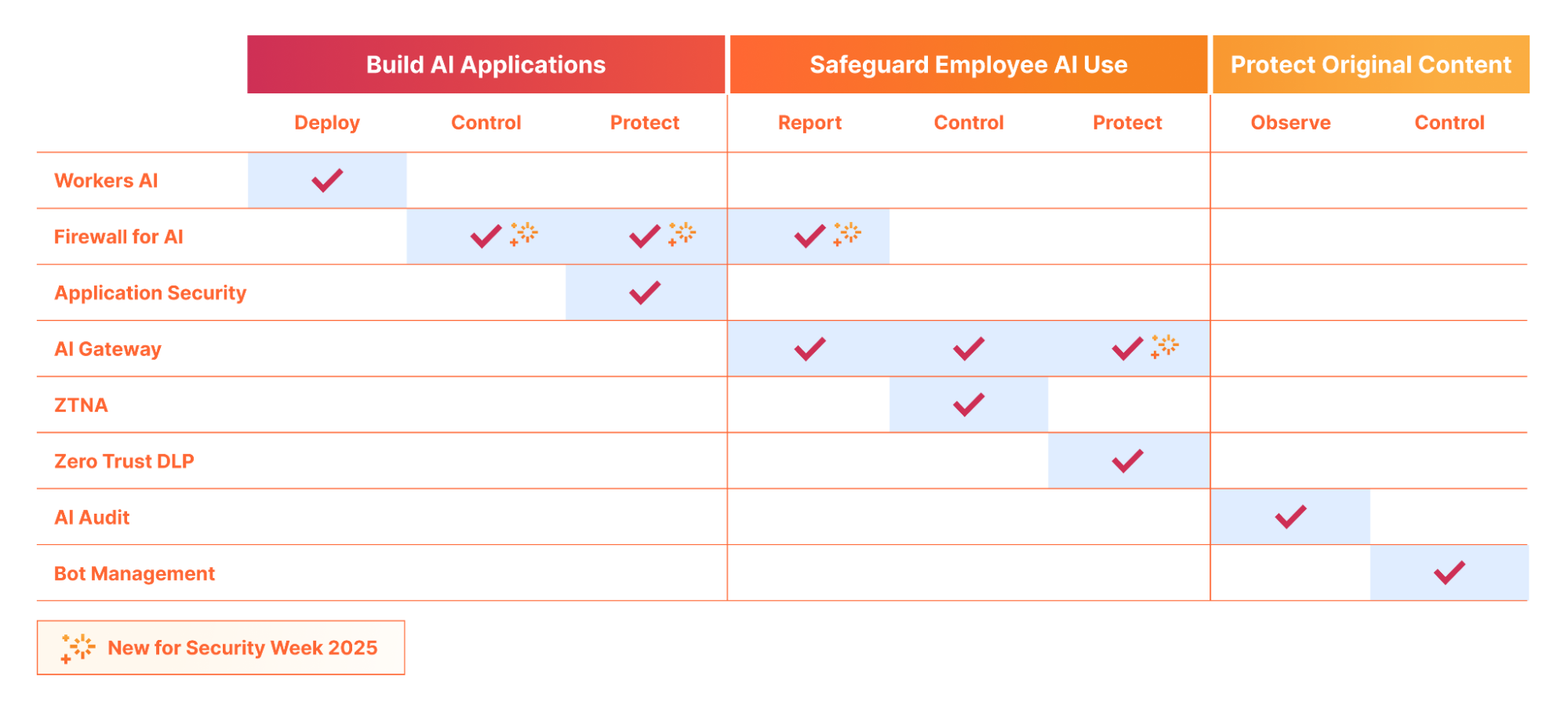
Let’s jump in to see what Cloudflare for AI can deliver for developers, security teams, and content creators…
If you Continue reading
Trapping misbehaving bots in an AI Labyrinth
Today, we’re excited to announce AI Labyrinth, a new mitigation approach that uses AI-generated content to slow down, confuse, and waste the resources of AI Crawlers and other bots that don’t respect “no crawl” directives. When you opt in, Cloudflare will automatically deploy an AI-generated set of linked pages when we detect inappropriate bot activity, without the need for customers to create any custom rules.
AI Labyrinth is available on an opt-in basis to all customers, including the Free plan.
AI-generated content has exploded, reportedly accounting for four of the top 20 Facebook posts last fall. Additionally, Medium estimates that 47% of all content on their platform is AI-generated. Like any newer tool it has both wonderful and malicious uses.
At the same time, we’ve also seen an explosion of new crawlers used by AI companies to scrape data for model training. AI Crawlers generate more than 50 billion requests to the Cloudflare network every day, or just under 1% of all web requests we see. While Cloudflare has several tools for identifying and blocking unauthorized AI crawling, we have found that blocking malicious bots can alert the attacker that you are Continue reading
An early look at cryptographic watermarks for AI-generated content
Generative AI is reshaping many aspects of our lives, from how we work and learn, to how we play and interact. Given that it's Security Week, it's a good time to think about some of the unintended consequences of this information revolution and the role that we play in bringing them about.
Today's web is full of AI-generated content: text, code, images, audio, and video can all be generated by machines, normally based on a prompt from a human. Some models have become so sophisticated that distinguishing their artifacts — that is, the text, audio, and video they generate — from everything else can be quite difficult, even for machines themselves. This difficulty creates a number of challenges. On the one hand, those who train and deploy generative AI need to be able to identify AI-created artifacts they scrape from websites in order to avoid polluting their training data. On the other hand, the origin of these artifacts may be intentionally misrepresented, creating myriad problems for society writ large.
Part of the solution to this problem might be watermarking. The basic idea of watermarking is to modify the training process, the inference process, or both so that an artifact of Continue reading
How we train AI to uncover malicious JavaScript intent and make web surfing safer
Modern websites rely heavily on JavaScript. Leveraging third-party scripts accelerates web app development, enabling organizations to deploy new features faster without building everything from scratch. However, supply chain attacks targeting third-party JavaScript are no longer just a theoretical concern — they have become a reality, as recent incidents have shown. Given the vast number of scripts and the rapid pace of updates, manually reviewing each one is not a scalable security strategy.
Cloudflare provides automated client-side protection through Page Shield. Until now, Page Shield could scan JavaScript dependencies on a web page, flagging obfuscated script content which also exfiltrates data. However, these are only indirect indicators of compromise or malicious intent. Our original approach didn’t provide clear insights into a script’s specific malicious objectives or the type of attack it was designed to execute.
Taking things a step further, we have developed a new AI model that allows us to detect the exact malicious intent behind each script. This intelligence is now integrated into Page Shield, available to all Page Shield add-on customers. We are starting with three key threat categories: Magecart, crypto mining, and malware.

Screenshot of Page Shield dashboard showing results of three types of analysis.
With Continue reading
Comparing IP and CLNP: Network State Summarization
In the previous blog posts, we discussed how TCP/IP and CLNP reach adjacent nodes and build ARP/ND/ES caches and how they reach off-subnet nodes. Now, let’s move from the network edge into the network core and explore how the two protocol stacks reduce the amount of information they have to propagate in routing protocols.
While I’m not exactly an OSI fan, I must admit they got many things right (and IPv6 copied those ideas), but TCP/IP is a clear winner in this aspect.
Nvidia Draws GPU System Roadmap Out To 2028
High tech companies always have roadmaps. Whether or not they show them to the public, they are always showing them to key investors if they are in their early stages, getting ready to sell some shares on Wall Street to make money – literally, going public – or talking to key customers who are interested in buying a platform, not just a point product to solve a problem today. …
Nvidia Draws GPU System Roadmap Out To 2028 was written by Timothy Prickett Morgan at The Next Platform.