CBRS Spectrum Auction Transforms Enterprise Cellular Landscape
Win, lose, or watch, IT managers gained as auction opens numerous opportunities for corporate wireless networks soon.Next Platform TV for September 17, 2020
On today’s program we landed a couple of unplanned themes; namely silicon photonics and its role in both quantum and AI architectures. …
Next Platform TV for September 17, 2020 was written by Nicole Hemsoth at The Next Platform.
About Your Remote Access Policy: It’s Time for an Update
Times have changed, with more employees working from home. Has your enterprise's remote access policy kept pace with the arrival of new users, tasks, access technologies, and threats?Developing and Testing Ansible Roles with Molecule and Podman – Part 2
Molecule is a complete testing framework that helps you develop and test Ansible roles, which allows you to focus on role content instead of focusing on managing testing infrastructure. In the first part of this series, we’ve successfully installed, configured and used Molecule to set up new testing instances.
Now that the instances are running, let’s start developing the new role and apply Molecule to ensure it runs according to the specifications.
This basic role deploys a web application supported by the Apache web server. It must support Red Hat Enterprise Linux (RHEL) 8 and Ubuntu 20.04.
Developing the Ansible Role with Molecule
Molecule helps in the development stage by allowing you to “converge” the instances with the role content. You can test each step without worrying about managing the instances and test environment. It provides quick feedback, allowing you to focus on the role content, ensuring it works in all platforms.
In the first part of this series, we initialized a new role “mywebapp”. If you’re not there yet, switch to the role directory “mywebapp” and add the first task, installing the Apache package “httpd” using the “package” Ansible module. Edit the file “tasks/main.yaml” and include Continue reading
A Chat With Docker’s New Community Manager
Community is a backbone of all sustainable open source projects and so at Docker, we’re particularly thrilled to announce that William Quiviger has joined the team as our new Head of Community.
William is a seasoned community manager based in Paris, having worked with open source communities for the past 15 years for a wide range of organizations including Mozilla Firefox, the United Nations and the Open Networking Foundation. His particular area of expertise is in nurturing, building and scaling communities, as well as developing mentorship and advocacy programs that help push leadership to the edges of a community.

To get to know William a bit more, we thought we’d ask him a few questions about his experience as a community manager and what he plans to focus on in his new role:
What motivated you most about joining Docker?
I started following Docker closely back in 2016 when I joined the Open Networking Foundation. There, I was properly introduced to cloud technologies and containerization and quickly realised how Docker was radically simplifying the lives of our developers and was the de-facto standard for anything deployed in the cloud. I was particularly impressed by the incredible passion Continue reading
Can Video Game Systems Like PS5 Be Used for Workplace Team Collaboration?
Team collaboration has been an issue in the workplace for too long. Countless solutions have been proposed and tried. And here is a new idea. Can video game systems like PS5 be used for workplace team collaboration? The simple answer is yes. But how?
Video game systems have long had the option for multiplayer games. These also allow numerous people around the world to connect, create teams, and play against other teams. If you’re a true gamer, you would know how this works. However, what does this mean for offices? Video game systems like the PS5 have many features that can enable workplace team collaboration. Here are some of the ways this is encouraged.
3 Ways PS5 Will be Used for Workplace Team Collaboration
Delegation of Tasks
The option to play as teams helps develop skills in employees that contribute to the workplace. The more you work in a team, the better you adapt to it. In video game systems like PS5, you can choose your own game, which means having a story you like. This can engage the employees in multiple ways, but most importantly divide the tasks.
Playing as a team in a video game would not only Continue reading
Cloudflare’s Always Online and the Internet Archive Team Up to Fight Origin Errors


Every day, all across the Internet, something bad but entirely normal happens: thousands of origin servers go down, resulting in connection errors and frustrated users. Cloudflare’s users collectively spend over four and a half years each day waiting for unreachable origin servers to respond with error messages. But visitors don’t want to see error pages, they want to see content!
Today is exciting for all those who want the Internet to be stronger, more resilient, and have important redundancies: Cloudflare is pleased to announce a partnership with the Internet Archive to bring new functionality to our Always Online service.
Always Online serves as insurance for our customers’ websites. Should a customer’s origin go offline, timeout, or otherwise break, Always Online is there to step in and serve archived copies of webpages to visitors. The Internet Archive is a nonprofit organization that runs the Wayback Machine, a service which saves snapshots of billions of websites across the Internet. By partnering with the Internet Archive, Cloudflare is able to seamlessly deliver responses for unreachable websites from the Internet Archive, while the Internet Archive can continue their mission of archiving the web to provide access to all knowledge.
Enabling Always Online in the Continue reading
Are Business Needs Just Excuses for Vendor Shenanigans?
Every now and then I call someone’s baby ugly (or maybe it was their third cousin’s baby and they nonetheless feel offended). In such cases a common resort is to cite business or market needs to prove how ignorant and clueless I am. Here’s a sample LinkedIn comment talking about my ignorance about the need for smart NICs:
The rise of custom silicon by Presando [sic], Mellanox, Amazon, Intel and others confirms there is a real market need.
Now let’s get something straight: while there are good reasons to use tons of different things that might look inappropriate, irrelevant or plain stupid to an outsider, I don’t believe in real market need argument being used to justify anything without supporting technical facts (tell me why you need that stuff and prove to me that using it is the best way of solving a problem).
Use Python to translate TCP/UDP port numbers to names
This short post shows how you can use Python to convert TCP/UDP port number to port name and vice versa.
Most of us know names of common TCP and UDP ports like 22/ssh, 23/telnet, 80/http or 443/https. We learn these early in our networking careers and many of them are so common that even when woken up middle of the night you'd know 53 is domain aka dns!
But there are also many not-so commonly used ports that have been given names. These ones sometimes show up in firewall logs or are mentioned in literature. Some vendors also try to replace numeric value with a human readable name in the configs and outputs of different commands.
One way or the other, I'd be good to have an easy method of getting port number given its name, and on occasion we might want to get name of particular port number.
There are many ways one could achieve that. We might search web, drop into documentation, or even check /etc/services if we have access to Linux box.
I decided to check if we can do some programmatic translation with Python, seeing as sometimes we could have hundreds of entries to process and Continue reading
The Hedge 52: Tobi Metz and the Technologist Question
Tobi Metz asked What is a Technologists? in a recent blog post. Tobi joins Tom and Russ on this episode of the Hedge to expand on his answer, and get our thoughts on the question.
Check out the Azure CLI experience now available in Desktop Stable
Back in May we announced the partnership between Docker and Microsoft to make it easier to deploy containerized applications from the Desktop to the cloud with Azure Container Instances (ACI). Then in June we were able to share the first version of this as part of a Desktop Edge release, this allowed users to use existing Docker CLI commands straight against ACI making getting started running containers in the cloud simpler than ever.
We are now pleased to announce that the Docker and ACI integration has moved into Docker Desktop stable 2.3.0.5 giving all Desktop users access to the simplest way to get containers running in the cloud.
Getting started
As a new starter, to get going all you will need to do is upgrade your existing Docker Desktop to the latest stable version (2.3.0.5), store your image on Docker Hub so you can deploy it (you can get started with Hub here) and then lastly you will need to create an ACI context to deploy it to. For a simple example of getting started with ACI you can see our initial blog post on the edge experience.
More CLI commands
Day Two Cloud 066: Cloud Computing At The Edge(s)
Mark Thiele joins the Day Two Cloud podcast to school us on all things edge. He argues that edge is more than a buzzword, with a specific set of opportunities and challenges for IT operations and infrastructure.Day Two Cloud 066: Cloud Computing At The Edge(s)
Mark Thiele joins the Day Two Cloud podcast to school us on all things edge. He argues that edge is more than a buzzword, with a specific set of opportunities and challenges for IT operations and infrastructure.
The post Day Two Cloud 066: Cloud Computing At The Edge(s) appeared first on Packet Pushers.
What Will the Internet Look Like in 2030? New Grants Program for Researchers Studying the Future of the Internet

From the environment to the economy, the Internet is reshaping and disrupting several sectors of our society. What might future patterns of disruption look like? How will these changes affect all of us, particularly those on the margins of society? What new solutions can we generate today, to address the challenges of tomorrow?
At the Internet Society Foundation, we believe the answers to these questions and many others lies in research. That’s why we’re thrilled to announce a new grants program supporting researchers worldwide who are studying the future and sustainability of the Internet. Grants of up to US$200,000 are available for research lasting up to two years and focused in one of two categories:
- Greening the Internet: How the Internet affects and is affected by the environment
- The Internet Economy: How digital technologies are transforming our economic landscape
Established in 2019 to support the positive difference the Internet can make to people everywhere, the Internet Society Foundation awards grants to Internet Society Chapters/Special Interest Groups (SIGs) as well as nonprofit organizations and individuals dedicated to providing meaningful access to an open, globally-connected, secure, and trustworthy Internet for everyone.
Learn more about future calls for Continue reading
Moobot vs. Gatebot: Cloudflare Automatically Blocks Botnet DDoS Attack Topping At 654 Gbps
On July 3, Cloudflare’s global DDoS protection system, Gatebot, automatically detected and mitigated a UDP-based DDoS attack that peaked at 654 Gbps. The attack was part of a ten-day multi-vector DDoS campaign targeting a Magic Transit customer and was mitigated without any human intervention. The DDoS campaign is believed to have been generated by Moobot, a Mirai-based botnet. No downtime, service degradation, or false positives were reported by the customer.
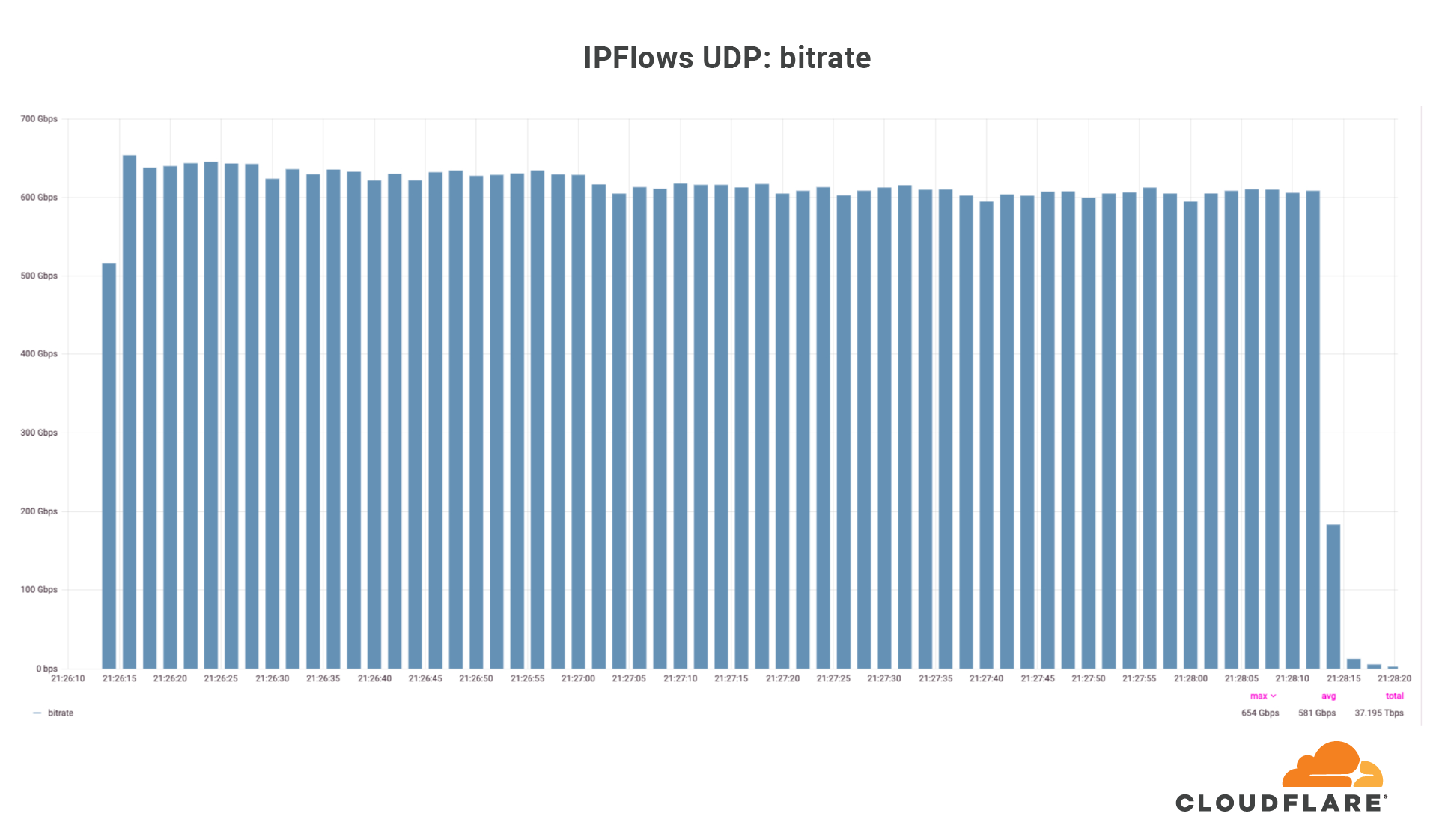
Over those ten days, our systems automatically detected and mitigated over 5,000 DDoS attacks against this one customer, mainly UDP floods, SYN floods, ACK floods, and GRE floods. The largest DDoS attack was a UDP flood and lasted a mere 2 minutes. This attack targeted only one IP address but hit multiple ports. The attack originated from 18,705 unique IP addresses, each believed to be a Moobot-infected IoT device.
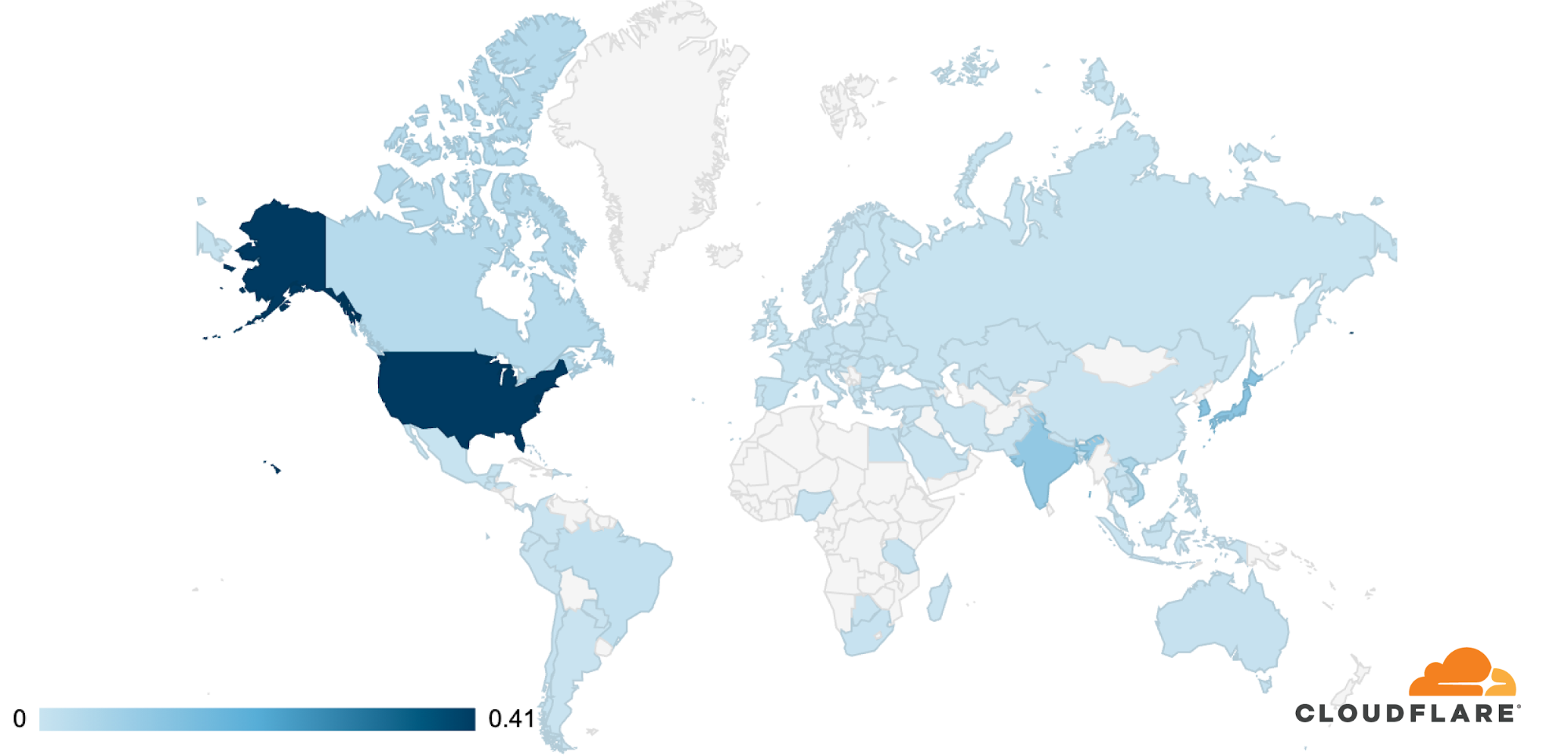
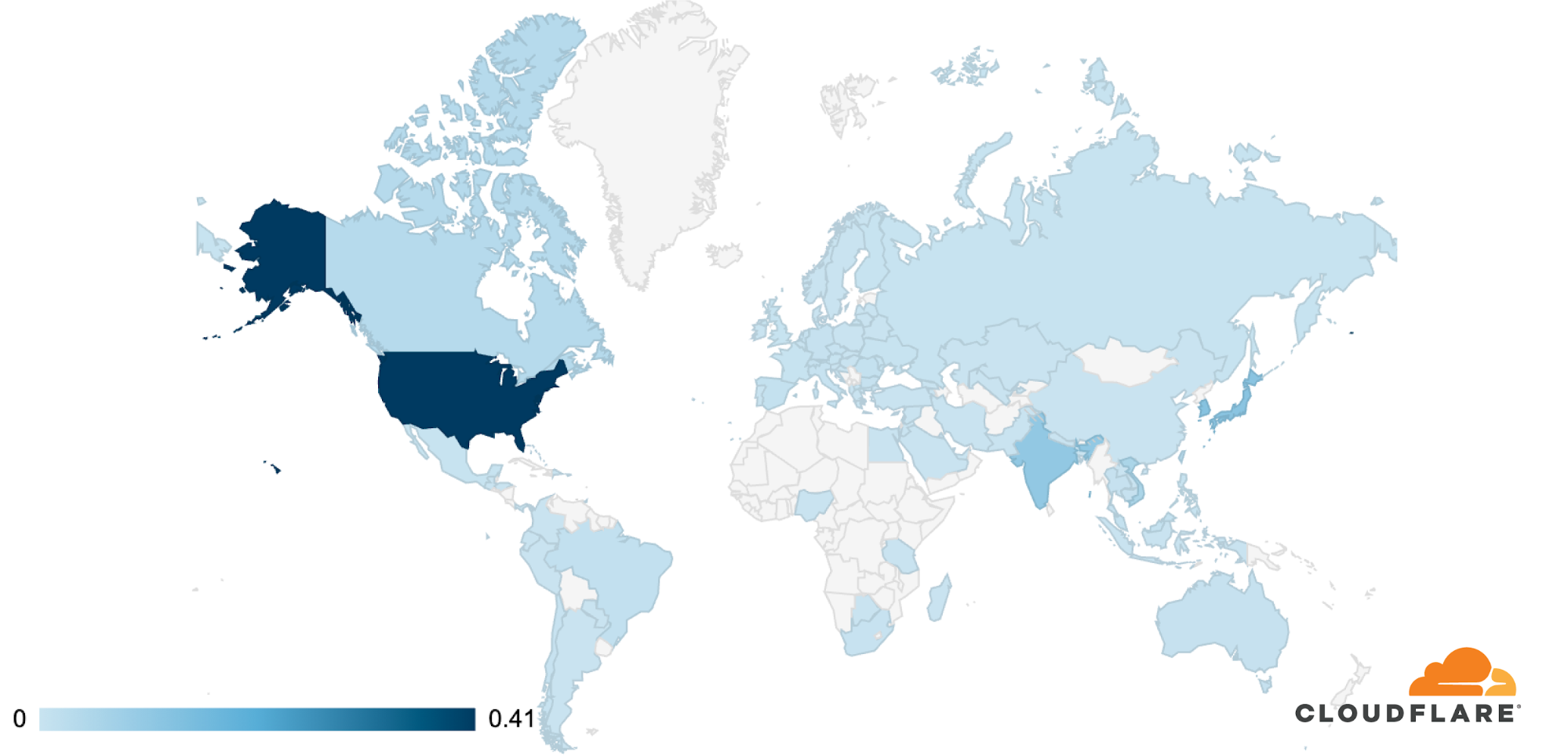
The attack was observed in Cloudflare’s data centers in 100 countries around the world. Approximately 89% of the attack traffic originated from just 10 countries with the US leading at 41%, followed by South Korea and Japan in second place (12% each), Continue reading
Restoring data to Netbox Docker
Having just shot myself in the foot by deleting docker and losing a container I had been working on, here is the command to restore data to netbox-docker’s Postgres database:
sudo docker exec -i netbox-docker_postgres_1 psql --username netbox netbox < /path/to/backup/file.sql
Phew…