0
Real-time DDoS mitigation using BGP RTBH and Flowspec describes the open source
DDoS Protect application. The software runs on the
sFlow-RT real-time analytics engine, which receives industry standard
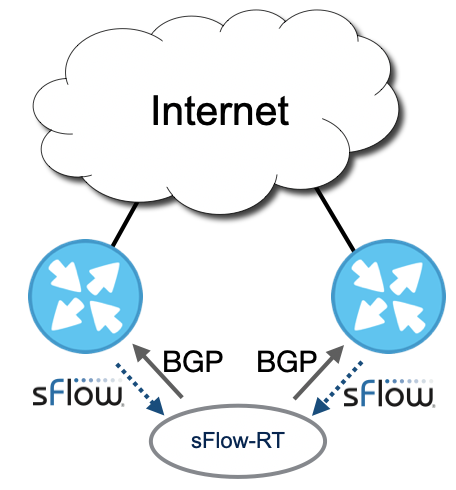
sFlow telemetry from routers and pushes controls using BGP. A recent enhancement to the application pushes controls to multiple routers in order to protect networks with redundant edge routers.
ddos_protect.router=10.0.0.96,10.0.0.97
Configuring multiple BGP connections is simple, the
ddos_protect.router configuration option has been extended to accept a comma separated list of IP addresses for the routers that will be connecting to the controller.
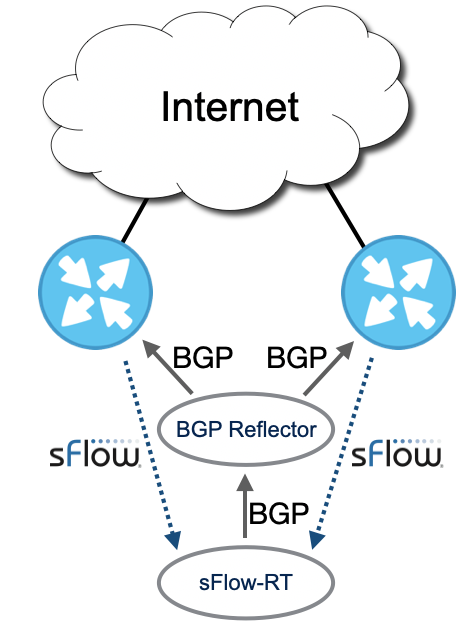
Alternatively, a BGP Flowspec/RTBH reflector can be used to propagate the controls. Flowspec is a recent addition to open source BGP software,
FRR and
Bird, and it should be possible to use this software to reflect Flowspec controls. A reflector can be a useful place to implement policies that direct controls to specific enforcement devices.
Support for multiple BGP connections in the DDoS Protect application reduces the complexity of simple deployments by removing the requirement for a reflector. Controls are pushed to all devices, but differentiated policies can still be implemented by configuring each device's response to controls.