For more than two decades, DirectData Networks has focused on HPC storage, supplying large systems to enterprises and research institutions wrestling with complex and data-laden workloads and taking on such challenges as acquiring the Lustre File System from Intel in 2018. …
This is a guest post by Dimitris Koutsourelis and Alexis Dimitriadis, working for the Security Team at Workable, a company that makes software to help companies find and hire great people.
This post is about our introductive journey to the infrastructure-as-code practice; managing Cloudflare configuration in a declarative and version-controlled way. We’d like to share the experience we’ve gained during this process; our pain points, limitations we faced, different approaches we took and provide parts of our solution and experimentations.
Terraform world
Terraform is a great tool that fulfills our requirements, and fortunately, Cloudflare maintains its own provider that allows us to manage its service configuration hasslefree.
On top of that, Terragrunt, is a thin wrapper that provides extra commands and functionality for keeping Terraform configurations DRY, and managing remote state.
The combination of both leads to a more modular and re-usable structure for Cloudflare resources (configuration), by utilizing terraform and terragrunt modules. We’ve chosen to use the latest version of both tools (Terraform-v0.12 & Terragrunt-v0.19 respectively) and constantly upgrade to take advantage of the valuable new features and functionality, which at this point in time, remove important limitations.
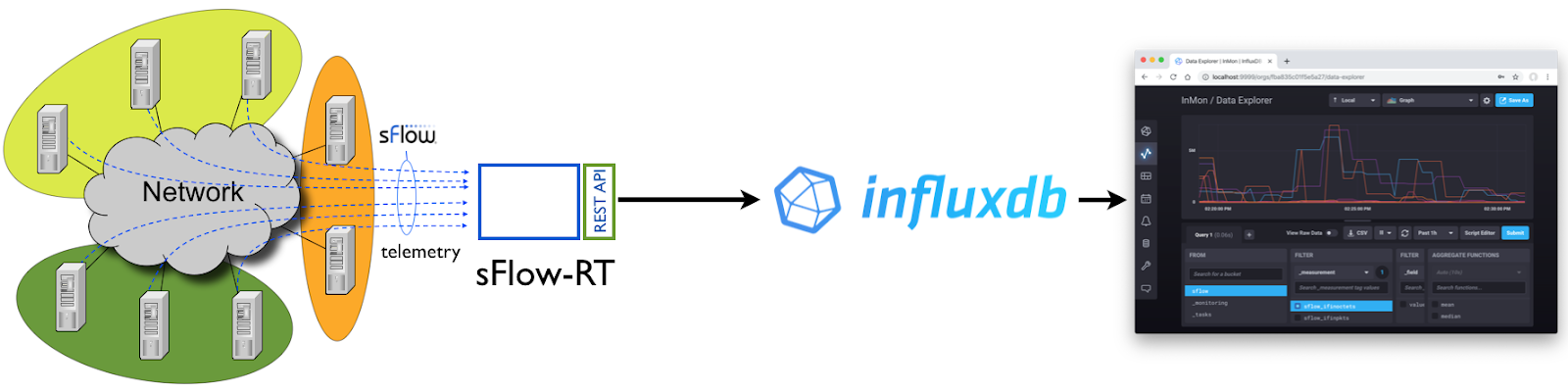
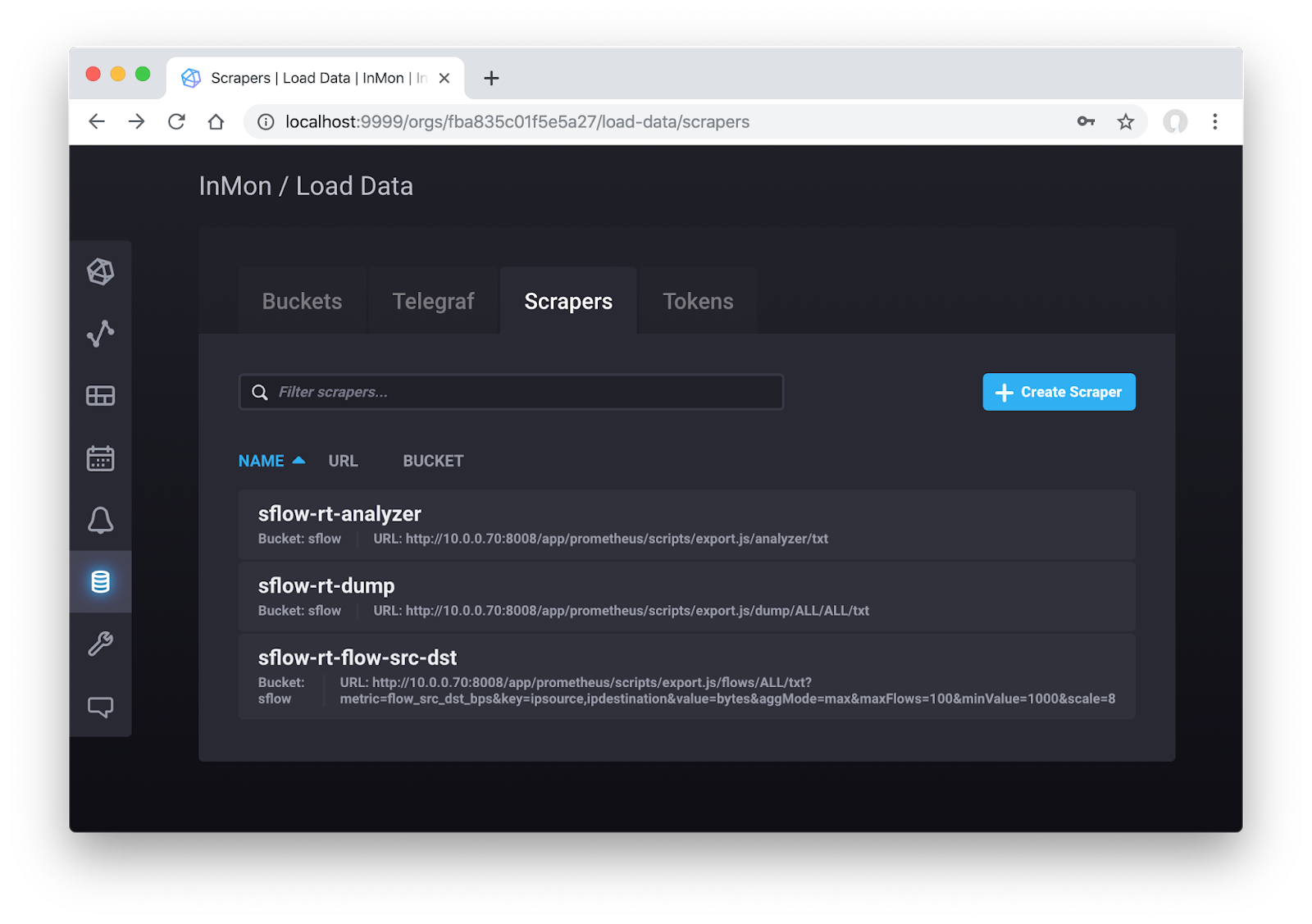
The first collects metrics about the performance of the sFlow-RT analytics engine, the second, all the metrics exported by the sFlow agents, and the third, is a flow metric (see Flow metrics with Prometheus and Grafana).
Updated 19 October 2019, native support for Prometheus export added to sFlow-RT, URLs 1 and 2 modified to reflect new API.
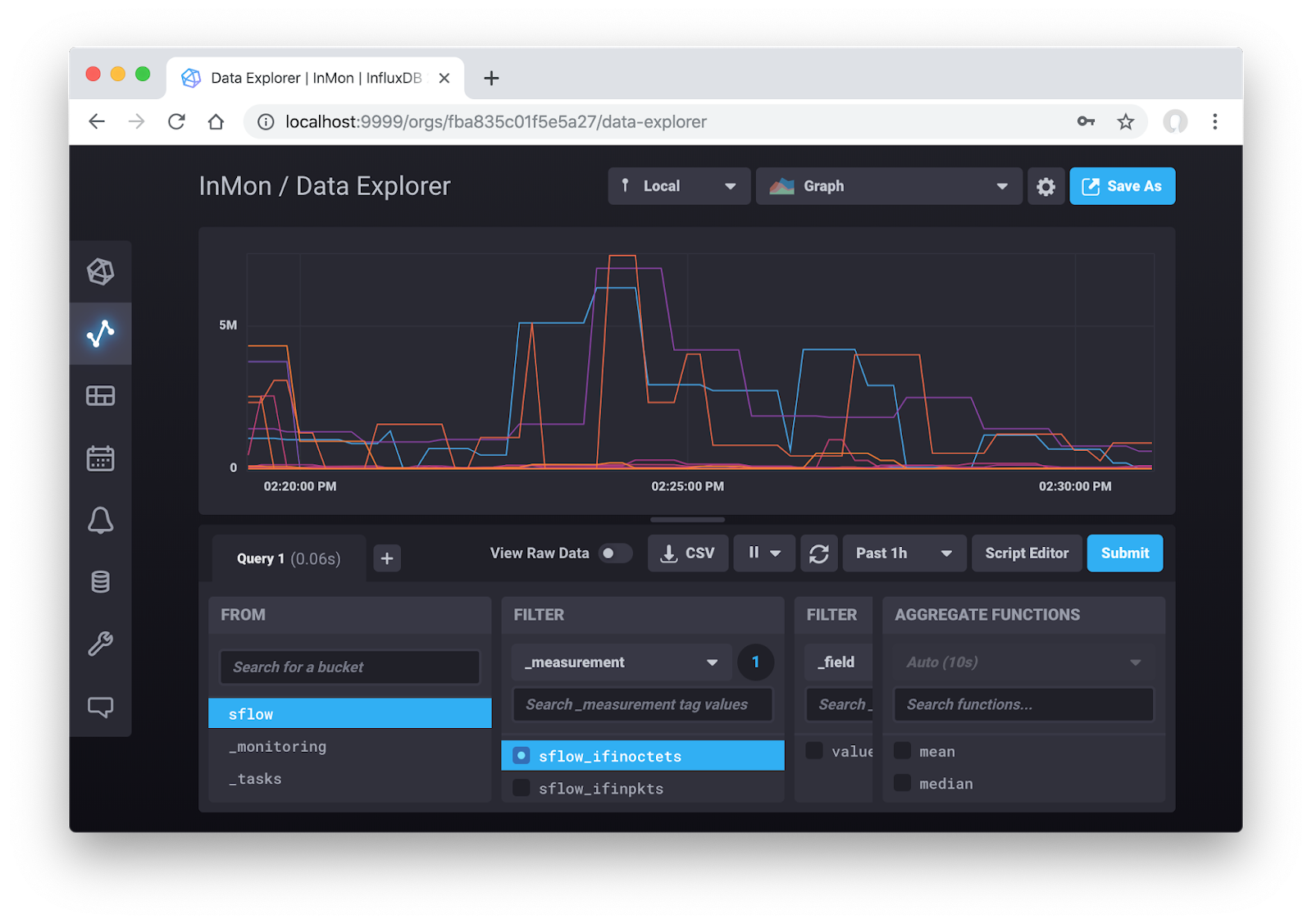
InfluxDB 2.0 now includes the data exploration and dashboard building capabilities that were previously in the separate Chronograf application. The screen Continue reading
The 5th Pakistan School on Internet Governance (pkSIG 2019) was successfully held last month in Quetta, Pakistan. This represents a significant achievement for the Internet Society Pakistan Islamabad Chapter as it played an instrumental role in bringing the first-ever Internet Governance event to the provincial capital of Balochistan.
For those who may not know, Balochistan has the largest land area among the four provinces of Pakistan, yet it is the least populated and least developed. Only 27% of its population lives in urban areas and Internet penetration is low. Finding adequate sponsors, and more importantly, diversity among the students to participate was a critical concern. But, pkSIG 2019 in Quetta proved to be one of the best editions of this school.
Over 60 people (one-third of them female) registered for the event, including students, professionals, startup founders, speakers, and some guests who showed keen interest in the program. Following a four-week long process of registration and shortlisting, 35 students were selected for pkSIG 2019 and five were awarded fellowships. Since all the sessions were livestreamed, a sizeable audience participated online as well. (The sessions and presentations are available online.)
“It’s our fifth consecutive year conducting pkSIG – Continue reading
Last time out we looked at Booking.com’s lessons learned from introducing machine learning to their product stack. Today’s paper takes a look at what happened in Airbnb when they moved from standard machine learning approaches to deep learning. It’s written in a very approachable style and packed with great insights. I hope you enjoy it as much as I did!
Ours is a story of the elements we found useful in applying neural networks to a real life product. Deep learning was steep learning for us. To other teams embarking on similar journeys, we hope an account of our struggles and triumphs will provide some useful pointers.
An ecosystem of models
The core application of machine learning discussed in this paper is the model which orders available listings according to a guest’s likelihood of booking. This is one of a whole ecosystem of models which contribute towards search rankings when a user searches on Airbnb. New models are tested online through an A/B testing framework to compare their performance to previous generations.
The time is right
The very first version of search ranking at Airbnb was a hand-written Continue reading
Red Hat Ansible Tower offers value by allowing automation to scale in a checked manner - users can run playbooks for only the processes and targets they need access to, and no further.
Not only does Ansible Tower provide automation at scale, but it also integrates with several external platforms. In many cases, this means that users can use the interface they are accustomed to while launching Ansible Tower templates in the background.
One of the most ubiquitous self service platforms in use today is ServiceNow, and many of the enterprise conversations had with Ansible Tower customers focus on ServiceNow integration. With this in mind, this blog entry walks through the steps to set up your ServiceNow instance to make outbound RESTful API calls into Ansible Tower, using OAuth2 authentication.
This is part 3 in a multi-part series, feel free to refer to part 1 and part 2 for more context.
The following software versions are used:
Ansible Tower: 3.4, 3.5
ServiceNow: London, Madrid
If you sign up for a ServiceNow Developer account, ServiceNow offers a free instance that can be used for replicating and testing this functionality. Your ServiceNow instance needs to be able Continue reading
This a report on a four-year long experiment in advertising a 'dark' prefix on the internet and examining the profile of unsolicited traffic that is sent to a traffic collector.
Floor space is often at a premium in a cramped data center, and Schneider Electric believes it has a fix for that: a wall-mounted server rack.The EcoStruxure Micro Data Center Wall Mount is a 6U design, meaning it has the capacity of six rack units. Schneider is pushing its space-saving option as an edge solution. The company's EcoStruxure IT Expert remote management and vulnerability assessment service will be available for the wall-mount units, even when installed in non-secured edge locations.
READ MORE: Micro-modular data centers set to multiplyTo read this article in full, please click here
Floor space is often at a premium in a cramped data center, and Schneider Electric believes it has a fix for that: a wall-mounted server rack.The EcoStruxure Micro Data Center Wall Mount is a 6U design, meaning it has the capacity of six rack units. Schneider is pushing its space-saving option as an edge solution. The company's EcoStruxure IT Expert remote management and vulnerability assessment service will be available for the wall-mount units, even when installed in non-secured edge locations.
READ MORE: Micro-modular data centers set to multiplyTo read this article in full, please click here
Docker Enterprise was built to be secure by default. When you build a secure by default platform, you need to consider security validation and governmental use. Docker Enterprise has become the first container platform to complete the Security Technical Implementation Guides (STIG) certification process. Thanks to Defense Information Systems Agency (DISA) for its support and sponsorship. Being the first container platform to complete the STIG process through DISA means a great deal to the entire Docker team.
The STIG took months of work around writing and validating the controls. What does it really mean? Having a STIG allows government agencies to ensure they are running Docker Enterprise in the most secure manner. The STIG also provides validation for the private sector. One of the great concepts with any compliance framework, like STIGs, is the idea of inherited controls. Adopting a STIG recommendation helps improve an organization’s security posture. Here is a great blurb from DISA’ site:
The Security Technical Implementation Guides (STIGs) are the configuration standards for DOD IA and IA-enabled devices/systems. Since 1998, DISA has played a critical role enhancing the security posture of DoD’s security systems by providing the Security Technical Implementation Guides (STIGs). The STIGs Continue reading
On today's Heavy Networking our guest walks us through a project that brought both ACI and NSX into the same data center at a very large company. We discuss the drivers for ACI in the underlay and NSX in the overlay, the learning curves on each product, challenges and successes, and more. Our guest is Derek Wilson, a Principal Network Consultant.
It’s Women in Tech Week, and we want to take the opportunity to celebrate some of the amazing women who make a tremendous impact at Docker – this week, and every week – helping developers build modern apps.
Anusha Ragunathan is a Software Engineer at Docker. You can follow her on Twitter @AnushaRagunatha.
What is your job?
Software Engineer. I build systems, write and review code, test and analyze software. I’ve always worked on infrastructure software both at and before Docker. I participate in Moby and Kubernetes OSS projects. My current work is on persistent storage for Kubernetes workloads and integrating it with Docker’s Universal Control Plane. I also enjoy speaking at technical conferences and writing blogs about my work.
How long have you worked at Docker?
4 years and 1 month!
Is your current role one that you always intended on your career path?
Yes, I’ve always been on this path. In my high school, we had the option to take biological sciences or Computer Sciences (CS). I chose CS and since then that has been my path. I earned both my bachelors’ and master’s degrees in CS.
What is your advice for someone entering the field?
Managing the Wide Area Network (WAN) for Redmond Inc., a supplier of industrial and commercial products – from salt that’s used to protect winter roadways to organic dairy products and health items – is an easier job today for the company’s technical project manager Aaron Gabrielson than it was a year ago.Redmond manages a phone system, point of sale and fax centrally out of headquarters in Heber City, Utah, which means each of Redmond’s 10 branch sites across the Midwest need a reliable connection back to headquarters in Utah. That’s easier for some sites, like those in Salt Lake City, than others, such as rural areas where there may only be a handful of workers on a farm.To read this article in full, please click here