One of the biggest concerns with the Internet of Things (IoT) is making sure networks, data, and devices are secure. IoT-related security incidents have already occurred, and the worries among IT, security and networking managers that similar events will take place are justified.“In all but the most restrictive environments, you’re going to have IoT devices in your midst,” says Jason Taule, vice president of standards and CISO at security standards and assurance company HITRUST. "The question then isn’t if, but how you are going to allow such devices to connect to and interact with your networks, systems and data.”To read this article in full, please click here
One of the biggest concerns with the Internet of Things (IoT) is making sure networks, data, and devices are secure. IoT-related security incidents have already occurred, and the worries among IT, security and networking managers that similar events will take place are justified.“In all but the most restrictive environments, you’re going to have IoT devices in your midst,” says Jason Taule, vice president of standards and CISO at security standards and assurance company HITRUST. "The question then isn’t if, but how you are going to allow such devices to connect to and interact with your networks, systems and data.”To read this article in full, please click here
We often compare ourselves to others around us. We are impressed with the skills others possess, the content others produce, the appearances others maintain, the successes others have achieved, the feats others have conquered. This constant comparison can lead to melancholic states of ambivalence, and sometimes depression due to the artificial expectations of who we […]
Check out our sixth edition of The Serverlist below. Get the latest scoop on the serverless space, get your hands dirty with new developer tutorials, engage in conversations with other serverless developers, and find upcoming meetups and conferences to attend.
Sign up below to have The Serverlist sent directly to your mailbox.
Check out our sixth edition of The Serverlist below. Get the latest scoop on the serverless space, get your hands dirty with new developer tutorials, engage in conversations with other serverless developers, and find upcoming meetups and conferences to attend.
Sign up below to have The Serverlist sent directly to your mailbox.
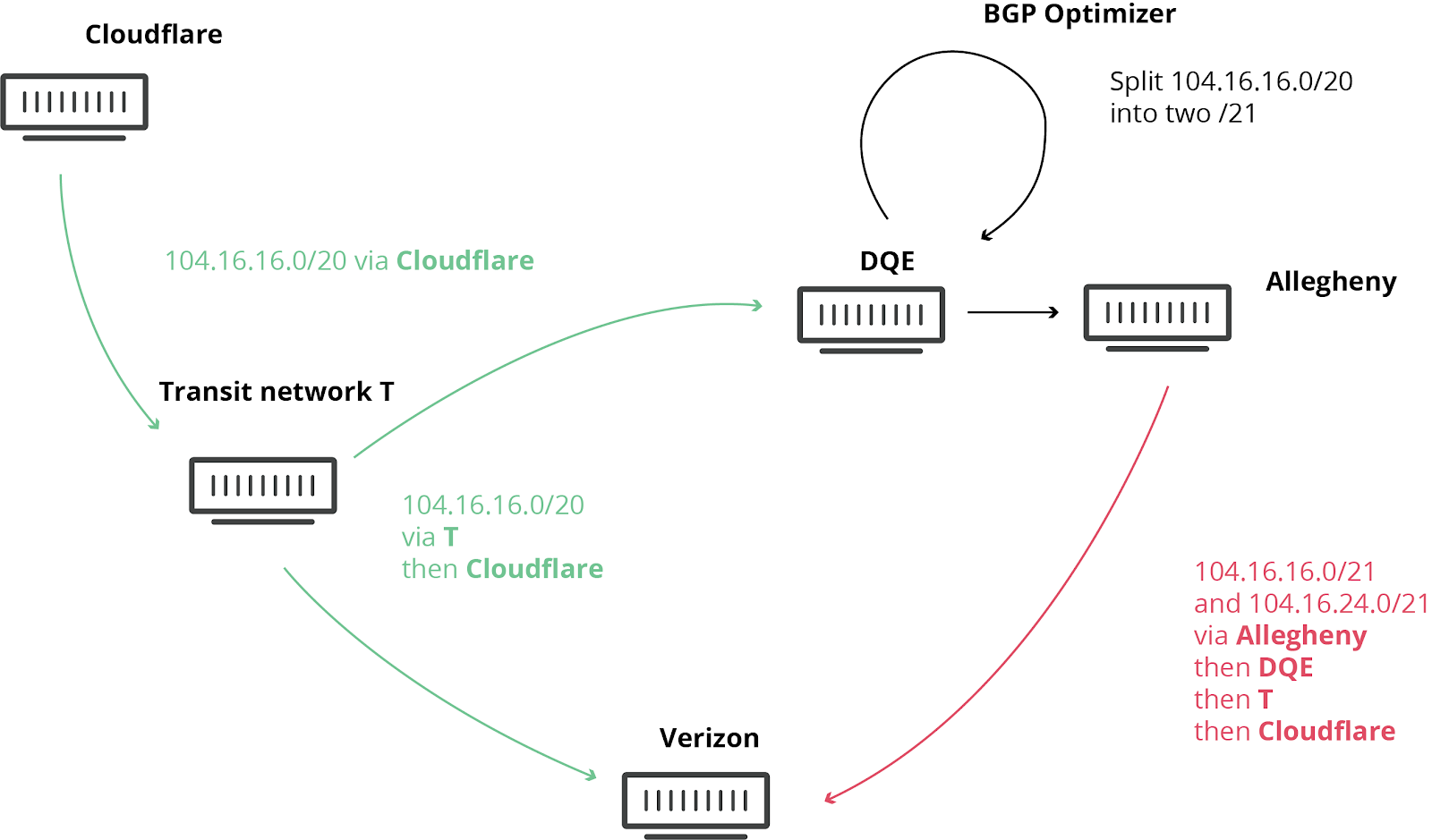
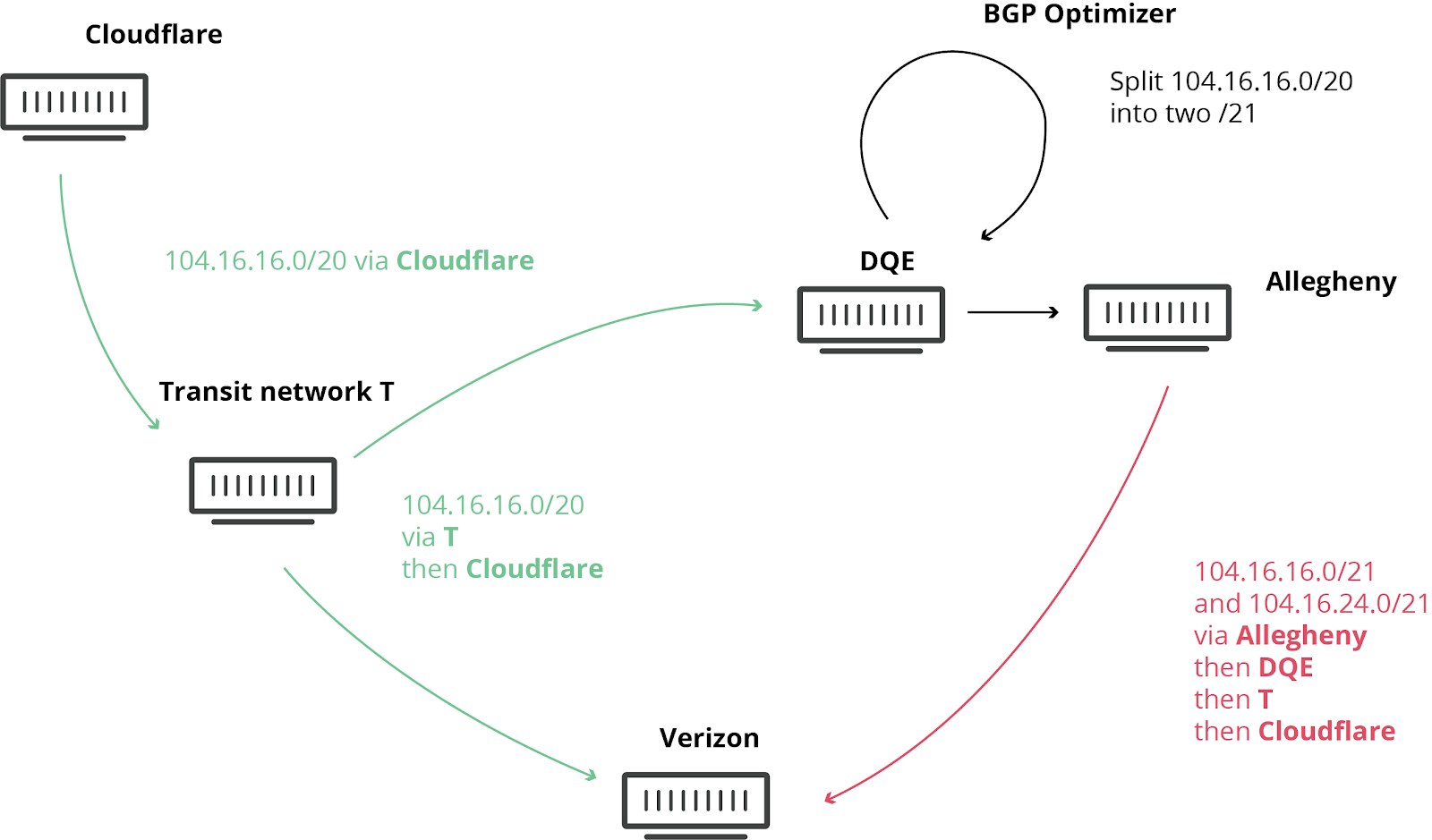
此类不幸事件并不罕见,我们以前曾发布相关博文。这一次,全世界都再次见证了它所带来的严重损害。而Noction “BGP 优化器”产品的涉及,则让今天的事件进一步恶化。这个产品有一个功能:可将接收到的 IP 前缀拆分为更小的组成部分(称为更具体前缀)。例如,我们自己的 IPv4 路由 104.20.0.0/20 被转换为 104.20.0.0/21 和 104.20.8.0/21。就好像通往 ”北京”的路标被两个路标取代,一个是 ”北京东”,另一个是 ”北京西”。通过将这些主要 IP 块拆分为更小的部分,网络可引导其内部的流量,但这种拆分原本不允许向全球互联网广播。正是这方面的原因导致了今天的网络中断。
为了解释后续发生的事情,我们先快速回顾一下互联网基础“地图”的工作原理。“Internet”的字面意思是网络互联,它由叫做自治系统(AS)的网络组成,每个网络都有唯一的标识符,即 AS 编号。所有这些网络都使用边界网关协议(BGP)来进行互连。BGP 将这些网络连接在一起,并构建互联网“地图”,使通信得以一个地方(例如,您的 ISP)传播到地球另一端的热门网站。
Massive route leak impacts major parts of the Internet, including Cloudflare
What happened?
Today at 10:30UTC, the Internet had a small heart attack. A small company in Northern Pennsylvania became a preferred path of many Internet routes through Verizon (AS701), a major Internet transit provider. This was the equivalent of Waze routing an entire freeway down a neighborhood street — resulting in many websites on Cloudflare, and many other providers, to be unavailable from large parts of the Internet. This should never have happened because Verizon should never have forwarded those routes to the rest of the Internet. To understand why, read on.
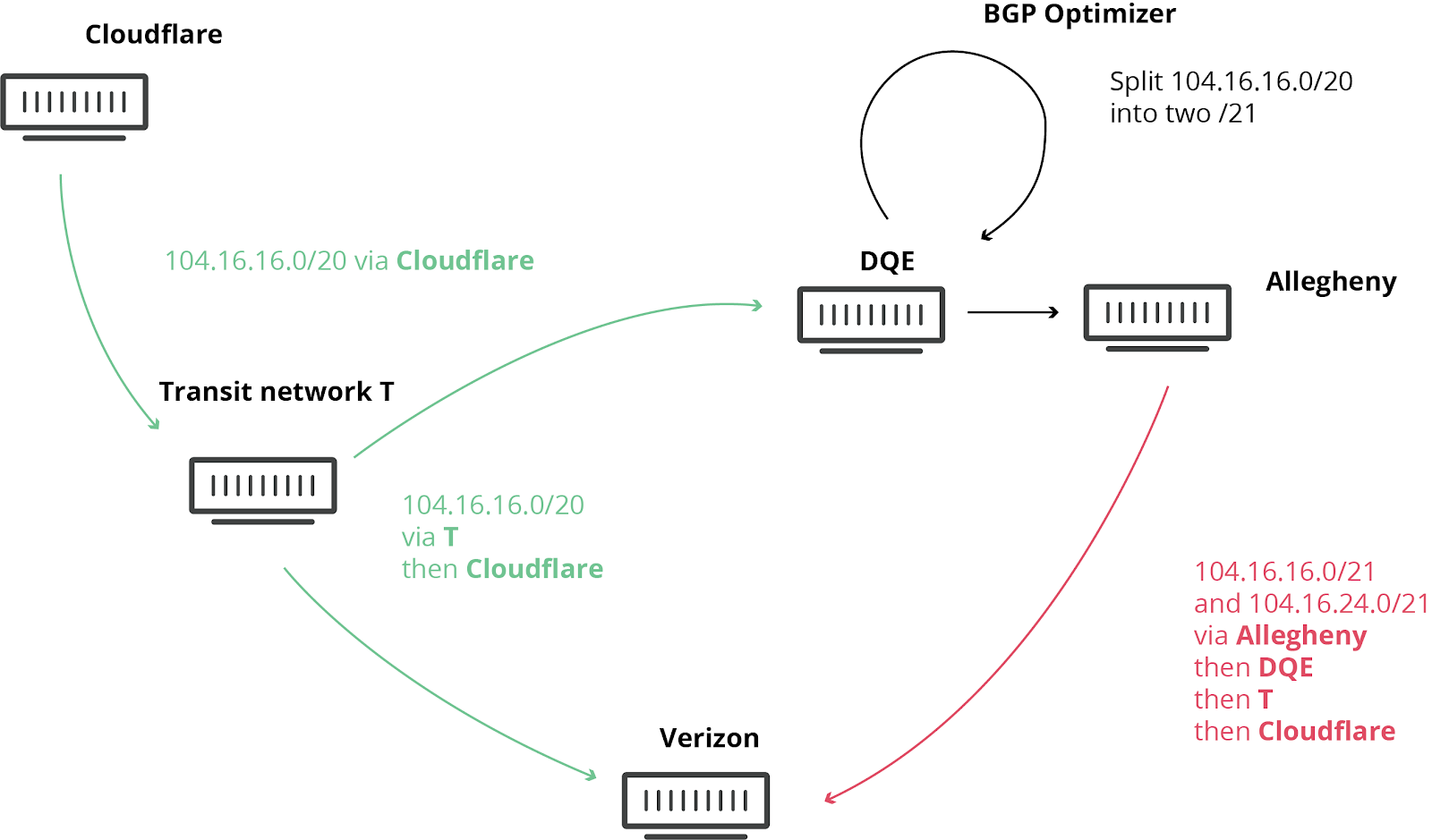
We have blogged about these unfortunate events in the past, as they are not uncommon. This time, the damage was seen worldwide. What exacerbated the problem today was the involvement of a “BGP Optimizer” product from Noction. This product has a feature that splits up received IP prefixes into smaller, contributing parts (called more-specifics). For example, our own IPv4 route 104.20.0.0/20 was turned into 104.20.0.0/21 and 104.20.8.0/21. It’s as if the road sign directing traffic to “Pennsylvania” was replaced by two road signs, one for “Pittsburgh, PA” and Continue reading
Massive route leak impacts major parts of the Internet, including Cloudflare
What happened?
Today at 10:30UTC, the Internet had a small heart attack. A small company in Northern Pennsylvania became a preferred path of many Internet routes through Verizon (AS701), a major Internet transit provider. This was the equivalent of Waze routing an entire freeway down a neighborhood street — resulting in many websites on Cloudflare, and many other providers, to be unavailable from large parts of the Internet. This should never have happened because Verizon should never have forwarded those routes to the rest of the Internet. To understand why, read on.
We have blogged about these unfortunate events in the past, as they are not uncommon. This time, the damage was seen worldwide. What exacerbated the problem today was the involvement of a “BGP Optimizer” product from Noction. This product has a feature that splits up received IP prefixes into smaller, contributing parts (called more-specifics). For example, our own IPv4 route 104.20.0.0/20 was turned into 104.20.0.0/21 and 104.20.8.0/21. It’s as if the road sign directing traffic to “Pennsylvania” was replaced by two road signs, one for “Pittsburgh, PA” and Continue reading
Une fuite massive de routes a eu un impact sur de nombreuses parties d'Internet, y compris sur Cloudflare
Que s'est-il passé ?
Aujourd'hui à 10h30 UTC, Internet a connu une sorte de mini crise cardiaque. Une petite entreprise du nord de la Pennsylvanie est devenue le chemin privilégié de nombreuses routes Internet à cause de Verizon (AS701), un important fournisseur de transit Internet. C’est un peu comme si Waze venait à diriger le trafic d’une autoroute complète vers une petite rue de quartier : de nombreux sites Web sur Cloudflare et beaucoup d’autres fournisseurs étaient indisponibles depuis une grande partie du réseau. Cet incident n'aurait jamais dû arriver, car Verizon n'aurait jamais dû transmettre ces itinéraires au reste d’Internet. Pour en comprendre les raisons, lisez la suite de cet article.
Nous avons déjà écrit un certain nombre d’articles par le passé sur ces événements malheureux qui sont plus fréquents qu’on ne le pense. Cette fois, les effets ont pu être observés dans le monde entier. Aujourd’hui, le problème a été aggravé par l’implication d’un produit « Optimiseur BGP » de Noction. Ce produit dispose d’une fonctionnalité qui permet de diviser les préfixes IP reçus en parties contributives plus petites (appelées « Continue reading
Une fuite massive de routes a eu un impact sur de nombreuses parties d'Internet, y compris sur Cloudflare
Que s'est-il passé ?
Aujourd'hui à 10h30 UTC, Internet a connu une sorte de mini crise cardiaque. Une petite entreprise du nord de la Pennsylvanie est devenue le chemin privilégié de nombreuses routes Internet à cause de Verizon (AS701), un important fournisseur de transit Internet. C’est un peu comme si Waze venait à diriger le trafic d’une autoroute complète vers une petite rue de quartier : de nombreux sites Web sur Cloudflare et beaucoup d’autres fournisseurs étaient indisponibles depuis une grande partie du réseau. Cet incident n'aurait jamais dû arriver, car Verizon n'aurait jamais dû transmettre ces itinéraires au reste d’Internet. Pour en comprendre les raisons, lisez la suite de cet article.
Nous avons déjà écrit un certain nombre d’articles par le passé sur ces événements malheureux qui sont plus fréquents qu’on ne le pense. Cette fois, les effets ont pu être observés dans le monde entier. Aujourd’hui, le problème a été aggravé par l’implication d’un produit « Optimiseur BGP » de Noction. Ce produit dispose d’une fonctionnalité qui permet de diviser les préfixes IP reçus en parties contributives plus petites (appelées « Continue reading
Hyperscalers change their datacenters – by which we mean whole generations of servers, storage, and switching – like regular enterprises upgrade server platforms. …
Gluware sponsors today's Tech Bytes episode. Greg Ferro and Gluware CEO Jeff Gray discuss network automation, how Gluware's software works, how it lets you solve immediate problems in your current environment while working toward intent, and more.
Gluware sponsors today's Tech Bytes episode. Greg Ferro and Gluware CEO Jeff Gray discuss network automation, how Gluware's software works, how it lets you solve immediate problems in your current environment while working toward intent, and more.
It’s with quite a heavy heart that that I’m announcing that Russ White and Eyvonne Sharp are both stepping away from organizational responsibilities at Network Collective. There is no question that this is a significant loss on both accounts. Both Russ and Eyvonne have played irreplaceable roles in building Network Collective into what it is today, and those contributions cannot be understated. I’m grateful for every ounce of effort, wisdom, and perspective that they have invested into the podcast and wish nothing but success to the both of them as they move into new endeavors. Luckily both will still be around in the member’s slack and hopefully on a show or two every once in a while!
What does this mean for Network Collective?
First, Network Collective as you know it isn’t going anywhere. Clearly, I’m going to have to take a step back and evaluate how things proceed from here. We’ve made many plans with the intention of three active contributors and now that’s simply not the case. You might notice some blips in the production schedule and changes to the lineup of podcasts as I get things rearranged and streamlined for a one-person shop.
HPE trolls the tech industry with a "cloudless" marketing campaign, Riverbed partners with Versa to bolster its SD-WAN portfolio, a startup dabbles in peer-to-peer networking and cryptocurrency, GE releases an unintentional parody video on the perils of IoT and more tech news on today's Network Break podcast.
I spent a bit of time the other day reflecting on how much I’ve learn’t from the course in terms of technical skills and the amount I’ve learned has been great. I literally no idea about things like Git, Jinja2, CI testing, reading YAML files and had only briefly seen Ansible before.
I’m not an expert now, but I understand these things and have real practical experience on these subjects which has given me great confidence to push on and keep getting better.
What do oysters, clams, and mussels have in common with network operators? Hint: it’s not just that they are both in Atlanta this week, either in exhibits in the Georgia Aquarium or for the 2019 International Telecoms Week.
It’s that both bivalves and network operators play an incredibly
important role for their ecosystems: they
filter the bad stuff out and leave things a lot cleaner.
As water quality is vital to life in the ocean, the global
routing system is vital to the smooth functioning of the Internet. The routing
system’s decentralized structure, made up of thousands of independent networks
tied together through business decisions and trusted relationships, provides
flexibility, scalability, and overall durability.
However, despite its strengths, thousands of routing incidents
occur every year. Some of these can be pretty scary, with route hijacks sending
government traffic through the networks of foreign adversaries; route leaks
slowing parts of the global Internet to a crawl; or hackers using spoofed traffic
to take down websites in distributed denial of service (DDoS) attacks.
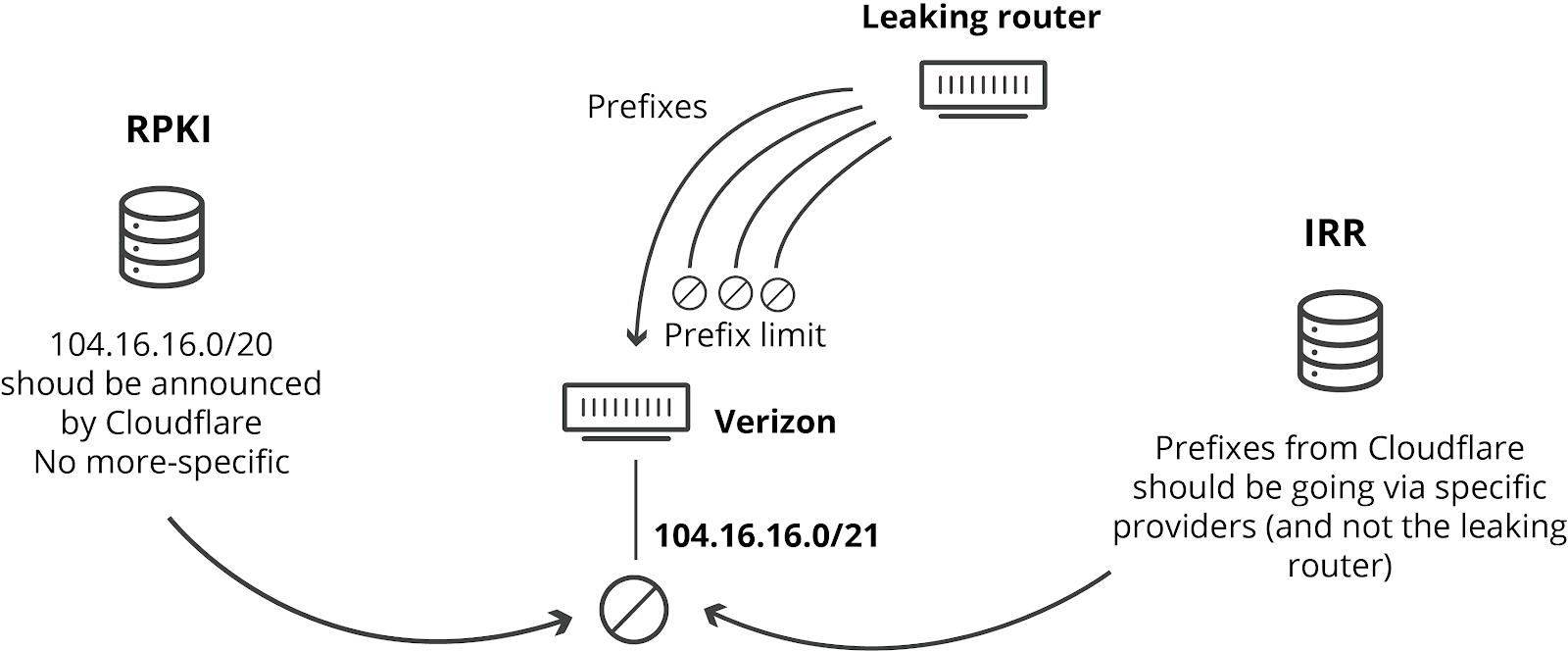
Network operators can help mitigate these problems by using stronger filtering policies to block spoofed traffic coming from their networks (helping guard against DDoS attacks) and filter route announcements Continue reading
The new revolution: Advances in the Internet of Things and Artificial Intelligence are leading to a fourth industrial revolution, Ars Technica suggests. This so-called Industry 4.0 represents “huge changes in much of the technology we deal with in our daily lives. Some of those changes have been for the better, making our interaction with machines and information more natural and more powerful. Others have helped companies tap into consumers’ relationships, behaviors, locations and innermost thoughts in powerful and often disturbing ways.”
Security gaps: But all is not well in IoT land. Legacy problems related to networking technologies are making IoT security “as bad as it gets,” IoT Hub reports. In addition, staff remotely monitoring IoT sensors don’t have the experience to fix problems.
They’re keeping their eyes on you: The Indian government has found a way to track WhatsApp messages without breaking encryption, Business Insider reports. The surveillance technique involves the government asking the Facebook-owned messaging platform to implement an identifier that would allow law enforcement officials to pinpoint who sent the message without reading it.
A new way to pay: In other Facebook-related news, the company is planning to launch a new cryptocurrency called Libra, The Verge Continue reading
Cloudflare is organizing a meetup in Seattle on Tuesday, June 25th and we hope you can join. We’ll be bringing together members of the developers community and Cloudflare users for an evening of discussion about serverless compute and the infinite number of use cases for deploying code at the edge.
To kick things off, our guest speaker Devin Ellis will share how Moz uses Cloudflare Workers to reduce time to first byte 30-70% by caching dynamic content at the edge. Kirk Schwenkler, Solutions Engineering Lead at Cloudflare, will facilitate this discussion and share his perspective on how to grow and secure businesses at scale.
Next up, Developer Advocate Kristian Freeman will take you through a live demo of Workers and highlight new features of the platform. This will be an interactive session where you can try out Workers for free and develop your own applications using our new command-line tool.
Food and drinks will be served til close so grab your laptop and a friend and come on by!