Go wild: Wildcard support in Rules and a new open-source wildcard crate
Back in 2012, we introduced Page Rules, a pioneering feature that gave Cloudflare users unprecedented control over how their web traffic was managed. At the time, this was a significant leap forward, enabling users to define patterns for specific URLs and adjust Cloudflare features on a page-by-page basis. The ability to apply such precise configurations through a simple, user-friendly interface was a major advancement, establishing Page Rules as a cornerstone of our platform.
Page Rules allowed users to implement a variety of actions, including redirects, which automatically send visitors from one URL to another. Redirects are crucial for maintaining a seamless user experience on the Internet, whether it's guiding users from outdated links to new content or managing traffic during site migrations.
As the Internet has evolved, so too have the needs of our users. The demand for greater flexibility, higher performance, and more advanced capabilities led to the development of the Ruleset Engine, a powerful framework designed to handle complex rule evaluations with unmatched speed and precision.
In September 2022, we announced and released Single Redirects as a modern replacement for the URL Forwarding feature of Page Rules. Built on top of the Ruleset Engine, this Continue reading
Better IX network quality monitoring
Better IX network quality monitoring
This post is a textual version of a talk I gave at the first NetUK. You can watch the talk on YouTube that was recorded by the wonderful AV team below if that’s your preferred medium:
Using Multiple Transit VNIs per EVPN VRF
After reading the Layer-3-Only EVPN: Behind the Scenes blog post, one might come to an obvious conclusion: the per-VRF EVPN transit VNI must match across all PE devices forwarding traffic for that VRF.
Interestingly, at least some EVPN implementations handle multiple VNIs per VRF without a hitch; I ran my tests in a lab where three switches used unique per-switch VNI for a common VRF.
The rest of this blog post describes Arista cEOS behavior; please feel free to use the same netlab topology to run similar tests on other devices.
Arista Banks On The AI Network Double Whammy
Current AI training and some AI inference clusters have two networks. …
Arista Banks On The AI Network Double Whammy was written by Timothy Prickett Morgan at The Next Platform.
D2DO249: The Anatomy of TLS 1.3 and Why You Should Risk It
Transport Layer Security (TLS) is today’s topic with guest Ed Harmoush. TLS plays a critical role in Internet security, and we dive into the differences between versions 1.2 and 1.3 In addition, Ed shares his journey into TLS, explains its components, and addresses common misconceptions about certificates and their validation processes. The episode also highlights... Read more »NAN071: Understanding the Infrastructure Requirements for AI Workloads (Sponsored)
On today’s Network Automation Nerds, we get into the infrastructure required to support AI workloads. We discuss key considerations including bandwidth, the substantial power and cooling requirements of AI infrastructure, and GPUs. We also talk about InfiniBand and Ethernet as network fabrics for AI workloads, cabling considerations, and more. This is a sponsored episode. Our... Read more »Review: Lenovo ThinkPad X1 Carbon Gen11
I’ve recently had the opportunity to start using a Lenovo ThinkPad X1 Carbon (X1C) Gen11 as my primary work system. Since I am not a Windows person—I don’t think I’ve used Windows as a daily driver since before the turn of the century—I’m running Linux on the X1C Gen11. Now that I’ve had a few weeks of regular use, in this post I’ll provide my review of this laptop.
This is my second ThinkPad X1 Carbon; my first was a Gen 5 that I received when I joined Heptio in 2018 (see my review of the X1C Gen5). I loved that laptop; my experience with the Gen5 was what made me choose the X1C Gen11 when given the opportunity. What I’ve found is that the Gen11 improves upon the X1C experience in some ways, but falls short in other ways.
Before getting into the details, here’s a quick rundown on the specifications:
- 10-core Intel 13th generation Core i7-1365U (two performance cores and eight efficiency cores)
- 32GB of RAM
- 512GB NVMe storage
- 2880×1800 display
- Two USB-C ports, two USB-A ports, and an HDMI port
As with the Gen5, I’m happy with the build quality and subjective “feel” of the laptop; Continue reading
Ethernet History Deepdive – Why Do We Have Different Frame Types?
In my previous post Encapsulation of PDUs On Trunk Ports, I showed what happens to PDUs when you change the configuration of a trunk. You may have noticed that there are typically three different types of Ethernet encapsulations that we see:
- Ethernet II.
- 802.2 LLC.
- 802 SNAP.
Historically, there were even more than three, but we’re ignoring that for now. Why do we have three? To understand this, we need to go back in history.
The Origin of Ethernet
In the early 70’s, Robert Metcalfe, inspired by ARPANET and ALOHAnet had been working on developing what we today know as Ethernet. He published a paper in 1976, together with David Boggs, named Ethernet: Distributed Packet Switching for Local Computer Networks:
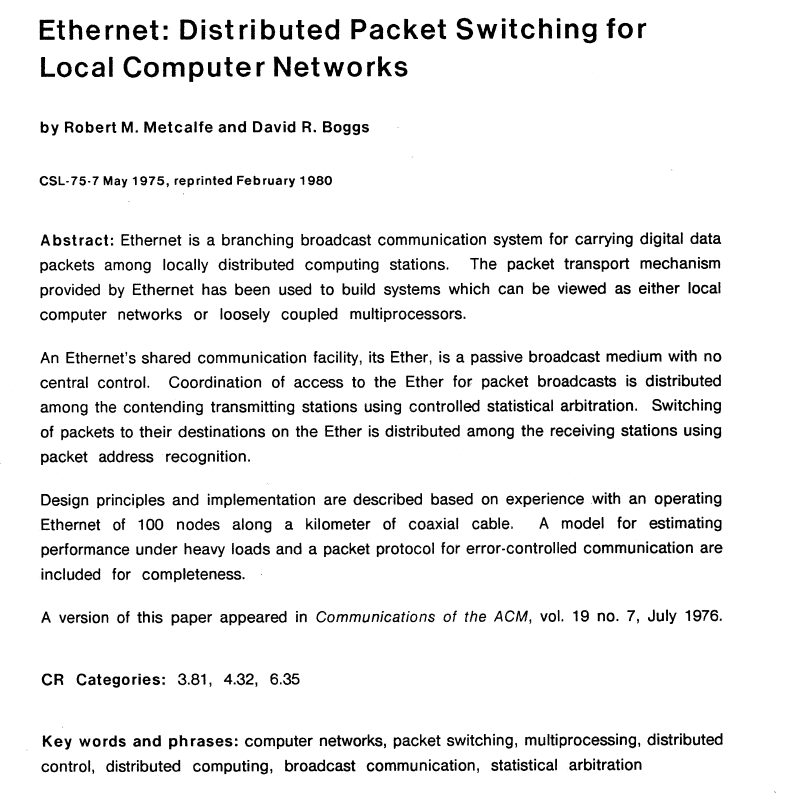
In the paper, they describe the addressing used in Ethernet:
3.3 Addressing
Each packet has a source and destination, both of which are identified in the packet’s header.
A packet placed on the Ether eventually propagates to all stations. Any station can copy a packet
from the Ether into its local memory, but normally only an active destination station matching ‘its
address in the packet’s header will do so as the packet passes. By convention, a Continue reading
Testing bgpipe with netlab
Ever since Pawel Foremski talked about BGP Pipe @ RIPE88 meeting, I wanted to kick its tires in netlab. BGP Pipe is a Go executable that runs under Linux (but also FreeBSD or MacOS), so I could add a Linux VM (or container) to a netlab topology and install the software after the lab has been started. However, I wanted to have the BGP neighbor configured on the other side of the link (on the device talking with the BGP Pipe daemon).
I could solve the problem in a few ways:
NIST’s first post-quantum standards
On August 13th, 2024, the US National Institute of Standards and Technology (NIST) published the first three cryptographic standards designed to resist an attack from quantum computers: ML-KEM, ML-DSA, and SLH-DSA. This announcement marks a significant milestone for ensuring that today’s communications remain secure in a future world where large-scale quantum computers are a reality.
In this blog post, we briefly discuss the significance of NIST’s recent announcement, how we expect the ecosystem to evolve given these new standards, and the next steps we are taking. For a deeper dive, see our March 2024 blog post.
Why are quantum computers a threat?
Cryptography is a fundamental aspect of modern technology, securing everything from online communications to financial transactions. For instance, when visiting this blog, your web browser used cryptography to establish a secure communication channel to Cloudflare’s server to ensure that you’re really talking to Cloudflare (and not an impersonator), and that the conversation remains private from eavesdroppers.
Much of the cryptography in widespread use today is based on mathematical puzzles (like factoring very large numbers) which are computationally out of reach for classical (non-quantum) computers. We could likely continue to use traditional cryptography for decades to Continue reading
Supermicro Financials Get Better As The Company Gets Bigger
It’s still Ketchup Week here at The Next Platform, and we are going to be circling back to look at the financials of a number of bellwether datacenter companies that we could not get to during a number of medical crisis – including but not limited to our family catching COVID when we took a week of vacation at a lake in Michigan. …
Supermicro Financials Get Better As The Company Gets Bigger was written by Timothy Prickett Morgan at The Next Platform.
HW034: Fixing Your Indoor Cellular Coverage
In this episode of the Heavy Wireless podcast, we talk with Howard Buzick from American Bandwidth about the evolution and current state of wireless connections, particularly in guest network environments. We explore advancements in Wi-Fi technologies, the workings of Passpoint (formerly Hotspot 2.0), and the differences between Passpoint and Open Roaming. Howard explains how American... Read more »PP027: How Wi-Fi Positioning Systems Enable Mass Surveillance
Smartphones use Wi-Fi based Positioning Systems (WPSes) to collect data about nearby Wi-Fi access points and other wireless devices to help determine the phones’ geographic location. Researchers at the University of Maryland show how WPSes from Apple and Google can be used for mass surveillance of access points and, potentially, owners and users of those... Read more »Building Blocks of AI: How Storage Architecture Shapes AI Success
COMMISSIONED On a bustling factory floor, an advanced AI system orchestrates a symphony of robotic arms, each performing its task with precision. …
Building Blocks of AI: How Storage Architecture Shapes AI Success was written by Timothy Prickett Morgan at The Next Platform.
NIST’s first post-quantum standards
On August 13th, 2024, the US National Institute of Standards and Technology (NIST) published the first three cryptographic standards designed to resist an attack from quantum computers: ML-KEM, ML-DSA, and SLH-DSA. This announcement marks a significant milestone for ensuring that today’s communications remain secure in a future world where large-scale quantum computers are a reality.
In this blog post, we briefly discuss the significance of NIST’s recent announcement, how we expect the ecosystem to evolve given these new standards, and the next steps we are taking. For a deeper dive, see our March 2024 blog post.
Why are quantum computers a threat?
Cryptography is a fundamental aspect of modern technology, securing everything from online communications to financial transactions. For instance, when visiting this blog, your web browser used cryptography to establish a secure communication channel to Cloudflare’s server to ensure that you’re really talking to Cloudflare (and not an impersonator), and that the conversation remains private from eavesdroppers.
Much of the cryptography in widespread use today is based on mathematical puzzles (like factoring very large numbers) which are computationally out of reach for classical (non-quantum) computers. We could likely continue to use traditional cryptography for decades to Continue reading
netlab 1.9.0: Routing Policies, Default Routes, Route Redistribution
netlab release 1.9.0 brings tons of new routing features:
- Generic Routing Configuration Module implements routing policies (route maps), prefix filters, AS-path filters, and BGP community filters.
- Default route origination in OSPFv2 and OSPFv3
- Route import (redistribution) into OSPFv2, OSPFv3, and BGP.
- Named prefixes
Other new goodies include:
Summer 2024 weather report: Cloudflare with a chance of Intern-ets
During the summer of 2024, Cloudflare welcomed approximately 60 Intern-ets from all around the globe on a mission to #HelpBuildABetterInternet. Over the course of their internships, our wonderful interns tackled real-world challenges from different teams all over the company and contributed to cutting-edge projects. As returning interns, we – Shaheen, Aaron, and Jada – would like to show off the great work our cohort has done and experiences we’ve had throughout our time here.
Austin Interns after volunteering at the Central Texas Food Bank.
Putting the SHIP in internSHIP
Cloudflare interns take pride in driving high-impact initiatives, playing a vital role in advancing Cloudflare's mission. With our diverse roles and projects this summer, we'd love to highlight some of the exciting work we've been involved in:
Rahul, a Software Engineer intern, built a system to autograde intern application assignments for future students looking to join Cloudflare. It was built entirely on the Cloudflare Developer Platform, using Cloudflare Access, Browser Rendering, D1, Durable Objects, R2, and Workers!
Jessica, a Software Engineer intern, created a new threads api for the Workers AI team that automatically recalls past messages when running inference, helping developers to Continue reading