Using Containers For Persistent Storage
Learn how container-based storage is implemented and blurring the lines between data, storage, and applications.
Learn how container-based storage is implemented and blurring the lines between data, storage, and applications.
In this post I would like to give a demonstration of using the Auto-Tunnel Mesh group feature.
As you may know, manual MPLS-TE tunnels are first and foremost unidirectional, meaning that if you do them between two PE nodes, you have to do a tunnel in each direction with the local PE node being the headend.
Now imagine if your network had 10 PE routers and you wanted to do a full mesh between them, this can become pretty burdensome and error-prone.
Thankfully there’s a method to avoid doing this manual configuration and instead rely on your IGP to signal its willingness to become part of a TE “Mesh”. Thats what the Auto-Tunnel Mesh Group feature is all about!
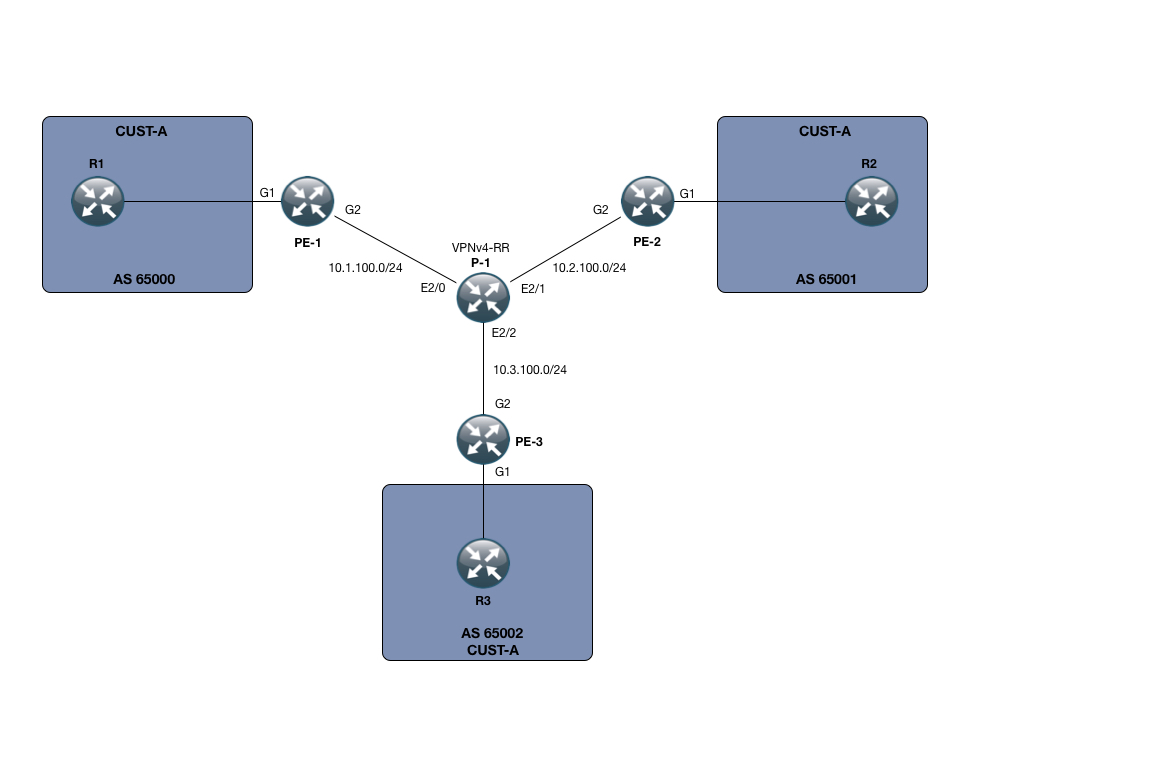
In my small SP setup, I only have 3 PE devices, namely PE-1, PE-2 and PE-3. I also only have one P node, called P-1.
However small this setup is, its enough to demonstrate the power of the Auto-Tunnel mesh functionality.
Beyond that, I have setup a small MPLS L3 VPN service for customer CUST-A, which has a presence on all 3 PE nodes. The VPNv4 address-family is using a RR which for this purpose is P-1.
We are running OSPF Continue reading
One of my readers sent me an interesting NSSA question (more in a future blog post) that sent me chasing for the reasons behind the OSPF Forwarding Address (FA) field in type-5 and type-7 LSAs.
This is the typical scenario for OSPF FA I was able to find on the Internet:
Read more ...
Almost 2 years ago, I set out on an experiment in plain text productivity. I won’t say the experiment was a failure; I did learn from the experiment, and gaining knowledge is usually a positive outcome. In the end, I switched back to OmniFocus, the OS X- and iOS-specific app I’d been using previously. In the last few weeks, though, I’ve revisited the idea of a plain text productivity system as part of my migration to Ubuntu Linux as my primary desktop OS, and I think I’ve resolved some of the issues that were present in my last attempt.
To recap, in my previous attempt I settled on the TaskPaper format (named after the OS X app of the same name). The format is extraordinarily flexible, and the OS X app is more powerful than you might expect. However, I uncovered some issues that made the solution untenable; namely:
At the time, the app had no way to dynamically respond to Continue reading
Welcome to Technology Short Take #76, the first Technology Short Take of 2017. Normally, I’d publish this on a Friday, but due to extenuating circumstances (my mother-in-law’s funeral is tomorrow) I’m posting it today. Here’s hoping you find something useful!
It's 2017 and my blog was starting to look a little dated so I decided it was time for a face-lift. While I was at it, I overhauled the way I deploy my blog too.
 Gluster gets a boost in the container world.

