
One Million Views
It’s hard to believe that my blog has just surpassed 1000000 views! I started this blog out just on the side to go over things I was learning. I’ve learned a lot in the process, and managed to bag myself two CCIEs, a JNCIE-SP, a job at Google, and the opportunity to write a book … Continue reading One Million Views


Show 266: Exploring Riverbed SD-WAN And Project Tiger (Sponsored)
Riverbed’s Hansang Bae, Josh Dobies, and Kevin Glavin discuss how an application-centric approach to SD-WAN puts IT at the forefront of business innovation. And get an in-depth preview of Project Tiger, Riverbed’s engineering effort that will dramatically simplify how IT manages hybrid WANs.
The post Show 266: Exploring Riverbed SD-WAN And Project Tiger (Sponsored) appeared first on Packet Pushers.
Show 266: Exploring Riverbed SD-WAN And Project Tiger (Sponsored)
Riverbed’s Hansang Bae, Josh Dobies, and Kevin Glavin discuss how an application-centric approach to SD-WAN puts IT at the forefront of business innovation. And get an in-depth preview of Project Tiger, Riverbed’s engineering effort that will dramatically simplify how IT manages hybrid WANs.
The post Show 266: Exploring Riverbed SD-WAN And Project Tiger (Sponsored) appeared first on Packet Pushers.
Tools for debugging, testing and using HTTP/2
With CloudFlare's release of HTTP/2 for all our customers the web suddenly has a lot of HTTP/2 connections. To get the most out of HTTP/2 you'll want to be using an up to date web browser (all the major browsers support HTTP/2).
But there are some non-browser tools that come in handy when working with HTTP/2. This blog post starts with a useful browser add-on, and then delves into command-line tools, load testing, conformance verification, development libraries and packet decoding for HTTP/2.
If you know of something that I've missed please write a comment.
Browser Indicators
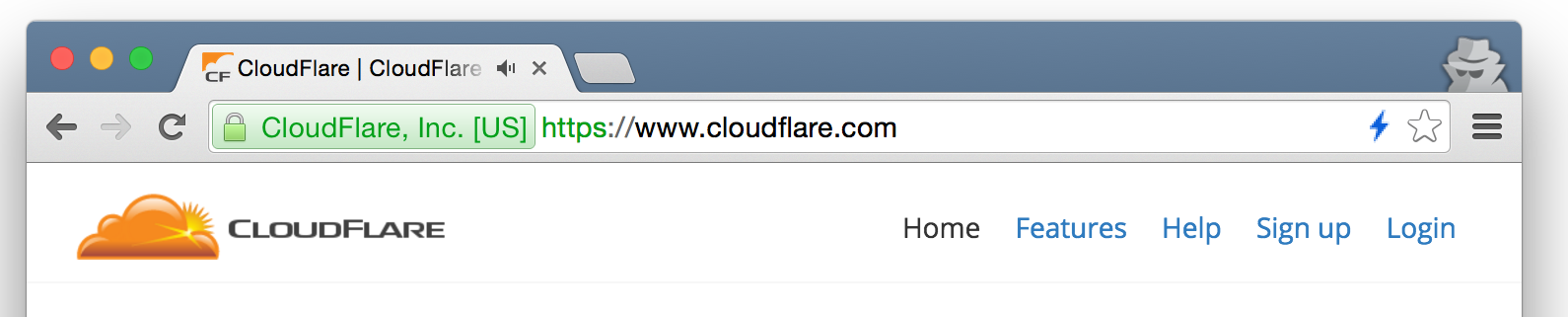
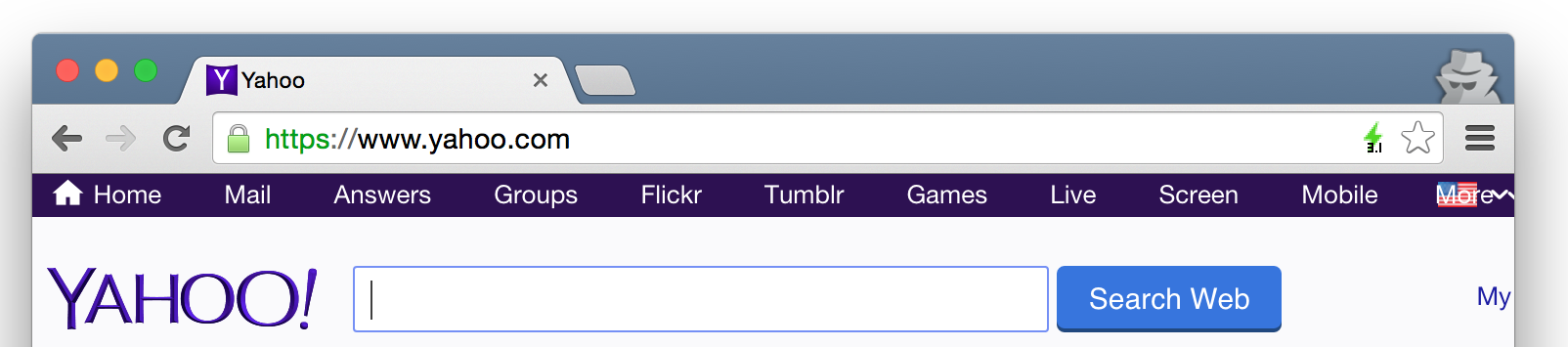
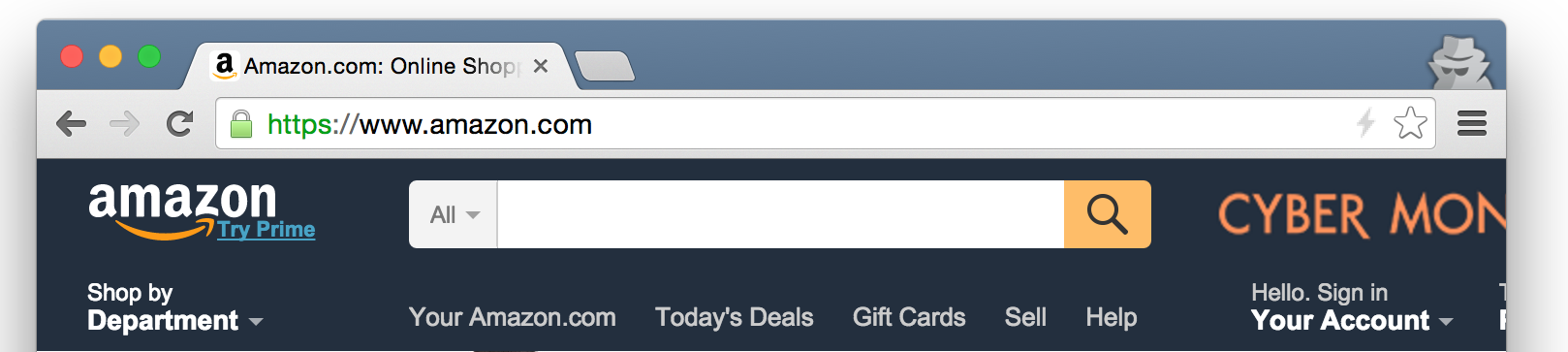
For Google Chrome there's a handy HTTP/2 and SPDY Indicator extension that adds a colored lightning bolt to the browser bar showing the protocol being used when a web page is viewed.
The blue lightning bolt shown here indicates that the CloudFlare home page was served using HTTP/2:
A green lightning bolt indicates the site was served using SPDY and gives the SPDY version number. In this case SPDY/3.1:
A grey lightning bolt indicates that neither HTTP/2 no SPDY were used. Here the web page was served using HTTP/1.1.
There's a similar extension for Firefox.
Online testing
There's also a handy online Continue reading
SD-WAN: Streamlining Branch Office Connectivity
Traditional WANs are expensive and complex. Enterprises can tackle the problem by extending SDN from the data center to the WAN.What Data Centers Can Learn From The Military
Hyperscale innovators are driving technology today in the way that NASA and the military introduced new capabilities decades ago, but some principles remain the same.Why Do We Need VXLAN (and What Is It)?
Do you need VXLAN in your data center or could you continue using traditional bridging? Do layer-2 fabrics make sense or are they a dead end in the evolution of virtual networking?
I tried to provide a few high-level answers in the Introduction to VXLAN video which starts the VXLAN Technical Deep Dive webinar. The public version of the video is now available on ipSpace.net Free Content web site.
Tesla is copying Apple’s business model
One of the interesting things about Tesla is that the company is trying to copy Apple's business model. As a Silicon Valley entrepreneur myself, and an owner of a Tesla car, I thought I'd write up what that means.DockerCon EU 2015 Videos: Day 2 of Black Belt
We have more vides from DockerCon EU 2015 to share! Scroll down to watch the recorded sessions and accompanying slides from Day 2 in the Black Belt track at DockerCon EU 2015. How to be successful running Docker in Production – … ContinuedNetwork Automation with Ansible – Dynamically Configuring Interface Descriptions
It’s been a while since my last post, but let’s hope that changes with the flurry of posts planned for this month. Most of my recent time has been spent traveling and teaching courses that cover how to use Python and Ansible for Network Automation. I’ve written about many of these concepts in the past, but to re-iterate what I’ve been saying, and what I’ve written in the past, it’s crucial to start small when it comes to automation (otherwise it’s easy to feel overwhelmed trying to automate everything and then you never make any real progress). By starting small, you can get a quick win, and can gradually expand from there. In this post, I’m going to review one very small example of how to use Ansible for network automation. We’ll review how to use Ansible to dynamically configure interface descriptions populated with real-time LLDP neighbor information. While this post focuses on Cisco Nexus switches, note that the same approach can be used for any vendor.
The process that we’ll be using to auto-configure the interface descriptions is a three-step process:
1. Discover the device
While we are only using Cisco switches in this example, we still go through Continue reading
A Use Case for an SSH Bastion Host
In this post, I’m going to explore one specific use case for using an SSH bastion host. I described this configuration and how to set it up in a previous post; in this post, though, I’d like to focus on one practical use case.
This use case is actually one I depicted graphically in my earlier post:

This diagram could represent a couple different examples. For example, perhaps this is an AWS VPC. Security best practices suggest that you should limit access from the Internet to your instances as much as possible; unless an instance needs to accept traffic from the Internet, don’t assign a public IP address (or an Elastic IP address). However, without a publicly-accessible IP address, how does one connect to and manage the instance? You can’t SSH to it without a publicly-accessible IP address—unless you use an SSH bastion host.
Or perhaps this diagram represents an OpenStack private cloud, where users can deploy instances in a private tenant network. In order for those instances to be accessible externally (where “externally” means external to the OpenStack cloud), the tenant must assign each instance a floating IP address. Security may not be as much of a concern Continue reading
Artificial Intelligence Handles Phone Calls for NTT
 NTT also announced a reseller partnership with Hewlett Packard Enterprise.