Sudan: seven days without Internet access (and counting)


It's not every day that there is no Internet access in an entire country. In the case of Sudan, it has been five days without Internet after political turmoil that started last Monday, October 25, 2021 (as we described).
The outage continues with almost a flat line and just a trickle of Internet traffic from Sudan. Cloudflare Radar shows that the Internet in Sudan is still almost completely cut off.
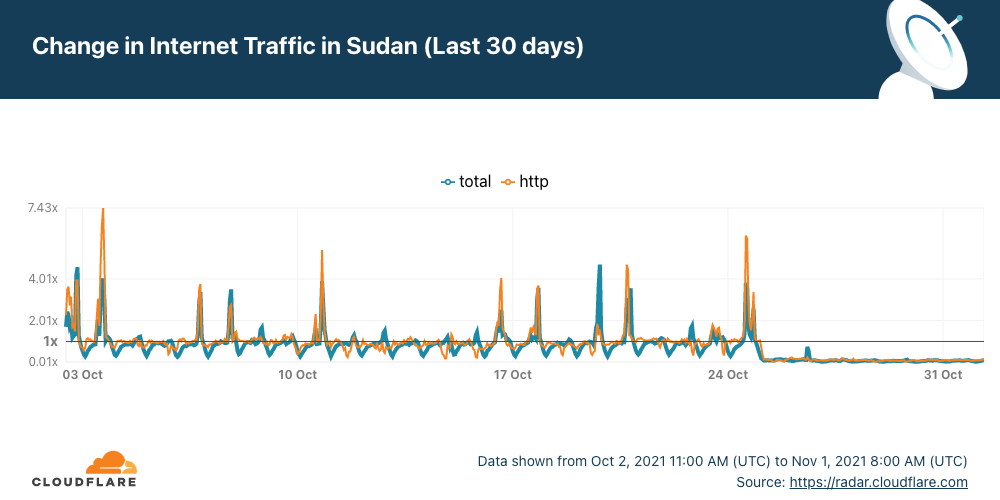
There was a blip of traffic on Tuesday at ~14:00 UTC, for about one hour, but it flattened out again, and it continues like that — anyone can track the evolution on the Sudan page of Cloudflare Radar.

Internet shutdowns are not that rare
Internet disruptions, including shutdowns and social media restrictions, are common occurrences in some countries and Sudan is one where this happens more frequently than most countries according to Human Rights Watch. In our June blog, we talked about Sudan when the country decided to shut down the Internet to prevent cheating in exams, but there were situations in the past more similar to this days-long shutdown — something that usually happens when there’s political unrest.
The country's longest recorded network disruption was back in Continue reading
netsim-tools Release 1.0
It looks like netsim-tools reached a somewhat stable state, so it was time to do a cleanup and publish release 1.0 (also available on PyPi, use pip3 install –upgrade netsim-tools to fetch it).
During the cleanup, I removed all references to the obsolete scripts, leaving only the netlab command. I also found an old bash script that enabled LLDP passthrough on Linux bridges and made it part of netlab up process; your libvirt-based labs will have LLDP enabled by default.
Interested? Install the tools and follow the tutorials to get started.
netsim-tools Release 1.0
It looks like netsim-tools reached a somewhat stable state, so it was time to do a cleanup and publish release 1.0 (also available on PyPi, use pip3 install –upgrade netsim-tools to fetch it).
During the cleanup, I removed all references to the obsolete scripts, leaving only the netlab command. I also found an old bash script that enabled LLDP passthrough on Linux bridges and made it part of netlab up process; your libvirt-based labs will have LLDP enabled by default.
Interested? Install the tools and follow the tutorials to get started.
Python Script Pulling AWS IP Prefixes – Part 2
In the previous post I described some of the design considerations for this script and what modules I use. In this post, we will look at using YAML to collect data and use it in Python in the form of a dictionary. Why YAML? YAML is commonly used as a readable way of storing configuration data and there are modules for Python to read that data.
The YAML file is a very basic one containing these mappings:
---
outside_interface: outside
aws_service: s3
aws_region: eu-north-1
asa_ip: 192.168.255.241
...
The three dashes indicate the start of the file and the three dots indicate the end of the file. We have configured what service we are interested in (S3) and in what region (eu-north-1). The outside interface in our Cisco ASA is named outside.
The natural fit to work with mappings in Python is a dictionary. We need to get the data from the file named aws_prefix.yml into a dictionary. To do that, we will use the following code:
def get_yaml_data() -> dict:
    """Gets the interface name, ASA IP address AWS service, and region
    from the YAML file and returns a dictionary"""
    try:
        with open("aws_prefix.yml")  Continue reading
Worth Reading: Operators and the IETF
Long long time ago (seven years to be precise), ISOC naively tried to bridge the gap between network operators and Internet Vendor Engineering Task Force1. They started with a widespread survey asking operators why they’re hesitant to participate in IETF mailing lists and meetings.
The result: Operators and the IETF draft that never moved beyond -00 version. A quick glimpse into the Potential Challenges will tell you why IETF preferred to kill the messenger (and why I published this blog post on Halloween).
Worth Reading: Operators and the IETF
Long long time ago (seven years to be precise), ISOC naively tried to bridge the gap between network operators and Internet Vendor Engineering Task Force1. They started with a widespread survey asking operators why they’re hesitant to participate in IETF mailing lists and meetings.
The result: Operators and the IETF draft that never moved beyond -00 version. A quick glimpse into the Potential Challenges will tell you why IETF preferred to kill the messenger (and why I published this blog post on Halloween).
Debunking: that Jones Alfa-Trump report
The Alfa-Trump conspiracy-theory has gotten a new life. Among the new things is a report done by Democrat operative Daniel Jones [*]. In this blogpost, I debunk that report.
If you'll recall, the conspiracy-theory comes from anomalous DNS traffic captured by cybersecurity researchers. In the summer of 2016, while Trump was denying involvement with Russian banks, the Alfa Bank in Russia was doing lookups on the name "mail1.trump-email.com". During this time, additional lookups were also coming from two other organizations with suspicious ties to Trump, Spectrum Health and Heartland Payments.
This is certainly suspicious, but people have taken it further. They have crafted a conspiracy-theory to explain the anomaly, namely that these organizations were secretly connecting to a Trump server.
We know this explanation to be false. There is no Trump server, no real server at all, and no connections. Instead, the name was created and controlled by Cendyn. The server the name points to for transmitting bulk email and isn't really configured to accept connections. It's built for outgoing spam, not incoming connections. The Trump Org had no control over the name or the server. As Cendyn explains, the contract with the Trump Org ended in Continue reading
Automation 3. Configuring of Nokia SROS via NETCONF/YANG with pySROS and Python
Hello my friend,
we continue the review and tutorial of pySROS, the Nokia Python library to manage the Nokia SR OS based routers via NETCONF/YANG. In previous blogposts we’ve covered how to poll the configuration and operational data and how to structure the received data and explore its YANG modules. Today we’ll take a look how to configure Nokia SR OS based devices.
2
3
4
5
retrieval system, or transmitted in any form or by any
means, electronic, mechanical or photocopying, recording,
or otherwise, for commercial purposes without the
prior permission of the author.
I Have Software Developers in My Company. Why Should I Do Automation?
This is one of the trickiest questions, which doesn’t have a simple answer. Really, why should you, network or security engineer, bother yourself and step into completely new and unknown world of automation and development? The reason for that very simple: network and security automation (and infrastructure automation in general) requires detailed knowledge of the network and security infrastructure first of all. We always say at our trainings: automation is automation of your knowledge and skills. So
On top of that, Continue reading
Worth Reading: Programming Sucks
Just FYI: if you’re wondering about the wisdom of every networking engineer should become a programmer religion, you might benefit from the Programming Sucks reality check. I had just enough exposure to programming to realize how spot-on it is (and couldn’t decide whether to laugh or cry).
Worth Reading: Programming Sucks
Just FYI: if you’re wondering about the wisdom of every networking engineer should become a programmer religion, you might benefit from the Programming Sucks reality check. I had just enough exposure to programming to realize how spot-on it is (and couldn’t decide whether to laugh or cry).
Amazon Is The Flywheel, AWS Is The Cash Register
The coronavirus pandemic giveth to Amazon retail business and its Amazon Web Services cloud business, and the pandemic taketh away from the Amazon retail business. …
Amazon Is The Flywheel, AWS Is The Cash Register was written by Timothy Prickett Morgan at The Next Platform.
Calico is celebrating 5 years
October marks the five-year anniversary of Calico Open Source, the most widely adopted solution for container networking and security. Calico Open Source was born out of Project Calico, an open-source project with an active development and user community, and has grown to power 1.5M+ nodes daily across 166 countries.
When Calico was introduced 5 years ago, the world—and technology—was much different from what it is today. The march toward distributed applications and microservices had just begun. Today, open-source projects like Project Calico are enabling the large-scale adoption of a modern architecture that is ultimately responsible for the wholesale transition to digital transformations that we are witnessing.
As part of our celebration, we’ve compiled a few comments from people who have worked on the project over the years.
“Calico works well out of the box. It scales well, rarely has bugs, and is feature rich. Tigera does a good job supporting its customers also.” —Network engineer“[Calico is] the industry standard [for] networking for Kubernetes.” —Platform engineer“The support for a lot of K8s distributions (either on-prem or cloud managed) is great with Calico.” —Platform architect“[Calico helped us learn] about network segmentation in cloud-native environments.” Continue reading