Introducing Zero Trust Private Networking
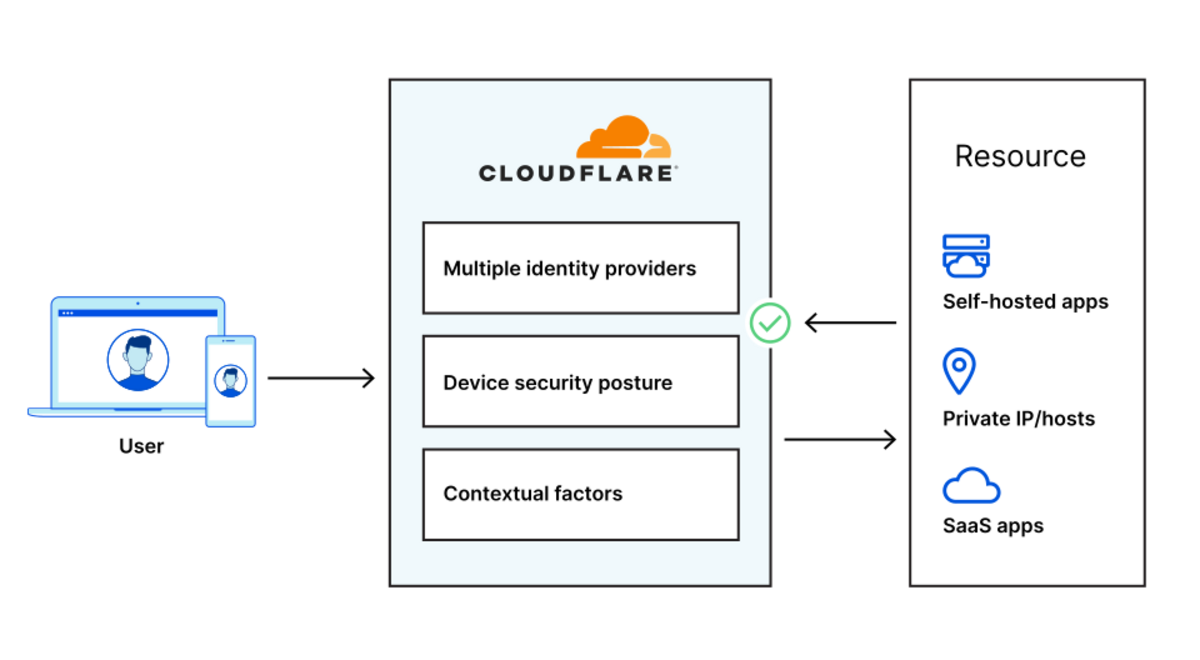
Starting today, you can build identity-aware, Zero Trust network policies using Cloudflare for Teams. You can apply these rules to connections bound for the public Internet or for traffic inside a private network running on Cloudflare. These rules are enforced in Cloudflare’s network of data centers in over 200 cities around the world, giving your team comprehensive network filtering and logging, wherever your users work, without slowing them down.
Last week, my teammate Pete’s blog post described the release of network-based policies in Cloudflare for Teams. Your team can now keep users safe from threats by limiting the ports and IPs that devices in your fleet can reach. With that release, security teams can now replace even more security appliances with Cloudflare’s network.
We’re excited to help your team replace that hardware, but we also know that those legacy network firewalls were used to keep private data and applications safe in a castle-and-moat model. You can now use Cloudflare for Teams to upgrade to a Zero Trust networking model instead, with a private network running on Cloudflare and rules based on identity, not IP address.
To learn how, keep reading or watch the demo below.
Deprecating the castle-and-moat model
Private Continue reading
Supporting IXPs in Asia-Pacific: New Partnership with the Asia Pacific Internet Exchange Association

The Internet Society and the Asia Pacific Internet Exchange Association (APIX) commit to work together to support communities that build the Internet and improve digital infrastructure in the region. At the peak of the COVID-19 pandemic, average international Internet traffic increased by 48%, putting an unprecedented strain on the Internet. The trend was the same […]
The post Supporting IXPs in Asia-Pacific: New Partnership with the Asia Pacific Internet Exchange Association appeared first on Internet Society.
Serving WebP & AVIF images with Nginx
WebP and AVIF are two image formats for the web. They aim to produce smaller files than JPEG and PNG. They both support lossy and lossless compression, as well as alpha transparency. WebP was developed by Google and is a derivative of the VP8 video format.1 It is supported on most browsers. AVIF is using the newer AV1 video format to achieve better results. It is supported by Chromium-based browsers and has experimental support for Firefox.2
Your browser supports WebP and AVIF image formats. Your browser supports none of these image formats. Your browser only supports the WebP image format. Your browser only supports the AVIF image format.
Without JavaScript, I can’t tell what your browser supports.
Converting and optimizing images
For this blog, I am using the following shell snippets to convert and optimize JPEG and PNG images. Skip to the next section if you are only interested in the Nginx setup.
JPEG images
JPEG images are converted to WebP using cwebp.
find media/images -type f -name '*.jpg' -print0 \
  | xargs -0n1 -P$(nproc) -i \
      cwebp -q 84 -af '{}' -o '{}'.webp
They are converted to AVIF using avifenc Continue reading
iPerf2 vs iPerf3 | Panos Vouzis | WLPC Phoenix 2020 – YouTube
 Short video on differences.
Unnumbered Ethernet Interfaces, DHCP Edition
Last week we explored the basics of unnumbered IPv4 Ethernet interfaces, and how you could use them to save IPv4 address space in routed access networks. I also mentioned that you could simplify the head-end router configuration if you’re using DHCP instead of per-host static routes.
Obviously you’d need a smart DHCP server/relay implementation to make this work. Simplistic local DHCP server would allocate an IP address to a client requesting one, send a response and move on. Likewise, a DHCP relay would forward a DHCP request to a remote DHCP server (adding enough information to allow the DHCP server to select the desired DHCP pool) and forward its response to the client.
Unnumbered Ethernet Interfaces, DHCP Edition
Last week we explored the basics of unnumbered IPv4 Ethernet interfaces, and how you could use them to save IPv4 address space in routed access networks. I also mentioned that you could simplify the head-end router configuration if you’re using DHCP instead of per-host static routes.
Obviously you’d need a smart DHCP server/relay implementation to make this work. Simplistic local DHCP server would allocate an IP address to a client requesting one, send a response and move on. Likewise, a DHCP relay would forward a DHCP request to a remote DHCP server (adding enough information to allow the DHCP server to select the desired DHCP pool) and forward its response to the client.
CVE-2021-31440: Kubernetes container escape using eBPF
In a recent post by ZDI, researchers found an out-of-bounds access flaw (CVE-2021-31440) in the Linux kernel’s (5.11.15) implementation of the eBPF code verifier: an incorrect register bounds calculation occurs while checking unsigned 32-bit instructions in an eBPF program. The flaw can be leveraged to escalate privileges and execute arbitrary code in the context of the kernel.
This vulnerability allows a local privilege escalation, which means an attacker with non-root access to the system can gain higher privileges by exploiting this vulnerability. The non-root access can be a user account without sudo or group privileges, which are usually provided to the application user.
Why you should be worried
In a Kubernetes environment, containers use the host kernel to run themselves. Therefore, the execution of malicious eBPF code as an unprivileged user in the context of the kernel can result in container escape and privilege escalation to the host.
Unprivileged users inside the container need CAP_SYS_ADMIN permission already assigned to the container to run a malicious eBPF program. For Linux kernels 5.8 and above, a new permission, CAP_BPF, is added to allow users to run eBPF programs. CAP_BPF is a subset of CAP_SYS_ADMIN.
In Kubernetes, Continue reading
AMD on Why Chiplets—And Why Now
Moore’s Law is not just a simple rule of thumb about transistor counts, it’s an economic, technical, and developmental force—and one strong enough to push some of the largest chipmakers to future-proof architectural approaches. …
AMD on Why Chiplets—And Why Now was written by Nicole Hemsoth at The Next Platform.
Bringing “docker scan” to Linux
At the end of last year we launched vulnerability scanning options as part of the Docker platform. We worked together with our partner Snyk to include security testing options along multiple points of your inner loop. We incorporated scanning options into the Hub, so that you can configure your repositories to automatically scan all the pushed images. We also added a scanning command to the Docker CLI on Docker Desktop for Mac and Windows, so that you can run vulnerability scans for images on your local machine. The earlier in your development that you find these vulnerabilities, the easier and cheaper it is to fix them. Vulnerability scan results also provide remediation guidance on things that you can do to remove the reported vulnerabilities. Some of the examples of remediation include recommendations for alternative base images with lower vulnerability counts, or package upgrades that have already resolved the specified vulnerabilities.
We are now making another update in our security journey, by bringing “docker scan” to the Docker CLI on Linux. The experience of scanning on Linux is identical to what we have already launched for Desktop CLI, with scanning support for linux/amd64 (x86-64) Docker images. The Continue reading
The Hedge 87: Jordan Holand and nPrint
The network monitoring world is rife with formats for packets being measured—every tool has its own format. What would make things a lot better for network engineers is a standard data representation for packet analysis, no matter what format packets are captured in. Jordan Holland joins Russ White and Tom Ammon on this episode of the Hedge to discuss the problem and nprint, a standard packet analysis format and tools for converting from other formats.
CVE-2021-31440: Kubernetes container escape using eBPF
In a recent post by ZDI, researchers found an out-of-bounds access flaw (CVE-2021-31440) in the Linux kernel’s (5.11.15) implementation of the eBPF code verifier: an incorrect register bounds calculation occurs while checking unsigned 32-bit instructions in an eBPF program. The flaw can be leveraged to escalate privileges and execute arbitrary code in the context of the kernel.
This vulnerability allows a local privilege escalation, which means an attacker with non-root access to the system can gain higher privileges by exploiting this vulnerability. The non-root access can be a user account without sudo or group privileges, which are usually provided to the application user.
Why you should be worried
In a Kubernetes environment, containers use the host kernel to run themselves. Therefore, the execution of malicious eBPF code as an unprivileged user in the context of the kernel can result in container escape and privilege escalation to the host.
Unprivileged users inside the container need CAP_SYS_ADMIN permission already assigned to the container to run a malicious eBPF program. For Linux kernels 5.8 and above, a new permission, CAP_BPF, is added to allow users to run eBPF programs. CAP_BPF is a subset of CAP_SYS_ADMIN.
In Kubernetes, Continue reading
Exploring VMware’s Kubernetes App Connectivity and Security Solution: A Deep Dive, with Demos
Modern apps need to run in multi-cluster, multi-cloud environments across a mix of traditional and microservices architectures. In this context, enterprise platform, infrastructure, and operations teams are presented with unique challenges in securely connecting and managing modern workloads, in delivering scalable services, or bridging between traditional VM workloads and containers, and supporting production operations for modern apps.
VMware recently introduced the “VMware Modern Apps Connectivity solution”, which brings together the advanced capabilities of Tanzu Service Mesh (TSM) and VMware NSX Advanced Load Balancer ALB (formerly Avi Networks) address today’s unique enterprise challenges.

In this blog, we’ll take a deeper look at this solution and demonstrate how its cloud-native principles enable a set of important use cases that automate the process of connecting, observing, scaling, and better securing applications across multi-site environments and clouds. We’ll also show how state-of-the-art capabilities in this solution — like Global Server Load Balancing (GSLB) and Intelligent Autoscaling — enable enterprises to deliver advanced use cases such as cloud-bursting.
Step 0: Set up (typical HA architecture for a modern distributed app)
Let’s start by looking at our set-up, which is a typical architecture for a highly-available modern app deployment Continue reading
Confronting European Encroachment on Encryption

In late 2020, as Portugal prepared to take over the rotating Presidency of the Council of the European Union (EU), the Internet Society’s Portugal Chapter began ramping up its advocacy against worrying new plans to create encryption backdoors. The Council of the European Union, in a resolution in November 2020, and the European Commission (EC), in a […]
The post Confronting European Encroachment on Encryption appeared first on Internet Society.
Volume Management, Compose v2, Skipping Updates, and more in Docker Desktop 3.4
We are excited to announce the release of Docker Desktop 3.4.
This release includes several improvements to Docker Desktop, including our new Volume Management interface, the Compose v2 roll-out, and changes to how to Skip an update to Docker Desktop based on your feedback.
Volume Management
Have you wanted a way to more easily manage and explore your volumes?
In this release we’re introducing a new capability in Docker Desktop that helps you to create and delete volumes from Desktop’s Dashboard as well as to see which ones are In Use.

For developers with Pro and Team Docker subscriptions, we’ll be bringing a richer experience to managing your volumes.
You’ll be able to explore the contents of the volumes so that you can more easily get an understanding of what’s taking up space within the volume.

You’ll also be able to easily see which specific containers are using any particular volume.

We’re also looking to add additional capabilities in the future, such as being able to easily download files from the volume, read-only view for text files, and more. We’d love to hear more about what you’d like to see us prioritize and focus on in improving the Continue reading
Day Two Cloud 101: Closing The Network/Cloud Gap Before You Fall In (Sponsored)
On today's episode, sponsored by BlueCat Networks, we examine the technology and human challenges that arise when you integrate on-prem and the public cloud. You can't continue to do things in the cloud with traditional toolsets and processes. You need to update the tech and the people, including how they collaborate. We also discuss a new report that examines the need for, and challenges of, integrating networking and cloud teams. Our guest is Andrew Wertkin, Chief Strategy Officer at BlueCat.Day Two Cloud 101: Closing The Network/Cloud Gap Before You Fall In (Sponsored)
On today's episode, sponsored by BlueCat Networks, we examine the technology and human challenges that arise when you integrate on-prem and the public cloud. You can't continue to do things in the cloud with traditional toolsets and processes. You need to update the tech and the people, including how they collaborate. We also discuss a new report that examines the need for, and challenges of, integrating networking and cloud teams. Our guest is Andrew Wertkin, Chief Strategy Officer at BlueCat.
The post Day Two Cloud 101: Closing The Network/Cloud Gap Before You Fall In (Sponsored) appeared first on Packet Pushers.