Ericsson Updates Existing Radios to 5G NR via Software
 It looks like Verizon's claim about a software upgrade to standardized 5G is true.
Want to Learn More about Docker and Containers?
One of my readers wanted to know more about containers and wondered how ipSpace.net materials could help him. Here’s a short step-by-step guide:
I published this blog post to help ipSpace.net subscribers navigate through Docker- and containers-related material. You might want to skip it if you’re not one of them.
Read more ...Datanauts 120: Data Center Transformation, Certifications & Consulting
Today the Datanauts explore the worlds of consulting and VARs, and their customer focus areas, including data center transformation and certifications. Our guests are Jason Nash and Josh Coen. The post Datanauts 120: Data Center Transformation, Certifications & Consulting appeared first on Packet Pushers.

Dfinity Raises $61M for Blockchain-Based Open Cloud
 The startup plans to launch its decentralized cloud this year.
BiB 32: Netscout Adds Security Chaining To nGenius PFS5000
Netscout talked to Ethan Banks about how they are unifying visibility fabrics inside of an IT team with features like security tool chains.
The post BiB 32: Netscout Adds Security Chaining To nGenius PFS5000 appeared first on Packet Pushers.
Compass Datacenters Doubles Down on Edge Plans
 The bolstered platform includes core to edge support for mission critical operations.
OCP’s Global Market to Quintuple by 2021, Says IHS Markit
 Primary adoption drivers for OCP are power efficiency, cost reductions, standardization, and quick deployment.
Check Point Pumps Up Cloud Security: ‘It’s CASB on Steroids’
 The CloudGuard technology takes a device- and application-centric approach.
SD-WAN Startups Head Toward the Trough of Disillusionment
 The hype cycle for SD-WAN vendors has moved fast.
Cisco Gets Yet Another CVSS 10 for ASA & Firepower | Threatpost

Yet another CVSS 10 for Cisco security products

Check Out Our Newest Course: CCNA Cyber Ops Technology: SECFND 210-250
Last week we added a new CCNA Cyber Ops Course. This course is available to AAP members through your members and to everyone else through ine.com
Why You Should Watch:
Cisco’s CCNA Cyber Ops certification provides individuals with the knowledge to identify and respond to security incidents. This certification provides a path to working in a Security Operations Center (SOC) and security positions. As a CCNA level certification, Cyber Ops provides introductory knowledge so one may be aware of the security landscape, understand security concepts and general networking.
About the Course:
This course will cover the exam topics of the Understanding Cisco Cybersecurity Fundamentals (SECFND 210-250) Exam.This course is taught by Andrew Crouthamel and is 7 hours and 32 minutes long.
What You’ll Learn:
We will dive into topics such as networking concepts and IP addressing, as well as security concepts including access control models, risk assessment and the CIA triad. We will also review cryptography methods and host-based analysis details, as well as security monitoring tools and attack methods used by threat actors.
About the Author:
Andrew is a seasoned IT engineer with over 12 years of experience. He started out in IT as an assistant Continue reading
AT&T to Release “dNOS” Software Framework Into Open Source to Accelerate Network White Box Adoption
 dNOS goes to Linux Foundation to be Open (instead of half closed)
OpenCT’s Blockchain Platform Aims to Transform Telcos
 A new white paper from OpenCT features detailed technical examples of OpenCT’s two telco solutions: Blockchain as a Transport (BaaT) and Blockchain-Defined Wide Area Networks (BD-WAN).
Context-Aware Micro-segmentation – an innovative approach to Application and User Identity Firewall
Summary: With Context-awareness, NSX for vSphere 6.4 enables customers to enforce policy based on Application and Protocol Identification and expands the Identity Firewall support to Multiple User Sessions.
A few weeks ago, VMware released version 6.4 of NSX for vSphere. The 6.4 release brings many new features, with Context-awareness being key from a security perspective. Micro-segmentation enables East-West security controls, and is a key building block to a secure datacenter. Context-awareness builds-on and expands Micro-segmentation by enabling customers even more fine-grained visibility and control. NSX has supported the use infrastructure or application-centric constructs such as Security Groups based on criteria like VM name or OS version, or Dynamic Security Tags describing things like the workload function, the environment it’s deployed in, or any compliance requirements the workload falls under, enabling fine-grained control and allowing customers to automate the lifecycle of a security policy from the time an application is provisioned to the time it’s decommissioned. Prior to 6.4, rules with infrastructure or application-centric grouping constructs on the Management plane, are eventually translated to 5-tuple based rules in the dataplane.
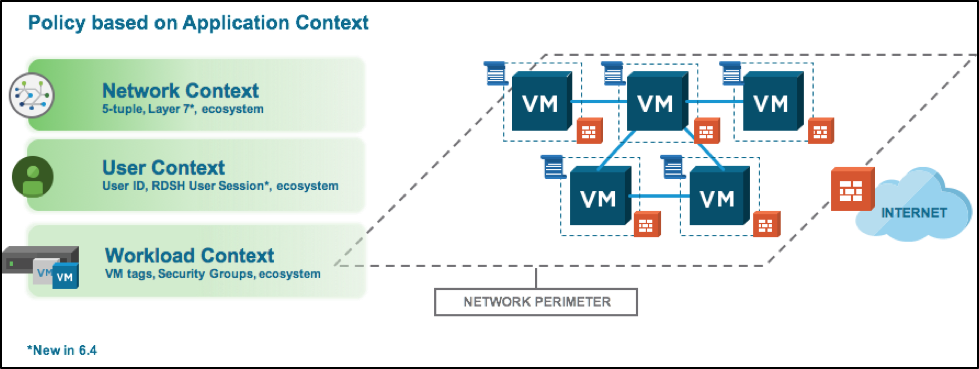 Figure: NSX drives policy based on Network, User and Workload Context
A crucial aspect of Context-awareness Continue reading