WEBINAR: Deploying IPv6 for WISPs and FISPs.
A few weeks ago, we recorded a webinar on deploying IPv6 for WISPs and FISPs. As IPv6 adoption continues to climb, developing an IPv6 strategy for design, deployment and system integration is an important step before subscribers begin asking for IPv6.
Some of the topics that were covered include:
- IPv6 basics – addressing, subnetting, types
- IPv6 design and deployment
- IPv6 systems and operations
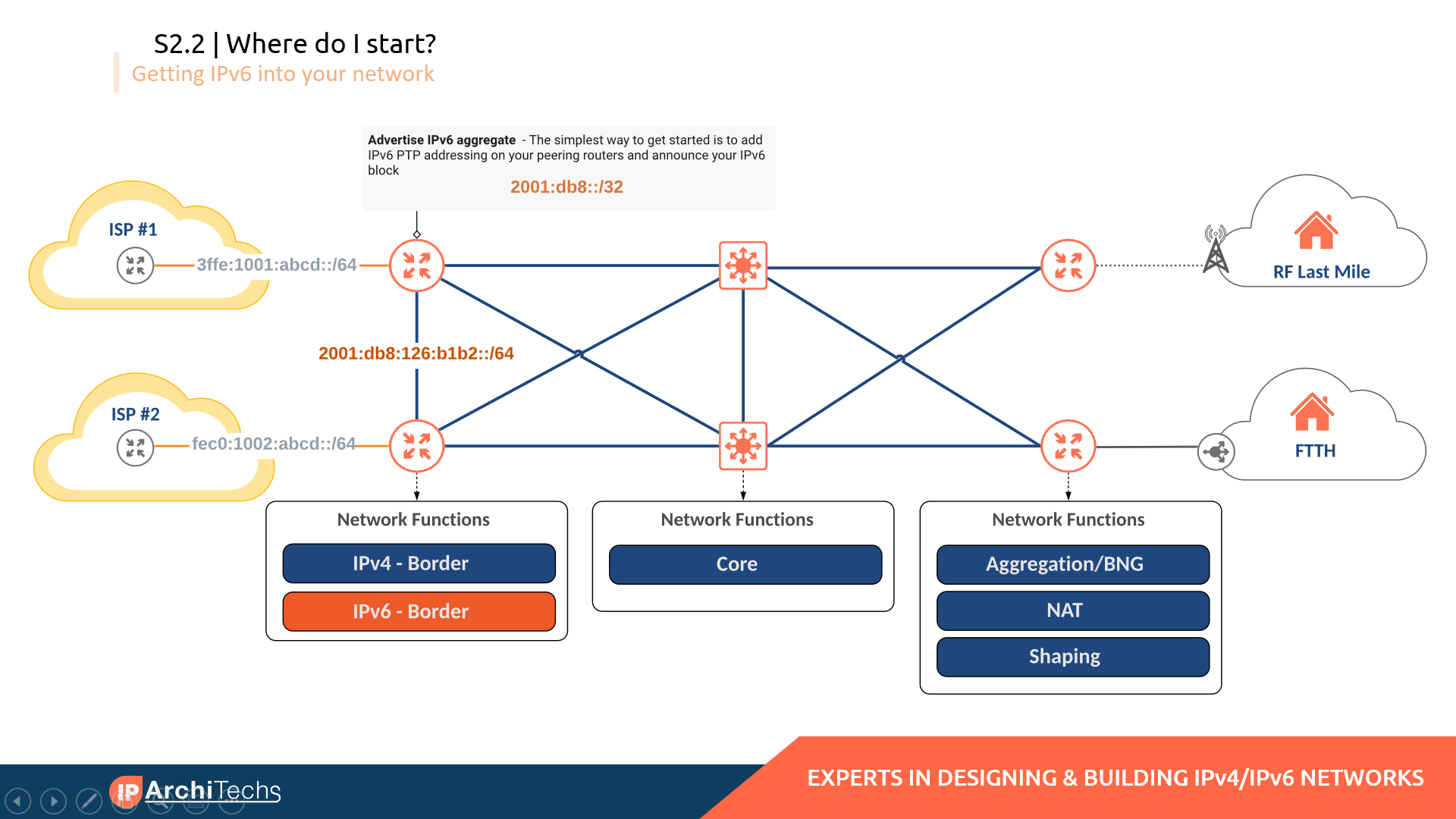
Here is an example of getting started with IPv6 deployment at the border of the ASN
Link to the webinar and slide deck

Webinar: click here
Slides: click here

VMware named a Leader in Cloud Networking in GigaOm Radar Report
We’re delighted to report that GigaOm, a global provider of technology industry insights and analysis, has placed VMware in the leader ring in the GigaOm Radar Report for Cloud Networking 2022. In the leader ring, VMware is placed in the Platform Play and Maturity quadrant. This is a testament to the robustness of VMware’s cloud networking solution and its leading position in the cloud networking space. Click here to download the complete report.

Noting VMware’s broad portfolio of networking solutions, which covers the entire network stack and includes native network features for observability, micro-segmentation, and beyond, GigaOm says that VMware is in a leading position to help enterprises with complex networking requirements “modernize and optimize their infrastructure.”
Cloud Network Evaluation Criteria
The report evaluates 11 vendors that provide tools or platforms to help build and operate cloud networks. They include major enterprises like VMware, as well as several smaller companies.
GigaOm assessed the vendors on a variety of criteria, including:
- Network traffic security and micro-segmentation.
- Observability.
- Troubleshooting and diagnostics.
- Optimization and autoscaling.
- APIs and IaC integration.
- Application-aware infrastructure.
- Solution management.
VMware received a triple-plus score – the highest evaluation possible – for most of the categories given above.
Continue reading
HS018 API Management is a Configuration Problem
Johna believes that API management is part of IT operations. Greg doesn't understand the question and so we set off in search of answers.
The post HS018 API Management is a Configuration Problem appeared first on Packet Pushers.

HS018 API Management is a Configuration Problem
Johna believes that API management is part of IT operations. Greg doesn't understand the question and so we set off in search of answers.
Duplicate ARP Replies with Anycast Gateways
A reader sent me the following intriguing question:
I’m trying to understand the ARP behavior with SVI interface configured with anycast gateways of leaf switches, and with distributed anycast gateways configured across the leaf nodes in VXLAN scenario.
Without going into too many details, the core dilemma is: will the ARP request get flooded, and will we get multiple ARP replies. As always, the correct answer is “it depends” 🤷♂️
Duplicate ARP Replies with Anycast Gateways
A reader sent me the following intriguing question:
I’m trying to understand the ARP behavior with SVI interface configured with anycast gateways of leaf switches, and with distributed anycast gateways configured across the leaf nodes in VXLAN scenario.
Without going into too many details, the core dilemma is: will the ARP request get flooded, and will we get multiple ARP replies. As always, the correct answer is “it depends” 🤷♂️
What Enterprises Can Expect as Carriers to Spend Billions on Broadband Rollouts
From funding to the front door, IT managers can learn from state-level fiber expansions and benefit from programs created to speed high-speed Internet buildouts powered by federal legislation, the FCC, and annual carrier capital expenditures.Optimizing Magic Firewall’s IP lists


Magic Firewall is Cloudflare’s replacement for network-level firewall hardware. It evaluates gigabits of traffic every second against user-defined rules that can include millions of IP addresses. Writing a firewall rule for each IP address is cumbersome and verbose, so we have been building out support for various IP lists in Magic Firewall—essentially named groups that make the rules easier to read and write. Some users want to reject packets based on our growing threat intelligence of bad actors, while others know the exact set of IPs they want to match, which Magic Firewall supports via the same API as Cloudflare’s WAF.
With all those IPs, the system was using more of our memory budget than we’d like. To understand why, we need to first peek behind the curtain of our magic.
Life inside a network namespace
Magic Transit and Magic WAN enable Cloudflare to route layer 3 traffic, and they are the front door for Magic Firewall. We have previously written about how Magic Transit uses network namespaces to route packets and isolate customer configuration. Magic Firewall operates inside these namespaces, using nftables as the primary implementation of packet filtering.
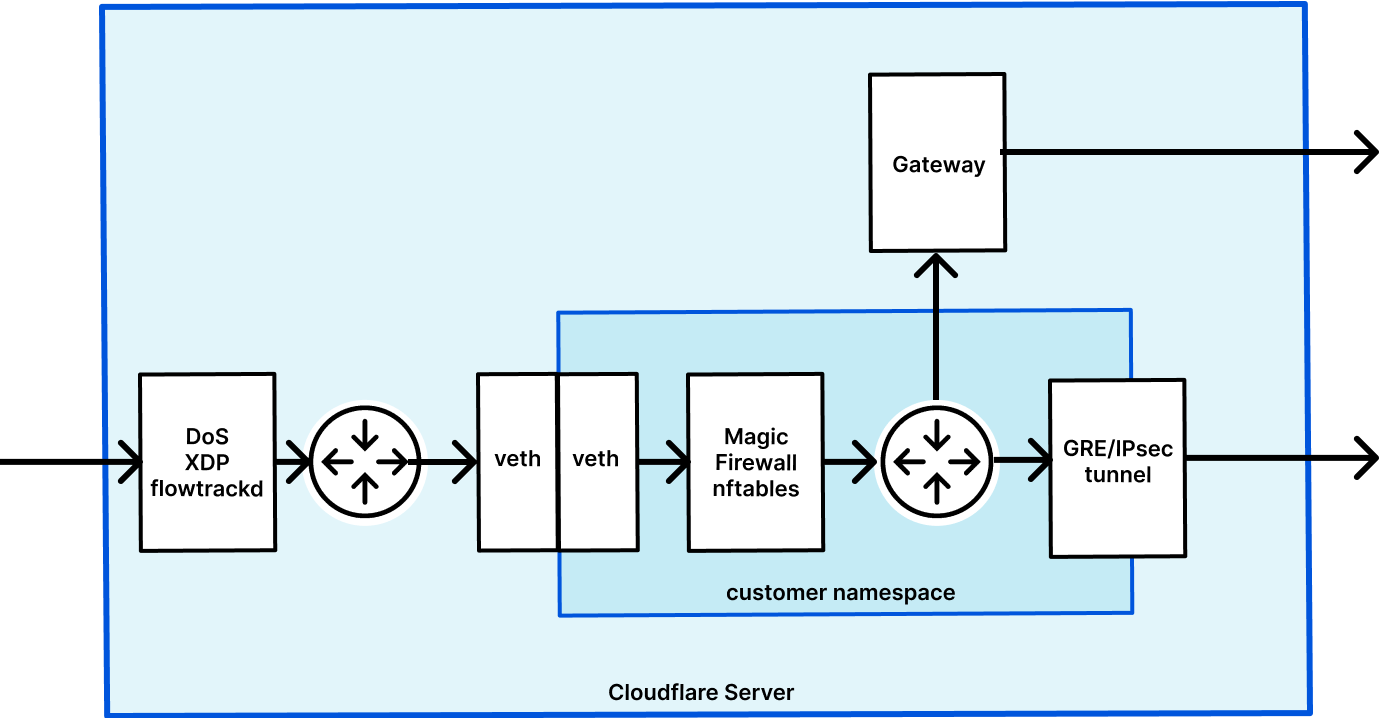
When a user makes an API request to configure their Continue reading
Understanding Data Center Fabrics 09: Other Considerations – Video
In the final video of this series on data center fabrics, Russ White walks through a set of considerations you might want to ponder as you design your data center fabric. These considerations include whether to single-home or dual-home a server in a fabric (it depends!), why Russ isn’t a fan of MLAGs in a […]
The post Understanding Data Center Fabrics 09: Other Considerations – Video appeared first on Packet Pushers.
Can Fantastical Openings Replace Calendly?
TL;DR
Fantastical Openings can’t replace Calendly for my scheduling needs yet, but it’s close.
The Rest Of The Story
I use Calendly so that folks can schedule me for appointments. I send people a Calendly link, and they choose an available time slot. Calendly creates calendar invitations and sends them to me and the requestor. Calendly also integrates with Zoom, so that an invite comes with a Zoom meeting already attached.
In my years of Calendly use, I’ve found it to be…
- Reliable. It just works.
- Flexible. The availability rules engine allows me to configure conditions such as “leave a gap of X minutes between appointments” that I rely on to keep my calendar sane.
- Expensive. $144/year for the features I need.
I also use Fantastical by Flexibits. In my few months as a Fantastical user, I’ve found it to be…
- Beautiful. It’s the best calendaring interface of anything I’ve tried.
- Integrated. I use Fantastical to integrate with multiple calendars, Zoom, and the Todoist task manager. I use Fantastical both on my Mac and iOS devices.
- A super power. Fantastical happens to be highly compatible with how I work. I am more productive with Fantastical.
- Affordable. $40/year for the features Continue reading
CVE-2022-1096: How Cloudflare Zero Trust provides protection from zero day browser vulnerabilities


On Friday, March 25, 2022, Google published an emergency security update for all Chromium-based web browsers to patch a high severity vulnerability (CVE-2022-1096). At the time of writing, the specifics of the vulnerability are restricted until the majority of users have patched their local browsers.
It is important everyone takes a moment to update their local web browser. It’s one quick and easy action everyone can contribute to the cybersecurity posture of their team.
Even if everyone updated their browser straight away, this remains a reactive measure to a threat that existed before the update was available. Let’s explore how Cloudflare takes a proactive approach by mitigating the impact of zero day browser threats with our zero trust and remote browser isolation services. Cloudflare’s remote browser isolation service is built from the ground up to protect against zero day threats, and all remote browsers on our global network have already been patched.
How Cloudflare Zero Trust protects against browser zero day threats
Cloudflare Zero Trust applies a layered defense strategy to protect users from zero day threats while browsing the Internet:
- Cloudflare’s roaming client steers Internet traffic over an encrypted tunnel to a nearby Cloudflare data center for inspection and Continue reading
The New Edge as a Service

As we enter 2022, there is much discussion on the “post-pandemic” world of campus and how it’s changing. Undoubtedly, the legacy 2000 era campus was mired in complexity, with proprietary features, siloed designs, and fragile software ripe for change. This oversubscribed campus is riddled with challenges, including critical outages causing risk-adverse behaviors and labor-intensive roll-outs hampering improvements. The future of the campus has changed as the lines between corporate headquarters, home, remote and transit workers are blurring and creating distributed workspaces. Before the pandemic, the most common network designs were rigidly hierarchical. They were based upon a manual model developed in the mid-1990s. As the demand for scale increased, the end user experience was degraded and the cost per connected host continued to escalate.
Are we ready to evolve the legacy campus to a new cognitive edge for the new and dispersed class of users, devices and IoT/OT? I think so and the time to recalibrate and redesign the campus is now!
