Zoom Meeting IDs are sequential ten digit numbers. People are randomly creating IDs and dropping into Zoom conferences often using abusive language, displaying pornagraphic images or worse. Yes, Zoom has poor security posture generally. The design approach appears makes it easy to use as possible while compromising security. Compared to other conferencing platforms, it does […]
Two years ago today we announced 1.1.1.1, a secure, fast, privacy-first DNS resolver free for anyone to use. In those two years, 1.1.1.1 has grown beyond our wildest imagination. Today, we process more than 200 billion DNS requests per day making us the second largest public DNS resolver in the world behind only Google.
Yesterday, we announced the results of the 1.1.1.1 privacy examination. Cloudflare's business has never involved selling user data or targeted advertising, so it was easy for us to commit to strong privacy protections for 1.1.1.1. We've also led the way supporting encrypted DNS technologies including DNS over TLS and DNS over HTTPS. It is long past time to stop transmitting DNS in plaintext and we're excited that we see more and more encrypted DNS traffic every day.
1.1.1.1 for Families
Since launching 1.1.1.1, the number one request we have received is to provide a version of the product that automatically filters out bad sites. While 1.1.1.1 can safeguard user privacy and optimize efficiency, it is designed for direct, fast DNS resolution, not for blocking or Continue reading
Last April 1 we announced WARP — an option within the 1.1.1.1 iOS and Android app to secure and speed up Internet connections. Today, millions of users have secured their mobile Internet connections with WARP.
While WARP started as an option within the 1.1.1.1 app, it's really a technology that can benefit any device connected to the Internet. In fact, one of the most common requests we've gotten over the last year is support for WARP for macOS and Windows. Today we're announcing exactly that: the start of the WARP beta for macOS and Windows.
What's The Same: Fast, Secure, and Free
We always wanted to build a WARP client for macOS and Windows. We started with mobile because it was the hardest challenge. And it turned out to be a lot harder than we anticipated. While we announced the beta of 1.1.1.1 with WARP on April 1, 2019 it took us until late September before we were able to open it up to general availability. We don't expect the wait for macOS and Windows WARP to be nearly as long.
The WARP client for macOS and Windows relies on the Continue reading
In the previous article from the networking series we have started the discussion about SONiC (Software for Open Networking in Clouds), which is a network infrastructure behind Microsoft Azure cloud. Today we continue this discussion from slightly different angle: we will emulate the whole data centre infrastructure end-to-end with leafs, spines and servers.
Network automation training – boost your career
Don’t wait to be kicked out of IT business. Join our network automation training to secure your job in future. Come to NetDevOps side.
How does the training differ from this blog post series? Here you get the basics and learn some programming concepts in general, whereas in the training you get comprehensive set of knowledge with the detailed examples how to use Python for the network and IT automation. You need both.
Thanks
Big thanks to a colleague of mine, Michael Salo, who shared with me useful insights on namespaces networking in Linux.
With IT and security teams stressed due to the COVID-19 crisis, it’s more important than ever to make sure you’ve prepared your network for a disaster.
With IT and security teams stressed due to the COVID-19 crisis, it’s more important than ever to make sure you’ve prepared your network for a disaster.
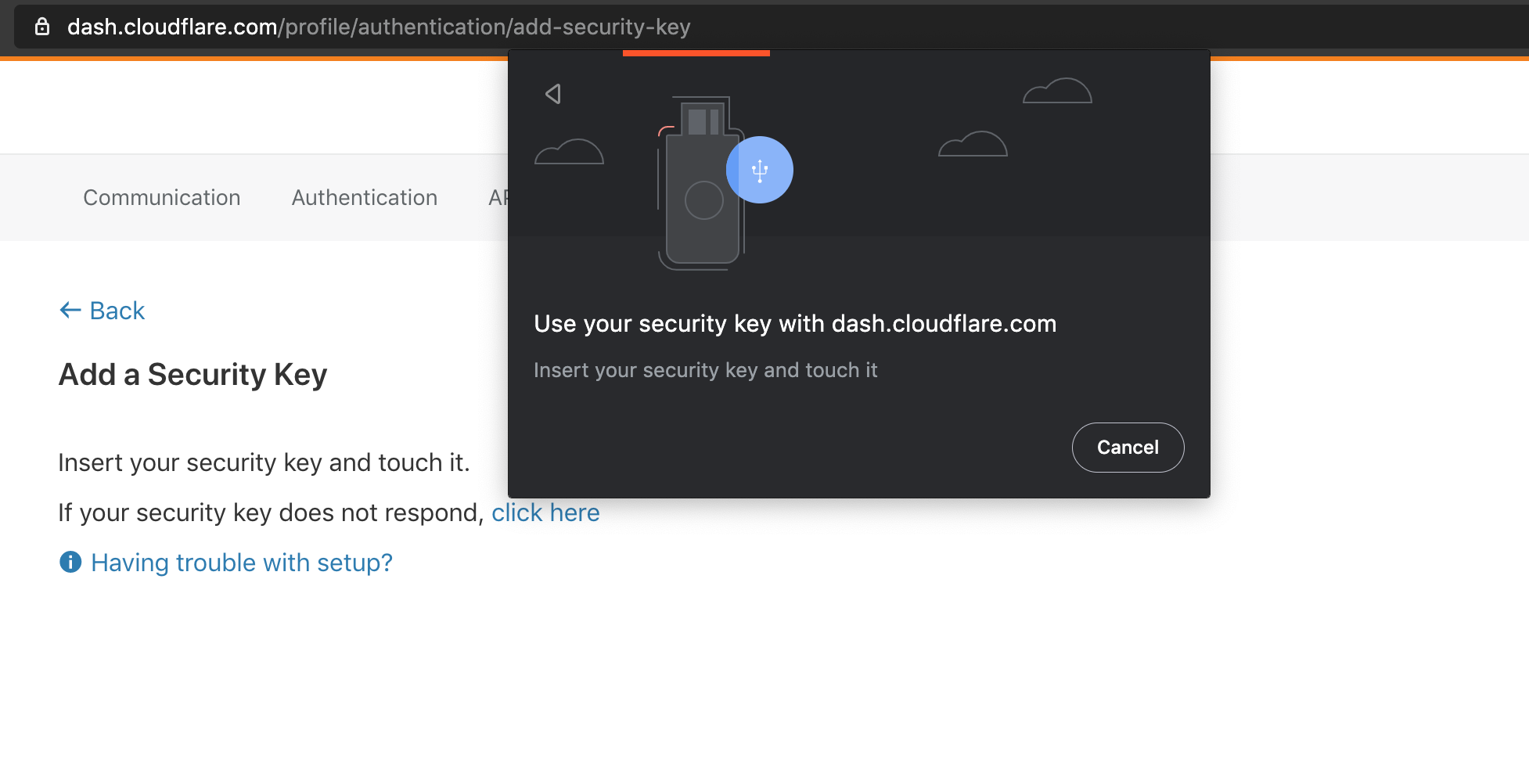
We’re excited to announce that Cloudflare now supports security keys as a two factor authentication (2FA) method for all users. Cloudflare customers now have the ability to use security keys on WebAuthn-supported browsers to log into their user accounts. We strongly suggest users configure multiple security keys and 2FA methods on their account in order to access their apps from various devices and browsers. If you want to get started with security keys, visit your account's 2FA settings.
What is WebAuthn?
WebAuthn is a standardized protocol for authentication online using public key cryptography. It is part of the FIDO2 Project and is backwards compatible with FIDO U2F. Depending on your device and browser, you can use hardware security keys (like YubiKeys) or built-in biometric support (like Apple Touch ID) to authenticate to your Cloudflare user account as a second factor. WebAuthn support is rapidly increasing among browsers and devices, and we’re proud to join the growing list of services that offer this feature.
To use WebAuthn, a user registers their security key, or “authenticator”, to a supporting application, or “relying party” (in this case Cloudflare). The authenticator then generates and securely stores a public/private keypair on the device. The keypair Continue reading
It is a duty of a pre-sales, consultant, vendor representative to inform the customer about the risk.
When you stop laughing (and it’s not an April Fools’ joke), here’s how the reality of that process looks like (straight from one of my readers):
I remember when the VM guys and their managers were telling me (like they had discovered the solutions to all of ours problems) about “with VXLAN we can move a machine from one country to another, and keep having service with the same IP” … while looking at me with the “I’m so smart” face… and me thinking shit… I’m doomed :) … I don’t even want to start explaining … but in the long run I had to anyway.
Electronics on missiles and military helicopters need to survive extreme conditions. Before any of that physical hardware can be deployed, defense contractor McCormick Stevenson Corp. simulates the real-world conditions it will endure, relying on finite element analysis software like Ansys, which requires significant computing power.Then one day a few years ago, it unexpectedly ran up against its computing limits.10 of the world's fastest supercomputers
"We had some jobs that would have overwhelmed the computers that we had in office," says Mike Krawczyk, principal engineer at McCormick Stevenson. "It did not make economic or schedule sense to buy a machine and install software." Instead, the company contracted with Rescale, which could sell them cycles on a supercomputer-class system for a tiny fraction of what they would've spent on new hardware.To read this article in full, please click here
Today's show goes deep on cloud-based security, remote access, and zero trust with sponsor Zscaler. In particular we explore Zscaler Private Access, an alternative to traditional IPSec VPNs. We take a packet walk through Zscaler's service to understand how it works. Our guest is Lisa Lorenzin, Director, Transformation Strategy at Zscaler.
Today's show goes deep on cloud-based security, remote access, and zero trust with sponsor Zscaler. In particular we explore Zscaler Private Access, an alternative to traditional IPSec VPNs. We take a packet walk through Zscaler's service to understand how it works. Our guest is Lisa Lorenzin, Director, Transformation Strategy at Zscaler.
Software intelligence company Alois Reitbauer, vice president and chief technology strategist for Dynatrace, shared his observations about what the company is seeing.
While Reitbauer usually splits his time between living and working in the United States and Europe, Reitbauer spoke with The New Stack from his remote-location home in Austria.
What traffic changes are your customers seeing due to the effects of the COVID-19 pandemic?
It’s definitely important to know we’re experiencing a perfect storm scenario right now. We all need to be on the same page for what’s going to happen.
We have certainly ramped up our monitoring of networks recently. So the way you can describe the situation for many websites now is it’s just like Black Friday, where all people go really wild on a certain number of sites. The only difference with Black Friday- or Super Bowl-like surges in traffic compared to the saturation COVID-19 might cause is that nobody knows when it’s happening.
We Continue reading
The Great Infection is unique among recessions in that it is essentially a self-imposed economic downturn, not the result of over-exuberance or excess optimism or greed, but by a spikey ball of fat that is not alive but is more like a self-replicating biological machine that only knows how to do one thing: Copy itself if it reaches the right sticky environment in time before it dries out and falls apart. …
With an eye towards significantly bolstering its edge networking offerings, Palo Alto has entered into an agreement to buy cloud-based SD-WAN vendor CloudGenix for $420 million in cash.Palo Alto said upon the completion of the acquisition it will integrate CloudGenix's cloud-managed SD-WAN products to accelerate the intelligent onboarding of remote branches and retail stores into its Prisma Access package. More about SD-WAN: How to buy SD-WAN technology: Key questions to consider when selecting a supplier • How to pick an off-site data-backup method • SD-Branch: What it is and why you’ll need it • What are the options for security SD-WAN?
Announced in May 2019, Palo Alto’s Prisma is a cloud-based security package that includes access control, advanced threat protection, user behavior monitoring and other services that promise to protect enterprise applications and resources.To read this article in full, please click here
With an eye towards significantly bolstering its edge networking offerings, Palo Alto has entered into an agreement to buy cloud-based SD-WAN vendor CloudGenix for $420 million in cash.Palo Alto said upon the completion of the acquisition it will integrate CloudGenix's cloud-managed SD-WAN products to accelerate the intelligent onboarding of remote branches and retail stores into its Prisma Access package. More about SD-WAN: How to buy SD-WAN technology: Key questions to consider when selecting a supplier • How to pick an off-site data-backup method • SD-Branch: What it is and why you’ll need it • What are the options for security SD-WAN?
Announced in May 2019, Palo Alto’s Prisma is a cloud-based security package that includes access control, advanced threat protection, user behavior monitoring and other services that promise to protect enterprise applications and resources.To read this article in full, please click here
An example of using the fuzzywuzzy Python module to match data sets with similar but not exact data - fuzzy matches! I was recently given a list of locations that I had to analyze. For the analysis, I needed data that was not in the original list (lets call that the source list). Luckily I READ MORE
Nathalie Trenaman is the Routing Security Programme Manager at RIPE NCC. Rick & Melchior ask her everything about what RIPE NCC does, why should we care about Routing Security, RPKI and of course we talk about if and how we can get IPv4 address space.