Verizon Boosts Capex $500M to Deal With Coronavirus Impact
The operator was the most detailed among the nation’s largest telecom providers in how they are...
While other tech companies have blamed COVID-19 for recent revenue declines, citing supply chain...

The last few weeks have seen unprecedented changes in how people live and work around the world. Over time more and more companies have given their employees the right to work from home, restricted business travel and, in some cases, outright sent their entire workforce home. In some countries, quarantines are in place keeping people restricted to their homes.
These changes in daily life are showing up as changes in patterns of Internet use around the world. In this blog post I take a look at changing patterns in northern Italy, South Korea and the Seattle area of Washington state.
To understand how Internet use is changing, it’s first helpful to start with what a normal pattern looks like. Here’s a chart of traffic from our Dallas point of presence in the middle of January 2020.

This is a pretty typical pattern. If you look carefully you can see that Internet use is down a little at the weekend and that Internet usage is diurnal: Internet use drops down during the night and then picks up again in the morning. The peaks occur at around 2100 local time and the troughs in the dead of night at around 0300. Continue reading
The top 10,000 most spoken words in English represented by a point in hundreds of dimensions where the distance and direction between points encodes the relationship between words. (roadmaps)
Do you like this sort of Stuff? Without your support on Patreon this kind of Stuff can't happen. You are that important to the fate of the intelligent world.
Know someone who wants to understand the cloud? I wrote Explain the Cloud Like I'm 10 just for them. On Amazon it has 100 (!!!) mostly 5 star reviews. Here's a recent authentic unfaked review:

Don't miss all that the Internet has to say on Scalability, click below and become eventually consistent with all scalability knowledge (which means this post has many more items to read so please keep on reading)...
The COVID-19 outbreak has upended our world, but know that we here at SDxCentral will remain...
Are you looking for a break from the general news? Our content round-ups are a great source for all the recent blogs (and more!) that we’ve shared. From podcasts, to product updates, to industry thought leadership and even customer examples of how they’re implementing open networking technology— we’ve got it all here for you.
Dive into the content below and update yourself on what’s been happening. It may just be that needed break from the rest of the news that you were looking for.
From Cumulus Networks:
VXLAN/EVPN vs VRF Lite: In this blog Rama Darbha, Senior Consulting Engineer at Cumulus Networks, talks through the difference between VXLAN with EVPN and VRFLite and offers up his conclusion as to which solution is better.
Kernel of Truth season 3 episode 1: FRRouting update: Season three jumps right into the deep end of the pool with a discussion on FRRouting. Listen as hosts Brian O’Sullivan & Roopa Prabhu chat about what’s new with the FRR community with a new guest to the podcast, FRR expert Donald Sharp.
Topology matters: how port-per-workload management strategies no longer hold up: A new way of looking at switching—as a logical, rather Continue reading
SDxCentral Weekly Wrap for March 13, 2020: The Sweden-based vendor cited Viptela's remote...

As the status of COVID-19 continues to impact people and businesses around the world, Cloudflare is committed to providing awareness and transparency to our customers, employees, and partners about how we are responding. We do not anticipate any significant disruptions in Cloudflare services.
Our Business Continuity Team is monitoring the situation closely and all company personnel are kept up to date via multiple internal communication channels including a live chat room. Customers and the public are encouraged to visit this blog post for the latest information.
You can check the status of our network at www.cloudflarestatus.com. For COVID-19-related questions that aren’t answered below, please contact our Customer Support Team.
Yes, Cloudflare’s Business Continuity Team is a cross-functional, geographically diverse group dedicated to navigating through a health crisis like COVID-19 as well as a variety of other scenarios that may impact employee safety and business continuity.
In addition to Cloudflare’s existing Disaster Recovery Plan we have implemented the following strategies:
This story is about the importance of remembering networking fundamentals when dealing with advanced routing topics.

Seamless MPLS is a really neat design for large ISP networks. The idea is to overcome the scalability limitations of …
After decades of riding the Moore’s law curve the networking bandwidth should be (almost) infinite and (almost) free, right? WRONG, as I explained in the Bandwidth Is (Not) Infinite and Free video (part of How Networks Really Work webinar).
There are still pockets of Internet desert where mobile- or residential users have to deal with traffic caps, and if you decide to move your applications into any public cloud you better check how much bandwidth those applications consume or you’ll be the next victim of the Great Bandwidth Swindle. For more details, watch the video.
After decades of riding the Moore’s law curve the networking bandwidth should be (almost) infinite and (almost) free, right? WRONG, as I explained in the Bandwidth Is (Not) Infinite and Free video (part of How Networks Really Work webinar).
There are still pockets of Internet desert where mobile- or residential users have to deal with traffic caps, and if you decide to move your applications into any public cloud you better check how much bandwidth those applications consume or you’ll be the next victim of the Great Bandwidth Swindle. For more details, watch the video.
Rex: preventing bugs and misconfiguration in large services using correlated change analysis, Mehta et al., NSDI’20
and
Check before you change: preventing correlated failures in service updates, Zhai et al., NSDI’20
Today’s post is a double header. I’ve chosen two papers from NSDI’20 that are both about correlation. Rex is a tool widely deployed across Microsoft that checks for correlations you don’t have but probably should have: it looks at files changed in commits and warns developers if files frequently changed with them have not been changed. CloudCanary on the other hand is about detecting correlations you do have, but probably don’t want: it looks for potential causes of correlated failures across a system, and can make targeted recommendations for improving your system reliability.
"If you change the foo setting, don’t forget that you also need to update all the clients…"
Large-scale services run on a foundation of very large codebases and configuration repositories. To run uninterrupted a service not only depends on correct code, but also on correct network and security configuration, and suitable deployment specification. This causes various dependencies both within and across components/sources of the service which emerge Continue reading

This email was sent to all Cloudflare customers a short while ago
From: Matthew Prince
Date: Thu, Mar 12, 2020 at 4:20 PM
Subject: Cloudflare During the Coronavirus Emergency
We know that organizations and individuals around the world depend on Cloudflare and our network. I wanted to send you a personal note to let you know how Cloudflare is dealing with the Coronavirus emergency.
First, the health and safety of our employees and customers is our top priority. We have implemented a number of sensible policies to this end, including encouraging many employees to work from home. This, however, hasn't slowed our operations. Our network operations center (NOC), security operations center (SOC), and customer support teams will remain fully operational and can do their jobs entirely remote as needed.
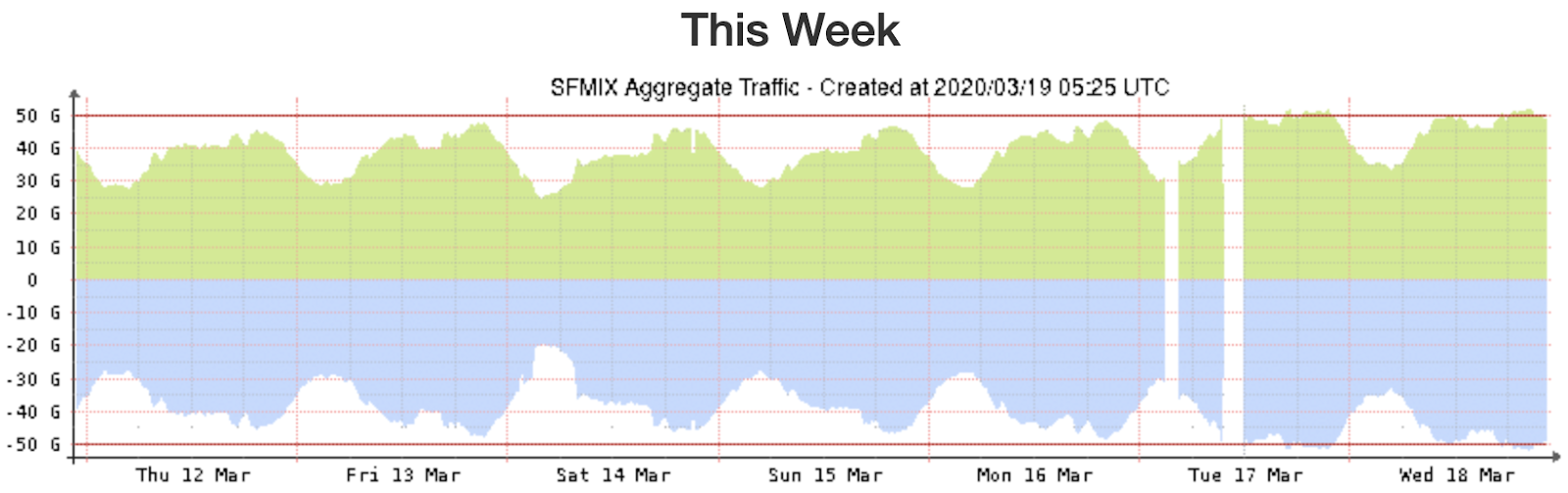
Second, we are tracking Internet usage patterns globally. As more people work from home, peak traffic in impacted regions has increased, on average, approximately 10%. In Italy, which has imposed a nationwide quarantine, peak Internet traffic is up 30%. Traffic patterns have also shifted so peak traffic is occurring earlier in the day in impacted regions. None of these traffic changes raise any concern for us. Cloudflare's network is well provisioned Continue reading
AT&T peddled its 5G lead; AWS launched Bottlerocket Container OS; and Splunk made security...
After attempting (and failing) to get Sublime Text to have some of the same “intelligence” that Visual Studio Code has with certain languages, I finally stopped trying to make Sublime Text work for me and just went back to using Code full-time. As I mentioned in this earlier post, now that I’ve finally solved how Code handles wrapping text in brackets and braces and the like I’m much happier. (It’s the small things in life.) Now I’ve moved on to tackling how to update Code’s Kubernetes API awareness.
Code’s awareness of the Kubernetes API comes via the YAML extension by Red Hat, and uses the yaml-language-server project found in this GitHub repository. (This is the same language server I was trying to get working with Sublime Text via LSP.) Note that I tested this procedure with version 0.7.2 of the extension; files may be in different locations or have different contents in other versions.
The information in this post is based heavily on this article by Josh Rosso, who some of you may know from his guest appearances on TGIK. I’ve adapted the information in Josh’s post to apply to the macOS version of Continue reading

Since its introduction at PyCon in 2013, Docker has changed the way the world develops applications. And over the last 7 years, we’ve loved watching developers – new and seasoned – bring their ideas to life with Docker.
As is our tradition in the Docker community, we will be celebrating Docker’s birthday month with meetups (virtual + IRL), a special hands-on challenge, cake, and swag. Join us and celebrate your #myDockerBDay and the ways Docker and this community have impacted you – from the industry you work in, to an application you’ve built; from your-day-to-day workflow to your career.
Learn more about the birthday celebrations below and share your #myDockerBday story with us on twitter or submit it here for a chance to win some awesome Docker swag.
Celebrate Docker’s Birthday with a special 3-hour live show featuring exclusive conversations with the Docker team and Captains, open Q&A sessions, and prizes. To reserve a spot, sign up here.
Learn some of the Docker Captain’s favorite Tips + Tricks by completing 7 hands-on exercises. Earn a virtual badge for each exercise completed.
Broadcom's Tomahawk, Trident 3, and Jericho platforms are in the crosshairs of Mellanox's new...
“We believe we're going to have the best, deepest coverage on the 5G perspective than any of our...