I just completed the Programming for Network Engineers (PRNE) learning path training on Cisco U and would like to share this with you: For a limited time, you have FREE…
One of the best ways of learning something is building a lab for it. Especially when it comes to complex topics like network authentication. When I started learning about network authentication and Cisco Identity Services Engine (ISE), I found that there wasn’t a lot of clear information on how you build a lab. Not in Cisco documentation and also not on blogs, etc. In this post I’ll explain how I built my lab using CML and ESX.
Having a lab with ISE only is not going to get you very far. At a minimum, I think the following devices are needed in a network authentication lab:
Cisco ISE.
Active Directory Domain Services.
Public Key Infrastructure (PKI) such as Active Directory Certificate Services (ADCS).
Network Authentication Device (NAD) such as Catalyst 9000.
For my lab, I’m using only virtual devices. The focus is on learning network authentication and ISE which is why I’ve setup a very simple PKI, ignoring best practices such as offline root, intermediate CA, and so on. I might lab that at a later stage, but that’s not the current focus.
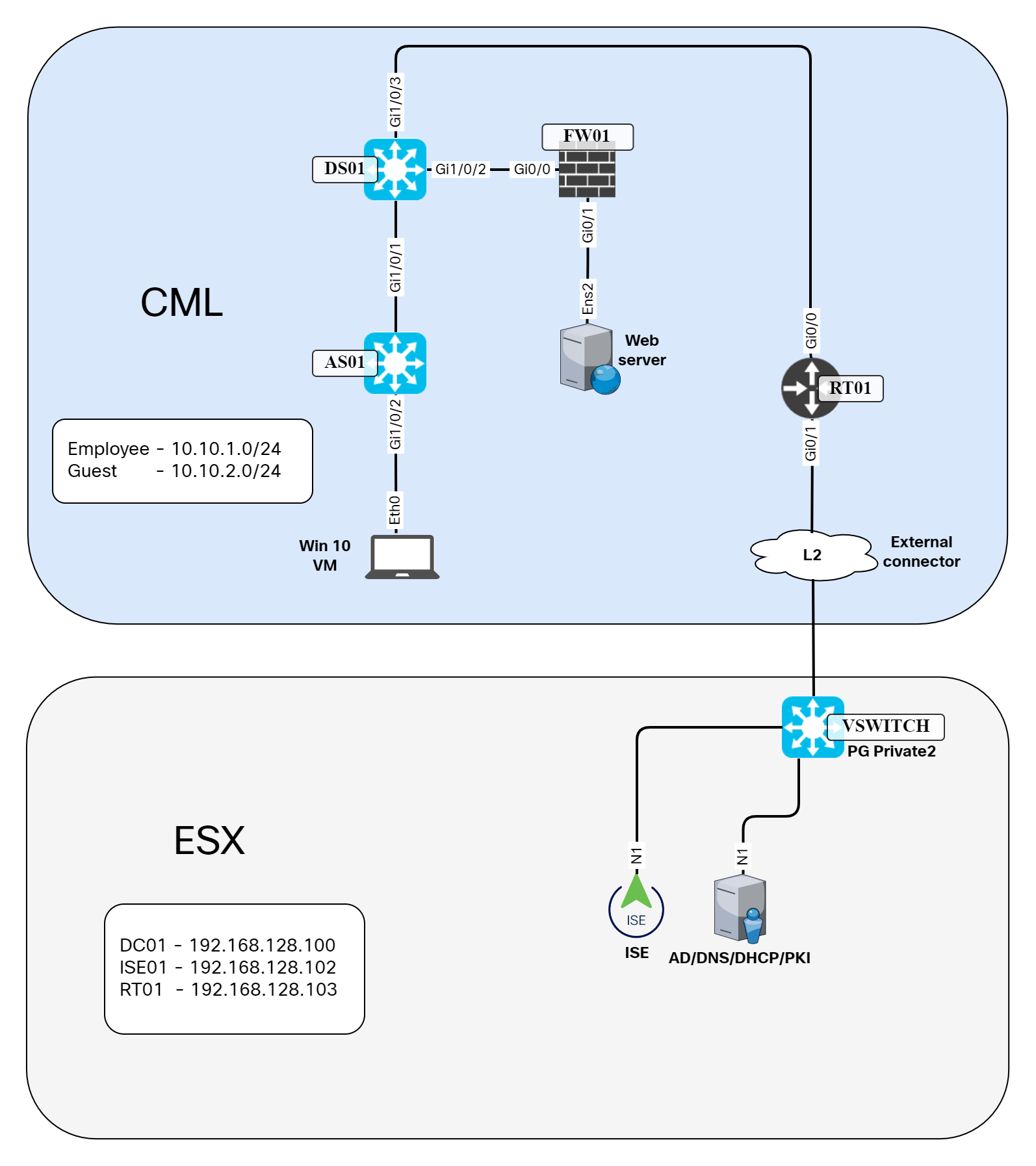
The topology of my lab is shown below:
Note that some VMs such as the virtual Catalyst Continue reading
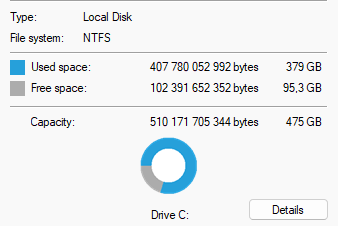
This is a quick post to describe how to reclaim disk space being used by an old Windows install. Recently, I upgraded to Windows 11 from Windows 10. I noticed that I was starting to run a bit low on disk space on my SSD. I have a 512 GB SSD and had less than 100 GB available:
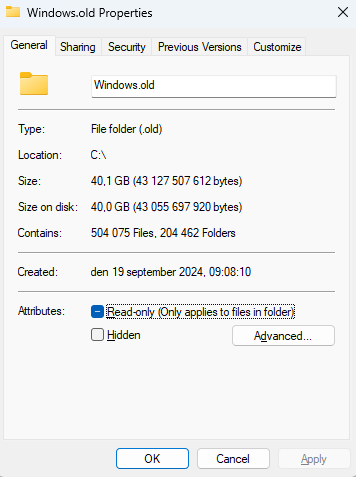
I noticed that there is a folder named Windows.old that is 40 GB in size:
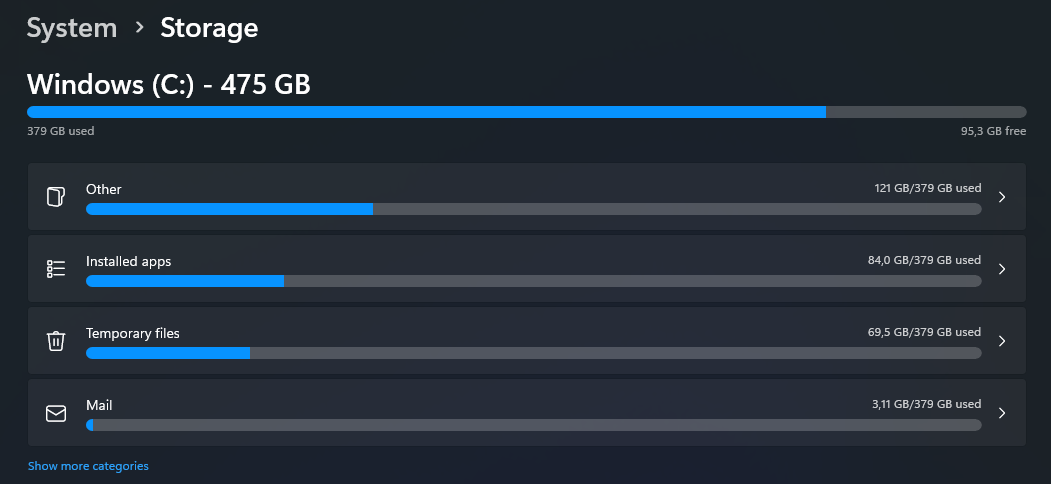
The instructions to reclaim the space seemed clear. Go to Settings -> System -> Storage and reclaim the space labeled as Previous Windows installation. However, ther was no such category when I tried:
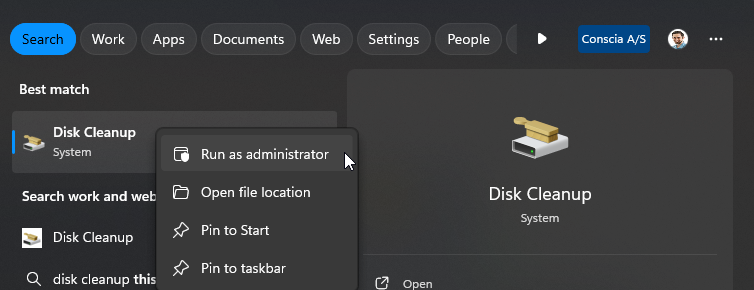
After some searching and a little bit of thinking, I realized that this is probably a privileges problem. I became local admin by using the PAM tool. Then I ran the disk cleanup util as administrator:
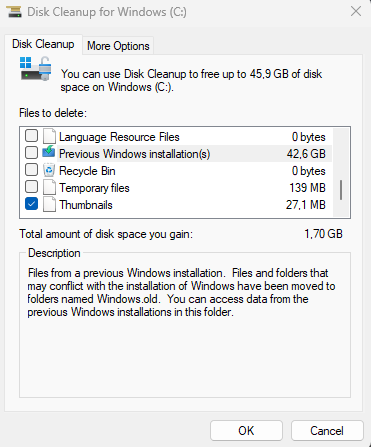
I can now see that there are previous Windows installations:
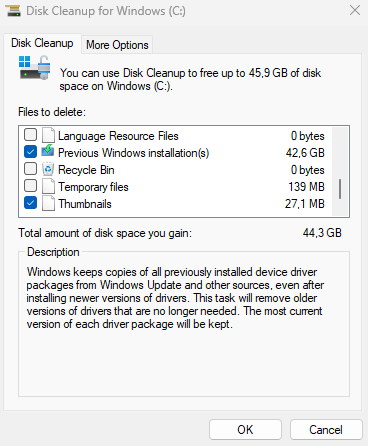
I select to delete Previous Windows installations:
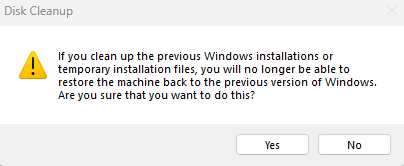
You have to confirm that it’s OK to delete:
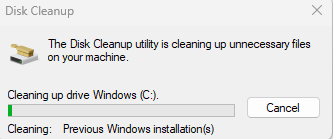
The deletion process starts:
This will take some time…
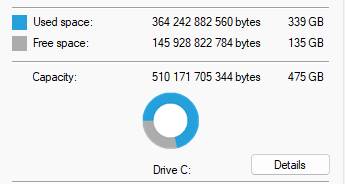
There is now more space available:
If you’re running low on disk, check if you have previous Windows installations that you can Continue reading
We’ve now been running packet-switched networks for many decades, and these days it’s packets and not virtual circuits lie behind most of the world’s digital communications service. But some very fundamental questions remain unanswered in this packet-switched world. Perhaps the most basic question is: “How big should a packet be?” And, surprisingly enough, there is no clear answer!
Today on the Packet Protector podcast we talk with sponsor Juniper Networks about how to simplify the complexity that affects network and cybersecurity teams alike. From tool sprawl to floods of data, complexity bedevils operations and troubleshooting. We talk about what Juniper brings to the table for networking and security professionals to help them do... Read more »
Don’t let the perfect be the enemy of the good… it’s a challenge that architects and strategists often face. They may design a “perfect” architecture or strategy, only to see it overwhelmed by the realities of implementation. John Burke and Johna Johnson discuss the questions to ask to ensure that devotion to the perfect doesn’t... Read more »
We’re excited to announce that Kivera, a cloud security, data protection, and compliance company, has joined Cloudflare. This acquisition extends our SASE portfolio to incorporate inline cloud app controls, empowering Cloudflare One customers with preventative security controls for all their cloud services.
In today’s digital landscape, cloud services and SaaS (software as a service) apps have become indispensable for the daily operation of organizations. At the same time, the amount of data flowing between organizations and their cloud providers has ballooned, increasing the chances of data leakage, compliance issues, and worse, opportunities for attackers. Additionally, many companies — especially at enterprise scale — are working directly with multiple cloud providers for flexibility based on the strengths, resiliency against outages or errors, and cost efficiencies of different clouds.
Security teams that rely on Cloud Security Posture Management (CSPM) or similar tools for monitoring cloud configurations and permissions and Infrastructure as code (IaC) scanning are falling short due to detecting issues only after misconfigurations occur with an overwhelming volume of alerts. The combination of Kivera and Cloudflare One puts preventive controls directly into the deployment process, or ‘inline’, blocking errors before they happen. This offers a proactive approach essential to Continue reading
Cloudflare runs several multi-tenantKubernetes clusters across our core data centers. These general-purpose clusters run on bare metal and power our control plane, analytics, and various engineering tools such as build infrastructure and continuous integration.
Kubernetes is a container orchestration platform. It enables software engineers to deploy containerized applications to a cluster of machines. This enables teams to build highly-available software on a scalable and resilient platform.
In this blog post we discuss our Kubernetes architecture, why we needed virtualization, and how we’re using it today.
Multi-tenant clusters
Multi-tenancy is a concept where one system can share its resources among a wide range of customers. This model allows us to build and manage a small number of general purpose Kubernetes clusters for our internal application teams. Keeping the number of clusters small reduces our operational toil. This model shrinks costs and increases computational efficiency by sharing hardware. Multi-tenancy also allows us to scale more efficiently. Scaling is done at either a cluster or application level. Cluster operators scale the platform by adding more hardware. Teams scale their applications by updating their Kubernetes manifests. They can scale vertically by increasing their resource requests or horizontally by increasing the number of Continue reading
Now, imagine someone persuaded you that EBGP is better than any IGP (OSPF or IS-IS) when building a data center fabric. You’re running EBGP sessions between the leaf- and the spine switches and exchanging IPv4 and IPv6 prefixes over those EBGP sessions. Can you use the same EBGP sessions for EVPN?
Welcome to N Is For Networking, the newest podcast on the Packet Pushers network, where we explain the jargon, acronyms, and concepts of the networking industry in plain language. Your hosts are Holly Metlitzky, an industrial engineer and now a network sales engineer; and Ethan Banks, a veteran network engineer. Together, they’ll educate and help... Read more »
The AI boom is going sonic, and it looks like we had all better cover our ears if we want to be able to hear by the end of the holiday season if the prognostications of the box counters at IDC are correct. …
The main conclusions based on testing described in the two VPP blog posts are:
If sFlow is not enabled on a given interface, there is no regression on other interfaces.
If sFlow is enabled, copying packets costs 11 CPU cycles on average
If sFlow takes a sample, it takes only marginally more CPU time to enqueue.
No sampling gets 9.88Mpps of IPv4 and 14.3Mpps of L2XC throughput,
1:1000 sampling reduces to 9.77Mpps of L3 and 14.05Mpps of L2XC throughput,
and an overly harsh 1:100 reduces to 9.69Mpps and 13.97Mpps only.
The VPP sFlow plugin provides a lightweight method of exporting real-time sFlow telemetry from a VPP based router. Including the plugin with VPP distributions has no impact on performance. Enabling the plugin provides real-time visibility that opens up additional use cases for VPPs programmable dataplane. For example, VPP is well suited to packet filtering use cases where the number of Continue reading
Take a Network Break! DDI specialist BlueCat is getting into network performance monitoring with its LiveAction acquisition, T-Mobile is ordered to spend almost $16 million to improve its infosec practices and get a CISO, and Cisco announced the end of life for its LoRaWAN IoT product line. Verizon recovers from a US-wide outage, security researchers... Read more »
In the dynamic evolution of AI and cloud computing, the deployment of efficient and reliable hardware is critical. As we roll out our Gen 12 hardware across hundreds of cities worldwide, the challenge of maintaining optimal thermal performance becomes essential. This blog post provides a deep dive into the robust thermal design that supports our newest Gen 12 server hardware, ensuring it remains reliable, efficient, and cool (pun very much intended).
The importance of thermal design for hardware electronics
Generally speaking, a server has five core resources: CPU (computing power), RAM (short term memory), SSD (long term storage), NIC (Network Interface Controller, connectivity beyond the server), and GPU (for AI/ML computations). Each of these components can withstand different temperature limits based on their design, materials, location within the server, and most importantly, the power they are designed to work at. This final criteria is known as thermal design power (TDP).
The reason why TDP is so important is closely related to the first law of thermodynamics, which states that energy cannot be created or destroyed, only transformed. In semiconductors, electrical energy is converted into heat, and TDP measures the maximum heat output that needs to be managed to ensure Continue reading
Meet Georgia, a diligent website administrator at a growing e-commerce company. Every day, Georgia juggles multiple tasks, from managing server uptime to ensuring customer data security. One morning, Georgia receives an email from a security researcher who discovered a potential vulnerability on the website. The researcher struggled to find the right contact information, leading to delays in reporting the issue. Georgia realizes the need for a standardized way to communicate with security researchers, ensuring that vulnerabilities are reported swiftly and efficiently. This is where security.txt comes in.
Why security.txt matters
Security.txt is becoming a widely adopted standard among security-conscious organizations. By providing a common location and format for vulnerability disclosure information, it helps bridge the gap between security researchers and organizations. This initiative is supported by major companies and aligns with global security best practices. By offering an automated security.txt generator for free, we aim to empower all of our users to enhance their security measures without additional costs.
In 2020, Cloudflare published the Cloudflare Worker for the security.txt generator as an open-source project on GitHub, demonstrating our commitment to enhancing web security. This tool is actively used Continue reading