Python Working with Files

Almost every Python script eventually needs to read from or write to a file. You might want to save the output of a command for later, back up device configs to disk, load a list of devices from a text file instead of hardcoding them, or write a log of what your script did. Python makes all of this straightforward once you know how it works.
In this part, we will start with reading text files, cover the proper way to open files using context managers, and then move on to writing and appending. Once we have the basics down, we will build a small config backup script that connects to devices, pulls the running config, and saves each one to its own file on disk.
Reading a Text File
To read a file in Python, you use the built-in open() function. It takes the path to the file as the first argument and returns a file object that you can read from.
Let's say you have a file called devices.txt in the same folder as your script, with the following contents.
192.168.202.101
192.168.202.102
192.168.202.103
Here is the most basic Continue reading
D2DO305: Scaling Human Connection in Tech Communities
Kyler and Ned are joined by former AWS Community Program Manager Jason Dunn to discuss what it takes to build and maintain a thriving tech community. Jason shares his “benevolent dictatorship” philosophy on community management, emphasizing the importance of authentic human connections. They also explore how AI can empower non-technical individuals to build custom solutions... Read more »Anycast-Only Gateways in EVPN Asymmetric IRB
In the previous blog post, I described how ARP works in an EVPN asymmetric IRB environment where the PE devices share an anycast MAC/IP address in addition to a unicast MAC/IP address. Today, let’s see how well things work if the PE devices have only the anycast MAC/IP address:
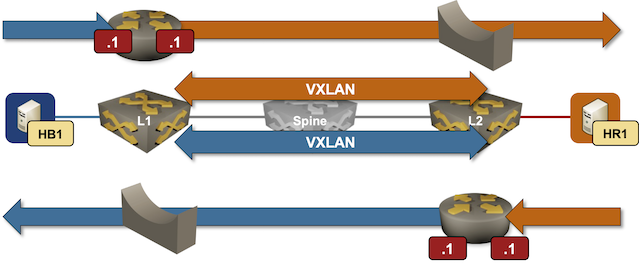
Packet forwarding in an EVPN asymmetric IRB design using only anycast gateways
Unlocking the Cloudflare app ecosystem with OAuth for all
Cloudflare provides services that help run 20% of the web, but we don’t do it alone. Developers on our platform use a myriad of tools and services from other companies too. Cloudflare provides a rich API for our platform that enables developers to create automations, CI/CD, and integrations that glue together the various parts of their infrastructure. Earlier this month, we announced self-managed OAuth, making it easier for customers to create and manage their own OAuth clients for delegated access to the Cloudflare API.
Cloudflare isn’t new to OAuth. If you’ve used Wrangler, or used integrations from partners like PlanetScale, then you’ve already used it. However, until now, third-party OAuth was only available through a small number of manually onboarded integrations, and was not available to developers more broadly. That meant developers building their own integrations had to rely on API tokens, which are harder to manage and a poor fit for many delegated application flows.
Over the last year, we onboarded a growing number of early partners while improving the consent, revocation, and security model behind Cloudflare OAuth. But as our Developer Platform grew and agentic tools drove demand for delegated access, it became clear that opening Continue reading
HS136: How AI Is Changing Enterprise Software Development (Sponsored)
AI can generate working code quickly. Building reliable software to run infrastructure platforms is still a multi-year engineering challenge. In this sponsored episode, BlueCat chief strategy officer Andrew Wertkin joins John Burke and Scott Robohn to talk through the difference between code generation and enterprise software development, and the challenges and opportunities of engineering reliability... Read more »
The post-quantum EO is an important milestone. Now it’s time to get to work
On June 22, 2026, President Trump signed Executive Order 14409, "Securing the Nation Against Advanced Cryptographic Attacks." The order sets a December 31, 2030, deadline for federal agencies to transition their most sensitive systems to post-quantum encryption, and a December 31, 2031, deadline for post-quantum authentication. The EO also directs federal contractors to comply with post-quantum Federal Information Processing Standards (FIPS) by the end of 2030.
We welcome this executive order. The U.S. government has a long track record of using federal leadership and procurement to drive adoption of new technologies across the broader industry. We've seen this work with IPv6, with routing security and the Resource Public Key Infrastructure (RPKI), and with DNSSEC, and we’re glad to see this tradition continue with post-quantum cryptography.
The EO is especially important at this moment because the timeline for Q-Day, the day that quantum computers can break the public-key cryptography used across the Internet, has been accelerated. In April 2026, Cloudflare moved our own target for full post-quantum security to 2029, following research breakthroughs from Google and Oratomic. This EO updates guidance from 2024, when the National Institute of Standards Continue reading
HW082: Employee or Independent Contractor in the Wi-Fi Industry?
Is it better to be an employee or an independent contractor in the Wi-Fi industry? Keith walks us through the good, the bad, and the ugly of both sides of the equation, offering a candid look at the financial and professional realities of each. Keith helps provide a framework for listeners to assess their own... Read more »PP115: Palo Alto Networks: Reality of 109 to 1: Securing Machine Identities and AI Agents (Sponsored)
Machine identities now outnumber human identities in the enterprise 109 to 1 — and most of them are running without the governance controls you’d never skip for a human employee. Service accounts, API keys, tokens, workload credentials, and a fast-growing population of autonomous AI agents: all of them need access, all of them can be... Read more »Chapter 2: Installing SONiC NOS
ONIE-Based SONiC Installation
Many
switch vendors have added SONiC NOS support to at least part of their switch
portfolio. Depending on the vendor and switch model, customers may be able to
order a switch with a vendor-customized SONiC version that is supported at the
same level as the vendor's own network operating system. Some vendors also
allow customers to run the community-based SONiC distribution.
The
support model for Community SONiC depends on the vendor. Some hardware vendors
provide full support, while others provide no support at all. Compared with
vendor-specific SONiC distributions, Community SONiC provides greater
flexibility because it can be customized, rebuilt, and adapted to customer
requirements. However, running a Community SONiC deployment without vendor
support or in-house expertise is generally not a recommended operating model.
Community
SONiC is typically installed by using ONIE (Open Network Install Environment)
[1],
a small open-source installation environment that provides a standardized
method for installing network operating systems on supported switches. Figure
2-1 illustrates a conceptual ONIE-based Community SONiC installation process.
If the switch is delivered with a vendor-specific SONiC distribution already installed, it may boot directly into that operating system without requiring a separate ONIE installation workflow. For Community SONiC deployments, Continue reading
Python Parsing Command Output with TextFSM

So far, whenever we have run a command with Netmiko, the output has come back as one big string. That is fine when you just want to print it or eyeball it, but the moment you want to actually do something with the output, filter interfaces that are down, count the number of routes in the table, extract the software version from a show version, you hit a wall. Raw text is hard to work with.
You could split it, use string methods, write clever slicing logic, or reach for regular expressions. Some people do this including myself, and it works, but it is not ideal. The moment the output format changes even slightly, your parsing breaks. And every command needs its own custom parsing code, which quickly becomes a maintenance nightmare.
This is where TextFSM comes in. It is a small library that turns messy device output into clean, structured data, usually a list of dictionaries. Instead of one big blob of text, you get proper Python objects you can loop through, filter, and index. And you do not have to write the parsing logic yourself, because there is a huge community-maintained library of ready-made templates called ntc-templates Continue reading
Worth Reading: My Network is Talking Back Thanks to SuzieQ MCP
Claudia de Luna published a step-by-step description of how you can use SuzieQ data with an AI agent.
That’s definitely interesting, but I found the list of MCP resources at the end of her blog post even more valuable; that’s a keeper even if you never looked at SuzieQ (in which case you REALLY SHOULD).
How we found a bug in the hyper HTTP library
The Images service, built in Rust on Workers, runs on every machine in Cloudflare’s edge network. To handle client connections, we use hyper, an open-source HTTP library for Rust.
Last year, we introduced the Images binding to enable custom, programmatic workflows for processing remote images in Workers. At the end of 2025, we rearchitected the binding to provide a more direct, local connection between the Workers runtime and the Images service.
Shortly after rollout, we received reports that transformation requests from the binding were failing — but only intermittently and only for larger images. Even stranger, the responses for these requests returned a 200 status without any errors logged. The image data was simply cut short: A response that should have been two megabytes might arrive with a few hundred kilobytes instead.
We spent six weeks chasing a nearly invisible bug — a race condition that occurred only under specific conditions — in the hyper library that impacted how the Images binding returned processed image data back to the client. In the end, it took four lines of code to fix it.
When developers build on Cloudflare, they compose full-stack applications from a set Continue reading
NB580: Project Glasswing on Hold – or Not; Why You Should Hold In-Person Background Checks
Take a Network Break! Our Red Alert covers critical vulnerabilities found in OpenClaw, the open-source AI assistant. On the news front, we discuss the status of Anthropic’s Project Glasswing and examine the Korean Electronics and Telecommunications Research Institute‘s (ETRI) development of an intelligent, service-programmable mobile core network, a key enabling technology for the 6G era.... Read more »Python Managing Credentials and Secrets

If you look back at every Netmiko script we have written in this series, you will notice something (very ) uncomfortable, the username and password are sitting right there in the script as plain text. That has been fine for learning, but it is not something you want to do in real scripts.
In this part, we will look at safer ways to manage credentials in your scripts. We will cover a few different approaches, from the simplest (asking the user to type the password when the script runs) to the more common patterns used in real projects (environment variables and .env files). We will also touch on .gitignore
There is no single "correct" way to manage credentials. Different projects and different environments call for different approaches. What matters is that you understand the trade-offs and stop hardcoding passwords into your scripts.
The Problem with Plain Text Credentials
Let's start by being clear about why this matters. Take a look at a script you have written in the last couple of chapters.
device = {
    "device_type": "cisco_ios",
    "host": "192.168.202.101",
    "username": "admin",
    "password": "admin"
}
This looks harmless on your own machine, but think about everything that could Continue reading
Worth Reading: AI Enthusiasts Against AI Skeptics
Charity Majors wrote an excellent article describing AI enthusiasts in a race against time and AI skeptics in a race against entropy. Fair warning: its very first sentence triggered an acute case of PTSD:
I recently attended a talk where one of the presenters made some pretty…astonishing claims about what they had achieved by the pure, uncut power of vibe coding.
I’ve seen way too many presentations making “astonishing claims” about the unlimited unicorn-driven powers of OpenFlow, SDN, OpenDaylight, or Ansible.
Rebuilding My Proxmox Cluster for the Version 9 Upgrade

I've been running Proxmox for maybe two years now, and I'd consider myself somewhat of a beginner. I set it up once using Proxmox version 8.x alongside Proxmox Backup Server and pretty much forgot about it. I can spin up new VMs and CTs, or remove existing ones, and that's about it. Fast forward to mid-2026, Proxmox released version 9, and I'd been meaning to upgrade. I went through a few guides and forum posts, and people tended to recommend backing up the VMs and CTs using PBS, then reinstalling Proxmox with the new version and restoring from backup.
TL;DR
I upgraded my Proxmox setup from version 8.x to 9 without doing an in-place upgrade. Instead, I used a spare node already on version 9 as a temporary home and rebuilt the other two nodes one at a time. The idea was to back up everything with PBS, restore onto the spare, then wipe and fresh install version 9 on each node before joining them into a new three-node cluster. Once the cluster was sorted, I also rebuilt pbs-01 to version 4 and cleaned up the old backups. The whole thing was seamless, I didn't lose anything, and Continue reading
Python – Working With Netmiko

In the last part, we got Netmiko up and running, connected to a device, ran a show command, and printed the output. That is enough to write some genuinely useful scripts, but Netmiko can do a lot more than just run a single command.
In this part, we will look at what else Netmiko has to offer. We will cover how to run multiple commands, push configuration changes, load config from a file, save the running config, and use enable mode when the device requires it. We will also look at how to parse command output into structured data instead of raw text, which is a huge time-saver when you are trying to actually use the output for something.
By the end of the chapter, you will have a much better feel for what Netmiko can do, and you will be ready to start writing scripts that actually make changes to your network instead of just reading from it. For the examples in this chapter, I will be using three real Cisco IOS devices in my lab.
devices = [
    {
        "device_type": "cisco_ios",
        "host": "192.168.202.101",
        "username": "admin",
        "password": "admin"
    },
    {
        "device_type": "cisco_ios",
"host": "192.168.202. Continue readingAutomating Palo Alto HA Firewall Upgrades with Ansible

In this blog post, we will cover upgrading Palo Alto firewalls in HA using Ansible. This only covers upgrading minor versions, so it won't work if you are going from 10.x to 11.x, for example. This also only supports an HA pair.
This playbook is based on the repo from Palo Alto itself. There are many playbooks there covering scenarios like upgrading the major version, upgrading the content, and so on, but we will only focus on one specific playbook for HA, which I tweaked a little bit to suit my own setup.
Manual Upgrade Process
Of course, this post assumes you already know how to upgrade the firewalls manually. In case you don't, here are the steps. Palo Alto also recommends upgrading the active unit first and then the passive. You download the image to the active unit and tick the box to sync it to the peer, then suspend the active unit to trigger a failover so the passive takes over. Install the image on the suspended unit, reboot it, and wait for it to come back online so the HA pair syncs again. Once it is back, suspend the current active unit (the original passive) Continue reading