Hedge 105: Johan Gustawsson and Changing Provider Architectures
Many service providers have the feeling that they “didn’t do anything wrong, but somehow we still lost.” How are providers reacting to the massive changes in the networking field, and how are they trying to regain their footing so they can move into the coming decades better positioned to compete? Join Johan Gustawsson, Tom Ammon, and Russ White as we discuss the impact of merchant silicon and changing applications on the architecture of service providers.
Traffic Sequence: Which Product Runs First?


“Which came first, the chicken or the egg?” It’s one of life's great questions. There are hundreds of articles published which conclude with eggs predating chickens by millions of years. Unfortunately, Cloudflare users don't have New Scientist on hand to answer similar questions.
Which runs first, Firewall Rules or Workers? Page Rules or Transform Rules? Whilst not as philosophically challenging, the answers to these questions are key to setting up your Cloudflare zone correctly. Answering them has become increasingly difficult as more and more functionality is added, thanks to our incredible rate of shipping products. What was once a relatively easy to understand traffic flow exploded in complexity with the introduction of products such as Workers, Load Balancing Rules and Transform Rules. And this big bang of product announcements is only accelerating each year.
To begin addressing this problem, we developed Traffic Sequence. Traffic Sequence is a simple dashboard illustration which shows a default, high-level overview of how Cloudflare products interact. Think of this as your atlas, rather than your black cab driver’s “Knowledge”. This helps you understand that London is in the south east of the UK, but not that it's quicker to walk than use Continue reading
Automating Data Center VXLAN/EVPN Using CI/CD: Gluware LiveStream Video [6/8]
Chris DiPaola, Senior Systems Engineer – Network at Acuity, chats with Ethan Banks of the Packet Pushers about Acuity’s EVPN/VXLAN network. Chris & his team used the Gluware API to automate their EVPN deployments, all while tied into their company’s CI/CD pipeline. If Gluware might be a fit for your network automation needs, visit here. […]
The post Automating Data Center VXLAN/EVPN Using CI/CD: Gluware LiveStream Video [6/8] appeared first on Packet Pushers.
Day Two Cloud 120: Web Assembly, K8s Rivals, And Other Cloud Computing Trends
On today's Day Two Cloud we talk trends and predictions in cloud computing, including emerging technologies such as Web assembly, rivals to Kubernetes, and the role of GitOps in infrastructure as code. Our guest is Adrian Mouat, Chief Scientist at Container Solutions. His blog post "10 Predictions for the Future of Computing or; the Inane Ramblings of our Chief Scientist" inspired this episode.
The post Day Two Cloud 120: Web Assembly, K8s Rivals, And Other Cloud Computing Trends appeared first on Packet Pushers.
Day Two Cloud 120: Web Assembly, K8s Rivals, And Other Cloud Computing Trends
On today's Day Two Cloud we talk trends and predictions in cloud computing, including emerging technologies such as Web assembly, rivals to Kubernetes, and the role of GitOps in infrastructure as code. Our guest is Adrian Mouat, Chief Scientist at Container Solutions. His blog post "10 Predictions for the Future of Computing or; the Inane Ramblings of our Chief Scientist" inspired this episode.Get to Know Your Tools: Nmap Ping Subnet Scan
Tony Fortunato of The Technology Firm uses Wireshark to observe how nmap discovers a subnet.Telegraf sFlow input plugin

The Telegraf agent is bundled with an SFlow Input Plugin for importing sFlow telemetry into the InfluxDB time series database. However, the plugin has major caveats that severely limit the value that can be derived from sFlow telemetry.
Currently only Flow Samples of Ethernet / IPv4 & IPv4 TCP & UDP headers are turned into metrics. Counters and other header samples are ignored.
Series Cardinality Warning
This plugin may produce a high number of series which, when not controlled for, will cause high load on your database.
InfluxDB 2.0 released describes how to use sFlow-RT to convert sFlow telemetry into useful InfluxDB metrics.

Using sFlow-RT overcomes the limitations of the Telegraf sFlow Input Plugin, making it possible to fully realize the value of sFlow monitoring:
- Counters are a major component of sFlow, efficiently streaming detailed network counters that would otherwise need to be polled via SNMP. Counter telemetry is ingested by sFlow-RT and used to compute an extensive set of Metrics that can be imported into InfluxDB.
- Flow Samples are fully decoded by sFlow-RT, yielding visibility that extends beyond the basic Ethernet / IPv4 / TCP / UDP header metrics supported by the Telegraf plugin to include ARP, ICMP, Continue reading
Getting Cloudflare Tunnels to connect to the Cloudflare Network with QUIC
I work on Cloudflare Tunnel, which lets customers quickly connect their private services and networks through the Cloudflare network without having to expose their public IPs or ports through their firewall. Tunnel is managed for users by cloudflared, a tool that runs on the same network as the private services. It proxies traffic for these services via Cloudflare, and users can then access these services securely through the Cloudflare network.
Recently, I was trying to get Cloudflare Tunnel to connect to the Cloudflare network using a UDP protocol, QUIC. While doing this, I ran into an interesting connectivity problem unique to UDP. In this post I will talk about how I went about debugging this connectivity issue beyond the land of firewalls, and how some interesting differences between UDP and TCP came into play when sending network packets.
How does Cloudflare Tunnel work?
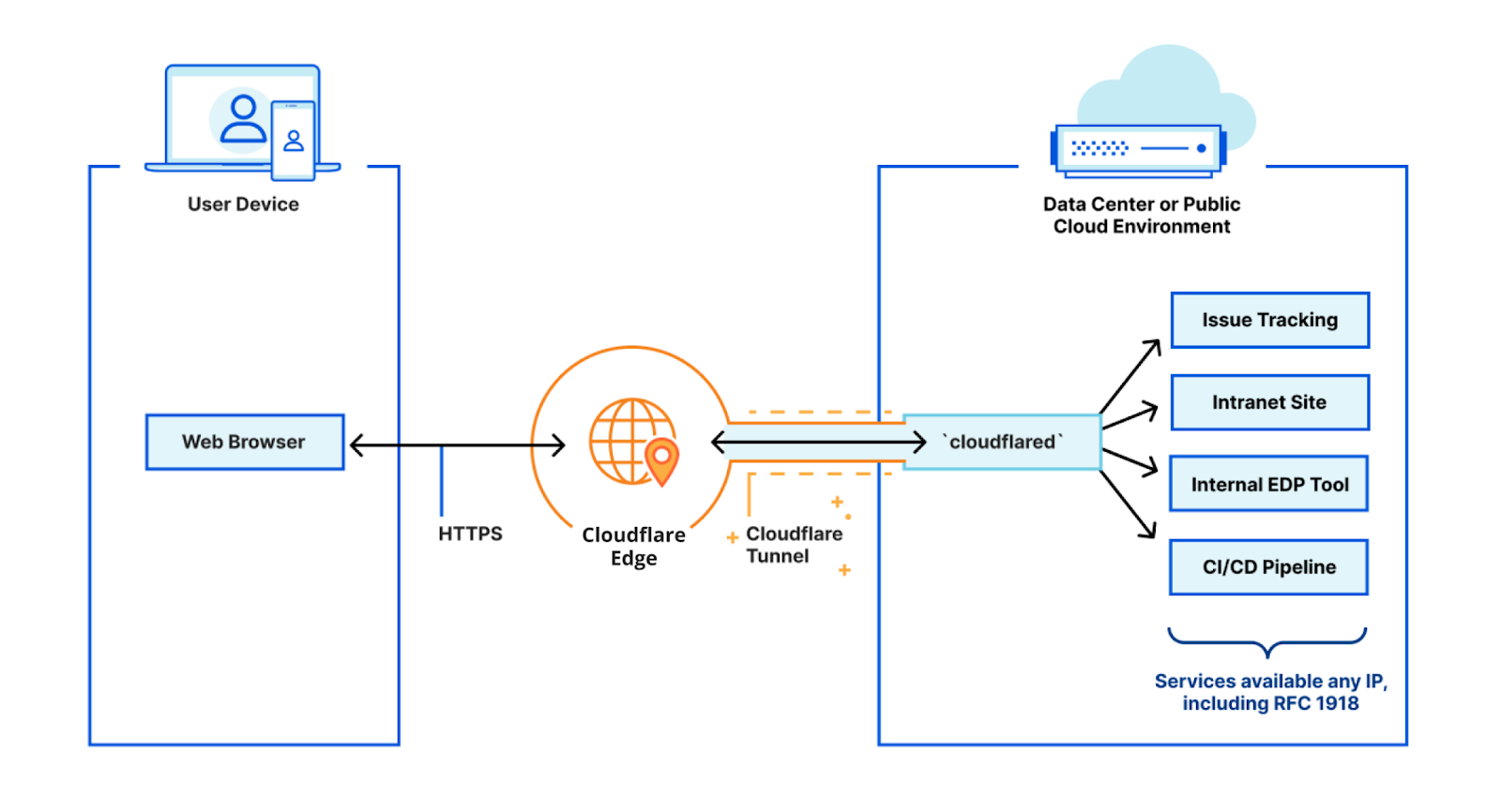
cloudflared works by opening several connections to different servers on the Cloudflare edge. Currently, these are long-lived TCP-based connections proxied over HTTP/2 frames. When Cloudflare receives a request to a hostname, it is proxied through these connections to the local service behind cloudflared.
While our HTTP/2 protocol mode works great, we’d like to improve a Continue reading
HS011 Can We Survive IT Supply Chain Disruption
We discuss what we know so far about supply chain disruption, what impacts to your projects. We also consider resellers/distributors survival and what plans can companies make.
The post HS011 Can We Survive IT Supply Chain Disruption appeared first on Packet Pushers.

HS011 Can We Survive IT Supply Chain Disruption
We discuss what we know so far about supply chain disruption, what impacts to your projects. We also consider resellers/distributors survival and what plans can companies make.
La configuration BGP a l’aide du GRE Tunnel
The post La configuration BGP a l’aide du GRE Tunnel appeared first on Noction.
Do We Need Multiple Global IPv6 Addresses Per Interface (RFC 7934)
I was happily munching popcorn while watching the latest season of Lack of DHCPv6 on Android soap opera on v6ops mailing list when one of the lead actors trying to justify the current state of affairs with a technical argument quoted an RFC to prove his rightful indignation with DHCPv6 and the decision not to implement it in Android:
[…not having multiple IPv6 addresses per interface…] is also harmful for a variety of reasons, and for general purpose devices, it’s not recommended by the IETF. That’s exactly what RFC 7934 is about - explaining why it’s harmful.
If you’re new to this discussion, you might want to start with Why Does DHCPv6 Matter blog post
Do We Need Multiple Global IPv6 Addresses Per Interface (RFC 7934)
I was happily munching popcorn while watching the latest season of Lack of DHCPv6 on Android soap opera on v6ops mailing list when one of the lead actors trying to justify the current state of affairs with a technical argument quoted an RFC to prove his rightful indignation with DHCPv6 and the decision not to implement it in Android:
[…not having multiple IPv6 addresses per interface…] is also harmful for a variety of reasons, and for general purpose devices, it’s not recommended by the IETF. That’s exactly what RFC 7934 is about - explaining why it’s harmful.
If you’re new to this discussion, you might want to start with Why Does DHCPv6 Matter blog post
Python Script Pulling AWS IP Prefixes – Part 1
I have been playing around with Python lately with the goal of building basic skills in it. I have found that to make good progress what works best for me is:
- Have a project that I find interesting to work on
- Spend a little time every day on the project
The project I decided on was to get the IP addresses that AWS uses for their services, build an access-list based on these prefixes, and then configure a Cisco ASA with that access-list. The final result looks like this:
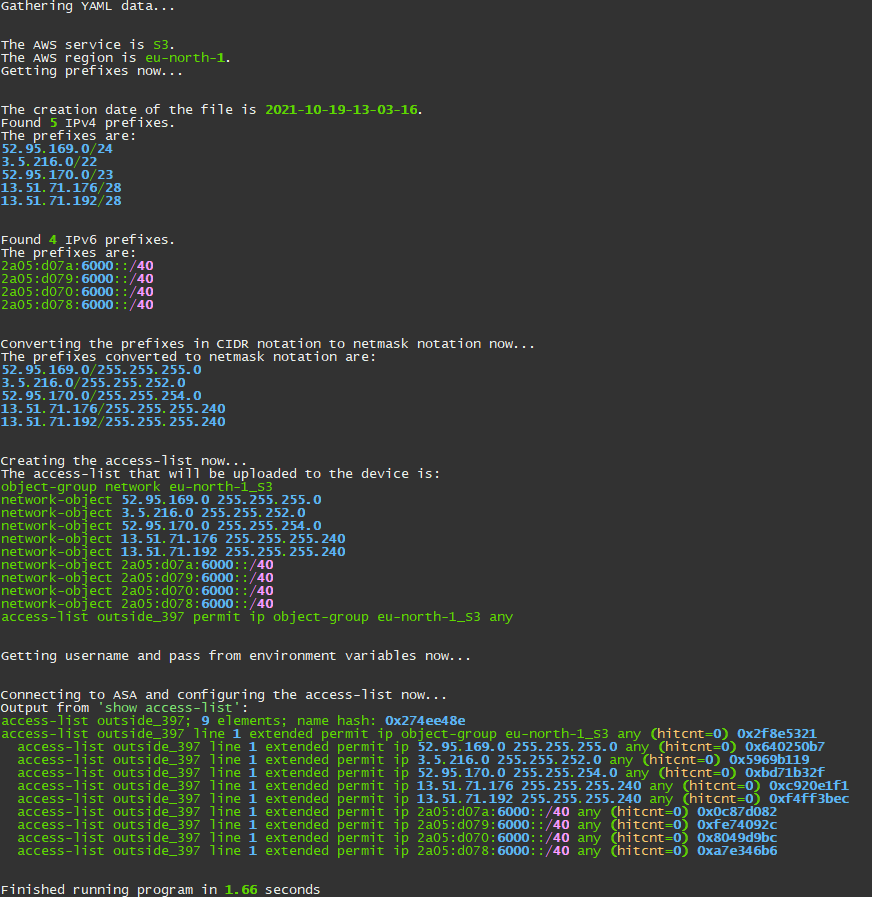
In a series of blog posts, I will cover how I built this script. Keep in mind that my focus was to get a script that works and then improve on it. I have some plans for getting an experienced Python coder to go through the code with me and to work on improvements. Stay tuned for that!
As with any coding project, you need to come up with some general guidelines on how to get data and what is good enough. These are some of the considerations I had:
- I will get the configuration needed from a YAML file rather than a CLI (good enough for Continue reading
Zero Trust — Not a Buzzword
Over the last few years, Zero Trust, a term coined by Forrester, has picked up a lot of steam. Zero Trust, at its core, is a network architecture and security framework focusing on not having a distinction between external and internal access environments, and never trusting users/roles.
In the Zero Trust model, the network only delivers applications and data to authenticated and authorized users and devices, and gives organisations visibility into what is being accessed and to apply controls based on behavioral analysis. It gained popularity as the media reported on several high profile breaches caused by misuse, abuse or exploitation of VPN systems, breaches into end-users’ devices with access to other systems within the network, or breaches through third parties — either by exploiting access or compromising software repositories in order to deploy malicious code. This would later be used to provide further access into internal systems, or to deploy malware and potentially ransomware into environments well within the network perimeter.
When we first started talking to CISOs about Zero Trust, it felt like it was just a buzzword, and CISOs were bombarded with messaging from different cybersecurity vendors offering them Zero Trust solutions. Recently, another term, SASE (Secure Continue reading