Optimizing Magic Firewall’s IP lists


Magic Firewall is Cloudflare’s replacement for network-level firewall hardware. It evaluates gigabits of traffic every second against user-defined rules that can include millions of IP addresses. Writing a firewall rule for each IP address is cumbersome and verbose, so we have been building out support for various IP lists in Magic Firewall—essentially named groups that make the rules easier to read and write. Some users want to reject packets based on our growing threat intelligence of bad actors, while others know the exact set of IPs they want to match, which Magic Firewall supports via the same API as Cloudflare’s WAF.
With all those IPs, the system was using more of our memory budget than we’d like. To understand why, we need to first peek behind the curtain of our magic.
Life inside a network namespace
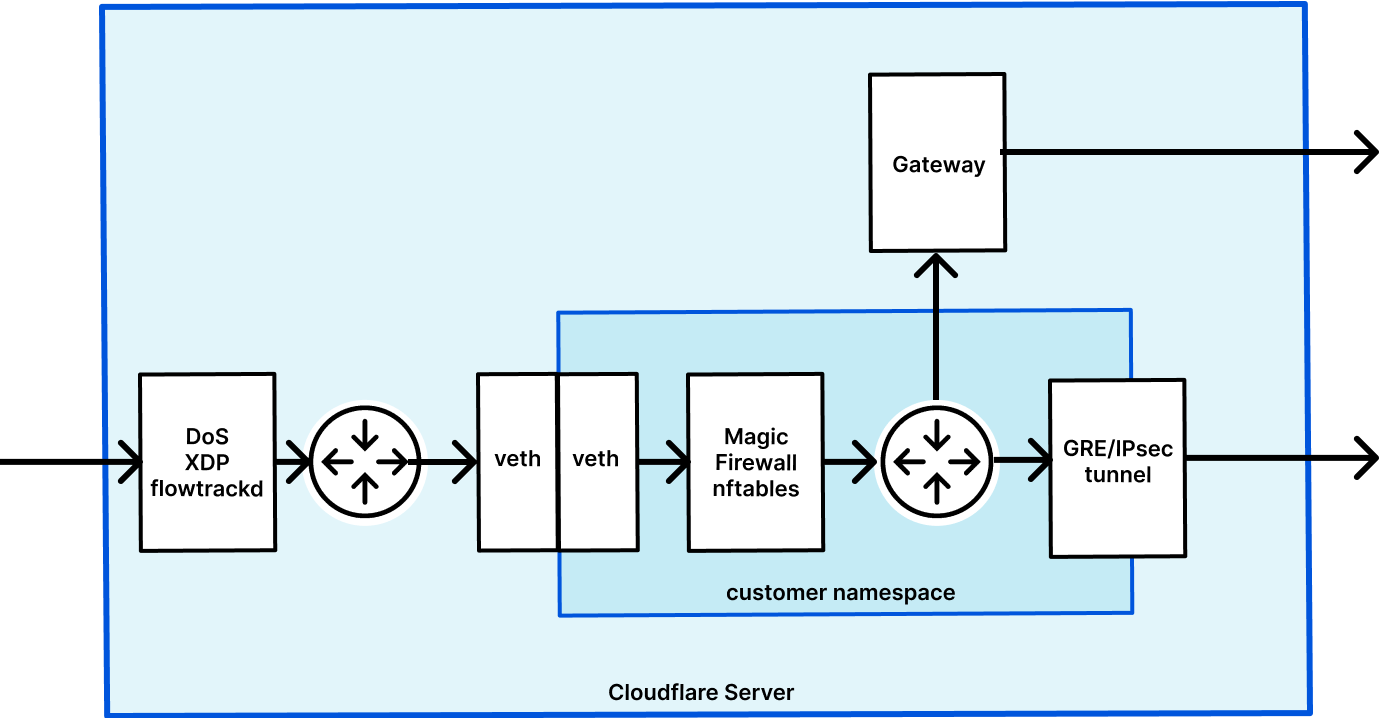
Magic Transit and Magic WAN enable Cloudflare to route layer 3 traffic, and they are the front door for Magic Firewall. We have previously written about how Magic Transit uses network namespaces to route packets and isolate customer configuration. Magic Firewall operates inside these namespaces, using nftables as the primary implementation of packet filtering.
When a user makes an API request to configure their Continue reading