Heavy Networking 635: Unified Network Fabrics With Juniper Apstra (Sponsored)
In today’s sponsored Heavy Networking we talk to Juniper Apstra about how how Apstra delivers on unified data center operations, why fabrics are everywhere, how Apstra differs from other automation and intent solutions, and more. Our guest is Mansour Karam, VP of Product Management.
The post Heavy Networking 635: Unified Network Fabrics With Juniper Apstra (Sponsored) appeared first on Packet Pushers.
Using OpenSSL With Ed Harmoush 4/6 Inspecting Certificates: Valid Certificates – Video
ED, HIS TLS COURSE, AND THE FREE OPENSSL CHEATSHEET Twitter @ed_pracnet https://practicalnetworking.net Practical TLS course: https://pracnet.net/tls OpenSSL Cheatsheet: https://pracnet.net/openssl FILES FOR THE CERT/KEY MATCHING EXERCISE: ZIP VERSION: packetpushers-pracnet-openssl.zip https://ln5.sync.com/dl/1f1f63d90/kqztwkp9-hkcz3yvq-tuzx79ke-aewxgaip TAR.GZ VERSION: packetpushers-pracnet-openssl.tar.gz https://ln5.sync.com/dl/0791b8d50/q973jpyb-qrmz3cpd-xeiar9zn-qu99gi5w FOR MORE INFO Hashing, Hashing Algorithms, and Collisions – Cryptography Symmetric Encryption vs Asymmetric Encryption Public & Private Keys – Signatures & […]
The post Using OpenSSL With Ed Harmoush 4/6 Inspecting Certificates: Valid Certificates – Video appeared first on Packet Pushers.
Cloudflare mitigates 26 million request per second DDoS attack
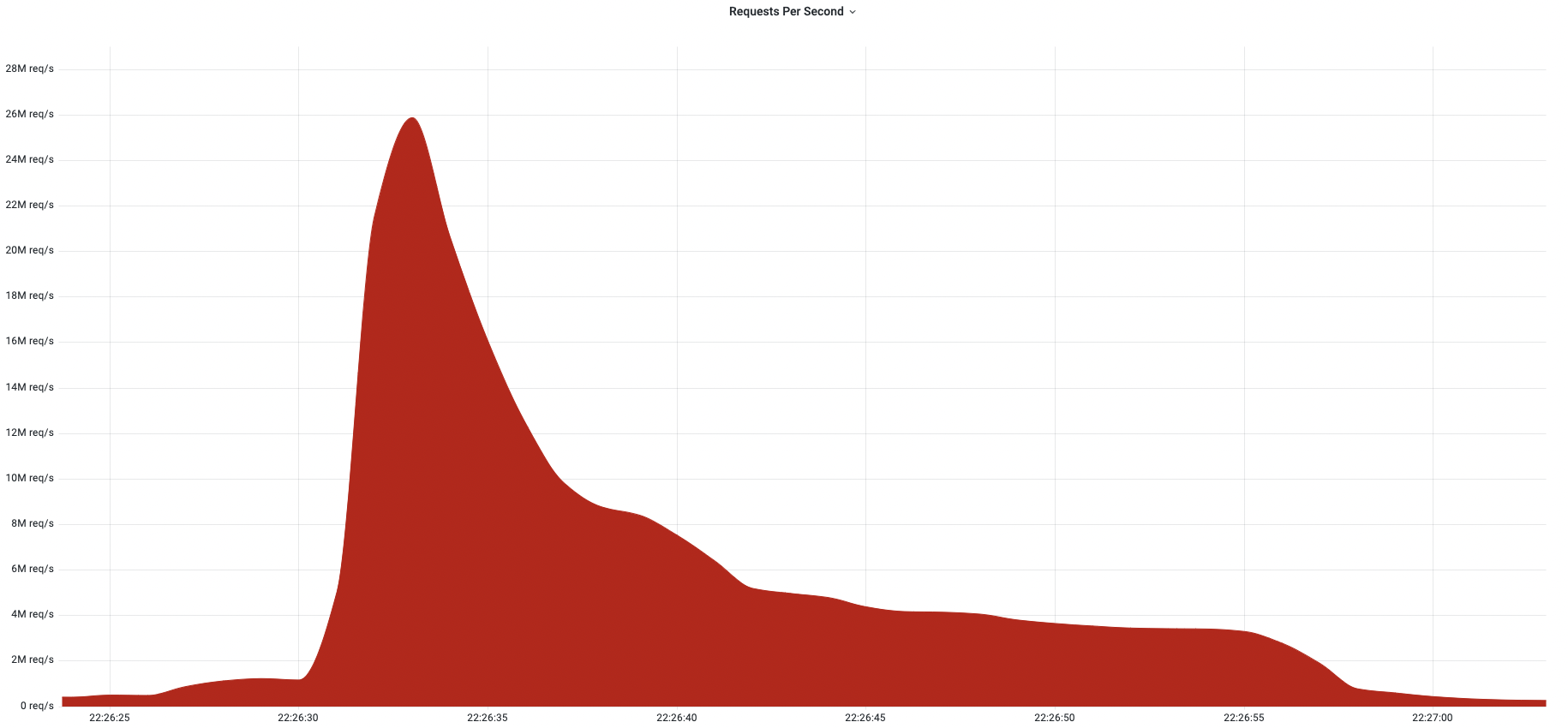
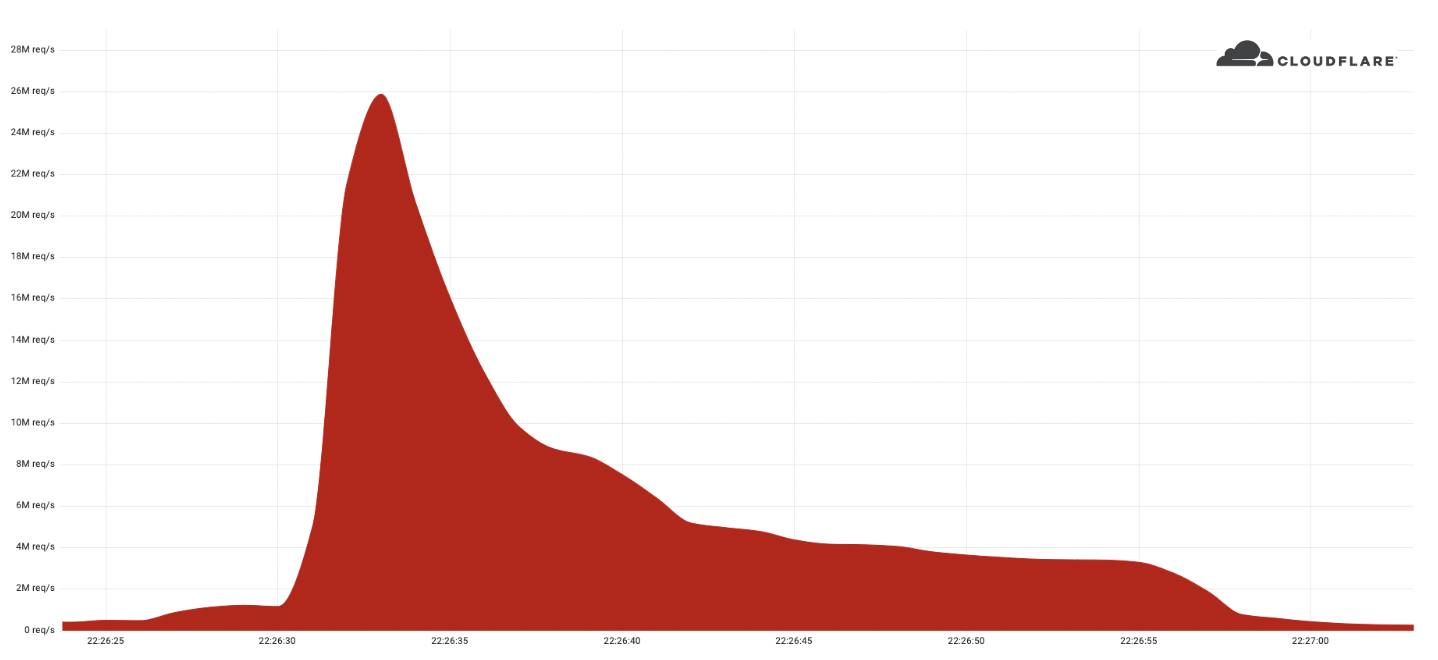
Last week, Cloudflare automatically detected and mitigated a 26 million request per second DDoS attack — the largest HTTPS DDoS attack on record.
The attack targeted a customer website using Cloudflare’s Free plan. Similar to the previous 15M rps attack, this attack also originated mostly from Cloud Service Providers as opposed to Residential Internet Service Providers, indicating the use of hijacked virtual machines and powerful servers to generate the attack — as opposed to much weaker Internet of Things (IoT) devices.
Record-breaking attacks
Over the past year, we’ve witnessed one record-breaking attack after the other. Back in August 2021, we disclosed a 17.2M rps HTTP DDoS attack, and more recently in April, a 15M rps HTTPS DDoS attack. All were automatically detected and mitigated by our HTTP DDoS Managed Ruleset which is powered by our autonomous edge DDoS protection system.
The 26M rps DDoS attack originated from a small but powerful botnet of 5,067 devices. On average, each node generated approximately 5,200 rps at peak. To contrast the size of this botnet, we’ve been tracking another much larger but less powerful botnet of over 730,000 devices. The latter, larger botnet wasn’t able to generate more than one Continue reading
Exam time means Internet disruptions in Syria, Sudan and Algeria


It is once again exam time in Syria, Sudan, and Algeria, and with it, we find these countries disrupting Internet connectivity in an effort to prevent cheating on these exams. As they have done over the past several years, Syria and Sudan are implementing multi-hour nationwide Internet shutdowns. Algeria has also taken a similar approach in the past, but this year appears to be implementing more targeted website/application blocking.
Syria
Syria has been implementing Internet shutdowns across the country since 2011, but exam-related shutdowns have only been in place since 2016. In 2021, exams took place between May 31 and June 22, with multi-hour shutdowns observed on each of the exam days.
This year, the first shutdown was observed on May 30, with subsequent shutdowns (to date) seen on June 2, 6, and 12. In the Cloudflare Radar graph below, traffic for Syria drops to zero while the shutdowns are active. According to Internet Society Pulse, several additional shutdowns are expected through June 21. Each takes place between 02000530 UTC (0500–0830 local time). According to a published report, the current exam cycle covers more than 500,000 students for basic and general secondary education certificates.
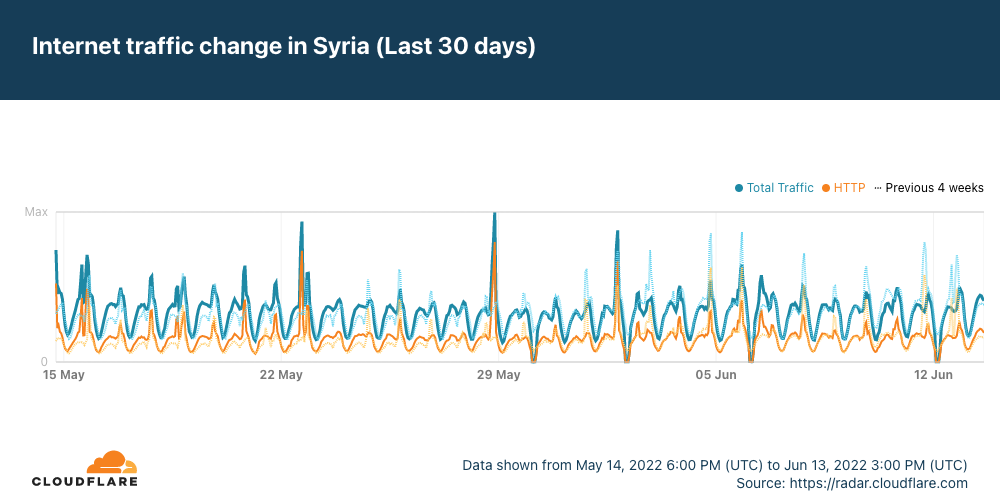
Consistent with Continue reading
Multicast PIM Dense Mode vs PIM Sparse Mode
Multicast PIM Dense mode vs PIM Sparse mode is one of the most important things for every Network Engineer who deploys IP Multicast on their networks. Because these two design option is completely different and the resulting impact can be very high. In this post, we will look at, which situation, which one should be used, and why.
Although we will not explain PIM Dense or PIM Sparse mode in detail in this post, very briefly we will look at them and then compare them for clarity. First of all, you should just know both PIM Dense and PIM Sparse are the PIM Deployment models.

PIM Dense Mode
PIM Dense mode work based on push and prune. Multicast traffic is sent everywhere in the network where you enable PIM Dense mode.
This is not necessarily bad.
In fact, as a network designer, we don’t think there is bad technology. They have use cases
If Multicast receivers are everywhere or most of the places in the network, then pushing the traffic everywhere is not a bad thing.
Because when you push, you don’t build a shared tree, you don’t need to deal with the RP – Rendezvous Point, because Multicast Continue reading
How Does Satellite Internet Work?
The orbiting satellite transmits and receives its information to a location on Earth called the Network Operations Center (NOC). NOC is connected to the Internet so all communications made from the customer location (satellite dish) to the orbiting satellite will flow through the NOC before they reached the Internet and the return traffic from the Internet to the user will follow the same path.

How does Satellite Internet work?
Data over satellite travels at the speed of light and Light speed is 186,300 miles per second. The orbiting satellite is 22,300 miles above earth (This is true for the GEO-based satellite)
The data must travel this distance 4 times:
1. Computer to satellite
2. Satellite to NOC/Internet
3. NOC/Internet to satellite
4. Satellite to computer
Satellite Adds latency
This adds a lot of time to the communication. This time is called “Latency or Delay” and it is almost 500 milliseconds. This may not be seen so much, but some applications like financial and real-time gaming don’t like latency.
Who wants to pull a trigger, and wait for half a second for the gun to go off?
But, latency is related to which orbit the Continue reading
Tier 1 Carriers Performance Report: May, 2022
The post Tier 1 Carriers Performance Report: May, 2022 appeared first on Noction.
When You Find Yourself on Mount Stupid
The early October 2021 Facebook outage generated a predictable phenomenon – couch epidemiologists became experts in little-known Bridging the Gap Protocol (BGP), including its Introvert and Extrovert variants. Unfortunately, I also witnessed several unexpected trips to Mount Stupid by people who should have known better.
To set the record straight: everyone’s been there, and the more vocal you tend to be on social media (including mailing lists), the more probable it is that you’ll take a wrong turn and end there. What matters is how gracefully you descend and what you’ve learned on the way back.
When You Find Yourself on Mount Stupid
The early October 2021 Facebook outage generated a predictable phenomenon – couch epidemiologists became experts in little-known Bridging the Gap Protocol (BGP), including its Introvert and Extrovert variants. Unfortunately, I also witnessed several unexpected trips to Mount Stupid by people who should have known better.
To set the record straight: everyone’s been there, and the more vocal you tend to be on social media (including mailing lists), the more probable it is that you’ll take a wrong turn and end there. What matters is how gracefully you descend and what you’ve learned on the way back.
Content vs Carriage – Who Pays?
The Internet may be many things, but its definitely not free. One way or another the users of the Internet pay for the Internet. But this does not stop various players in the space jostling for relative advantage, claiming others should be paying more while they pay less. This tension is often reflected between carriage providers and content service providers when they try and figure out who should pay whom and how much.BGP RTBH – Remotely Triggered Blackholing
BGP RTBH – Remotely triggered blackholing is used for DDOS prevention for a long time by many companies. DDOS – Distributed Denial of Service Attacks have an economic impact. According to an NBC News article, More than 40% of DDOS Attacks cost $1 million per day.
Remote Triggered Blackhole is a technique that is used to mitigate DDOS attacks dynamically.
Before RTBH, customers used to call the Operator when there is an attack, Operator NOC engineers used to connect to the attacked network, trace the source of the attack, place the filters accordingly and the attack goes away.
•Manual operation is open to configuration mistakes, cannot scale in large networks, and between the attack and the required action, services stay down
There are two types of RTBH
Destination based RTBH
Source-based RTBH
Let’s have a look at both of them in this blog post.
Destination-Based BGP RTBH – Remotely Triggered Blackholing
The first RTBH idea was Destination-based RTBH.With this technique, SP and the Customer agree on the discard community.
When there is an attack on the server, the victim (customer) sends the server prefix with the previously agreed community value.
When SP receives the update with that community, action Continue reading