Enterprises and tech vendors alike for the past few years have been talking about the growing importance of the edge in the increasingly distributed IT environment. …
In our last blog, we talked about how Cloudflare can help SaaS providers extend the benefits of our network to their customers. Today, we’re excited to announce that SaaS providers will now be able to give their customers visibility into what happens to their traffic when the customer onboards onto the SaaS provider, and inherently, onto the Cloudflare network.
As a SaaS provider, you want to see the analytics about the traffic bound for your service. Use it to see the global distribution of your customers, or to measure the success of your business. In addition to that, you want to provide the same insights to your individual customers. That’s exactly what Custom Hostname Analytics allows you to do!
The SaaS Setup
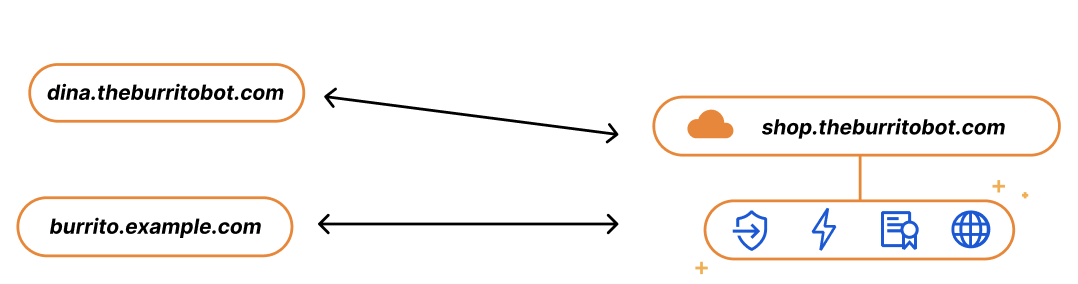
Imagine you run a SaaS service for burrito shops, called The Burrito Bot. You have your burrito service set up on shop.theburritobot.com and your customers can use your service either through a subdomain of your zone, i.e. dina.theburritobot.com, or through their own website e.g. burrito.example.com.
When customers onboard to your burrito service, they become fully reliant on you to provide their website with the fastest load time, the Continue reading
On August 25, 2021, Atlassian released a security advisory for their Confluence Server and Data Center. The advisory highlighted an Object-Graph Navigation Language (OGNL) injection that would result in an unauthenticated attacker being able to execute arbitrary code.
A full proof of concept (PoC) of the attack was made available by a security researcher on August 31, 2021. Cloudflare immediately reviewed the PoC and prepared a mitigation rule via an emergency release. The rule, once tested, was deployed on September 1, 2021, at 15:32 UTC with a default action of BLOCK and the following IDs:
100400 (for our legacy WAF)
e8c550810618437c953cf3a969e0b97a (for our new WAF)
All customers using the Cloudflare WAF to protect their self-hosted Confluence applications have automatically been protected since the new rule was deployed last week. Additionally, the Cloudflare WAF started blocking a high number of potentially malicious requests to Confluence applications even before the rule was deployed.
And customers who had deployed Cloudflare Access in front of their Confluence applications were already protected even before the emergency release. Access checks every request made to a protected hostname for a JSON Web Token (JWT) containing a user’s identity. Any unauthenticated users attempting this exploit Continue reading
When I started collecting topics for the September 2021 ipSpace.net Design Clinic one of the subscribers sent me an interesting challenge: are there any open-source alternatives to Cisco’s DMVPN?
When I started collecting topics for the September 2021 ipSpace.net Design Clinic one of the subscribers sent me an interesting challenge: are there any open-source alternatives to Cisco’s DMVPN?
We are excited to announce Calico Enterprise 3.9, which provides faster and simpler live troubleshooting using Dynamic Packet Capture for organizations while meeting regulatory and compliance requirements to access the underlying data. The release makes application-level observability resource-efficient, less security intrusive, and easier to manage. It also includes pod-to-pod encryption with Microsoft AKS and AWS EKS with AWS CNI.
Live troubleshooting
Enterprises that want to carry out live troubleshooting in their production environments face the following challenges when doing packet capture at an organizational scale:
Difficult to limit access to packet capture by organizational roles
Takes hours to days to setting up packet capture instead of making part of the code
Extremely difficult to capture the right amount of data to lessen storage and compute cost
Spend days and weeks to correlate the data collected from different Kubernetes components such as namespaces, workloads, pods, microservices
With Dynamic Packet Capture, organizations can enable DevOps, SREs, service owners to collect the data that they need when they need it. They can filter the data based on protocol and port to fine-tune their capture for faster debugging and subsequent analysis for shorter time-to-resolution. With just-in-time data collection and built-in smart correlation, Continue reading
The system world would have been a simpler place if InfiniBand had fulfilled its original promise as a universal fabric interconnect for linking all manner of devices together within a system and across systems. …
Dave Brown remembers when Amazon executives would pop into their small office in Cape Town, populated by the entire EC2 team of fourteen, and tell them they would be working for a billion-dollar business one day. …
Today's Network Break podcast opines on why Ciena acquired the Vyatta router from AT&T (and why AT&T wanted to sell), how T-Mobile failed current and former customers via a breach that exposed sensitive details on millions of people, financial results from HPE and Dell Technologies, and more.
Today's Network Break podcast opines on why Ciena acquired the Vyatta router from AT&T (and why AT&T wanted to sell), how T-Mobile failed current and former customers via a breach that exposed sensitive details on millions of people, financial results from HPE and Dell Technologies, and more.
This past April, we announced the Cloudflare for SaaS Beta which makes our SSL for SaaS product available to everyone. This allows any customer — from first-time developers to large enterprises — to use Cloudflare for SaaS to extend our full product suite to their own customers. SSL for SaaS is the subset of Cloudflare for SaaS features that focus on a customer’s Public Key Infrastructure (PKI) needs.
Today, we’re excited to announce all the customizations that our team has been working on for our Enterprise customers — for both Cloudflare for SaaS and SSL for SaaS.
Let’s start with the basics — the common SaaS setup
If you’re running a SaaS company, your solution might exist as a subdomain of your SaaS website, e.g. template.<mysaas>.com, but ideally, your solution would allow the customer to use their own vanity hostname for it, such as example.com.
The most common way to begin using a SaaS company’s service is to point a CNAME DNS record to the subdomain that the SaaS provider has created for your application. This ensures traffic gets to the right place, and it allows the SaaS provider to make infrastructure changes without Continue reading
SD-WAN resources
What is SD-WAN and what does it mean for networking, security, cloud?
10 SD-WAN features you're probably not using but should be
SD-WAN may be the key to smart network services
SD-WAN and analytics: A marriage made for the new normal
Native SD-WAN monitoring tools are not enough, survey says
Why is it that we always seem to think that we can adopt a technology that has seriously revolutionary pieces by just buying it and hooking it up? This, despite the undeniable fact that everything in tech is getting more sophisticated, more complex? Software-defined WAN is a technology like that, and because all SD-WANs aren’t the same, or even close to the same, you’ll have to do some digging to make SD-WAN your own.To read this article in full, please click here
Although it’s tempting to just deploy more access points (APs) when expanding your Wi-Fi network, there are many considerations to take in account first in order to get a high-performing result without overspending.
Wi-Fi resources
Test and review of 4 Wi-Fi 6 routers: Who’s the fastest?
How to determine if Wi-Fi 6 is right for you
Five questions to answer before deploying Wi-Fi 6
Wi-Fi 6E: When it’s coming and what it’s good for
Step one is to clearly understand what you are trying to achieve, then analyze the current setup so you know how well the network serves the coverage area, and only then go about designing and deploying the APs.To read this article in full, please click here
Jason Yee
Jason is director of advocacy at Gremlin where he helps companies build more resilient systems by learning from how they fail. He also helps lead Gremlin's internal chaos engineering practices to make it more reliable.
In the movies, it seems like Tokyo is constantly facing disasters — natural ones in the forms of earthquakes and tsunamis, and unnatural ones like giant kaiju and oversized robots. On the morning of Sept. 1, the mechanized behemoth was Amazon Web Services.
At around 7:30 am JST, AWS began experiencing networking issues in its AP-Northeast-1 region based in Tokyo. The outage affected business across all sectors, from financial services to retail stores, travel systems and telecommunications. Despite the troubles with not being able to access money, purchase goods, travel or call each other, the Japanese people demonstrated resilience, proving that at least some things from the movies are true. However, the financial losses due to the outage are expected to be huge.
After the six-hour outage, AWS explained the issue
Non-Stop Forwarding (NSF) is one of those ideas that look great in a slide deck and marketing collaterals, but might turn into a giant can of worms once you try to implement them properly (see also: stackable switches or VMware Fault Tolerance).
NSF has been around for at least 15 years, so I’m positive at least some vendors got most of the details right; I’m also pretty sure a few people have scars to prove they’ve been around the non-optimal implementations.
Non-Stop Forwarding (NSF) is one of those ideas that look great in a slide deck and marketing collaterals, but might turn into a giant can of worms once you try to implement them properly (see also: stackable switches or VMware Fault Tolerance).
NSF has been around for at least 15 years, so I’m positive at least some vendors got most of the details right; I’m also pretty sure a few people have scars to prove they’ve been around the non-optimal implementations.
Researchers have found numerous new vulnerabilities impacting the NicheStack TCP/IP stack. These vulnerabilities could lead to heightened risks to technology managing critical infrastructure.